cuda-quantum: a heterogeneous quantum-classical toolchain, plus a pulse-level layer marked experimental
C++ and Python support for the CUDA Quantum programming model for heterogeneous quantum-classical workflows
At a glance
- What is it?
- The CUDA-Q repository holds the nvq++ compiler, the CUDA-Q runtime and integrated CPU and GPU backends for hybrid quantum-classical work, and it has recently added a pulse-level programming package that the project itself calls a research preview with no compatibility guarantee. The build is a large CMake and Python project with per CUDA version package manifests.
- Who is it for?
- cuda-quantum fits a research team that wants to write hybrid quantum-classical programs in Python and C++ against a single toolchain that also targets the GPU backends, and a team that wants to read how a vendor structures a compiler, a runtime and a set of simulation backends.
- Can I use it commercially?
- Yes. Apache-2.0 is a permissive licence: you can use, modify and sell software built on it, as long as you keep its copyright and licence notices.
- Is it still maintained?
- Yes. The repository received new commits within the last day.
- What is it written in?
- Mainly C++, according to GitHub's language statistics.
Answers come from the project's GitHub data, last synced on November 7, 2026, and from our analysis. They are not legal advice.
Star history
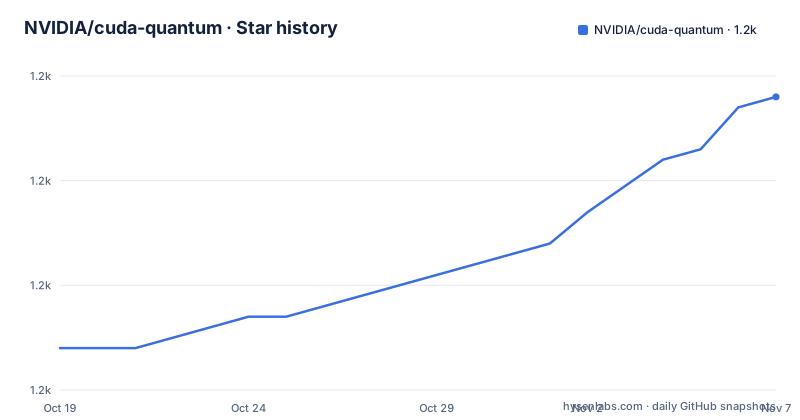
- NVIDIA/cuda-quantum1,188 ★ · +24
| Repository | 2026-10-19 | 2026-11-07 |
|---|---|---|
| NVIDIA/cuda-quantum | 1.2k | 1.2k |
24 Stars in the last 19 days, measured from the daily GitHub snapshot. Compare with other projects
Editorial analysis
One compiler, one runtime, and a set of backends under the same roof
The CUDA-Q Platform for hybrid quantum-classical computers enables integration and programming of quantum processing units, GPUs and CPUs in one system. That sentence is the whole pitch: a quantum program that wants to use a GPU for a linear algebra step and a QPU for the circuit should not require two toolchains.
This repository contains the source code for all the C++ and Python tools in the toolkit, and the README names three of them specifically: the nvq++ compiler, the CUDA-Q runtime, and a selection of integrated CPU and GPU backends for rapid application development and testing.
The repository layout is what a large hybrid toolchain looks like in practice. The cudaq/ directory holds the main package, python/ and runtime/ hold the language bindings and the runtime, cmake/ and CMakeLists.txt hold the build, realtime/ and preview/ and targettests/ and unittests/ cover the different test layers, examples/ holds the sample programs, and there are separate docs/ and skills/ directories. There are also five pyproject files, pyproject.toml, pyproject.toml.core, pyproject.toml.cu12, pyproject.toml.cu13 and pyproject.toml.devel, which tells you the package is published per CUDA major version rather than as one artefact.
There is a CITATION.cff at the root, which is a small signal about the audience. A toolchain for research groups that need to cite the software in a paper is a different project from a library that happens to be used in research, and the presence of a citation file, a Zenodo DOI badge and an llms.txt at the root all point the same way.
The topics list names the scope honestly: cpp, python, quantum, quantum algorithms, quantum computing, quantum machine learning, quantum programming language, plus hacktoberfest and unitaryhack. The last two are about contribution mechanics rather than about the technology, which is a reminder that this is a project with an active external community attached.
The pulse-level package, and why its own warning matters
The most interesting thing in the README is a section with an unusual title for a vendor project: Research Preview, Pulse-Level Programming.
CUDA-Q pulse is a new research preview package for programming at the pulse level. It provides a Python kernel DSL, pulse and operator dialects, compiler passes, and an experimental GPU execution path. The README then states the terms plainly: because it is a research preview, its APIs and behavior may change incompatibly or be removed without notice, and it is not a product-supported CUDA-Q feature.
That last clause is the one to note. A research preview inside a supported product is a specific commitment: the code is in the repository, it is documented, and there is a README to read, but nobody is going to keep its API stable for you. The link points at a README on a feature/pulse/pulse branch rather than on the main branch, which is a further sign of its status.
The reason it exists at all is worth spelling out. Most quantum programming models operate on gates, on abstract operations that a control system turns into pulses on hardware. Pulse level programming moves down a level, to describing the pulses themselves, which is the level at which a real device is driven and the level at which timing and calibration actually matter. Writing that layer is a different kind of programming, with different tools, and a Python kernel DSL plus compiler passes is a plausible way to offer it.
For an adopter the practical consequence is simple. If your work is at the gate level, the rest of CUDA-Q is a stable platform and this is a place to experiment. If your work is at the pulse level, you are depending on code that is explicitly documented as subject to incompatible change, and your own project inherits that.
Four package manifests, because the CUDA version is part of the package identity
The pyproject.toml in the repository root is not the main one. It is the CUDA 13 variant, and its name field says so: cuda-quantum-cu13, with the description Python bindings for the CUDA-Q toolkit for heterogeneous quantum-classical workflows and a requires-python of 3.11 or newer.
The dependency block shows the structure of the install in a way the README does not, and one line in particular is worth reading closely.
dependencies = [
  'astpretty ~= 3.0',
  'numpy >= 1.24',
  'scipy >= 1.10.1',
  'requests >= 2.32.3',
  # CUDA dependencies - excluded on macOS (CPU-only support)
  'custatevec-cu13 ~= 1.15.0; sys_platform != "darwin"',
  'cutensornet-cu13 ~= 2.14.0; sys_platform != "darwin"',
  'cudensitymat-cu13 ~= 0.7.0; sys_platform != "darwin"'
]
Every CUDA dependency is marked with a sys_platform != darwin marker, and the comment says why: CUDA dependencies are excluded on macOS for CPU-only support. So on a Mac you get the CPU simulation path and none of the GPU vendor libraries, and on Linux or Windows you get both. The same is true for the nvidia-cublas, curand, cusparse, cuda-runtime, cusolver and cuda-nvrtc entries.
The four manifests, pyproject.toml.core, pyproject.toml.cu12, pyproject.toml.cu13 and pyproject.toml.devel, cover the CUDA 12 line, the CUDA 13 line, a core variant with no CUDA version and a development variant. The version is dynamic, so it comes from the build rather than being written in the file.
This is a lot of surface for an install, and it is the practical cost of a toolchain that targets several CUDA generations at once. The good news is that the per-version pinning is explicit rather than accidental: custatevec-cu13 is at 1.15.0, cutensornet-cu13 at 2.14.0, cudensitymat-cu13 at 0.7.0, and each of the nvidia packages is pinned to a matching major version.
Two ways to get it, and one set of source build instructions
The Getting Started section is short, and it splits by whether you want the released product or the work in progress.
To learn how to work with CUDA-Q, the documentation site is the starting point, and that page also contains the installation instructions for the officially released packages. The documentation is at nvidia.github.io/cuda-quantum, with a quick start section linked as the official install path.
If you want the latest iteration under development in the repository, or you want to add your own modifications, the README points at the latest packages deployed on the GitHub Container Registry, under the NVIDIA organisation, filtered by the cuda-quantum repository name. Building from source has its own document, Building.md, and the repository also carries Dev_Setup.md and Developing.md for the development workflow.
The separation is the same one you would want from any vendor: released packages are versioned and documented as a product, and the repository is where the work in progress lives, distributed as container images rather than as pip releases.
For the runtime environment, requirements.txt pins exactly two packages, jupyterlab at 4.6.4 and notebook at 7.6.3, and the comment says why: single place these versions are pinned, used by the release image, installation validation and requirements-dev.txt. There are separate files for the development requirements, the mock QPU requirements, and the test backend requirements, and the mock QPU file is a detail worth knowing about, because it means the toolkit can be exercised against a simulated quantum target without hardware.
The build itself is a CMake project, and the repository also carries a .devcontainer/ directory, a .pre-commit-config.yaml, a .clang-format, a .style.yapf and a CppAPICodingStyle.md. The formatting tools are named for C++ and Python separately, which matches a codebase where the two languages have different conventions.
What a CLA means here, and what the licence files cover
Contributing a pull request to this repository requires accepting the Contributor License Agreement, which declares that you have the right to, and actually do, grant the rights to use your contribution. A CLA bot determines automatically whether a pull request needs one and decorates it accordingly, and the process only has to be done once.
That is a developer contribution agreement rather than a distribution licence, and the two should not be confused. The code in this repository is licensed under the Apache License 2.0, and the project metadata declares four licence files at once, LICENSE, NOTICE, CITATION.cff and the contents of the LICENSES/ directory.
That pattern is a well established one and it exists for a reason. A project that vendors third party code cannot put everything under one identifier, because the vendored code carries its own terms. The LICENSES/ directory is where the per dependency licences live, and the top level LICENSE covers the first party code. So before you ship anything, the question is not only what licence the CUDA-Q code is under, but what licences apply to the components it pulls in, and the repository is structured to let you answer that.
There is also a SECURITY.md, and the README gives a specific address, [email protected], for reporting security concerns, separate from the issue tracker and from the Code of Conduct violations route. That separation is a reasonable convention for a project of this size, and it means a vulnerability report does not become a public issue.
The repository also carries a NOTICE file, which under Apache 2.0 is where attribution for the included third party material is recorded.
Editorial conclusion
cuda-quantum fits a research team that wants to write hybrid quantum-classical programs in Python and C++ against a single toolchain that also targets the GPU backends, and a team that wants to read how a vendor structures a compiler, a runtime and a set of simulation backends. It does not fit a production application that needs a stable API, and it certainly does not fit anyone wanting to depend on the pulse-level layer, which the project states may change incompatibly or be removed without notice. Check three things before you commit. Check which installation you take, because the officially released packages are documented separately from the latest iteration under development, which is deployed on the GitHub Container Registry, and building from source has its own instructions in Building.md. Check your platform, since the package manifests are split by CUDA version and the CUDA dependencies are excluded on macOS for CPU-only support. And check the licence files, because the metadata declares several licence files at once, LICENSE, NOTICE, CITATION.cff and the contents of LICENSES/, which is the pattern for a project that ships third party code under different terms. The last push was on 2026-10-19, the newest release listed is 0.16.0 from 2026-09-12, and the code is under Apache 2.0.
Frequently asked questions
What is in the NVIDIA cuda-quantum repository?
It contains the source code for all the C++ and Python tools in the CUDA-Q toolkit, including the nvq++ compiler, the CUDA-Q runtime, and a selection of integrated CPU and GPU backends for rapid application development and testing.
What is CUDA-Q pulse and how stable is it?
CUDA-Q pulse is a research preview package for programming at the pulse level, providing a Python kernel DSL, pulse and operator dialects, compiler passes and an experimental GPU execution path. The project states its APIs and behavior may change incompatibly or be removed without notice and that it is not a product-supported CUDA-Q feature.
How do I install CUDA-Q?
The official installation instructions for the released packages are in the CUDA-Q documentation under the quick start section. For the latest iteration under development, the README points at the packages deployed on the GitHub Container Registry under the NVIDIA organisation, and building from source is covered in Building.md.
Does CUDA-Q work on macOS?
The package metadata marks every CUDA dependency with a sys_platform != darwin marker and comments that CUDA dependencies are excluded on macOS for CPU-only support. The core Python dependencies such as numpy, scipy and astpretty are installed on all platforms.
What license is the cuda-quantum code under?
The code is under the Apache License 2.0, and the project metadata declares the LICENSE file, the NOTICE file, CITATION.cff and the contents of the LICENSES/ directory, which is how third party components with their own terms are tracked. Pull requests also require accepting a Contributor License Agreement.
Official sources
Add this badge to your README
If you maintain this project, the badge below links readers to this analysis and shows its maintenance status from the daily GitHub snapshot. Paste the markdown into your README; add ?metric=license or ?metric=stars to the image URL for a different field.

[](https://hysenlabs.com/projects/nvidia-cuda-quantum)Star history chart for your README
[](https://hysenlabs.com/projects/nvidia-cuda-quantum)Was this useful?