Obsei: observer, analyzer, informer as a low-code text pipeline
Obsei is a low code AI powered automation tool. It can be used in various business flows like social listening, AI based alerting, brand image analysis, comparative study and more .
At a glance
- What is it?
- Obsei is a Python automation library shaped as three pluggable stages, Observer, Analyzer and Informer, where observers keep their state in a database so a job can be scheduled or run serverlessly, and every source and destination is an optional dependency extra. The README tells you to use a released version because the master branch breaks, and the newest one is from 2023.
- Who is it for?
- Adopt Obsei if you want a text pipeline that a scheduled job or a container can run without glue code, because observers persist their state to a database rather than to memory, the three stages are uniform, and each source and destination is an optional extra you install only when your workflow needs it.
- Can I use it commercially?
- Yes. Apache-2.0 is a permissive licence: you can use, modify and sell software built on it, as long as you keep its copyright and licence notices.
- Is it still maintained?
- Yes. The repository last received commits 2 days ago.
- What is it written in?
- Mainly Python, according to GitHub's language statistics.
Answers come from the project's GitHub data, last synced on November 7, 2026, and from our analysis. They are not legal advice.
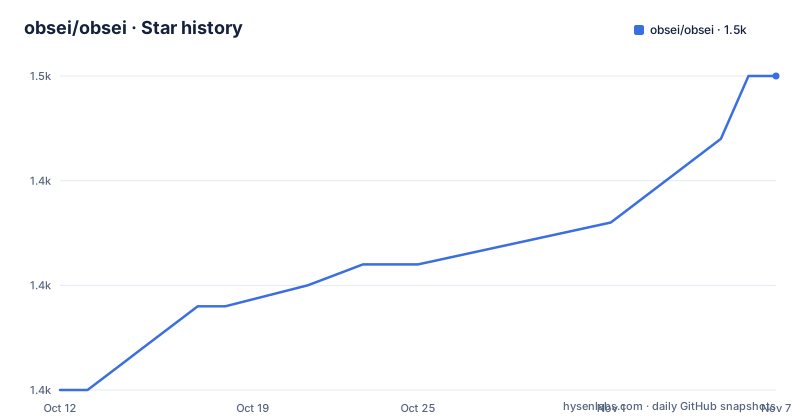
Star history
- obsei/obsei1,450 ★ · +15
| Repository | 2026-10-12 | 2026-11-07 |
|---|---|---|
| obsei/obsei | 1.4k | 1.5k |
15 Stars in the last 26 days, measured from the daily GitHub snapshot. Compare with other projects
Editorial analysis
Three stages, and why the split is the design
Obsei is described as a low-code, AI powered automation tool, and its shape is three verbs.
The Observer collects unstructured data from sources, and the README names them: tweets from Twitter, Subreddit comments on Reddit, page post comments from Facebook, App Store reviews, Google reviews, Amazon reviews, news and websites. The Analyzer runs AI tasks over what came in, with classification, sentiment analysis, translation and PII detection given as examples. The Informer sends the result somewhere you can act on, described as ticketing platforms, data storage and dataframes.
Three stages rather than one is what makes the tool composable. A workflow that listens for complaints, classifies them by topic, sends urgent ones to a ticketing system and files the rest for later analysis is four different capabilities in three pluggable slots, and swapping the destination does not touch the collection code.
The keyword in the description is low-code, and the mechanism is configuration. The examples directory includes sdk.yaml and a script named with_sdk_config_file.py, alongside scripts such as pii_analyzer_example.py, twitter_source_example.py, jira_example.py and elasticsearch_example.py, so a workflow can be described in YAML rather than written as Python control flow. There is also a script named with_state_example.py, which is the hook into the state feature described below.
The stated future direction is broader: workflows oriented to text, image, audio, documents and video, collection from private as well as public channels, and a path from every workflow to a downstream AI application.
Observer state is what makes scheduled jobs work
One sentence in the README does more for practical usefulness than any of the use cases, and it is easy to skim past.
It says all the observers can store their state in databases, naming Sqlite, Postgres and MySQL, and that this makes Obsei suitable for scheduled jobs or serverless applications.
Consider what that means for a scraper. Without persisted state, a job that runs every ten minutes re-collects what it collected last time unless you build deduplication yourself, and a serverless function that dies between invocations loses its cursor entirely. Persisted observer state is the difference between a pipeline you schedule and one you debug.
This is also the design decision that most affects where you run Obsei. A tool with in-memory cursors belongs in a long-lived process. A tool with database-backed cursors belongs in a cron job, a container that starts and stops, or a function platform that hands you a fresh interpreter each time. The README's own Dockerfile supports that second world: it sets an environment variable pointing at a workflow script and runs that script as its command.
The cost is a schema and a migration story, since the observers are writing rows through SQLAlchemy rather than holding offsets in memory. That is a reasonable trade for scheduled collection, and it is the reason the tool lists SQLAlchemy as a core dependency.
Installing: a dependency matrix rather than one package
Installation is pip, and the interesting part is that the dependency set is a menu rather than a bundle.
The default install takes everything:
pip install obsei[all]The README warns against it directly, noting that the all option installs dependencies you might not need for your workflow. What follows is a long list of extras, one per source and destination: source and sink sets for everything, an analyzer set that also installs PyTorch, and then per-integration sets such as twitter-api, reddit-scraper, reddit-api, facebook-api, google-play-scraper, google-play-api, app-store-scraper, google-news-scraper, pandas, and for the informers atlassian-api, elasticsearch and slack-api. They can be combined in one command.
That structure is the right call for this kind of tool. A scraper for one platform brings its own client library, the analyzer set brings a deep learning stack measured in gigabytes, and a team running one workflow should not pay for either. The cost is that a dependency you forget shows up as a broken workflow at runtime rather than as a failed install.
There is a source branch path for people who want the newest code, which the README presents with a warning attached elsewhere in the document. The prerequisite is Python 3.7 or newer with pip, while the packaging metadata declares support for Python 3.8 and above and lists classifiers through 3.11.
The build backend is hatchling, and the version is dynamic rather than hardcoded, which means the installed version comes from the packaging tooling rather than from a number in the file.
Analyzers: including the one that changes your dependency footprint
The Analyzer stage is where the AI claim lives, with classification, sentiment analysis, translation and PII detection given as the task families.
Four families is a modest list, and that is worth noting against the description. This is not a model zoo; it is a set of task types a business workflow needs, which is a different design choice from offering every embedding or classifier someone might want.
PII detection is the one with the most operational weight. It sits between collection and storage, which means a pipeline can redact or route sensitive content before it reaches a destination, and the examples directory includes a dedicated pii_analyzer_example.py alongside the source and sink examples. For a tool whose observers scrape public reviews and comments, having a documented redaction stage is the difference between a demo and something you can point at a legal review.
The dependency consequence is significant. The analyzer extra installs PyTorch as well, which means the analyzer stage is where your installation becomes heavy. That is exactly why the extras exist, and why a workflow that only needs collection and storage can skip the stage entirely.
Translation and sentiment are listed as tasks rather than as specific models, and the README does not name backends or versions. So the honest reading is that this stage is an interface with implementations behind it, and choosing Obsei partly means accepting whatever model wiring sits there.
Informers: where analyzed text becomes someone else's problem
The Informer stage is the least glamorous and the most consequential, because it is where a pipeline touches systems other people depend on.
Destinations are ticketing platforms, data storage and dataframes, and the extras list plus the examples directory give the concrete set: an atlassian-api extra with a jira_example.py, a slack-api extra with a slack_example.py, an elasticsearch extra with an elasticsearch_example.py, and a pandas extra that appears on both sides with pandas_source_example.py and pandas_sink_example.py.
The use cases explain why ticketing is a first-class destination. Automatic issue creation based on customer complaints, and automatic assignment of tags to tickets based on the content of a complaint, for example a login issue, a sign up issue or a delivery issue, are both listed. That is a workflow where a sentiment or classification result becomes a record in someone else's tracker, which means the Informer stage needs to be idempotent and needs to fail in a way that does not create duplicate tickets.
Elasticsearch and pandas sit at the other end of the spectrum. One makes text searchable, the other puts it in a dataframe so an analyst can look at it. Both are the kind of destination that lets you adopt Obsei for collection and analysis without automating any outbound action, which is a sensible way to start.
The stated use cases also include social listening, alerting for events such as complaints or qualified sales leads, extracting deeper insight from feedback, market research and creating datasets for AI tasks.
Running it in a container: config by environment
The Dockerfile shows how the tool is meant to run unattended, and it is more informative than it looks.
The base image is python:3.10-slim-bullseye. A non-root user is created, pip cache and version checks are disabled through environment variables, and the code is installed in editable mode with the all extra:
FROM python:3.10-slim-bullseye
ENV WORKFLOW_SCRIPT '/home/user/obsei/process_workflow.py'
ENV OBSEI_CONFIG_PATH ""
ENV OBSEI_CONFIG_FILENAME ""
CMD ["sh", "-c", "python ${WORKFLOW_SCRIPT}"]
Three configuration variables carry the design. WORKFLOW_SCRIPT names the entry point, OBSEI_CONFIG_PATH and OBSEI_CONFIG_FILENAME locate the YAML that describes the workflow, so the image is generic and the workflow is supplied at run time. That is what makes one image reusable across teams.
There is also a comment in the file describing itself as a hack to install a JRE on Debian, with a step creating directories under /usr/share/man, which tells you some dependency expects a Java runtime in a non-obvious place. It is the kind of detail that only appears when a package's assumptions do not match a slim base image, and it is a useful warning for anyone building their own image.
The repository also ships a Dockerfile at the top level alongside a binder directory and a tutorials directory, which points to three intended ways in: a container, a hosted notebook, and a written walkthrough.
Which build to install, and what the numbers say
The README carries a warning in red that governs everything else, and it is unusually direct.
It says Obsei is still in alpha stage, so use it in production carefully, and that because development is constant, the master branch may contain many breaking changes, so the packaged build is the one to use. The default branch of this repository is master, which means cloning and running gives you exactly the code the README warns against.
The packaging metadata adds a second signal, and it points the other way from the README's wording: the development status classifier in pyproject.toml reads Pre-Alpha, which is a step earlier than alpha. So the project calls itself alpha in prose and pre-alpha in its own metadata.
The version history is the part that matters most for a dependency. The published versions are v0.0.13, v0.0.14 and v0.0.15, with v0.0.15 dated 2023-12-31. The repository itself was pushed to on 2026-09-25, nearly three years later.
Read together, that means the packaged artifact is old and the working tree is much newer, so the two will differ in ways the README's own warning anticipates. Anyone adopting this should pin the packaged build, expect breakage on every upgrade, and treat the default branch as a development environment rather than a source of truth. The code is under Apache 2.0, with the terms text in the repository and attribution and citation files alongside it.
Editorial conclusion
Adopt Obsei if you want a text pipeline that a scheduled job or a container can run without glue code, because observers persist their state to a database rather than to memory, the three stages are uniform, and each source and destination is an optional extra you install only when your workflow needs it. Do not adopt it on a pin you do not control: the README says the master branch may contain many breaking changes, so your dependency pin and your code have to move together at each upgrade. Verify four things. Check which build you actually get, since the newest packaged version is v0.0.15 from 2023-12-31 while the repository was pushed to as recently as 2026-09-25, so the code you read on the default branch is not what PyPI installs. Install only the extras your workflow uses rather than the all set, which pulls PyTorch through the analyzer extra and a long tail of scrapers otherwise. Decide where state lives, since observer state in SQLite, Postgres or MySQL is what makes reruns idempotent and what makes the tool survive a serverless cold start. And read the packaging metadata rather than the README claim, because the classifier in pyproject.toml says Pre-Alpha while the README calls it alpha. Start with a Yahoo or Google reviews observer and a pandas informer.
Frequently asked questions
What are the three stages of an Obsei workflow?
Observer collects unstructured data from sources such as tweets, Reddit comments, app store reviews and news sites. Analyzer applies tasks like classification, sentiment analysis, translation and PII detection. Informer sends the result to destinations such as ticketing platforms, data storage or a dataframe.
How do I install Obsei with only the dependencies I need?
Avoid the all extra and choose per-integration sets such as twitter-api, reddit-scraper, facebook-api, google-news-scraper for sources and atlassian-api, elasticsearch, slack-api, pandas for informers. The analyzer extra additionally installs PyTorch, and extras can be combined in one command.
Can Obsei run as a scheduled or serverless job?
Yes, because observers can persist their state in a database such as Sqlite, Postgres or MySQL, so collection cursors survive process restarts. The provided Dockerfile supports this with a workflow script and config path supplied through environment variables.
Which version of Obsei should I install?
The released version, not the master branch. The README warns that master may contain many breaking changes, and the newest published version is v0.0.15 from 2023-12-31, so the packaged artifact is older than the repository.
What can Obsei send analyzed text to?
Ticketing platforms, data storage and dataframes are named in the README, with concrete integrations for Jira through the atlassian-api extra, Slack through slack-api, Elasticsearch through elasticsearch, and pandas as both a source and a sink.
Official sources
Add this badge to your README
If you maintain this project, the badge below links readers to this analysis and shows its maintenance status from the daily GitHub snapshot. Paste the markdown into your README; add ?metric=license or ?metric=stars to the image URL for a different field.

[](https://hysenlabs.com/projects/obsei-obsei)Star history chart for your README
[](https://hysenlabs.com/projects/obsei-obsei)Was this useful?