obsidian.nvim: keeping an Obsidian vault inside Neovim
Obsidian 🤝 Neovim (actively maintained version)
At a glance
- What is it?
- A community fork of epwalsh's Obsidian plugin that brings link completion, backlinks, daily notes and an image picker to Neovim, while leaving the mobile app and graph view to Obsidian itself.
- Who is it for?
- obsidian.nvim is a good fit if your notes are plain markdown in a directory you open from Neovim and you have stopped caring about the app's own editor. The parts it does well, link completion across the vault, block references, daily notes, the check command, are the parts that shape how you write, and the recent releases show active work on exactly those.
- Can I use it commercially?
- Yes. Apache-2.0 is a permissive licence: you can use, modify and sell software built on it, as long as you keep its copyright and licence notices.
- Is it still maintained?
- Yes. The repository received new commits within the last day.
- What is it written in?
- Mainly Lua, according to GitHub's language statistics.
Answers come from the project's GitHub data, last synced on October 24, 2026, and from our analysis. They are not legal advice.
Star history
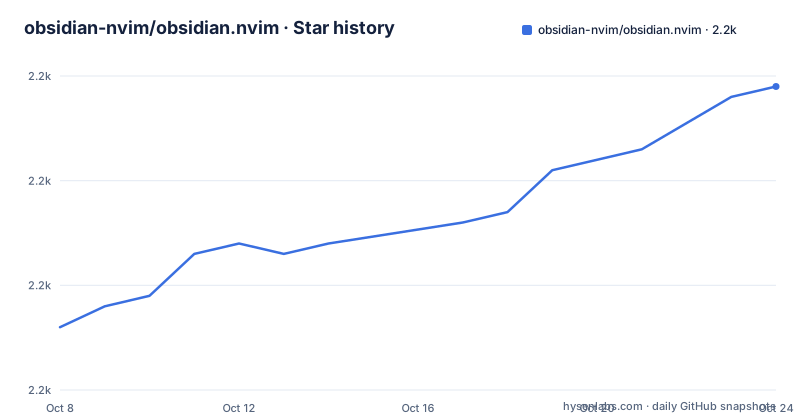
- obsidian-nvim/obsidian.nvim2,219 ★ · +23
| Repository | 2026-10-08 | 2026-10-24 |
|---|---|---|
| obsidian-nvim/obsidian.nvim | 2.2k | 2.2k |
23 Stars in the last 16 days, measured from the daily GitHub snapshot. Compare with other projects
Editorial analysis
A fork of epwalsh, with the reason stated plainly
obsidian.nvim started as epwalsh/obsidian.nvim, a Neovim plugin for Obsidian vaults, and is now maintained by a community fork under the obsidian-nvim organisation. The README is direct about the cause: the original project had not been maintained for some time, with bugs, issues and pull requests accumulating, so a group of people forked it to keep it moving.
Two statements in the repository sit side by side without contradiction, and both are worth taking at face value. The repository description calls this the actively maintained version of the plugin, and the README separately records that the upstream original is not actively maintained. Neither claim cancels the other; they describe two different repositories. What they tell a reader is that the fork relationship is recent enough that documentation has not fully converged.
The scope is stated as a limit rather than a promise. The README says the plugin is not meant to replace Obsidian but to complement it, naming the mobile app and the graph explorer view as things Neovim cannot reasonably reimplement. It then adds that you do not need to run the app alongside it. Both are true, and the distinction matters: the plugin works on a directory of markdown files, and the Obsidian app is what you use when you want Obsidian's own interface on the same directory.
For readers of the previous generation of documentation, the wiki holds a Breaking changes page specifically for migrating from the original repository or from older releases.
Completion that treats the vault as one index
The feature that separates this plugin from a link helper is that completion is vault-wide and asynchronous, running through an in-process language server rather than scanning on each keystroke. Typing two opening brackets gives note references, a hash gives tags, and two brackets followed by a caret gives block references.
The block reference syntax is the most Obsidian-flavoured part, and the README lays out four forms: a caret query scoped to the current note, a caret query scoped to a named note, a caret query scoped to a named note and heading, and a double caret that searches the whole vault. Blocks without a label are given an identifier when you select one, which means you can reference a paragraph in a long note without editing that paragraph to add a label first.
The indexing strategy is the part with a cost. Vault-wide block candidates are held in memory from first use and then updated per note as files change on disk. The index begins warming at the double caret trigger, and completion items only appear once the query reaches a configurable minimum character count, which can be set to zero to show candidates for a bare prefix. On a vault of tens of thousands of files that in-memory index is the feature's real footprint, and the configurable threshold exists precisely because of that.
One command namespace with context sensitive subcommands
Rather than a dozen top-level commands, the plugin exposes a single entry point named Obsidian. Pressing enter with no argument opens a picker of subcommands, tab completes them, and the subcommands that appear depend on your context. Visual mode commands only exist in visual mode, and note-related commands only appear when you are in a note.
The commands worth knowing about are specific. The check command looks for common problems in your vault and plugin setup, which is the one to run first on a new installation. Dailies opens a picker of daily notes and accepts an offset list, so an offset of minus two and one lists daily notes from two days ago through tomorrow. Today accepts an offset in days or a date string in several common formats, and it deliberately does not distinguish weekdays from weekends. Yesterday and tomorrow open the note for the previous or next working day, which does distinguish them. That inconsistency is in the commands themselves, not a typo in the docs, and it means tomorrow can land on a Monday from a Friday while today plus one cannot.
Other commands cover creating a new note, creating one from a named template, finding help files in the wiki, and opening a note in the Obsidian app by id, path or alias. Navigation also works from the keyboard: a smart action bound to enter follows a link under the cursor, opens a picker when the cursor sits on a tag, toggles a checkbox when it sits on one, and cycles the heading fold when it sits on a heading. Two additional mappings move to the next and previous valid link in the buffer.
Two migration notices that describe the same churn
The README carries a warning that note subcommands related to refactoring, rename and template, along with all visual mode commands, will move to code actions in a future release. The release notes for v3.16.8, published on 2026-09-28, already describe code actions being added: an unlink action that replaces a link with its display text and falls back to the target note's path stem, and dedicated date, URI, link location and Markdown heading APIs. Release v3.16.6 added insert_link, insert_tag, add_tag and a search_tags action behind a tags command.
So two different migration statements are current at once, and neither is wrong. The README warning describes a plan announced against a command set, while the release notes describe code actions landing alongside those commands. Rather than guess which one supersedes which, treat the transition as partial: check whether the action you want exists in your installed version with the in-editor help, and use the command form until the release notes say the command is gone.
This is the general shape of a plugin at version 3.16 moving fast. v3.16.8 also changed how note-reference completion works, using cached metadata and delegating fuzzy filtering to the completion engine, added attachment resolution across the vault with rename and delete APIs, added line-level parsers for list items and tasks, and merged frontmatter edits into the same undo tree as the note edit so one undo reverts both instead of two.
Cache, fallbacks and the dependency situation
Release v3.16.6 introduced the cache system, documented in the editor as a help topic. v3.16.7 then made the filesystem walk resilient: there is a fallback libuv-based walker so ripgrep becomes optional for file finding, plus a fallback interactive UI for the picker, and picker sources can be registered through the PICKER_NAME setup call. v3.16.8 added quick_switch options that default to showing existing notes only and to hiding attachments.
Those changes describe a plugin that has been removing hard external requirements. A vault plugin that shells out to ripgrep is a plugin that breaks in a constrained environment, and the libuv fallback removes that dependency at the cost of speed. The same release line added multi-workspace note resolution so that resolution picks the most specific workspace for a path, and experimental inlay hints when the cache is enabled, where a suggested link is accepted with the smart action.
The repository tree shows the shape of the codebase and the tooling around it: a lua/ directory for the plugin, after/ and plugin/ for editor integration, doc/ and docs/ for generated documentation, tests/ for the suite, scripts/ for the test bootstrap, and a Makefile driving lint, style, type and test targets. The tree also carries a minimal.lua, a selene/ config directory, a .stylua.toml for formatting, and an .emmyrc.json for type checking. Documentation is generated rather than hand written, from a markdoc source checked into deps/, which is why the README tells you to run help and helpgrep for the version you actually have installed.
Running the checks, and a stale path in the Makefile
The repository ships a development workflow worth borrowing even if you never patch the plugin. The default chores target runs lint, style, types and test in one step, and the Makefile is explicit that pull requests must pass it:
chores: style lint types test ## Run development tasks (lint, style, types, test); PRs must pass this.Lint runs selene over the lua and tests directories and then runs a typo check over the same source. Formatting is checked with stylua. Type checking uses emmylua_check against the same lua directory with the repository's config, and the Makefile carries a note that warnings are not yet treated as errors because the upstream Neovim standard library is still going through type refactors.
The test suite uses mini.test, run headless with a minimal init script:
nvim --headless --clean --noplugin -u ./scripts/minimal_init.lua -c "lua MiniTest.run()"Dependencies for that suite are cloned on demand into a deps/ directory, along with the markdoc documentation plugin and a nvim-treesitter checkout used to generate user documentation.
One inconsistency is visible in the same file and is worth knowing if you try to run this yourself. The Makefile declares a variable pointing at test/obsidian, but the repository tree contains a tests/ directory and no test/ directory, and the test target itself invokes MiniTest across the repository rather than that path. The variable looks left over from an earlier layout. If you script around this Makefile, drive make test or make chores rather than anything that depends on that variable.
Editorial conclusion
obsidian.nvim is a good fit if your notes are plain markdown in a directory you open from Neovim and you have stopped caring about the app's own editor. The parts it does well, link completion across the vault, block references, daily notes, the check command, are the parts that shape how you write, and the recent releases show active work on exactly those. What it does not do is anything visual: there is no graph explorer and no mobile client, because those live in the Obsidian app. Verify three things before committing. Run the check command first, since it validates configuration and reports problems in one place. Then confirm the documentation version you are reading matches your installed release, because the wiki tracks the latest release while the in-editor help tracks your install. And if you are migrating from the original epwalsh plugin, read the breaking changes page in the wiki rather than the README, since the rename and template commands are being moved into code actions.
Frequently asked questions
Do I need the Obsidian app to use obsidian.nvim?
No. The plugin works on a directory of markdown files on its own, and the README says you do not need to run the Obsidian app alongside it. What you give up is the app's own interface, including the mobile app and the graph explorer view, which the plugin explicitly does not try to reimplement. The open command will still hand a note to the app if you want it there.
Why did obsidian.nvim fork from epwalsh's original plugin?
The README states the reason plainly: the original project had not been actively maintained for quite a while and bugs, issues and pull requests were piling up, so people from the community forked it. Discussions moved to GitHub Discussions and funding runs through Open Collective. The repository description labels this the actively maintained version of the plugin.
Which Neovim version does obsidian.nvim need?
The README carries a badge pointing at the latest Neovim release rather than stating a minimum version in the text shown there. It does pin a documentation behaviour that helps answer the practical question: the wiki documents the latest release, while the help and helpgrep commands document the version you have installed. Check the in-editor help after upgrading, since feature notes lag a release behind the wiki.
Does obsidian.nvim require ripgrep installed?
Not any more. Release v3.16.7 added a fallback libuv-based filesystem walker that makes ripgrep optional for file finding, and a fallback interactive UI for the picker. So the plugin works on systems where ripgrep is unavailable, with slower file discovery as the trade-off.
Official sources
Add this badge to your README
If you maintain this project, the badge below links readers to this analysis and shows its maintenance status from the daily GitHub snapshot. Paste the markdown into your README; add ?metric=license or ?metric=stars to the image URL for a different field.

[](https://hysenlabs.com/projects/obsidian-nvim-obsidian-nvim)Star history chart for your README
[](https://hysenlabs.com/projects/obsidian-nvim-obsidian-nvim)Was this useful?