ohuelab/boltzina: a screening pipeline whose docking box comes from the model
Boltzina: Efficient and Accurate Virtual Screening via Docking-Guided Binding Prediction with Boltz-2
At a glance
- What is it?
- A Python package that joins conventional docking with a Boltz-2 structure and affinity model, and the interesting part is the ordering: the docking grid is derived from the pose the model predicts, docking runs inside that box, and then the model rescores every pose that comes out. Installation is one pip command plus a setup step that fetches Vina, MAXIT and the model weights.
- Who is it for?
- Use this pipeline if you are screening ligands against a target where you already have a protein sequence and want one tool to place poses and rank them with a single model, and if you can afford the Boltz-2 dependency and the GPU its integration tests want. Two things to plan for.
- Can I use it commercially?
- Yes. MIT is a permissive licence: you can use, modify and sell software built on it, as long as you keep its copyright and licence notices.
- Is it still maintained?
- Yes. The repository last received commits 159 days ago.
- What is it written in?
- Mainly Python, according to GitHub's language statistics.
Answers come from the project's GitHub data, last synced on October 21, 2026, and from our analysis. They are not legal advice.
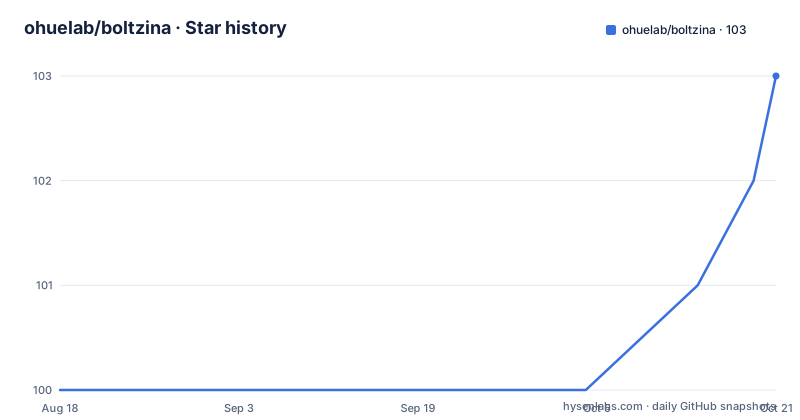
Star history
- ohuelab/boltzina103 ★ · +3
| Repository | 2026-08-18 | 2026-10-21 |
|---|---|---|
| ohuelab/boltzina | 100 | 103 |
3 Stars in the last 64 days, measured from the daily GitHub snapshot. Compare with other projects
Editorial analysis
The docking box is derived from the predicted pose
The pipeline order is the design, and it runs in four steps that the README numbers explicitly. First, Boltz-2 performs structure and affinity prediction on a complex built from your protein and a reference ligand. Second, the docking grid is determined automatically from the predicted binding pose. Third, AutoDock Vina runs the docking inside that grid. Fourth, all the resulting poses are scored with Boltz-2. So the search space is not something you specify by hand: the model tells the pipeline where to look. You can still override it, since the grid centre can be set explicitly with a comma separated x, y, z value, which is what you would do when you already know the site and want to check the model against your prior.
Four ways to name the protein and one of them is required
The main command takes an input of ligands, which can be a smiles list file with a text or smiles extension, an SDF file, or a whole directory. The protein side is the part with choices, and the CLI reference marks it as required: pick exactly one. A raw sequence string, short or long form, and for multiple chains the sequences are separated by a colon. A FASTA file, where each entry header marks a separate chain. A YAML file in the Boltz-2 format, which the README recommends for full control over multi-chain proteins, ligand definitions and Boltz-2 settings. Or a directory of existing Boltz-2 output, in which case the pipeline skips prediction and does only docking and scoring.
The YAML names the ligand that defines the box
The YAML form is the one to look at if you want to understand the pipeline's inputs, because it is small and everything in it maps to a decision. An example is included with the sample data.
version: 1
sequences:
  - protein:
      id: A
      sequence: MENFQKVEKIGEGTYGVVYK...  # CDK2 sequence
  - ligand:
      id: B
      smiles: 'CC(C)[C@H](CO)Nc1nc(Nc2ccc(C(=O)O)c(Cl)c2)c2ncn(C(C)C)c2n1'
properties:
  - affinity:
      binder: B
The chain identifiers are yours to choose, and further protein chains are added as more protein entries. The line that matters is the binder under the affinity property, because it identifies the reference ligand whose predicted position is used to determine the grid centre. If you swap which ligand is the binder, you are telling the pipeline to build the complex around a different molecule, and the search box moves with it.
Docking options have defaults you rarely need to change
The docking section of the CLI reference is short because the defaults are sensible for a screening run. The grid centre defaults to automatic, and the grid size defaults to twenty angstroms. The ligand chain identifier defaults to B, which matches the convention in the example YAML. The engine defaults to Vina, and the alternative is Uni-Dock2 for GPU-accelerated docking. Parallel Vina workers default to one. Two flags let you reuse work: skipping docking entirely to score poses that already exist, and regenerating a three-dimensional conformer for SDF input when the file does not carry usable coordinates. If you have several ligands and want throughput rather than correctness tricks, the worker count is the dial to turn.
Boltz-2's own knobs are exposed, including one for older GPUs
The prediction options are the ones worth reading before you change anything, because they change the model rather than the pipeline. Recycling steps default to three and sampling steps to two hundred, which are the model's own defaults exposed so you can trade time for quality. Diffusion samples default to one. Three flags default to off and each has a specific purpose: using an online sequence alignment server, subsampling those alignments, and applying potentials at inference time. Two more are worth noting. Disabling the fast kernels is described as being for older GPUs, which tells you the pipeline expects recent hardware by default. And a molecular weight correction to the affinity is available but off, so any published number you compare against may have been produced with or without it.
Setup installs three things and registers a fourth
Installing the Python package is separate from installing what it drives.
# From PyPI
pip install boltzina

# From source (development)
uv sync
The second stage is a setup command with a flag per component.
boltzina setup --all                          # Vina + MAXIT + Boltz-2 weights
boltzina setup --install-vina                 # Vina only
boltzina setup --install-maxit                # MAXIT only
boltzina setup --register-unidock2 /path/to/Uni-Dock2
boltzina setup --show                         # Show current config
Note that the GPU docking engine is not installed for you. Uni-Dock2 has to be cloned, built with pixi, and then registered by path, which is why two pixi files are committed in the repository root: one is copied into the clone and the other becomes its environment configuration. That path also requires CUDA 12, which is the point at which this stops being a one-command install.
Both stages cache, so both stages need a force flag
The output options tell you how the pipeline treats existing results, and this is the section to read before you change a setting and wonder why nothing happened. There is a separate override flag for each stage: one reruns Vina even if results exist, the other reruns the Boltz-2 scoring even if results exist. Both default to off, which is the right default for a screening campaign where you do not want to redo hours of docking because you changed an unrelated flag. Intermediate docking files are discarded unless you ask to keep them. Output goes to a results directory under the current directory by default, scoring batches one pose at a time, and there is a random seed flag for runs you need to repeat.
Tests split on whether you have a GPU
The test suite is divided by hardware, which tells you what the maintainers consider the project's real dependency.
# Unit tests (no GPU required)
uv run pytest tests/ --ignore=tests/test_integration.py -v

# Integration tests (requires GPU + Boltz-2 weights)
uv run pytest tests/test_integration.py -m gpu -v
The unit tests exclude the integration file and need nothing but the package, while the integration tests are marked and require both a GPU and downloaded weights. Two other things sit alongside. The benchmark dataset used in the paper, MF-PCBA, is included in the repository as an archive, with the evaluation protocol left to the paper rather than documented here. And the original script interface is still supported, so an existing configuration file can be run directly with the legacy entry point instead of being translated into CLI arguments.
Editorial conclusion
Use this pipeline if you are screening ligands against a target where you already have a protein sequence and want one tool to place poses and rank them with a single model, and if you can afford the Boltz-2 dependency and the GPU its integration tests want. Two things to plan for. Setting up is two stages, since the package installs from PyPI but Vina, MAXIT and the model weights are fetched separately by a setup command, and choosing the GPU docking engine adds a source build of Uni-Dock2. And read the resumption flags first, because both docking and scoring are cached and you may need to force a rerun to change anything.
Frequently asked questions
What is a virtual screening?
In this repository it is the task the pipeline exists for. Boltzina combines AutoDock Vina docking with Boltz-2 structure prediction and affinity scoring, so candidate ligands are placed in a binding site and then ranked by the model rather than by the docking score alone.
What is Boltz-2?
Within this pipeline it is the model doing the structure and affinity work: it predicts a complex with a reference ligand to locate the binding pose, determines the docking grid from that pose, and then rescores every pose Vina produces. Its sampling, recycling and diffusion options are exposed as flags.
How does Boltzina decide where to dock?
The grid is determined automatically from the binding pose Boltz-2 predicts for a complex built with the reference ligand, which is named by the binder entry in a YAML input or defaults to the first ligand in the input. You can override the centre explicitly with a comma separated x, y, z value.
What do I need to install before Boltzina runs?
The package itself from PyPI or a source sync, then a setup command that installs and registers the external tools: Vina, MAXIT and the Boltz-2 model weights with the all flag, or each separately. The GPU docking engine Uni-Dock2 is not installed for you, it has to be cloned, built with pixi and registered by path, and needs CUDA 12.
How do I force Boltzina to redo a stage?
There is a separate override flag for each cached stage, one that reruns Vina even when docking results exist and one that reruns Boltz-2 scoring even when scoring results exist. Both are off by default, so a screening run does not repeat work unless you ask it to.
Official sources
Add this badge to your README
If you maintain this project, the badge below links readers to this analysis and shows its maintenance status from the daily GitHub snapshot. Paste the markdown into your README; add ?metric=license or ?metric=stars to the image URL for a different field.

[](https://hysenlabs.com/projects/ohuelab-boltzina)Star history chart for your README
[](https://hysenlabs.com/projects/ohuelab-boltzina)