CCPlugins: 24 slash commands that stop you re-typing "act like a senior engineer" to Claude Code
Best Claude Code framework that actually save time. Built by a dev tired of typing "please act like a senior engineer" in every conversation.
At a glance
- What is it?
- CCPlugins is an archived collection of Claude Code command prompts. Its files show how the maintainer structured repeated review, refactoring, and project tasks. Check which commands still fit your Claude Code version before copying them into a workspace.
- Who is it for?
- The existing CCPlugins prompts are examples for teams that repeatedly give Claude Code the same task instructions. Read an individual command before trying it, then compare its output with the process your team already follows.
- Can I use it commercially?
- Yes. MIT is a permissive licence: you can use, modify and sell software built on it, as long as you keep its copyright and licence notices.
- Is it still maintained?
- No. The owners have archived the repository on GitHub, so it is read-only and no longer receives changes.
- What is it written in?
- Mainly Python, according to GitHub's language statistics.
Answers come from the project's GitHub data, last synced on November 22, 2026, and from our analysis. They are not legal advice.
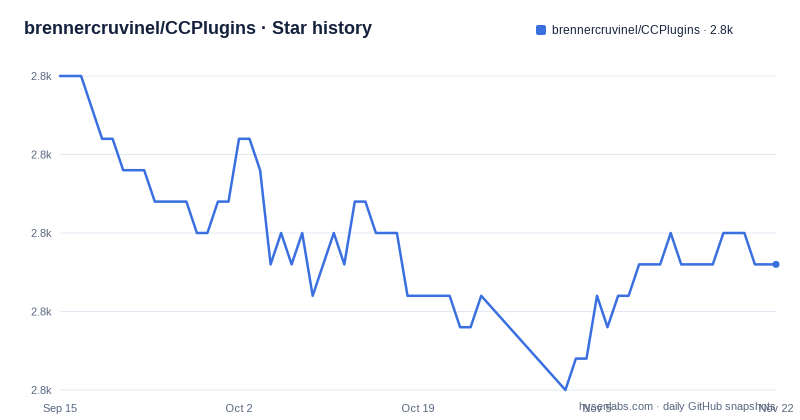
Star history
- brennercruvinel/CCPlugins2,774 ★ · -6
| Repository | 2026-09-15 | 2026-11-22 |
|---|---|---|
| brennercruvinel/CCPlugins | 2.8k | 2.8k |
-6 Stars in the last 68 days, measured from the daily GitHub snapshot. Compare with other projects
Editorial analysis
The problem CCPlugins is built around
CCPlugins names its problem in a way most Claude Code users will recognise. Ask Claude to fix a bug and get 15 test files; request a simple refactor and receive a dissertation on clean code; ask for a button and get a UI framework rewrite; and every conversation starts with please act like a senior engineer who doesn't overengineer. The framework's tagline sums up the intent: automate the boring stuff.
CCPlugins is a curated set of 24 professional commands for the Claude Code CLI that the README says save two to three hours a week on repetitive development tasks. They are optimised for Opus 4 and Sonnet 4, and the badges note they also work with Kimi K2. The audience is developers who already run Claude Code every day and want structured, predictable outcomes rather than re-steering the model each time. It is not for occasional users; the value comes from commands you reach for often.
Installing CCPlugins
Installation is quick and cross-platform. On Mac or Linux there is a one-line install script:
curl -sSL https://raw.githubusercontent.com/brennercruvinel/CCPlugins/main/install.sh | bashOn Windows or any platform, a Python installer does the same job:
python install.pyThere is also a manual route, cloning the repository and running python install.py, and matching uninstallers (./uninstall.sh or python uninstall.py). As always with a script piped from a URL into bash, it is reasonable to read install.sh first. The repository itself is small, a commands/ directory plus the install and uninstall scripts, so the commands are just files you can inspect before trusting them.
The command set, grouped by job
The 24 commands are organised by what you are trying to do. The development-workflow group covers the everyday actions: /cleanproject removes debug artifacts with git safety, /commit makes conventional commits after analysing the change, /format applies the project's formatter, /scaffold generates a feature from existing patterns, /test runs tests with failure analysis, /implement imports and adapts code from a source, and /refactor restructures code with a validation and mapping phase.
A code-quality and security group adds /review for multi-agent analysis across security, performance, quality and architecture, /security-scan for vulnerability analysis with remediation tracking, /predict-issues for proactive problem detection, and a cluster of smaller tools for comments, imports and TODOs (/remove-comments, /fix-imports, /find-todos, /create-todos, /fix-todos). An advanced-analysis group (/understand, /explain-like-senior, /contributing, /make-it-pretty) and a session-and-project group (/session-start, /session-end, /docs, /todos-to-issues, /undo) round it out. The naming is literal on purpose, so the command you want is usually the one you would guess.
Validation phases and extended thinking
The feature that separates CCPlugins from a plain prompt collection is that the complex commands include validation phases to check their own completeness. The README shows this for two of them:
/refactor validate
/implement validate
Refactor's validate pass finds remaining old patterns and verifies a full migration; implement's checks integration completeness and finds loose ends. This matters because the failure mode of an AI refactor is a half-finished migration that looks done, and a built-in verification step is exactly what catches that.
CCPlugins also leans on extended thinking for the hard cases: deep architectural analysis for large refactors, and chain analysis for sophisticated vulnerability detection in security scans. Combined with the review command's multi-agent split across security, performance, quality and architecture, the framework's design philosophy is clear: give the model structure and a check, rather than a single open-ended instruction.
What the proposed V2 redesign meant
The [archived README](https://github.com/brennercruvinel/CCPlugins) describes plans to revisit commands as Claude Code gained features of its own. Treat that plan as historical context. When you evaluate a command from the collection, read the prompt itself, identify the specific task it handles, and compare it with what your installed CLI already supports.
License and maintenance of an archived collection
The GitHub repository is read-only. The existing command files and version history are still available. If a prompt fits your workflow, review the repository's MIT license, pin the copy you tested, and keep it with the workspace where it is used. Recheck command syntax and context assumptions when you upgrade Claude Code.
Editorial conclusion
The existing CCPlugins prompts are examples for teams that repeatedly give Claude Code the same task instructions. Read an individual command before trying it, then compare its output with the process your team already follows. The GitHub archive is read-only, so budget for maintaining any commands you copy.
Frequently asked questions
What is CCPlugins?
CCPlugins is an MIT-licensed set of 24 professional slash commands for the Claude Code CLI, such as /commit, /cleanproject, /refactor and /review, designed to save two to three hours a week on repetitive tasks and to keep Claude from over-engineering simple requests.
How do I install CCPlugins?
On Mac or Linux, run the one-line install script that pipes install.sh into bash; on Windows or cross-platform, run python install.py. You can also clone the repo and run python install.py, and uninstall with uninstall.sh or python uninstall.py.
Is CCPlugins still worth it now that Claude Code does more natively?
The README says a V2 redesign is under way because Claude Code now handles some commands natively, and that some v1 commands have become redundant. v1 stays stable; use the commands that still save you steps and prefer native features where they overlap.
Official sources
Add this badge to your README
If you maintain this project, the badge below links readers to this analysis and shows its maintenance status from the daily GitHub snapshot. Paste the markdown into your README; add ?metric=license or ?metric=stars to the image URL for a different field.

[](https://hysenlabs.com/projects/brennercruvinel-ccplugins)Star history chart for your README
[](https://hysenlabs.com/projects/brennercruvinel-ccplugins)Was this useful?