OneCLI: the gateway intercepts your agent's HTTPS traffic to inject credentials
Open-source sandboxed agent harness for teams. Giving every employee a secured personal agent.
At a glance
- What is it?
- OneCLI is a platform for giving every person in a company their own sandboxed agent, with a gateway that inserts the credentials the agent never sees and a team policy applied in one place. It is also open core rather than open source, and unusually honest about it: the enterprise directories are named in the licence, and a licensing test is wired into the project's own check script.
- Who is it for?
- OneCLI fits an organisation that wants agents doing real work with company credentials without handing those credentials over, because the injection model and the per-person identity model are the whole product. Three things to weigh.
- Can I use it commercially?
- Yes. Apache-2.0 is a permissive licence: you can use, modify and sell software built on it, as long as you keep its copyright and licence notices.
- Is it still maintained?
- Yes. The repository last received commits 6 days ago.
- What is it written in?
- Mainly TypeScript, according to GitHub's language statistics.
Answers come from the project's GitHub data, last synced on November 15, 2026, and from our analysis. They are not legal advice.
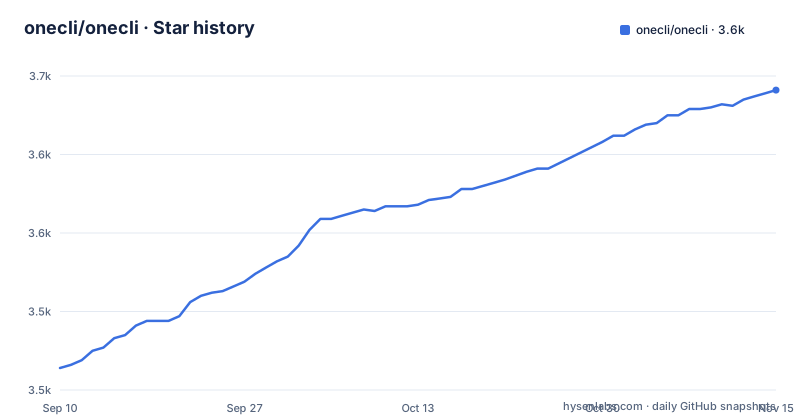
Star history
- onecli/onecli3,641 ★ · +177
| Repository | 2026-09-10 | 2026-11-15 |
|---|---|---|
| onecli/onecli | 3.5k | 3.6k |
177 Stars in the last 66 days, measured from the daily GitHub snapshot. Compare with other projects
Editorial analysis
A gateway terminates the agent's HTTPS traffic and inserts the credentials
The architecture list is where this project's design is stated, and one entry deserves to be read on its own.
The gateway is written in Rust, inside an otherwise TypeScript workspace. Its job is to intercept the agent's outbound requests, HTTPS included, by sitting in the middle of the connection, and to inject credentials into them. Agents authenticate to it with access tokens carried in a proxy authorisation header, which is the standard way to authenticate to an HTTP proxy.
So the agent's only route out of its sandbox is a component that is deliberately breaking the encryption in order to see and rewrite the request. That is the mechanism the whole product rests on, and it is the same mechanism a corporate inspection proxy uses. The difference is what happens to the request afterwards.
The secret store is the other half. Secrets are encrypted at rest with AES-256-GCM, decrypted only at the moment of a request, matched by host and by path pattern, and then injected either as headers or as query parameters.
That last choice is the one to notice. A secret in a query parameter ends up in access logs, in proxy logs and in browser history; the same secret in a header does not. The file offers both and does not say which services should use which.
What keeps the shape manageable is the runner: it is outbound-only, holds no inbound ports, and never touches the database. So the sandbox needs no ingress, no tunnel and no public address.
Five secrets are generated for you, and your shell beats the file
The environment reference is unusually explicit about who owns the configuration, and the answer is the tool.
The file opens by saying you do not copy it. Instead, the development command creates and maintains the environment file itself: it generates every required secret on first run, writes the development database URL, and never overwrites a value you have set.
Five secrets are named, which is a useful inventory of what the platform trusts: an authentication secret, a secret-encryption key, a gateway internal secret, a runner token, and a channel adapter token. Four of those five exist because the components talk to each other, which means the trust graph between the pieces is visible in the variable names.
The same treatment is described for a self-hosted install, which gets it from the setup command into the docker directory or from the install script into a dot-directory in the user's home.
Everything below those lines is an optional override, and there is one precedence rule worth memorising: your shell environment always beats the file. So a stray variable exported in a login shell will silently override what the tool generated, and the file itself says so rather than leaving you to discover it.
One optional integration is spelled out in full: signing in with Google is off unless you set two variables, and email and password always works without them.
One variable picks between two deployment modes, and the ports follow from it
There is a single variable that answers where people open the product, and the environment file explains the reasoning at length.
It is deliberately not derived from the address the server binds to, on the grounds that those are two different things and only you know the first one. Every other address in the configuration follows from it by one rule, and the rule keys off the scheme.
If the value is plain HTTP, you are in ports mode: the API and the gateway live on the same host on their own ports, 10256 and 10255 by default. If it is HTTPS, you are in proxy mode: one origin, with your own reverse proxy terminating TLS and routing two paths to the platform.
So a scheme character in one configuration value selects between two deployment topologies, and the default ports differ by fifteen between the API and the gateway. Anyone writing infrastructure around this needs those four numbers, and the file supplies three of them plus the dashboard's own port.
The quickstart gives the fourth. After the clone, the install and the setup step, the dashboard answers on port 10254:
git clone https://github.com/onecli/onecli.git && cd onecli
pnpm install
pnpm run setup
There is also an internal address variable, used where the gateway calls the API for its own work, including resolving a password manager reference. Its development default points at localhost and the compose stack points it at a service name, so the same variable means different things in the two setups.
The enterprise directories are named, and a test enforces the line
The licence section is the one to read before adopting this, because the project is open core and says so in the same breath as the open-source claim.
The default licence is Apache-2.0, with one exception. Directories named for enterprise features are under a separate enterprise licence, each carrying a notice that points at it. That licence is free for development, testing and evaluation, and requires a subscription for production use. Everything else is Apache-2.0 and, the file states, can be self-hosted in production with no commercial licence at all. The enterprise licence file carries the authoritative list of licensed paths.
That is a clearer statement than most open-core projects make. The terms, the boundary and the production consequence are all in one paragraph, and the list is in a file rather than in a sales conversation.
What makes it more than a promise is that the boundary is tested. The workspace scripts include a licensing test run from the API package, and the aggregate check script runs the lint pass, the type check, the format check, a script test suite and then that licensing test. So a change that moves code across the boundary has something to fail against.
One detail to resolve yourself: the licence points at directories named for enterprise features, and the repository's top-level listing does not show one. They must sit inside the application or package directories, which that listing does not expand, so the authoritative list is the file to read rather than the tree.
Approvals are deterministic, and a message mid-run redirects the agent
Two behaviours here are the difference between an agent harness and a chat box.
The first is human-in-the-loop approval, and the word the file uses is deterministic. For the things you want total control over, the approval happens in the chat itself, and three examples are given: sending the email, deleting the issue tracker ticket, and emptying an object storage bucket. Those are exactly the three actions where a model's judgement is the worst possible substitute for a person's, so the design puts a person in the path by default for that class of action.
The second is message handling while the agent is working. A message sent in that state redirects the agent immediately instead of queueing behind the current turn. Queuing is the more conventional behaviour, and it is the wrong one: a correction sent thirty seconds into a long task should change what happens next, not what happens after.
The rest of the per-person model follows from the same premise. An agent has its own page in the dashboard or its own presence in Slack, its own memory kept by the platform rather than by the prompt, skills you write once, and a schedule that lets it plan future work and be woken at the right time.
Its Slack application is created with it and deleted with it, which is a small detail that prevents an accumulating pile of orphaned bot accounts in a workspace.
It began as a Rust credential vault, and became a platform for teams
The origin story explains the architecture better than the architecture list does.
The project's first version was a credential vault for AI agents, written in Rust. What the authors found was that most of the demand came from individuals and teams already running autonomous agents, with three of them named in the file. Those agents were good at the work, and two things were missing: managing secrets and permissions, and, for teams, multiplayer management.
The diagnosis is the sentence that follows. Every autonomous agent in that market is built for one person, and for one person that is fine. Replicating it across a team gets messy in four named ways: spinning up each agent, deciding what each one may and may not do, hosting them, and keeping track of whose agent is whose.
That is the v2 pivot, and it explains three things about the current shape. An agent per person means identity is the primary key, which is why the project integrates with the company's identity provider and provisions agents against each employee's identity. A single policy enforced everywhere means policy lives in the control plane rather than in each agent. And the Rust core survives as the gateway and the SSH terminator, the two components where the trust boundary is, inside a TypeScript workspace.
Contributions are accepted under the terms of a contributor licence agreement rather than a developer certificate of origin, which is a heavier contributor relationship than most open-source projects ask for and worth reading before your first patch.
Editorial conclusion
OneCLI fits an organisation that wants agents doing real work with company credentials without handing those credentials over, because the injection model and the per-person identity model are the whole product. Three things to weigh. The gateway intercepts encrypted traffic in order to inject secrets, which means it holds the trust position that a proxy usually holds and should be deployed accordingly. Team policy is enforced by that same component, so the blast radius of a policy mistake is every agent in the workspace. And the licensing is split: most of it is Apache-2.0 and self-hostable in production, while the enterprise directories need a subscription, so check which side of that line the features you want are on before you plan a rollout.
Frequently asked questions
What is OneCLI?
An open-source platform for running AI agents as a team. You create an agent per person, give each the access it needs, and it works inside a sandbox whose only exit is a gateway that injects credentials and enforces your policy.
Does the OneCLI agent ever see credentials?
No. Each agent gets only the access you granted and the gateway enforces it on every request, and team-level connections are granted per agent without ever being handed to one. You can also connect a password manager for on-demand injection with nothing stored on the server.
Can I self-host OneCLI in production without paying?
Yes, everything outside the enterprise directories is Apache-2.0 and can be self-hosted in production with no commercial licence. The enterprise features are free for development, testing and evaluation and require a subscription for production use, and the enterprise licence file carries the authoritative list of licensed paths.
How does OneCLI reach my servers from a laptop?
The runner is outbound-only and holds no inbound ports, so a laptop, a homelab or a network behind NAT all work with no ingress and no tunnel. Inbound SSH connections are terminated with short-lived certificates and bridged into the agent sandboxes.
What does the development command do in a OneCLI checkout?
It generates the environment file with every required secret, starts PostgreSQL, applies migrations and runs the full stack, after which the dashboard answers on port 10254.
Official sources
Add this badge to your README
If you maintain this project, the badge below links readers to this analysis and shows its maintenance status from the daily GitHub snapshot. Paste the markdown into your README; add ?metric=license or ?metric=stars to the image URL for a different field.

[](https://hysenlabs.com/projects/onecli-onecli)Star history chart for your README
[](https://hysenlabs.com/projects/onecli-onecli)Was this useful?