OpenShift Installer: tags from September 2024, pushes from this week
Install an OpenShift 4.x cluster. The best thing to do is always pass the dir argument to create and destroy.
At a glance
- What is it?
- openshift/installer builds one binary, openshift-install, that creates and destroys OpenShift 4.x clusters across eleven platforms. Its README is 213 words, so most of what matters is visible in go.mod, the root tree and the version list rather than in the prose.
- Who is it for?
- Reach for this repository if you are building OpenShift 4.x from source or contributing to the installer itself, not if you are trying to install a cluster: the README points you at docs.openshift.com and at the platform specific preparation guides first. Before building, read docs/dev/dependencies.md, because the dependency list is the real prerequisite list.
- Can I use it commercially?
- Yes. Apache-2.0 is a permissive licence: you can use, modify and sell software built on it, as long as you keep its copyright and licence notices.
- Is it still maintained?
- Yes. The repository received new commits within the last day.
- What is it written in?
- Mainly Go, according to GitHub's language statistics.
Answers come from the project's GitHub data, last synced on November 14, 2026, and from our analysis. They are not legal advice.
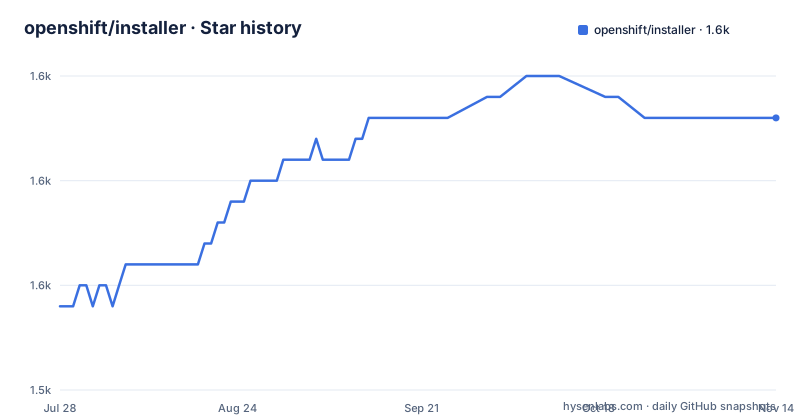
Star history
- openshift/installer1,558 ★ · +9
| Repository | 2026-07-28 | 2026-11-14 |
|---|---|---|
| openshift/installer | 1.5k | 1.6k |
9 Stars in the last 109 days, measured from the daily GitHub snapshot. Compare with other projects
Editorial analysis
The three newest releases share one date from 2024
The release list is where this project stops looking current. All three entries are dated 2024-09-26: v0.91.0 at 17:56 UTC, v0.90.16 at 21:44, and v0.90.17 at 21:33. The ordering is the giveaway that these are maintenance branches rather than a release train, since a 0.90.x patch sits above the higher 0.91.0 version, and two of the three names carry their branch explicitly, one for release-4.16 and one for release-4.17. Against that, the repository itself is not dormant: the main branch was pushed to on 2026-10-02. So a reader looking at tags alone would conclude the installer stopped two years ago, which the commit history contradicts.
The build is one script and one output path
The entire build story the README gives is three steps: install the build dependencies listed in docs/dev/dependencies.md, clone the repository, and run
hack/build.shThat script produces `bin/openshift-install`, and the binary is invoked by path, as `bin/openshift-install create cluster`. It prompts for the user-specific information and fills in defaults for everything else, using the survey library that appears in go.mod as survey/v2. The non-interactive path is a file rather than a flag set: in contexts where nobody can answer prompts, the documented alternative is to supply an `install-config.yaml`, with the README pointing at the multiple invocations section of the user overview for how that fits a repeated or scripted run.
Two Azure compute SDK majors sit in the same go.mod
The module is github.com/openshift/installer on go 1.26.0, and its require block is where the platform matrix becomes concrete. The Azure entries alone include the compute SDK at both major versions, armcompute/v4 at v4.2.1 and armcompute/v5 at v5.7.0, plus separate packages for authorization, dns, keyvault, msi, network, privatedns, resourcegraph, resources and storage, with authorization still on a beta, v3.0.0-beta.2. Alongside them sit IBM's power-go-client, ibm-cos-sdk-go and keyprotect-go-client, three Google Cloud modules for kms, monitoring and storage, and cloud.google.com/go/storage again at the higher level. A `vendor/` directory is committed, so that require list is not advisory: it is the build input.
Two golangci configs at the root, and no statement of which one runs
The root of the tree carries both `.golangci.yaml` and `.golangci-lint-v2.yaml`, and the README does not say which of them a contributor is meant to open or which one CI reads. The pairing is consistent with a linter configuration being migrated to its v2 layout without the old file being removed, but the file names alone do not settle it, and a contributor editing the wrong one would see no difference in a local run. The same pattern shows up in the CI and tooling entries: `.ci-operator.yaml`, `.yamllint`, `.gitattributes` and a `tools.go` for pinning tool dependencies, none of which the 213 word README mentions.
The console password is printed on stdout and kept in a log file
When the install finishes, the binary prints connection details and writes the same information to `.openshift_install.log`. The sample output shows what that contains: a wait for the openshift-console route to be created, a line telling you to export KUBECONFIG from the installer directory, a console URL built from the cluster name and base domain on port 6443, and a login line naming the kubeadmin user with a password rendered in the sample as 5char-5char-5char-5char. Two consequences follow from where that text lands. It is on your terminal, and it is in a file inside the asset directory that the cleanup step later asks you to remove.
destroy is written without the bin/ prefix that create carries
The quick start invokes the binary as `bin/openshift-install create cluster`, while the cleanup section writes `openshift-install destroy cluster` with no path in front of it, so the two commands as printed differ in how you reach the binary. The cleanup note is about state left behind rather than about the command: destroying the cluster does not remove the installer state files, and the ones named are `auth/` and `terraform.tfstate`. The advice that follows is to always pass the `--dir` argument to both create and destroy, and to remove the asset directory beforehand when reinstalling from scratch. The repository description carries the same instruction, though it words it as the dir argument rather than with the two dashes.
Four of the eleven platforms have no user guide in the repository
The supported platform list runs to eleven entries: AWS, Azure, Bare Metal, GCP, IBM Cloud, Nutanix, OpenStack, Power, Power VS, vSphere and z/VM. Seven of them, AWS, Azure, Bare Metal, GCP, OpenStack, Power and vSphere, link to a directory of their own under docs/user. IBM Cloud, Nutanix, Power VS and z/VM link only to the official documentation site, so a reader working on an s390x or Power VS install is sent off-repository from the same list that keeps the others in place. The tree also holds both a cluster-api directory and a upi directory, which is the declarative and user-provided-infrastructure split, and neither term appears in the README text.
AGENTS.md and CLAUDE.md sit side by side at the root
The top level of the repository carries an AGENTS.md and a CLAUDE.md, plus a `.claude/` directory and a `.coderabbit.yaml`, so instructions for automated coding agents are versioned here rather than kept elsewhere. Governance is versioned too, with an OWNERS file, OWNERS_ALIASES for group aliases, a DCO, a NOTICE file beside the Apache-2.0 LICENSE, and a code-of-conduct file. None of that is wrong for a project of this size, but it is all invisible from the front page, which covers platforms, one build script, one create command, a sample output block and one destroy note.
Editorial conclusion
Reach for this repository if you are building OpenShift 4.x from source or contributing to the installer itself, not if you are trying to install a cluster: the README points you at docs.openshift.com and at the platform specific preparation guides first. Before building, read docs/dev/dependencies.md, because the dependency list is the real prerequisite list. Before you rely on a tag to know what a branch contains, note that the newest release entries are all dated 2024-09-26 while the branch itself keeps receiving commits, and that the destroy path leaves auth/ and terraform.tfstate behind unless you pass the directory argument and clean up by hand.
Frequently asked questions
How do I build the openshift-install binary from source?
Install the build dependencies listed in docs/dev/dependencies.md, clone the repository, and run hack/build.sh. That script creates bin/openshift-install, which you then invoke as bin/openshift-install create cluster.
Can the OpenShift installer run without answering prompts?
Yes. Instead of the interactive prompts the binary normally shows, a non-interactive context supplies an install-config.yaml file, and the user overview's multiple invocations section covers how that fits repeated runs.
Where does the OpenShift installer write the kubeadmin password?
Connection details are printed to your terminal when the install completes and are also written to the .openshift_install.log file, including the line naming the kubeadmin user and its password.
What files does the OpenShift installer leave behind after destroy cluster?
The cleanup note says the installer state files remain, naming auth/ and terraform.tfstate. The advice is to pass the --dir argument to both create and destroy, and to remove the asset directory before reinstalling from scratch.
Which platforms does the OpenShift installer support?
Eleven are listed: AWS, Azure, Bare Metal, GCP, IBM Cloud, Nutanix, OpenStack, Power, Power VS, vSphere and z/VM. Seven of them have a user guide directory inside docs/user, while IBM Cloud, Nutanix, Power VS and z/VM link only to the official documentation site.
Official sources
Add this badge to your README
If you maintain this project, the badge below links readers to this analysis and shows its maintenance status from the daily GitHub snapshot. Paste the markdown into your README; add ?metric=license or ?metric=stars to the image URL for a different field.

[](https://hysenlabs.com/projects/openshift-installer)Star history chart for your README
[](https://hysenlabs.com/projects/openshift-installer)Was this useful?