GraalJS embeds JavaScript in Java, and the boundaries around it
GraalJS – A high-performance, ECMAScript compliant, and embeddable JavaScript runtime for Java
At a glance
- What is it?
- GraalJS runs JavaScript and Node.js applications on an engine written in Java, which makes it a natural fit inside services you already run on a JVM and a poor fit for npm trees full of prebuilt native addons.
- Who is it for?
- GraalJS earns its place when JavaScript has to run inside a Java process you already own, or when a Node.js application needs to leave V8 behind for a JVM you can operate; the polyglot Maven coordinates and the four-way standalone naming cover both routes with one engine. Leave it alone for pure npm services carrying prebuilt native addons, and for deployments pinned to a stock JDK, which the project calls unsupported.
- Can I use it commercially?
- Yes. UPL-1.0 is a permissive licence: you can use, modify and sell software built on it, as long as you keep its copyright and licence notices.
- Is it still maintained?
- Yes. The repository last received commits 1 day ago.
- What is it written in?
- Mainly C++, according to GitHub's language statistics.
Answers come from the project's GitHub data, last synced on November 7, 2026, and from our analysis. They are not legal advice.
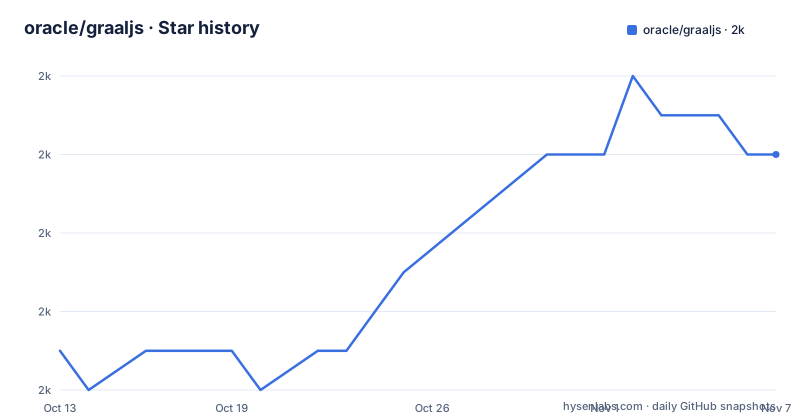
Star history
- oracle/graaljs2,042 ★ · +5
| Repository | 2026-10-13 | 2026-11-07 |
|---|---|---|
| oracle/graaljs | 2k | 2k |
5 Stars in the last 25 days, measured from the daily GitHub snapshot. Compare with other projects
Editorial analysis
A JavaScript engine written in Java instead of V8
A Java service that needs to run JavaScript has three routes: shell out to a Node.js process, bind a native V8 library, or put an engine on the JVM. GraalJS takes the third. The engine is implemented in Java on top of GraalVM, and the polyglot layer is what lets Java objects and script values move across the boundary in both directions.
The stated goal list is specific about what is being chased: full compatibility with the latest ECMAScript specification, interoperability with Java, WebAssembly through the JavaScript WebAssembly API, Node.js support including native packages, and a simple upgrade from code written for Nashorn or Rhino. Two entries on that list are about migration rather than runtime behaviour, and they matter most to an existing service. The final goal names the audience outright: embeddability in systems like Oracle RDBMS or MySQL, which is a different request from running scripts for developers on a laptop.
Node.js support comes from swapping the JavaScript core underneath a runtime that already exists. That runtime is based on a recent version of Node.js and executes the GraalJS engine where Google V8 would sit, so ordinary applications run unmodified and the npm package surface stays familiar to anyone who has used Node before.
Maven coordinates that became publishable at version 23.1.0
Embedding starts with coordinates. GraalJS has been published as Maven artifacts since version 23.1.0, under the dependency group `org.graalvm.polyglot`, and the two entries below are the minimal setup for a `pom.xml`. Look closely at the second one: the js artifact is declared with a pom type rather than a jar, so Maven resolves its runtime pieces instead of handing you a single compile-time library. Both entries share one property, which keeps the core and the language module on the same train.
<dependency>
    <groupId>org.graalvm.polyglot</groupId>
    <artifactId>polyglot</artifactId>
    <version>${graaljs.version}</version>
</dependency>
<dependency>
    <groupId>org.graalvm.polyglot</groupId>
    <artifactId>js</artifactId>
    <version>${graaljs.version}</version>
    <type>pom</type>
</dependency>
Keeping the declared version as a property means a version bump touches a single line rather than two blocks. A complete runnable embedding example lives in the separate polyglot-embedding-demo project, which is a faster starting point than assembling the dependency tree yourself. The same engine then reaches three kinds of host: GraalVM JDK, Oracle JDK, or OpenJDK, and that third option comes with its own warning further down.
Four standalone builds per component and the suffix that names them
Standalone distributions are a separate track from Maven, and their filenames carry the whole decision. There are 2 language runtime options to choose from: a native launcher compiled ahead of time with GraalVM Native Image, and a JVM-based runtime. A standalone that ships with a JVM carries a `-jvm` infix, while the GraalVM Community Edition build carries `-community`. The community build running on a JVM needs both, as `-community-jvm`, and there is no community archive that ends in a bare `-jvm`. A community archive is shaped like `graaljs-community-<version>-<os>-<arch>.tar.gz`, with the operating system and architecture spelled into the name.
That yields 4 configurations for every component and platform combination, and the tree carries 2 component directories, `graal-js` and `graal-nodejs`, so the JavaScript runtime and the Node.js runtime each ship under all 4. Picking the native-image launcher over the JVM runtime is a startup-time choice rather than a language one; the engine underneath is the same either way, and nothing in the naming tells you which one the code will like more.
The Maven side splits the same way. Use `js-community` for GraalJS built on GraalVM Community Edition, and switch to the `-isolate` suffix, for example `js-isolate`, to reach the polyglot isolate artifacts, which are offered under GFTC only.
Licensing follows that same two-track shape: community artifacts and community distributions are under the Universal Permissive License (UPL), Version 1.0, while the polyglot and js artifacts and the non-community standalone builds sit under the GraalVM Free Terms and Conditions (GFTC). That is a packaging fact to check before you commit, not a legal opinion.
Download, extract, then clear the macOS quarantine attribute
Installing a standalone means grabbing the archive that matches your operating system, architecture and distribution track, extracting it, and putting its bin directory on the path. Two executables land in there. The js one runs JavaScript files, the node one runs Node modules, and if you pass no file on the command line you get an interactive shell rather than an error, which is the quickest way to confirm the engine came up.
On macOS the first run is not the second run. A downloaded archive arrives stamped with a quarantine attribute, and the documented fix is to strip it before extracting:
sudo xattr -r -d com.apple.quarantine <archive>.tar.gzThat command needs sudo, which matters if you plan to script the install into a provisioning pipeline. Prebuilt binaries exist for Linux on x64 and AArch64, for macOS on AArch64, and for Windows on x64, and those are the combinations the project fully supports. Intel macOS is absent from that list, even though the core engine is described as a Java application that runs on any operating system providing a compatible JVM. Portability in principle and shipped binaries are not the same list, and only three desktop and server combinations are covered.
Native npm addons are the seam where compatibility turns conditional
The Node.js claim is the strongest one the project makes, and it carries a stated exception. GraalJS runs unmodified Node.js applications; the runtime tracks a recent version of Node.js and puts the GraalJS engine where Google V8 would otherwise sit. Compatibility with existing npm packages is described as high, and it explicitly extends to packages with native implementations rather than stopping at pure JavaScript.
The exception is about binaries, not source. A package that ships a binary compiled against V8 does not load into a different engine, so some npm modules have to be recompiled from source with GraalJS before they will run at all. A dependency tree that looks pure JavaScript from the outside can still pull a prebuilt addon during install, and the documentation does not publish a list of which packages fall into that category. For an application that depends on one specific native addon, that silence is the first thing worth resolving in your own tree before anything else gets evaluated.
Node.js itself arrives as its own standalone distribution rather than as part of the JavaScript one, and the repository points readers at NodeJS.md for the first steps. Two downloads, two bin directories, one engine.
Stock JDK mode is documented as not a supported feature
GraalJS runs with GraalVM JDK, Oracle JDK, or OpenJDK, and that list is where the project's own boundary becomes interesting. There is a document for running on a stock JVM, docs/user/RunOnJDK.md, and it arrives with a warning attached: in that mode many features and optimizations of GraalVM are not available. The line after it is unambiguous. Running on a stock JVM is not a supported feature, and the instruction is to use a GraalVM instead.
So the OpenJDK option is a way to get started rather than a deployment target the project will back. That reframes the choice between the native-image launcher and the JVM-based standalone as well: both are supported distributions, while the plain JDK route sits outside what the project supports. If your deployment is pinned to a JVM you do not control, that document is worth reading before you design anything around the engine.
Language coverage is the other place to verify. GraalJS states compatibility with the ECMAScript 2026 specification, and new proposals scheduled for future editions are added frequently behind an option instead of being switched on by default. Proposals ahead of the specification are therefore a configuration choice you own, and the compatibility notes under docs/user are where to check which extensions from other engines are present.
C++ in the language record, Java in the engine, a formatter switched off
Two details in this repository contradict what a skim expects. The first is language. The project's language breakdown puts C++ at the top, while the project description states that GraalJS is a JavaScript engine implemented in Java on top of GraalVM. A native-image toolchain and shared C++ sources can explain both, but the record is a poor guide to where the runtime logic lives, and anyone sizing a JVM embedding from the language breakdown alone will get the wrong impression.
The second is pyproject.toml. It configures Black with `line-length` 120 and `required-version` 23, then sets `force-exclude` to .*, with comments saying the black formatter is disabled in this repository and that individual suites can enable it by creating their own pyproject.toml in a suite folder. A formatter pinned to a major version and then excluded everywhere is a configuration kept as an opt-in for suites rather than a gate applied to the tree. ci.jsonnet and common.jsonnet sit next to it, so formatting was settled at the root of a repository whose build logic is already generated.
The top level also carries AGENTS.md, SECURITY.md and CONTRIBUTING.md, plus a docs directory split into user and contributor halves and a separate docs/Building.md for building from source. None of that points to a project winding down; the last push was on 2026-10-05.
Editorial conclusion
GraalJS earns its place when JavaScript has to run inside a Java process you already own, or when a Node.js application needs to leave V8 behind for a JVM you can operate; the polyglot Maven coordinates and the four-way standalone naming cover both routes with one engine. Leave it alone for pure npm services carrying prebuilt native addons, and for deployments pinned to a stock JDK, which the project calls unsupported. Before adopting, rebuild one real dependency from source and read docs/user/RunOnJDK.md.
Frequently asked questions
Which ECMAScript specification level does GraalJS implement?
GraalJS states compatibility with the ECMAScript 2026 specification. Proposals scheduled for future editions are added frequently and are reachable behind an option rather than enabled by default.
How do I add GraalJS to a Maven project?
Add the `org.graalvm.polyglot` group with the `polyglot` artifact plus the js artifact declared with a pom type, both on a single `${graaljs.version}` property. Artifacts have been published this way since version 23.1.0.
Can GraalJS run on a plain OpenJDK instead of GraalVM?
It runs with GraalVM JDK, Oracle JDK, or OpenJDK, but the stock JDK path is documented as not a supported feature because many GraalVM features and optimizations are unavailable there. The project asks you to use a GraalVM instead.
Does GraalJS run npm packages that contain native code?
Compatibility with existing npm packages is described as high and covers packages with native implementations. Modules that ship binaries compiled for V8 have to be recompiled from source with GraalJS before they run.
Which platforms get official GraalJS binaries?
Binary distributions are provided and fully supported on Linux x64 and AArch64, macOS AArch64, and Windows x64. The core engine is a Java application, so it runs anywhere a compatible JVM is available.
Official sources
Add this badge to your README
If you maintain this project, the badge below links readers to this analysis and shows its maintenance status from the daily GitHub snapshot. Paste the markdown into your README; add ?metric=license or ?metric=stars to the image URL for a different field.

[](https://hysenlabs.com/projects/oracle-graaljs)Star history chart for your README
[](https://hysenlabs.com/projects/oracle-graaljs)Was this useful?