orama: three install paths, one search option, and embeddings you have to supply
🌌 A complete search engine and RAG pipeline in your browser, server or edge network with support for full-text, vector, and hybrid search in less than 2kb.
At a glance
- What is it?
- Orama is a TypeScript search engine and RAG pipeline that claims to fit in less than 2kb and runs in the browser, on a server, or at the edge. Vector and hybrid search are a single mode option, but the vector dimension has to be declared in the schema before indexing and embeddings have to exist at query time, so the pipeline is yours to wire up.
- Who is it for?
- Choose Orama when you want full-text, vector or hybrid search in one small dependency, especially in a browser or edge worker, and you are willing to own embedding generation. The documented chat example calls OpenAI; keep provider credentials on a trusted server.
- Can I use it commercially?
- Check first. The repository uses a licence we do not classify automatically, so read its LICENSE file before any commercial use.
- Is it still maintained?
- Yes. The repository last received commits 28 days ago.
- What is it written in?
- Mainly TypeScript, according to GitHub's language statistics.
Answers come from the project's GitHub data, last synced on November 15, 2026, and from our analysis. They are not legal advice.
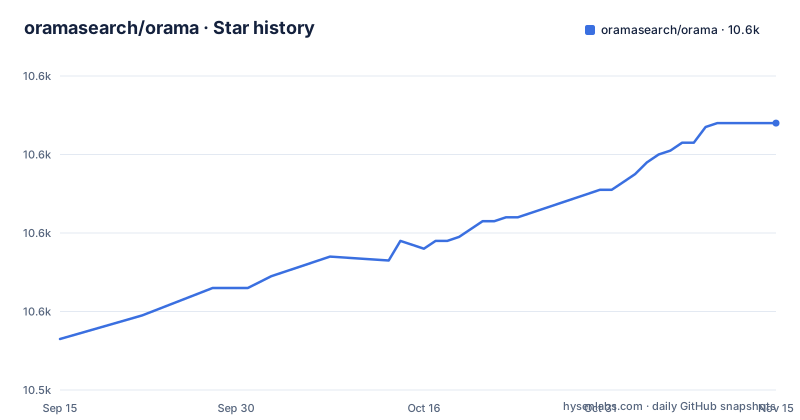
Star history
- oramasearch/orama10,608 ★ · +55
| Repository | 2026-09-15 | 2026-11-15 |
|---|---|---|
| oramasearch/orama | 10.6k | 10.6k |
55 Stars in the last 61 days, measured from the daily GitHub snapshot. Compare with other projects
Editorial analysis
Vector, hybrid and fulltext are one option on a single search call
The search surface is deliberately small, which is the design decision to understand before anything else. The same search function handles every mode, and the mode is passed as an option that can be 'vector', 'hybrid' or 'fulltext'. You select the mode with a flag on the call you already make. Two requirements come with the non-textual modes and both are yours to satisfy. First, the vector size must be expressed during schema initialization, which the code example makes explicit as a comment next to the vector column, so the dimension is part of your schema, not a runtime parameter. Second, you have to provide text embeddings at search time, meaning the query string has to be turned into a vector before search can compare it against anything. The README points at a plugin when that is inconvenient, @orama/plugin-embeddings, which can generate embeddings at insert time through its onInsert generate option, using a default property to store them and a set of properties concatenated into one unique embedding. The plugin also needs a TensorflowJS backend, and the example imports @tensorflow/tfjs-node with a comment noting that any other appropriate backend such as @tensorflow/tfjs-backend-webgl works instead. So the vector path is real, but the cost of it is an embedding pipeline somewhere in your stack.
Ten schema types, and a vector column commits you to a dimension
A database instance is created against an indexing schema, and the schema is where most of your early decisions get locked in. Ten types are supported. string, number (float or integer), boolean, enum, geopoint expressed as a latitude and longitude pair, the array variants string[], number[], boolean[] and enum[], and vector[<size>] for vector search. The example schema in the README uses a string name and description, a number price, a vector[1536] embedding, and a nested object holding a rating number, which shows that nesting is permitted inside the schema. Two properties of this list matter more than the others in practice. geopoint is a distinct type rather than two numbers, which is what makes the geosearch feature possible, and vector[<size>] has its size inside the type name, which means the dimension is declared once, at schema creation, and then assumed forever. That is the sharp edge. Deciding on 1536 dimensions and later wanting a different embedding model means creating the index again, because the type itself encodes the size. Plan the schema as a contract with your future self, because the type system is doing real work here rather than just validating shapes.
Three install paths: a package manager, a CDN module tag, or a Deno specifier
Installation is described for npm, yarn, pnpm and bun, and the actual command is one line:
npm i @orama/oramaThe browser path skips the bundler entirely by loading an ES module from a CDN, which is what makes the in-browser claim plausible:
<html>
  <body>
    <script type="module">
      import { create, insert, search } from 'https://cdn.jsdelivr.net/npm/@orama/orama@latest/+esm'
    </script>
  </body>
</html>
Deno is handled either with the same CDN URL or with an npm specifier:
import { create, search, insert } from 'npm:@orama/orama'Look closely at the CDN URL before you copy it. It points at @latest, not at a fixed version, which means the code in your page can change without a deploy on your side. That is fine for a demo and wrong for production, because a search library upgrade can change tokenization, ranking or the schema validation, and the resulting breakage looks like your bug rather than a dependency bump. For anything you ship, pin the version in that URL or install the package and bundle it.
The monorepo reads 3.2.0 while the newest release tag is v3.1.18
The repository is a pnpm workspace with a turbo task runner, and the root package.json tells you how the project is built. Workspaces cover packages/* and sandboxes/*, so the published libraries and the runnable sandboxes live side by side. Scripts are thin wrappers: build and lint and test all delegate to turbo, format runs biome format, prepare runs husky install, and publish-packages runs node scripts/release.mjs. Development tooling is a coherent stack rather than a mix: biome for formatting and linting with a pinned 2.2.5, swc for compilation with a .swcrc at the root, tap with tape and tcompare plus c8 for coverage, turbo for orchestration, husky for hooks, lint-staged to run the formatter over every staged file, and commitizen pointed at cz-conventional-changelog so commits are conventional. A .changeset/ directory alongside CHANGELOG.md is how releases get their notes, and .nvmrc and .devcontainer/ exist so a contributor's node version and container environment are not guesswork. Now the detail worth flagging before you pick a version: the root manifest reads version 3.2.0, while the recent release tags are v3.1.18 from 2025-12-19, v3.1.17 from 2025-12-14 and v3.1.16 from 2025-10-13. The last push to the repository was on 2026-10-18. The monorepo version and the last published package tag are not the same thing, so read the changelog rather than assuming the tag matches.
Browser RAG means your API key is in the page unless a proxy handles it
Since version 3.0.0 the project supports building a ChatGPT, Perplexity or SearchGPT-like experience, and the README is explicit about the cost: you will need to call the OpenAI APIs yourself. Running that in a browser is where the interesting engineering problem appears, and the project names the solution. There is a Secure Proxy plugin, documented under plugins, whose stated purpose is calling OpenAI from the client side securely, and the recommendation is strong enough that the RAG section repeats it. The project plugin is one option, not the only possible secure architecture: an authenticated backend proxy can also hold the provider key. Never embed a private API key in browser JavaScript, where users can inspect it. That is not a theoretical risk for a search demo that happens to be reachable on the internet. The same reasoning applies to embedding generation. The embeddings plugin keeps generation client-side, which means it needs a TensorflowJS backend in the browser, and the example names @tensorflow/tfjs-backend-webgl as an alternative to the Node build, which is the choice that actually works in a page. The pattern across both cases is the same: Orama gives you a compact index in the browser, and it gives you the proxy and plugin seams, but the keys and the model calls remain decisions you make and secure yourself.
Under 2kb is the claim, and the plugin system is where the budget goes
The headline number is in the package description and in the repository description: a complete search engine and RAG pipeline in your browser, server or edge network with full-text, vector and hybrid search in less than 2kb. Treat that as a target for a minimal configuration rather than a guarantee for whatever you assemble, because the feature surface is much larger than the headline. The documented capabilities include BM25, typo tolerance, exact match, facets, fields boosting, search filters, geosearch, pinning rules for merchandising, stemming and tokenization in 30 languages, GenAI chat sessions, and a plugin system. If your constraint is a hard byte budget for a mobile bundle, measure your own configuration rather than relying on the headline figure. The related risk of that claim is that it is easy to quote and hard to verify, since the answer depends on which plugins and which mode you ship.
A benchmarks folder exists, but the documentation publishes no numbers
The repository root contains a benchmarks/ directory alongside the sandboxes/ directory, so the project has somewhere to measure itself, and the documentation site at docs.orama.com is where the reference pages live. Check the benchmarks/ directory for the project's own measurements. If your decision depends on query performance for a specific corpus size, you have to run it against your own data. The same applies to the parts of the feature list that sound like different classes of engine: BM25 scoring, typo tolerance, facets and fields boosting change ranking behaviour, and their interaction is the kind of thing only measurement settles. Two smaller practical notes for anyone starting. Support and feedback go through the project's Slack channel, while CONTRIBUTING.md and CHANGELOG.md sit at the root for code changes and history. And if you arrive with an embedding model already chosen, check its dimension against your schema before you write the insert code, because that is the decision this library makes hardest to change later.
Editorial conclusion
Choose Orama when you want full-text, vector or hybrid search in one small dependency, especially in a browser or edge worker, and you are willing to own embedding generation. The documented chat example calls OpenAI; keep provider credentials on a trusted server. The project recommends its Secure Proxy plugin for browser-side use, and another properly secured backend proxy can serve the same purpose. Check the version you install, because the monorepo and the release tags do not agree, and measure the bundle yourself before you rely on the size claim.
Frequently asked questions
What is Orama?
Orama is a TypeScript search engine and RAG pipeline that runs in the browser, on a server or at the edge, with full-text, vector and hybrid search, published on npm as @orama/orama. You create a database instance against a schema, insert documents, and search it through a single function whose mode option can be vector, hybrid or fulltext.
How do I install Orama in a browser without a bundler?
Import it as an ES module from a CDN inside a type="module" script, importing create, insert and search from the jsdelivr URL for @orama/orama. With Deno you can use the same CDN URL or an npm specifier, import { create, search, insert } from 'npm:@orama/orama'.
What schema types does Orama support?
Ten types are listed: string, number, boolean, enum, geopoint, string[], number[], boolean[], enum[] and vector[<size>]. The vector size has to be expressed when the schema is initialized, and geopoint is a distinct type holding a latitude and longitude pair, which is what enables geosearch.
Can Orama call OpenAI safely from the browser?
The project ships a Secure Proxy plugin for calling OpenAI from the client side securely, and the documentation recommends it for the chat experience added in version 3.0.0, which otherwise requires you to call the OpenAI APIs yourself. Generating embeddings in the browser uses the embeddings plugin with a TensorflowJS backend such as @tensorflow/tfjs-backend-webgl.
Official sources
Add this badge to your README
If you maintain this project, the badge below links readers to this analysis and shows its maintenance status from the daily GitHub snapshot. Paste the markdown into your README; add ?metric=license or ?metric=stars to the image URL for a different field.

[](https://hysenlabs.com/projects/oramasearch-orama)Star history chart for your README
[](https://hysenlabs.com/projects/oramasearch-orama)Was this useful?