MyVision annotates images in the browser with COCO-SSD
Computer vision based ML training data generation tool :rocket:
At a glance
- What is it?
- MyVision is a JavaScript image annotation tool for building computer vision training data that runs from a single HTML file with no server: open public/index.html, draw boxes and polygons, let COCO-SSD pre-annotate locally, and import existing projects to continue them or convert formats.
- Who is it for?
- MyVision suits someone who wants to annotate a dataset today without standing up a backend or signing up for a hosted tool, and who is willing to treat the result as a starting point rather than a finished pipeline. It does not suit a team that needs tests, versioning or a maintained release cadence: the test script is the npm placeholder that fails on purpose, the only release dates from September 2020, and the repository was last pushed on July 30, 2026.
- Can I use it commercially?
- Yes, with conditions. GPL-3.0 is a copyleft licence: if you distribute software that includes it, you must release that software's source code under the same licence. Running it internally without distributing it does not trigger that obligation.
- Is it still maintained?
- Yes. The repository last received commits 118 days ago.
- What is it written in?
- Mainly JavaScript, according to GitHub's language statistics.
Answers come from the project's GitHub data, last synced on November 25, 2026, and from our analysis. They are not legal advice.
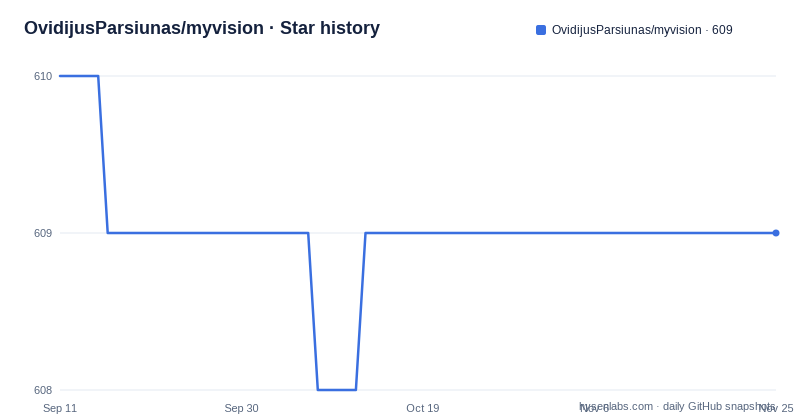
Star history
- OvidijusParsiunas/myvision609 ★ · -1
| Repository | 2026-09-11 | 2026-11-25 |
|---|---|---|
| OvidijusParsiunas/myvision | 610 | 609 |
-1 Stars in the last 75 days, measured from the daily GitHub snapshot. Compare with other projects
Editorial analysis
One HTML file, no server, no account
The first thing the project does is remove the install. The README states that no setup is required to run it: open public/index.html and you are set. There is no backend to deploy and nothing to sign up for, which is what makes the tool usable on a machine that is not allowed to talk to a service.
That decision is what the rest of the design hangs off. Automatic annotation uses the pre-trained COCO-SSD model to generate bounding boxes for your images, and the model runs locally in the browser. The stated consequence is that all data is retained within the privacy of your computer, since the images never leave the machine for a model to annotate them.
The tool is described as free and online, aimed at generating computer vision based machine learning training data, with the design goal of speeding up the labelling process and keeping workflows workable across large datasets.
Boxes for objects, polygons when the edges matter
Two primitives cover most labelling work. Bounding boxes are drawn around objects, which is what object detection datasets expect, and polygons are drawn where the outline of the object is the thing you care about, which is what segmentation datasets expect.
The polygon tool is where the extra work went. It is described as enriched with additional features to edit, remove and add points, which is the difference between a usable polygon tool and an unusable one: a segmentation annotation is wrong the moment one vertex sits half a pixel off, and re-drawing the whole shape to fix one vertex is where labelling sessions die.
The supported dataset formats are presented in the README as a picture rather than as a list of names, so the exact set is something you confirm by loading a project rather than by reading the documentation.
Importing a project is also the conversion path
Existing annotation projects can be imported and worked on further in MyVision, so a dataset labelled elsewhere does not have to be abandoned or redone. That is the entry point for continuing someone else's work.
The same import path doubles as a format converter. Converting a dataset from one format to another is described as the same process, which is the practical reason to care about this feature: format migrations are otherwise a scripting job, and here they are a file you open.
What the documentation does not give you is a list of formats in text form: the supported formats appear as a picture, so confirming that your source format is importable is a quick test with a real file rather than a documentation lookup.
Watch mode builds src into publicDev
Contributing is where the toolchain appears. The documented requirements are Node 10 or newer and NPM 6 or newer, then a normal install and a watch build:
npm install
npm run watch
The rule that trips people up is stated next to it: all changes should be made in the src directory and observed in publicDev. The source and the served directory are different places, so an edit that appears to have no effect is usually an edit in the wrong tree.
Underneath sits webpack 5 with Babel, html-webpack-plugin, copy-webpack-plugin and a cname plugin for domain configuration. Quality is enforced during the build rather than afterwards: eslint-webpack-plugin runs eslint-config-airbnb-base over the code, and fail-on-errors-webpack-plugin stops a build that would otherwise ship with lint problems. jszip handles the project archives that import and export read.
The test script is the placeholder that fails on purpose
package.json contains a test script that does not test anything. It is the default that npm scaffolds for a new project: it echoes an error saying no test is specified and exits with status 1.
That is worth knowing before you wire this into anything, because the honest reading is that there is no automated test suite in the repository, not that the tests are broken or skipped. The checks that do exist are the lint ones that run inside webpack, which catch style and import problems in the code you build, and nothing checks that annotation output is correct.
The build scripts themselves are minimal. There is watch, which is webpack in watch mode, and build, which is webpack. Everything else the project does with quality happens inside the bundler.
Two licence claims, one release, two README languages
There is an inconsistency to resolve before you redistribute anything. The project's recorded licence is GPL-3.0, while the licence field inside package.json says ISC. Those are different obligations, and neither file explains which one governs.
Activity is limited as well. There is exactly one release, 1.0.0, described as the official first release and dated September 15, 2020, and the last push to the master branch was on July 30, 2026. The citation block in the README asks to be cited with a year of 2019, which is the earliest of those dates.
Documentation exists in two languages, English in README.md and Chinese in README.cn.md, and the top-level tree also carries a notes.txt and a readme/ directory, which suggests material kept alongside the rendered pages rather than inside them.
Editorial conclusion
MyVision suits someone who wants to annotate a dataset today without standing up a backend or signing up for a hosted tool, and who is willing to treat the result as a starting point rather than a finished pipeline. It does not suit a team that needs tests, versioning or a maintained release cadence: the test script is the npm placeholder that fails on purpose, the only release dates from September 2020, and the repository was last pushed on July 30, 2026. Before you build on it, resolve the licence question, since the repository is recorded as GPL-3.0 while package.json declares ISC.
Frequently asked questions
Do I need to install MyVision before I can use it?
No. The README says no setup is required, and that opening public/index.html is enough. Node, npm and the webpack watch build are only needed if you want to change the code.
Does MyVision send my images anywhere?
Automatic annotation runs the pre-trained COCO-SSD model locally in your browser, and the README states that operating locally is what retains all data within the privacy of your computer.
Can MyVision convert a dataset from one format to another?
Yes. You can import existing annotation projects and keep working on them in MyVision, and that same import process is the one used to convert a dataset between formats.
What shapes can MyVision draw for annotations?
Bounding boxes and polygons. The polygon tools are enriched with features to edit, remove and add points, rather than only letting you draw a new outline from scratch.
Does MyVision have automated annotation?
It uses the pre-trained COCO-SSD model to generate bounding boxes for your images, which the README offers as a way to skip the hard part of labelling objects by hand.
What licence is MyVision released under?
The recorded project licence is GPL-3.0 while package.json declares ISC, so the two disagree. The only release is 1.0.0 from September 15, 2020, and the last push was on July 30, 2026.
Official sources
Add this badge to your README
If you maintain this project, the badge below links readers to this analysis and shows its maintenance status from the daily GitHub snapshot. Paste the markdown into your README; add ?metric=license or ?metric=stars to the image URL for a different field.

[](https://hysenlabs.com/projects/ovidijusparsiunas-myvision)Star history chart for your README
[](https://hysenlabs.com/projects/ovidijusparsiunas-myvision)Was this useful?