Letos is SQLiteStudio renamed, with a README that stops at download links
A free, open source, multi-platform SQLite database manager.
At a glance
- What is it?
- Letos is a free, open source, multi-platform SQLite database manager written in C++ with the Qt framework and previously named SQLiteStudio. Its README is a short page of download links, so the decisions about what the tool supports, how it is packaged and what it will not do all live somewhere else.
- Who is it for?
- Letos is worth a look if you want a standalone SQLite browser and you are willing to read the wiki to find out what it supports. The rename means the tool you knew as SQLiteStudio is the tool here.
- Can I use it commercially?
- Check first. The repository uses a licence we do not classify automatically, so read its LICENSE file before any commercial use.
- Is it still maintained?
- Yes. The repository received new commits within the last day.
- What is it written in?
- Mainly C, according to GitHub's language statistics.
Answers come from the project's GitHub data, last synced on November 15, 2026, and from our analysis. They are not legal advice.
Star history
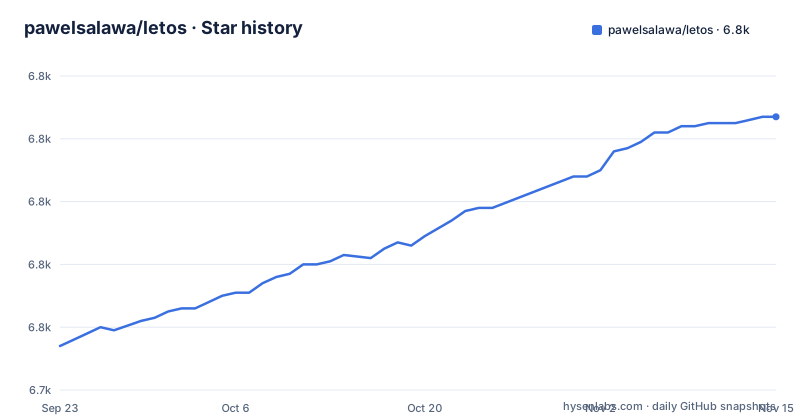
- pawelsalawa/letos6,827 ★ · +73
| Repository | 2026-09-23 | 2026-11-15 |
|---|---|---|
| pawelsalawa/letos | 6.8k | 6.8k |
73 Stars in the last 53 days, measured from the daily GitHub snapshot. Compare with other projects
Editorial analysis
SQLiteStudio renamed so it would not read as the official SQLite tool
The project used to be called SQLiteStudio, and the README gives the reason in one sentence. The name was changed to avoid confusion with the official SQLite project, because Letos is an independent application and is not affiliated with the SQLite authors.
That distinction is not cosmetic. SQLite itself ships a command line shell and the sqlite3 library, and neither is a desktop database browser. Sharing a name with the upstream project made it harder for someone landing on a download page to tell an independent third party tool from the official one, so the rename is the fix for a real problem.
The rename leaves a practical tail. The two names in circulation now describe the same application, so anyone who knows this program as SQLiteStudio should look for the repository at pawelsalawa/letos and will find it. Anyone who only knows the word Letos has a harder time, which is a naming problem the project chose for a defensible reason but did not fully escape.
The README also links the explanation directly: a wiki FAQ entry titled why did the project change name to Letos. The reasoning is treated as settled rather than as something a user should have to infer.
The README stops at download links and leaves the features undocumented
The README is short. It names the project, explains the rename, lists where to download it, links a donation page, and points at the wiki for contributing and for building from sources. There is no screenshot, no feature list, no shortcut table, and no description of how the tool handles anything.
That gap matters for anyone evaluating it. The README does not say which SQLite file formats are supported, whether it can open an encrypted database, how large a file it will open, how it treats WAL files, or which operating systems sit behind the word multi-platform. It does not state whether SQL statements can be edited before running, or what the result grid can do beyond show rows.
It also does not document a command line interface. Everything described is a desktop application you install and launch, so a workflow built on scripting finds no documented entry point here. And there is no statement of what the tool cannot do, which for a database browser matters more than for most programs: reading a file it does not understand is different from refusing to open it.
So the evaluation has to leave the README. The one documentation link it gives for building is the wiki page on compiling from sources. That page is where the real answers are, and the README does not preview what is in it.
Four download channels with the old builds split across two Dropbox folders
Getting Letos is a four way decision, and the README lays out each option.
If your operating system's package manager has a package for Letos, that is the option it puts first, with a link to the repology versions page so you can check whether yours is covered. The README does not say how closely those repackaged builds track upstream releases, so there is no stated lag to plan around and no changelog attached to a package.
The Releases page on GitHub holds the most recent packages, which is the channel to use when you want the version the maintainers actually shipped. Older builds are split across two Dropbox folders. One holds the 3.x.x versions. The other holds the legacy 2.x.x versions together with the Windows development dependencies, and that second folder is the only place the project points you for those.
The result is that no single page contains every version. Choosing one means first deciding which of four locations holds it, and the two oldest locations are file folders rather than anything with version history, release notes or checksums attached. A 2.x.x user and a 4.0.3 user are reading the same README and following completely different paths out of it.
Three listed 4.0.x releases in five weeks, then the branch kept moving
The release history is short and recent. The repository lists 4.0.2 on 2026-08-07, 4.0.3 on 2026-08-12 and 4.0.4 on 2026-10-15.
Every one of those releases is named after its version number plus the word release, so the titles carry no explanation of what changed. That is the real limitation for anyone upgrading across the 4.0 line: the tag tells you a version exists, not what broke or what moved underneath it. The root of the repository does keep a ChangeLog.md, and a release-checklist.md beside it, so the change detail may well be written down in a place the README does not send you.
The default branch is master and the last push landed on 2026-10-21, about a week after the 4.0.4 tag. The branch was therefore still taking commits after that release, which is ordinary for a project that ships from tags rather than from the branch head. The repository is not archived. Whether those commits are fixes or new work is not something the README states.
SignPath signs the Windows build and the official icon set is licensed
The official binaries are not the same set of files as the source, and the README is unusually direct about the two ways that is true.
Windows code signing is free for this project through SignPath.io, with the certificate issued by the SignPath Foundation. That arrangement covers the project's own Windows binaries and nothing beyond them. A binary you compile yourself, or one a distribution packaged for you, carries whatever signature that builder applies, or none at all. If your organisation refuses to run unsigned Windows binaries, this is the deciding detail: the official build is signed, and your rebuild is not the official build no matter how closely it matches.
The second difference is the icon set. The builds published on letos.org contain a proprietary icon set called Icons8, licensed to the project by Icons8. That licence covers Letos. It does not cover you. An installation assembled from the same source with your own artwork is a different distribution of the same program, and the terms attached to the official binary do not travel with the source tree.
Neither point is a reason to stay away from the project. Both are reasons to know which artefact you are actually shipping, because what is in the repository and what you download from letos.org are not the same thing.
C++ with Qt in the README, C in the repository metadata
The README says the manager is written in C++ with use of the Qt framework. The repository's own metadata reports C as the primary language.
Both statements can hold at once and neither is a red flag on its own. A Qt application is C++, and a project that also contains C, whether for its SQLite access, its platform layer or the libraries it links against, can be counted as C dominant. The point worth knowing is that the headline language statistic will not tell you what you are about to build.
The question this raises is what building costs, and the README does not answer it. It links to a wiki page called Compiling application from sources and stops there. It names no compiler version, no Qt version, no build system, no dependency list and no platform matrix.
Building Letos from source is a documented wiki page you have to go and read, not a procedure the README hands you, and the practical cost of a rebuild cannot be estimated from this project's own front page.
InnoSetupScript.iss and crowdin.yml are the build hints the tree gives
The top level of the repository is short enough to read as a map. It holds .gitattributes, .gitignore, AGENTS.md, ChangeLog.md, ISSUE_TEMPLATE.md, InnoSetupScript.iss, LICENSE, README.md, crowdin.yml, release-checklist.md, and four directories: Letos/, Plugins/, scripts/ and .github/.
Four of those entries tell you something about how the project is put together.
InnoSetupScript.iss is an Inno Setup script definition, and its presence at the root is the answer to how the Windows installer gets produced. It also explains how the README can promise official Windows binaries at all.
crowdin.yml points to a Crowdin translation setup.
Plugins/ is the interesting entry for an adopter and also the least explained. The name promises an extension mechanism. The README does not describe a plugin interface, does not explain how to write one, does not list the plugins that ship with the application, and does not say whether they load at runtime or compile in. Anyone planning to extend Letos has to read the directory and then the wiki to learn whether extension is even the shape of this project.
scripts/ is where release automation would live, which pairs with the release-checklist.md at the root. Neither is explained in the README.
Editorial conclusion
Letos is worth a look if you want a standalone SQLite browser and you are willing to read the wiki to find out what it supports. The rename means the tool you knew as SQLiteStudio is the tool here. It is the wrong shape for anyone who needs a stated platform matrix, a documented SQLite version range, or a plugin API, because none of those are in the README and the README is the only page the project writes itself. Before you adopt it, check two things: whether your operating system's package is close enough to the 4.0.4 release, and whether the Windows binary you intend to ship is the SignPath-signed official one, since both the signature and the icon set belong to the letos.org build and not to the source.
Frequently asked questions
What is Letos?
Letos is a free, open source, multi-platform SQLite database manager written in C++ with the Qt framework. It was previously called SQLiteStudio, and the name was changed so the project would not be confused with the official SQLite project, since it is an independent application not affiliated with the SQLite authors.
How do I use Letos?
The README does not give usage steps. Official builds are on letos.org and on the GitHub Releases page, the older 3.x.x and legacy 2.x.x builds sit in Dropbox folders linked from the README, and the wiki page on compiling from sources is where build instructions live.
Where can I download Letos from?
Four places, depending on the version: your operating system's package manager if it has one, with the repology versions page showing coverage; the GitHub Releases page for current packages; a Dropbox folder for the older 3.x.x releases; and a second Dropbox folder for the legacy 2.x.x releases together with the Windows development dependencies.
Official sources
Add this badge to your README
If you maintain this project, the badge below links readers to this analysis and shows its maintenance status from the daily GitHub snapshot. Paste the markdown into your README; add ?metric=license or ?metric=stars to the image URL for a different field.

[](https://hysenlabs.com/projects/pawelsalawa-letos)Star history chart for your README
[](https://hysenlabs.com/projects/pawelsalawa-letos)Was this useful?