No AI Slop is a prompt you install, and half its rule set is not in the README
Removes 20+ patterns of AI slop from any piece of writing. That's the whole thing." | It also enforces the fundamentals that make writing good: Lead with the point when it helps, use active voice, untangle hard-to-follow sentences, and prefer concrete numbers over abstractions.
At a glance
- What is it?
- No AI Slop is an MIT licensed agent skill that rewrites text to strip patterns such as binary contrasts, colon reveals, and weasel attribution. It is installed by pasting a line into ChatGPT, Claude Code, or Codex, and the README names 10 of the 20+ patterns the skill checks. Detection mode deliberately refuses to guess who wrote the text.
- Who is it for?
- Adopt No AI Slop as a second pair of eyes on English prose you have already written, and not as an authorship check or an unattended rewriting step. Anyone publishing in a language other than English gets no documented coverage from this rule set, and anyone letting it near a first draft should read the change list line by line, because the README lists only half the patterns and one of its four fundamentals is qualified with when it helps.
- Can I use it commercially?
- Yes. MIT is a permissive licence: you can use, modify and sell software built on it, as long as you keep its copyright and licence notices.
- Is it still maintained?
- Yes. The repository last received commits 74 days ago.
- What is it written in?
- Mainly Python, according to GitHub's language statistics.
Answers come from the project's GitHub data, last synced on November 14, 2026, and from our analysis. They are not legal advice.
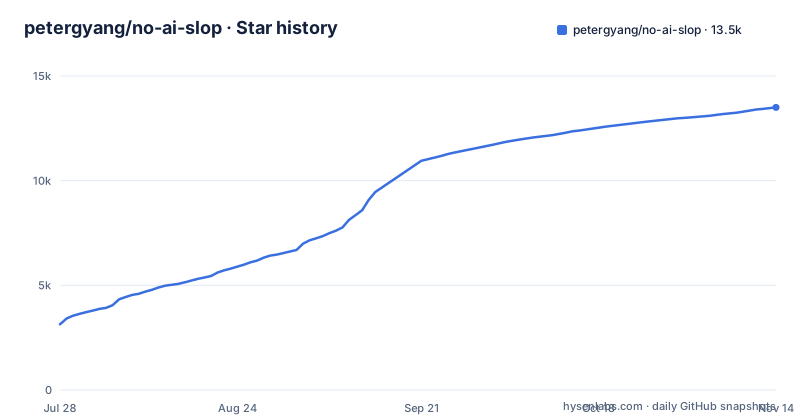
Star history
- petergyang/no-ai-slop13,498 ★ · +10,359
| Repository | 2026-07-28 | 2026-11-14 |
|---|---|---|
| petergyang/no-ai-slop | 3.1k | 13.5k |
10,359 Stars in the last 109 days, measured from the daily GitHub snapshot. Compare with other projects
Editorial analysis
Installation is a pasted prompt or one npx line, and nothing lands in your Python environment
Installation here is a prompt, not a package. The project's own instructions are a line of text to paste into whichever agent you use:
Install the /no-ai-slop skill globally from https://github.com/petergyang/no-ai-slopThe named targets are ChatGPT, Claude Code, Codex, or your favorite coding agent. There is a second route for people who would rather have the CLI fetch it:
npx skills add petergyang/no-ai-slop --skill no-ai-slop --global --yesBoth routes end in the same place, a skill registered with one agent. Neither one installs anything into a Python environment, which matters if you arrived from this repository's primary language, Python, and expected a library you could import. The project names no pip package and no import statement, and the single script it points at, scripts/build_plugin.py, builds and validates the plugin package rather than analysing text.
Scope is the other cost. No project document describes how to keep several agents in sync, and none states which agent versions the skill was written against.
The rules live in SKILL.md and are graded by eval.md
Two Markdown files carry the whole thing. skills/no-ai-slop/SKILL.md holds the editing rules and the workflow, and skills/no-ai-slop/eval.md holds the checks the skill runs on its own work. That pairing is the design worth noticing. The skill is instructed to evaluate the output it just produced, not merely to apply rules and hand back a paragraph.
The packaging around those two files is small and visible. .codex-plugin/plugin.json carries the ChatGPT and Codex plugin metadata, and the project also states that No AI Slop is available as a plugin in ChatGPT, so there is a third distribution path that bypasses both install commands above.
What sits unexplained at the root is as informative as what is explained. PRIVACY.md, TERMS.md, plugin-submission.md, an agents/ directory, and an assets/ directory all appear in the tree, and no project document says what any of them govern. If your plan is to paste unpublished drafts into an agent that rewrites them, those two policy files are the ones to open before the first run, and nothing in the docs summarizes them for you.
Ten patterns are named in public and more than ten are checked
The check list is numbered, which tells you more than the entries do. It runs from binary contrasts ('It's not X. It's Y.') through throat-clearing openers ('Here's the thing,' 'Let me be clear'), faux-insight setups ('What nobody tells you,' 'The part everyone misses'), colon reveals ('The best part: it learns.'), dramatic fragments ('That's it. That's the whole thing.'), superficial analysis ('highlighting the team's commitment to innovation'), importance puffery (lines announcing that something marks a turning point or proves a project's worth), weasel attribution ('experts agree,' 'studies show'), synonym cycling ('The agent handles your email. The assistant drafts replies.'), and fake-profound endings ('The future isn't coming. It's already here.').
Then it states the skill checks for 20+ patterns, including those. More than half the rule set is not shown in the README. That gap has a direct price for anyone reviewing the behaviour: you can predict what happens to a sentence built on 'It's not X. It's Y.', and you cannot predict what happens to a sentence built on a pattern nobody has been shown. Auditing it means opening SKILL.md, and auditing its self-checks means opening eval.md.
Detect mode quotes patterns and refuses to name an author
Detection is the mode most likely to be misread. The command is:
/no-ai-slop is this slop? (your writing)What comes back is every pattern it found, quoted, plus one deliberate refusal: the skill does not guess whether AI wrote the text. The consequence is sharp. You cannot use this as an AI detector, and a team hoping to gate submissions on an authorship verdict will not get one. What you get is closer to a linter that names the constructs it objects to and leaves provenance alone.
The refusal is the defensible part of the design. None of these patterns prove origin, since a human can write 'What nobody tells you' and a careful model can produce flat clean prose, so any authorship claim would be a guess wearing a confidence score. Quoting the pattern keeps the evidence checkable by a reader.
The corollary is that a clean detection result is weak evidence. Zero patterns found means the text avoided this particular list, not that it reads well. Every example the project gives is English, so as documented the rules offer no coverage of another language, and a text in one has no stated pass or fail condition here.
The edit mode also enforces four fundamentals, and one of them is a judgment call
Editing is the default mode, and the command takes a placeholder:
/no-ai-slop (your writing)Three things come back: the slop patterns are removed, your personal voice is preserved, and the skill lists what it changed. That last part matters operationally, because the project names the problem it addresses as AI editing that smooths away the vocabulary, cadence, humor, and imperfections that make writing sound like you. A change list is how you catch that when it happens anyway.
Underneath the patterns sit four fundamentals that are not slop at all: lead with the point when it helps, use active voice, untangle hard-to-follow sentences, and prefer concrete details over abstractions. The qualifier on the first one carries a lot of weight. When it helps is a judgment handed to the model, and it is the kind of judgment that can rearrange an argument rather than tidy a sentence. Set that against the unnamed half of the pattern list, and the result is a rewrite you cannot audit from the change list alone. Read the whole output, not the summary of it.
A third mode generates the patterns on purpose, and travels with the global install
There is a third mode, and it inverts the tool's purpose:
Draft an AI slop post about (topic)The stated framing is satire, generating the most cringe AI slop possible. This is not a detection aid and it is not a template for your own marketing copy. It sits there so you can watch the patterns work from the inside, which is a fair way to learn what a list of ten phrases actually means in a paragraph.
The consequence is structural. The same skill that removes patterns will produce them on request, and nothing in the project separates the satirical mode from the editing mode beyond the wording you type. So the ability to generate the patterns travels with the ability to detect them, into every agent where the global install landed.
One more thing to weigh before treating this as a writing dependency. Near the end of the README sits a promotion for over a dozen other skills and courses on the author's own site, channel, and newsletter. Judge the rule set on SKILL.md and eval.md, not on the pitch.
v1.0.4, v1.0.5, v1.0.6 in five days, and no changelog anywhere
Maintenance is easy to date and hard to track. Three releases landed in five days: v1.0.4 on 2026-07-27, v1.0.5 on 2026-07-31, and v1.0.6 on 2026-08-01. The last push to the default branch was on 2026-09-02, after that burst, and none of the three release names says what changed between them.
No changelog compensates. The repository root holds LICENSE, PRIVACY.md, README.md, and TERMS.md alongside the directories, and no CHANGES file of any kind appears in the tree. There is no upgrade section in the docs either. For a tool whose entire value is a rule set, that is the wrong file to leave out. A rule set that changes silently between v1.0.5 and a later version would alter your output with no signal except the version string, and you would have no way to tell whether a sentence you disliked came from the model or from a rule someone tightened.
Licence is MIT, the least encumbered option available, so there is no question about using the skill in commercial editing work or redistributing the rules. Everything else about the terms is delegated to TERMS.md and PRIVACY.md, which are linked from nowhere in the project's own text. Read those two files, then pin a version.
Editorial conclusion
Adopt No AI Slop as a second pair of eyes on English prose you have already written, and not as an authorship check or an unattended rewriting step. Anyone publishing in a language other than English gets no documented coverage from this rule set, and anyone letting it near a first draft should read the change list line by line, because the README lists only half the patterns and one of its four fundamentals is qualified with when it helps. Before installing globally, open skills/no-ai-slop/SKILL.md to read the patterns the README leaves unnamed, then read PRIVACY.md and TERMS.md, which are linked from nowhere in the project, because you will be pasting unpublished text into an agent.
Frequently asked questions
What does "no AI slop" mean?
The project treats AI slop as clean writing that all sounds the same, and it names the patterns outright: binary contrasts like "It's not X. It's Y.", throat-clearing openers, colon reveals, dramatic fragments, importance puffery, weasel attribution, and synonym cycling. The skill checks for 20+ such patterns and edits them out while preserving your voice.
Is all AI AI slop?
The project does not put it that way. Its stated problem is that even the best models keep producing the same lines, and it draws a line between spotting patterns and judging authorship: in detect mode the skill quotes every slop pattern it found without guessing whether AI wrote the text.
Why is AI being called slop?
Because AI makes it easy to generate clean writing that all sounds the same, which is the problem the project opens with. It adds a second effect: editing with AI can smooth away the vocabulary, cadence, humor, and imperfections that make writing sound like you.
How can I avoid AI slop?
With the skill itself, installed either by pasting the install line into ChatGPT, Claude Code, Codex, or a coding agent, or with npx. Then run /no-ai-slop with your writing to have the patterns removed and the changes listed, or add is this slop? to get every pattern quoted back without a guess about authorship.
Official sources
Add this badge to your README
If you maintain this project, the badge below links readers to this analysis and shows its maintenance status from the daily GitHub snapshot. Paste the markdown into your README; add ?metric=license or ?metric=stars to the image URL for a different field.

[](https://hysenlabs.com/projects/petergyang-no-ai-slop)Star history chart for your README
[](https://hysenlabs.com/projects/petergyang-no-ai-slop)Was this useful?