Rhino hands back every value as a string and keeps its context tooling in a browser console
On-device Speech-to-Intent engine powered by deep learning
At a glance
- What is it?
- Rhino is Picovoice's speech-to-intent engine for narrow, always-listening voice domains, wrapped in thirteen language demos that each need an access key and a context file. Its accuracy numbers live in another repository and its context authoring lives in a hosted console.
- Who is it for?
- Rhino fits a device with one narrow vocabulary, a fixed context file, and a willingness to accept a hosted console as the authoring surface for that file.
- Can I use it commercially?
- Yes. Apache-2.0 is a permissive licence: you can use, modify and sell software built on it, as long as you keep its copyright and licence notices.
- Is it still maintained?
- Yes. The repository received new commits within the last day.
- What is it written in?
- Mainly Python, according to GitHub's language statistics.
Answers come from the project's GitHub data, last synced on November 15, 2026, and from our analysis. They are not legal advice.
Star history
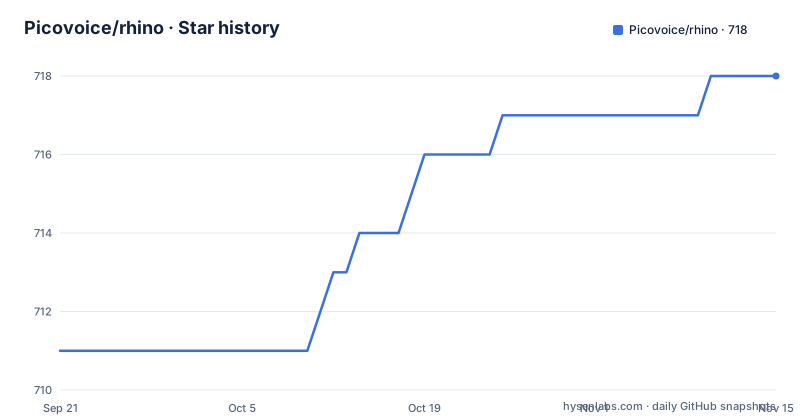
- Picovoice/rhino718 ★ · +7
| Repository | 2026-09-21 | 2026-11-15 |
|---|---|---|
| Picovoice/rhino | 711 | 718 |
7 Stars in the last 55 days, measured from the daily GitHub snapshot. Compare with other projects
Editorial analysis
isUnderstood comes back as the string true, and every slot value is text
The result object at the top of the README is worth reading character by character. Every scalar in it is a string. `isUnderstood` is set to `"true"` with quotation marks around it, `intent` is a string, and inside `slots` the shot count arrives as `numberOfShots` holding `"2"`. Anything written against a schema that expects a boolean or an integer will fail a direct comparison, and the correction lands on whoever writes the binding layer. Three values in this one example are typed as text: the understood flag, the intent name, and the slot payloads. The slot keys themselves come from the context file, so the set of keys under `slots` is whatever the intent author wrote in Picovoice Console, not a fixed contract enforced anywhere in this codebase. The shape of a Rhino response is decided outside the repository that runs it.
The performance section promises a benchmark summary that is not in the text
Under Performance, the README hands the accuracy comparison to a different repository and then stops mid promise. The text says a comparison between the accuracy of Rhino and major cloud-based alternatives is provided at the speech-to-intent-benchmark repository, then states: Below is the summary of the benchmark:. No summary follows. So the one quantitative claim this engine makes is a link outward, and the page carrying the numbers is not part of this tree. What the README asserts locally is qualitative instead: Rhino is described as compact and computationally-efficient, immediately followed by the judgement that it is perfect for IoT, with no size, latency or power figure anywhere in the text. The only hard targets named are processor families, from Arm Cortex-M, STM32 and Arduino through Raspberry Pi, Android, iOS, Chrome, Safari, Firefox and Edge, and Linux, macOS and Windows on x86_64 and arm64.
A context file is the artifact that makes the engine work, and it is authored elsewhere
The context is the whole domain model of a Rhino application, and none of the tooling to build one is in this repository. Custom contexts are made in Picovoice Console in the browser, and every demo section repeats the same requirement: replace `${CONTEXT_PATH}` with either a context file created using Picovoice Console or one within the repository. In practice that means the format is authored in a hosted console, while this tree ships example yaml files that the console produced. The demo commands then take an access key from the command line, so running any sample needs an account before it needs a microphone. There is no build step for contexts in the tree, no compiler to invoke, and no offline authoring path stated. That is worth knowing before you design around Rhino: the file that defines your domain, and therefore the file that defines your accuracy, is the one artifact you cannot keep in version control alongside your code.
Two sibling engines cover the scopes Rhino points away from
The engine names its own limits and hands the neighbouring cases to two other projects from the same vendor. Rhino is the right choice if the domain of voice interactions is specific, and limited. If you want to create voice experiences similar to Alexa or Google, that is the Picovoice platform repository, a different engine for open-ended conversation. If you need to recognize a few static, always listening voice commands, that is Porcupine. Three projects, three scopes, and the difference is in what happens on an unexpected utterance: an open-ended assistant can absorb wording it never saw, while a speech-to-intent engine has nothing to return outside the context it was given. Language reach follows the same shape. Nine languages are listed, English, Chinese (Mandarin), French, German, Italian, Japanese, Korean, Portuguese and Spanish, and anything beyond them is available for commercial customers on a case-by-case basis.
A slot type is a hand written phrase list, and the example ends in an ellipsis
The context syntax has three layers: intents holding expressions, and slot types holding phrases. An intent such as turnLightOff lists the phrasings a user is expected to say. A slot is written inline as `$location:lightLocation`, which means a variable of type `location` should occur in the utterance and its value should be captured under the name `lightLocation`. The type itself is a list of phrases, and the example closes with an ellipsis after living room, which is the honest signal that the vocabulary is enumerated by hand rather than inferred. Count what that costs: every value the engine can return for that slot is a phrase somebody typed into the console. The captured office in the example exists because the word office appears in the expression, not because a model decided it might be a place. The complete expression syntax is not in the repository either, it lives in a cheat sheet hosted on picovoice.ai.
Thirteen demo directories, two clone commands, and an access key in every one
Demos are the widest part of this repository: thirteen directories under `demo/`, one per binding, covering android, c, dotnet, flutter, ios, java, mcu, nodejs, python-train, python, react-native, react and web. Getting them requires submodules, and both clone forms are given:
git clone --recurse-submodules [email protected]:Picovoice/rhino.gitgit clone --recurse-submodules https://github.com/Picovoice/rhino.gitAfter that, every demo takes the same two inputs, an access key and a context path. The Python sample installs the demo package with `sudo pip3 install pvrhinodemo` and then runs `rhino_demo_mic --access_key ${ACCESS_KEY} --context_path ${CONTEXT_PATH}` against a working microphone. The .NET sample lets you choose between an audio file and live input, launched as `dotnet run -c MicDemo.Release -- --access_key ${ACCESS_KEY} --context_path ${CONTEXT_FILE_PATH}`. Both carry the same access key flag, and the clone must include submodules or the sample data will not arrive. One entry in that demo list deserves a second look: python-train sits alongside python, even though the instructions for building a context send you to the hosted console.
The table of contents promises eleven sections the text never reaches
The contents block is longer than the page it indexes. It promises sections for Java, Flutter, React Native, Android, iOS, Web, Node.js and C under SDKs, plus separate entries for Releases and FAQ, and the text stops partway through the .NET demo, mid sentence, in the middle of telling you to replace `${ACCESS_KEY}` with your Picovoice `AccessKey` and `${CONTEXT`. For those platforms you get a contents link and no body. The contents block is also inconsistent with itself, because the anchor `#react-demos` is used twice, once for the React demo listed under Demos and again for React nested under Web. The very top of the file is a row of links with no link text, one pointing at each distribution channel: two Maven artifacts for Android and Java, four npm packages for node, react, react-native and web, then NuGet, CocoaPods, pub.dev and PyPI. Nine distribution channels for one engine, and the last push to master was 2026-10-01, one day after the v4.1 tag of 2026-09-09.
Editorial conclusion
Rhino fits a device with one narrow vocabulary, a fixed context file, and a willingness to accept a hosted console as the authoring surface for that file. Before you adopt it, check three things: whether your language is on the nine language list rather than the case-by-case commercial list, whether the accuracy claim you have seen came from the separate benchmark repository rather than this README, and whether your platform has a demo you can actually build, since the table of contents promises more SDK sections than the text delivers. Budget for the access key in every entry point too.
Frequently asked questions
Does running a Rhino demo require a Picovoice account?
In practice yes, because every demo command takes an --access_key argument and the instructions tell you to replace ${ACCESS_KEY} with your Picovoice AccessKey. The demos also expect a --context_path pointing at a context file from Picovoice Console or at one in the repository.
How do I create a custom Rhino context?
In Picovoice Console, the hosted console the instructions link to. This repository ships example yaml context files but no local tool for building or compiling one, so the authoritative definition of your domain stays outside version control here.
Which languages does Rhino recognize?
Nine are listed: English, Chinese (Mandarin), French, German, Italian, Japanese, Korean, Portuguese and Spanish. Additional languages are available for commercial customers on a case-by-case basis.
Should I use Rhino, Porcupine, or the Picovoice platform?
Rhino is for a specific, limited domain of voice interactions. Recognizing a few static, always listening commands is Porcupine, and open-ended experiences similar to Alexa or Google belong to the Picovoice platform.
Where are Rhino's accuracy numbers compared with cloud alternatives?
In the separate speech-to-intent-benchmark repository linked from the performance section. The README says a summary of the benchmark follows and includes no summary, so no accuracy figure appears in the file itself.
Official sources
Add this badge to your README
If you maintain this project, the badge below links readers to this analysis and shows its maintenance status from the daily GitHub snapshot. Paste the markdown into your README; add ?metric=license or ?metric=stars to the image URL for a different field.

[](https://hysenlabs.com/projects/picovoice-rhino)Star history chart for your README
[](https://hysenlabs.com/projects/picovoice-rhino)Was this useful?