YouDub WebUI: self-hosted AI video dubbing from YouTube and Bilibili
Open-source AI video localization and dubbing tool for YouTube/Bilibili: speech recognition, subtitle translation, voice cloning, audio mixing and rendering.
At a glance
- What is it?
- YouDub WebUI chains Whisper-style recognition, LLM subtitle translation, Demucs stem separation, VoxCPM voice cloning and FFmpeg rendering into one local pipeline. It now ships as YouDub Desktop, an Electron app with a node-based workflow.
- Who is it for?
- Adopt YouDub WebUI if you publish English YouTube content and want Chinese dubbing without uploading media to a third party, and you are willing to run a desktop app that needs FFmpeg with libass/subtitles support (and Node.js ^22.19.0 || >=24.0.0 if you build from source). Do not adopt it if you need a managed service, or if you need languages beyond English, Chinese and Japanese.
- Can I use it commercially?
- Yes. Apache-2.0 is a permissive licence: you can use, modify and sell software built on it, as long as you keep its copyright and licence notices.
- Is it still maintained?
- Yes. The repository last received commits 2 days ago.
- What is it written in?
- Mainly Python, according to GitHub's language statistics.
Answers come from the project's GitHub data, last synced on November 15, 2026, and from our analysis. They are not legal advice.
Star history
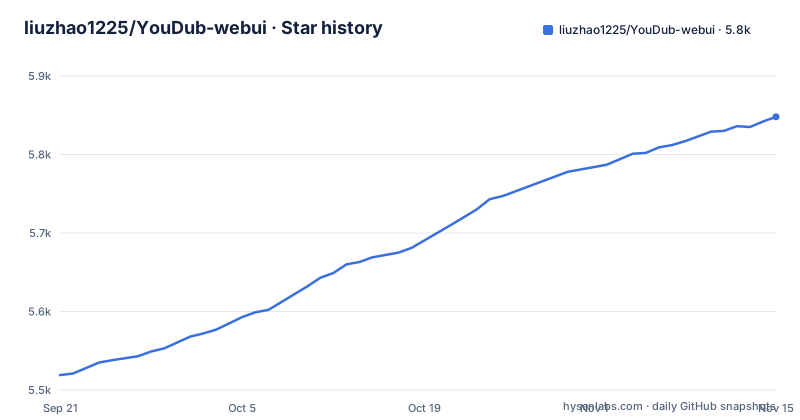
- liuzhao1225/YouDub-webui5,848 ★ · +329
| Repository | 2026-09-21 | 2026-11-15 |
|---|---|---|
| liuzhao1225/YouDub-webui | 5.5k | 5.8k |
329 Stars in the last 55 days, measured from the daily GitHub snapshot. Compare with other projects
Editorial analysis
What YouDub WebUI actually localizes, and for whom
YouDub WebUI turns a single video into a target-language version. You import a YouTube link, a Bilibili link, or a local file; the tool transcribes the speech, translates the subtitles, and then renders one of three outputs: a hard-subtitled video that keeps the original audio, a dubbed video with no hard subtitles, or a video with both hard subtitles and dubbing. In dubbing mode it also separates vocals from background audio, generates the dubbed speech, and mixes the two back together. Finished tasks can be played and downloaded from the task library.
The current language catalogue covers English, Chinese and Japanese, and the README says actual capability depends on the provider; optional Qwen alignment supports English and Chinese.
The pipeline: yt-dlp, FunASR, an LLM translator, Demucs and VoxCPM
The data flow follows the task stages. Link downloads use yt-dlp, Node.js and FFmpeg, and .env.example has an optional HTTP_PROXY. Speech recognition uses Whisper, with NLTK Punkt used to rebuild full English sentences from word-level timestamps. Translation goes through the Harness model service: the URL and key are configured in Settings and stored in the system keyring, and .env.example sets YOUDUB_TRANSLATION_MODELS=gpt-4.1-mini.
Dubbing splits into two tracks. Demucs, pulled in as a git submodule rather than a plain dependency, separates vocals from background music and effects. Speech synthesis uses VoxCPM (requirements.txt pulls in a voxcpm group), cloning each sentence from the audio of its matching source sentence, and FFmpeg processes the audio and video streams.
The application is an Electron product under apps/harness built on Cordis plugins, with Python workers under backend/workers. The root package.json defines the run scripts: start and dev launch the desktop app, dev:web runs npm --prefix apps/harness start, and test:backend runs node scripts/test-backend.mjs. The HTTP interface is /api/v2; the old FastAPI / v1 entry point has been removed.
Installing YouDub WebUI and running a first dubbing job
The README offers a Windows EXE installer and a macOS DMG; to run from source you need Node.js ^22.19.0 || >=24.0.0, npm, Git and platform build tools, and you initialise submodules on first checkout because Demucs is vendored that way:
git clone https://github.com/liuzhao1225/YouDub-webui.git
cd YouDub-webui
git submodule update --init --recursive
Install the dependencies and build from the repository root. The README uses the npmmirror registry:
npm ci --registry=https://registry.npmmirror.com
npm --prefix apps/web ci --registry=https://registry.npmmirror.com
npm --prefix apps/harness ci --registry=https://registry.npmmirror.com
npm run build:framework
npm run build:youdub
npm start
The repository ships .env.example; per its comments no access password is required, and on Windows FFMPEG_PATH must point at a shared/full-shared FFmpeg with av*.dll beside ffmpeg.exe. On first launch you choose the interface language and data directory, prepare runtime resources and configure a translation model; models and inference dependencies are prepared per workflow. Then import a video in the workbench, choose a workflow, create the task and follow it in the task library.
Where YouDub WebUI breaks: FFmpeg builds, CUDA, and Japanese
The FFmpeg build matters: .env.example says FFmpeg needs libass/subtitles support and that Windows requires a shared/full-shared FFmpeg with av*.dll beside ffmpeg.exe.
Device selection now belongs to workflow configuration, and the repository includes requirements-pytorch-cu128.txt for CUDA PyTorch.
The third limit is scope: the README says GitHub/npm remote plugin installation has not been accepted yet, there is no online plugin market, and hot reload, loops and distributed workers are deferred. Every translation depends on the model provider you configure. For failed jobs, the task manager supports cancel, retry and regeneration, and /api/v2 can regenerate a task from a given step.
How YouDub WebUI differs from KrillinAI and Linly Dubbing
KrillinAI and Linly Dubbing are not mentioned in the repository, so this section only describes YouDub's own architecture. YouDub is an Electron desktop application assembled from Cordis plugins, with Python media processing behind it; .env.example says no access password is required.
The voice stack is the sharper difference. YouDub uses VoxCPM for synthesis and Demucs for stem separation, so the dub can keep the separated background audio, and each translated sentence is cloned from its matching source sentence. Tools that do not separate stems before synthesis tend to flatten the mix. The trade-off is dependency weight: Demucs arrives as a submodule you must initialize, and requirements.txt pulls in base, media, download, whisper, voxcpm, demucs and qwen_forced_aligner groups.
YouDub also pins its scope: the language catalogue contains English, Chinese and Japanese, with capability depending on the provider.
Maintenance, licence and upgrade cost
The last push to the default branch was on 2026-10-30, which is recent enough that the repository is not stale. It is not archived. Releases are versioned: the latest is v0.0.11 from 2026-10-30, following v0.0.10 and v0.0.9, and the README points to docs/upgrade.md for installation and upgrades.
The Apache-2.0 licence applies to the repository and is declared in both LICENSE and package.json. That covers the code YouDub ships. It does not automatically cover the models the pipeline downloads: the Whisper, VoxCPM and Demucs models come from their own projects under their own terms; the repository includes a THIRD_PARTY_NOTICES.md file. If you plan to publish dubbed video commercially, check each model's licence separately. This is not legal advice.
Operational cost is mostly local. Model paths default to the models directory beneath the application data root, which you choose on first launch (YOUDUB_DESKTOP_DATA_DIR can override it). Because translation is metered by your OpenAI-compatible provider, the recurring cost that scales with volume is the LLM calls, not the local compute.
Editorial conclusion
Adopt YouDub WebUI if you publish English YouTube content and want Chinese dubbing without uploading media to a third party, and you are willing to run a desktop app that needs FFmpeg with libass/subtitles support (and Node.js ^22.19.0 || >=24.0.0 if you build from source). Do not adopt it if you need a managed service, or if you need languages beyond English, Chinese and Japanese. Verify three things before committing: that your FFmpeg build is shared/full-shared with av*.dll present, that the runtime resources for your chosen workflow are prepared, and that your configured translation provider returns usable translated subtitles for your target language.
Frequently asked questions
What is YouDub WebUI?
It is an open-source video localization and dubbing tool that converts a YouTube, Bilibili or local video into a target-language version through speech recognition, subtitle translation, voice cloning, audio mixing and rendering. It runs as an Electron desktop application, YouDub Desktop, with its own Python environment.
How do I install YouDub WebUI?
Download the Windows EXE installer or macOS DMG from the latest release. To run from source, use Node.js ^22.19.0 || >=24.0.0, initialise submodules, run npm ci in the root, apps/web and apps/harness, then npm run build:framework, npm run build:youdub and npm start.
Does YouDub WebUI need a GPU?
The README does not state a GPU requirement. Device selection belongs to workflow configuration, and the repository includes requirements-pytorch-cu128.txt for CUDA PyTorch.
Does YouDub WebUI need an access password?
No. .env.example states that no access password is required; it only keeps browser session settings such as YOUDUB_AUTH_SESSION_TTL_SECONDS.
Official sources
Add this badge to your README
If you maintain this project, the badge below links readers to this analysis and shows its maintenance status from the daily GitHub snapshot. Paste the markdown into your README; add ?metric=license or ?metric=stars to the image URL for a different field.

[](https://hysenlabs.com/projects/liuzhao1225-youdub-webui)Star history chart for your README
[](https://hysenlabs.com/projects/liuzhao1225-youdub-webui)Was this useful?