Porcupine: on-device wake word detection, and what the access key gates
On-device wake word detection powered by deep learning
At a glance
- What is it?
- Porcupine is a wake word engine rather than a speech recogniser: it detects a small set of fixed keywords on device across microcontrollers, phones and browsers. Every demo needs an access key from Picovoice Console, and the accuracy claim is measured against PocketSphinx and Snowboy on a Raspberry Pi 3.
- Who is it for?
- Porcupine fits a product that needs a low-power trigger phrase on a device with no round trip to a server, on hardware from an STM32 to a desktop browser. It does not fit a project that wants to understand free-form commands, where the project itself points you at the Rhino speech-to-intent engine or the Picovoice platform.
- Can I use it commercially?
- Yes. Apache-2.0 is a permissive licence: you can use, modify and sell software built on it, as long as you keep its copyright and licence notices.
- Is it still maintained?
- Yes. The repository last received commits 3 days ago.
- What is it written in?
- Mainly Python, according to GitHub's language statistics.
Answers come from the project's GitHub data, last synced on November 15, 2026, and from our analysis. They are not legal advice.
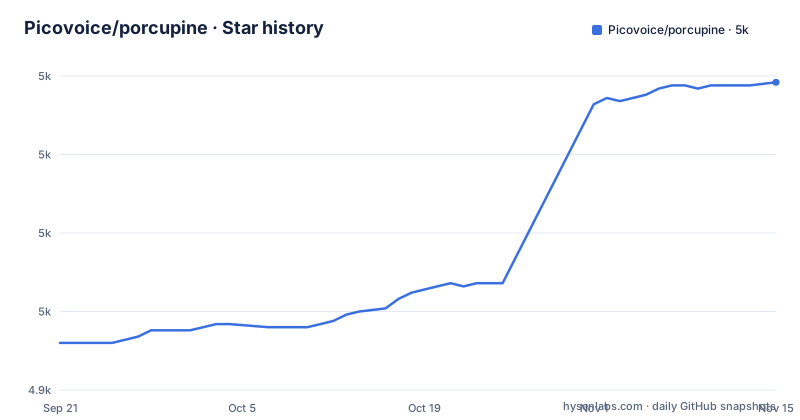
Star history
- Picovoice/porcupine5,023 ★ · +83
| Repository | 2026-09-21 | 2026-11-15 |
|---|---|---|
| Picovoice/porcupine | 4.9k | 5k |
83 Stars in the last 55 days, measured from the daily GitHub snapshot. Compare with other projects
Editorial analysis
A keyword detector, not a recogniser, and the project says which one you want
The first decision Porcupine forces on you is whether a keyword is the right abstraction. It is a wake word engine for always-listening applications: it detects a small number of static voice commands and nothing else. The README is explicit about the boundary and names what to use instead in two cases. If you want an experience like Alexa or Google, with a full voice assistant behind it, the answer is the Picovoice platform. If you need to understand complex, naturally spoken commands inside a specific domain, the answer is the Rhino Speech-to-Intent engine. That framing matters more than the feature list, because a reader who arrives expecting dictation will find a model tuned to fire on a phrase and stay silent otherwise. What you get instead of a recogniser is a set of characteristics that only make sense under that constraint: deep neural networks trained in real-world environments, a footprint compact enough for IoT, and a design where adding more keywords to detect costs no additional runtime. Multiple always-listening commands in one binary, with the same memory and compute as one, is the specific claim that separates this from a general speech stack. The engine runs from a microcontroller upward, which is why the platform list spans Arm Cortex-M, STM32 and Arduino on one end and desktop browsers on the other.
Every demo command passes an AccessKey, and Console is also where you train keywords
There is no anonymous path through this repository. Each demo takes an AccessKey, and the Python demo takes it as a command-line flag:
porcupine_demo_mic --access_key ${ACCESS_KEY} --keywords porcupineThe demo package itself comes from PyPI as a separate install step:
sudo pip3 install pvporcupinedemoThe same pattern repeats across the other bindings, with the flag spelling changing but the requirement not: the .NET demo passes `--access_key ${ACCESS_KEY} \` followed by `--keywords porcupine`, and the Java demo passes `-a ${ACCESS_KEY} -k porcupine` to `java -jar porcupine-mic-demo.jar`. In Flutter the key is not a flag at all but a literal you edit into source, replacing `final String accessKey = "{YOUR_ACCESS_KEY_HERE}"` in `lib/main.dart`. That single fact shapes how you evaluate the project. An access key ties an evaluation to an account. The same service is where custom wake word models are trained, so self-service training and key management are one account rather than two separate things. For a reader evaluating an offline or embedded product, the honest question is not whether the detection is on device, which it is, but what happens to your device when the key is absent, expired, or subject to a quota.
The accuracy number comes from a benchmark against two older engines
The performance claim is a comparison, and the comparison has a shape worth knowing before you quote it. Accuracy and runtime for Porcupine, PocketSphinx and Snowboy are measured in a separate repository, the wakeword-benchmark. The stated result: compared to the better performing of those two engines, Porcupine is 11.0 times more accurate and 6.5 times faster, measured on a Raspberry Pi 3. Three details are baked into that sentence and easy to drop when it gets repeated. First, the baseline is whichever of the two performs best, so the ratio is against the stronger competitor rather than an average. Second, both ratios come from one machine, a Raspberry Pi 3, which is a low power ARM board and a reasonable proxy for embedded work but not a laptop or a phone. Third, the two libraries it is measured against are named in the project description rather than dismissed: PocketSphinx and Snowboy are described as widely used. The README's performance section does not explain what the benchmark harness does about false accepts, wake-up rates, or the audio conditions, and the numbers here are a claim to verify in the benchmark repository rather than a measurement you can take from these pages. If your product depends on a false accept rate, that gap matters more than the speed multiplier.
Nine languages, and the tenth one is a sales conversation
Language support is a fixed list rather than a range: English, Chinese (Mandarin), French, German, Italian, Japanese, Korean, Portuguese and Spanish. That is nine. Beyond them, the README says support for additional languages is available for commercial customers on a case-by-case basis. The consequence for planning is straightforward but worth stating plainly, because it changes who you talk to at the start rather than at the end. If your product launches in a language from that list, keyword training is a self-service path through Picovoice Console and you can proceed. If it does not, the language question becomes a commercial negotiation before you have a prototype, and the shape of the deliverable is not specified in this repository. Note also what the list does not say: it does not distinguish which languages have custom keyword models available for training versus which ship with built-in keywords, and it does not give per-language accuracy figures, which is where language mismatch usually shows up in a wake word system. Keyword phonetics differ enough across languages that a 6.5 times faster engine on a Raspberry Pi 3 says nothing about recognition quality in your language. That number is a hardware and efficiency result; the per-language detection quality has to come from your own testing with your own keyword, on your own microphone, in your own acoustic environment.
Fourteen demo directories and one repository layout behind them
The repository is mostly demos, and the directory listing says more about the scope than the feature bullets do. Under `demo/` sit android, c, dotnet, dotnet-vui, flutter, ios, java, mcu, nodejs, python, react, react-native, tkinter and web. Alongside them at the top level sit `binding/`, `include/`, `lib/`, `resources/`, `script/` and `Package.swift`, plus `.clang-format`, `.gitattributes` and a `.gitmodules` file, which is why the documented clone command needs the submodule flag:
git clone --recurse-submodules https://github.com/Picovoice/porcupine.gitThe distribution story is equally broad, with badges linking a Maven artifact for Android and one for Java, npm packages for node, react, react-native and web, a NuGet package, a CocoaPods pod for iOS, a Flutter package on pub.dev, and `pvporcupine` on PyPI. That breadth is real and it is also the maintenance cost: a change to the keyword file format or the runtime interface has to land in a C core, a Swift package, a Maven artifact, four npm packages, a NuGet package, a CocoaPod, a pub.dev package and a PyPI package before a user on any platform sees it. The C and microcontroller demos under `demo/c` and `demo/mcu` are the clearest statement of what this engine is actually for, and the `tkinter` and `dotnet-vui` demos are the clearest statement of the range it has to serve. A reader choosing a binding should look at how that binding's demo handles the access key and the keyword argument, because that is where the SDKs differ most.
Release history: v2.2 in 2023, v3.0 later that year, v4.0 in December 2025
The tags show a project with long gaps between major versions. v2.2 landed on 2023-04-13, v3.0 on 2023-10-26, and v4.0 on 2025-12-11, which is more than two years after the version before it. The default branch is `master`, not archived, and the last push was on 2026-11-02, so work is landing after v4.0 even though no new tag has been cut. For an engineer pinning a version, that gap is the fact to plan around. A two-year span between major tags means the v3.0 to v4.0 jump covers a long accumulation of changes, and there is no tag history to bisect within. It also means the accuracy and speed figures quoted throughout this repository, are not tied to a specific release in the text you can read here. Verify the tag you intend to pin and read its own notes rather than assuming the current default branch matches it. The maintenance picture overall is a commercial one: Picovoice is a company in Vancouver shipping this as a product with a hosted console for training and keys, not a volunteer project, so the question of whether a given bug gets fixed is a question about a vendor's priorities rather than about contributor activity.
Editorial conclusion
Porcupine fits a product that needs a low-power trigger phrase on a device with no round trip to a server, on hardware from an STM32 to a desktop browser. It does not fit a project that wants to understand free-form commands, where the project itself points you at the Rhino speech-to-intent engine or the Picovoice platform. Before committing, check three things: whether your language is one of the nine listed or needs the commercial case-by-case path, whether the AccessKey model in Picovoice Console fits your deployment, and whether the accuracy comparison against PocketSphinx and Snowboy on a Raspberry Pi 3 tells you anything about your own hardware. Verify the release you pin, because v4.0 shipped on 2025-12-11 and the default branch has moved since.
Frequently asked questions
How do I run the Porcupine Python demo?
Clone the repository with submodules, install the demo package with `sudo pip3 install pvporcupinedemo`, connect a working microphone, then run `porcupine_demo_mic --access_key ${ACCESS_KEY} --keywords porcupine`. The engine processes microphone audio in realtime and prints to the terminal when it hears the keyword.
Which languages does Porcupine support for wake words?
English, Chinese (Mandarin), French, German, Italian, Japanese, Korean, Portuguese and Spanish. Support for additional languages is available for commercial customers on a case-by-case basis.
How does Porcupine compare to PocketSphinx and Snowboy?
The README points to a separate wakeword-benchmark repository for accuracy and runtime metrics. Against the better performing of those two engines, Porcupine is stated to be 11.0 times more accurate and 6.5 times faster, measured on a Raspberry Pi 3.
What platforms can Porcupine run on?
Arm Cortex-M, STM32 and Arduino; Raspberry Pi Zero, 3, 4 and 5; Android and iOS; Chrome, Safari, Firefox and Edge; and desktop Linux on x86_64, macOS on x86_64 and arm64, and Windows on x86_64 and arm64.
Does Porcupine handle free-form voice commands?
No. Porcupine detects a small number of static, always-listening keywords. For complex, naturally spoken commands in a domain the project points at the Rhino Speech-to-Intent engine, and for a full assistant experience it points at the Picovoice platform.
Can I train a custom wake word for Porcupine myself?
Yes, through the self-service path in Picovoice Console, which is also where the AccessKey used by every demo comes from.
Official sources
Add this badge to your README
If you maintain this project, the badge below links readers to this analysis and shows its maintenance status from the daily GitHub snapshot. Paste the markdown into your README; add ?metric=license or ?metric=stars to the image URL for a different field.

[](https://hysenlabs.com/projects/picovoice-porcupine)Star history chart for your README
[](https://hysenlabs.com/projects/picovoice-porcupine)Was this useful?