autoflow: two compose services run the same image, and the environment template defaults to production
pingcap/autoflow is a Graph RAG based and conversational knowledge base tool built with TiDB Serverless Vector Storage. Demo: https://tidb.ai
At a glance
- What is it?
- A conversational knowledge base built as a graph retrieval system over TiDB Vector, LlamaIndex and DSPy, shipped as a set of Docker images with an embeddable search widget. The feature list has two entries, the deployment description has one, and the compose file and environment template describe considerably more than that, including a duplicated backend and a production mode setting.
- Who is it for?
- autoflow is worth reading if you want a graph retrieval system on TiDB with the embeddable widget already solved, since the widget and the crawler are the parts the project has actually built, and a hosted demo is linked for anyone who would rather look before installing. Three things to check first.
- Can I use it commercially?
- Yes. Apache-2.0 is a permissive licence: you can use, modify and sell software built on it, as long as you keep its copyright and licence notices.
- Is it still maintained?
- Yes. The repository last received commits 7 days ago.
- What is it written in?
- Mainly TypeScript, according to GitHub's language statistics.
Answers come from the project's GitHub data, last synced on November 15, 2026, and from our analysis. They are not legal advice.
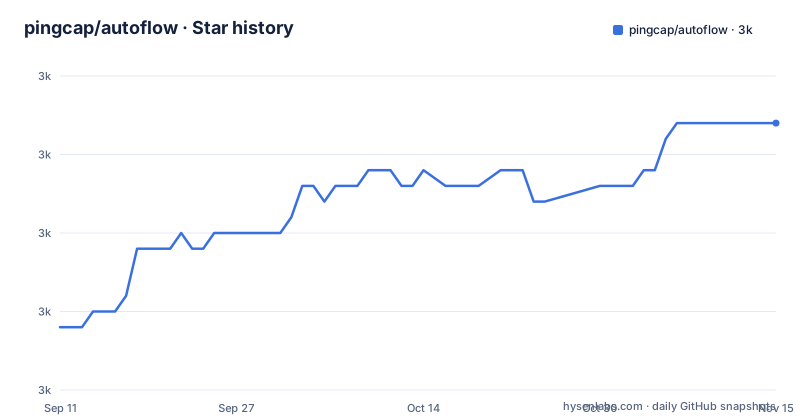
Star history
- pingcap/autoflow2,982 ★ · +13
| Repository | 2026-09-11 | 2026-11-15 |
|---|---|---|
| pingcap/autoflow | 3k | 3k |
13 Stars in the last 65 days, measured from the daily GitHub snapshot. Compare with other projects
Editorial analysis
The stated plan is to replace the Node stack with a Python package
The warning at the top of the file says the project is still in the early stages of development, that the team is actively working on it, and that the next move is to make it a Python package and a retrieval-augmented generation solution, with an install command of the form `pip install autoflow-ai` given as the intended shape. That is worth noting against what is actually in the repository today, which is a TypeScript codebase with a Next.js frontend, a backend service and a separate core directory, deployed as container images. The environment template already carries one piece of Python in it, since the command offered for generating the application secret is a `python3` one-liner. Releases tell the same story of a pause: 0.4.0 from January 2025, its release candidate three days earlier, and the version before that in December 2024, while the last push is dated 2026-04-27.
Two of the four services run the same backend image
The compose file defines four services and three distinct images, because one image appears twice. The backend service uses one tag of the backend image, and a second service uses the identical image with a different command:
  background:
    image: tidbai/backend:0.4.0
    restart: always
That second service runs a supervisor process instead of the application server, publishes a different host port, and mounts the same data directory and the same environment file as the primary backend. So the two containers share state on disk and configuration from one env file, and anything either of them writes to the shared volume is visible to the other. The frontend is a separate image that talks to the backend by service name, and a Redis service provides shared state with its data persisted into a directory beside the compose file.
Redis is pinned to an old release while the rest float
Version pinning across the file is inconsistent in a way that matters for a deployment you intend to keep. The backend and frontend images are both tagged 0.4.0, matching the last release, and the embedding and reranking image carries a tag with a cache marker in it. The cache service is pinned to a specific patch of an old major line, with the log level lowered to warning so it stays quiet and a named directory mounted for persistence. Everything else about the stack is application code you would rebuild, while the cache is the one component that will refuse to pick up security fixes without someone editing the compose file. The log rotation is configured consistently across the services, capping each file at 50 megabytes and keeping six.
The embedder is preloaded and the reranker is not
The embedding and reranking service is configured with one model flag on and the other off. Preloading the default embedding model is set to true, and preloading the default reranker model is set to false, with a comment explaining that you can change the second one. That asymmetry is the first thing a new deployment will feel: the embedding path is ready at startup and the reranking path is not, so the first query that needs a reranker pays for the load. The service also runs with library-level offline mode switched on, which means it will not fetch models over the network at runtime and must already contain them, which is what the cached image tag is for. A HuggingFace cache mount and a GPU reservation block are both present but commented out, so hardware acceleration needs two edits before it works.
The environment template starts in production mode with an empty secret
The example environment file opens with the environment set to production rather than development, which is an unusual default for a file whose main purpose is to be copied. The application secret on the next line is empty, with a comment above it giving a command to generate one and a note that the key matters, must not be shared, and must be at least 32 characters long. A deployment that copies the template and fills in only the database fields runs in production mode with no secret set, and the file does not say what the application does in that state. The database block points at a placeholder host in a production cloud domain with secure transport enabled, and the error reporting destination is left commented so it stays off unless you supply one.
The widget feature stays switched off until you set its origins
The second feature in the list is an embeddable JavaScript snippet: you copy it into your own site, it usually sits in the bottom right corner, and it answers product-related queries through the same conversational search. Turning that on is not automatic. The environment template has a commented line for the allowed origins, with a note that you need to set it if you want to use the widgets and that it exists to enable cross-origin access. Left as shipped, the origins list is unset, so the browser will refuse the requests the feature depends on. That makes the widget the one part of the project with a genuine deployment step beyond starting containers, and the step is documented only in a comment inside a template file.
Two documented features, one documented deployment, three compose files
The feature list has two entries. The first is a conversational search page in the style of Perplexity, backed by a crawler that navigates official and documentation sites by scraping sitemap URLs rather than searching the open web, so the coverage is bounded by what those sites publish in their sitemaps. The second is the embeddable snippet described above. The deployment section, by contrast, offers one route, a Docker Compose deployment with a stated floor of four CPU cores and 8 gigabytes of memory, and the detail lives on a separate documentation site. The repository carries three compose files, one default, one for development and one for use in China, plus a core directory beside the backend, an end to end test directory and a docs directory, so the shipped surface is considerably wider than the two features would suggest.
Editorial conclusion
autoflow is worth reading if you want a graph retrieval system on TiDB with the embeddable widget already solved, since the widget and the crawler are the parts the project has actually built, and a hosted demo is linked for anyone who would rather look before installing. Three things to check first. The project says outright that it is early and that the next step is to become a Python package, so the Node-based deployment you find today may not be the shape it takes later. The compose file runs the same backend image in two services against one data volume, so a failure in one is a failure in both. And the environment template ships in production mode with an empty secret, so generating that key is a required step rather than a nicety.
Frequently asked questions
what is autoflow software
An open source graph-based retrieval augmented generation knowledge base tool, written in TypeScript and built on TiDB Vector for storage with LlamaIndex as the retrieval framework and DSPy for programming foundation models. It is licensed under Apache 2.0 and a hosted demo is linked from the repository.
What is the purpose of autoflow?
To put a conversational knowledge base in front of your own documentation and product pages. It ships two features: a Perplexity-style conversational search page backed by a crawler that reads sitemaps of official and documentation sites, and an embeddable JavaScript snippet you can drop into your own site.
how to use autoflow
The documented route is Docker Compose, with a stated requirement of 4 CPU cores and 8GB of RAM. Fill in the example environment file, including the application secret of at least 32 characters and the database credentials, and set the allowed origins if you want the embeddable widget to work. The file also says the next planned step is a Python package.
Is autoflow free to use?
The code is open source under the Apache License, Version 2.0, with the licence text in the repository. The file says nothing about what running the hosted service or the backing database costs, so only the code terms are stated.
Official sources
Add this badge to your README
If you maintain this project, the badge below links readers to this analysis and shows its maintenance status from the daily GitHub snapshot. Paste the markdown into your README; add ?metric=license or ?metric=stars to the image URL for a different field.

[](https://hysenlabs.com/projects/pingcap-autoflow)Star history chart for your README
[](https://hysenlabs.com/projects/pingcap-autoflow)Was this useful?