MCExtractor: reading Intel, AMD, VIA and Freescale microcode
Intel, AMD, VIA & Freescale Microcode Extraction Tool
At a glance
- What is it?
- MCExtractor is a Python tool that parses processor microcode binaries, checks their integrity, tells you whether a microcode is outdated against a bundled database, and can convert Intel containers into images for BIOS integration. It is a research and maintenance tool that ships as one script plus one database file.
- Who is it for?
- MCExtractor fits a firmware researcher, a BIOS engineer integrating Intel microcode containers, or a support technician who needs to say whether a CPU is running the latest microcode without opening a hex editor. It does not fit a production deployment workflow on its own, because it reports and converts rather than delivering updates, and it does not fit a team that needs the tool to work on a machine with no Python.
- Can I use it commercially?
- Yes. BSD-2-Clause-Patent is a permissive licence: you can use, modify and sell software built on it, as long as you keep its copyright and licence notices.
- Is it still maintained?
- Yes. The repository last received commits 65 days ago.
- What is it written in?
- Mainly Python, according to GitHub's language statistics.
Answers come from the project's GitHub data, last synced on November 7, 2026, and from our analysis. They are not legal advice.
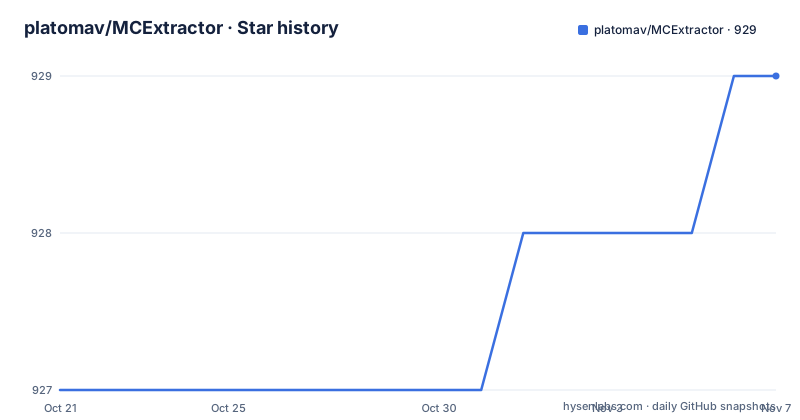
Star history
- platomav/MCExtractor929 ★ · +2
| Repository | 2026-10-21 | 2026-11-07 |
|---|---|---|
| platomav/MCExtractor | 927 | 929 |
2 Stars in the last 17 days, measured from the daily GitHub snapshot. Compare with other projects
Editorial analysis
A parser for microcode binaries, not a firmware updater
MCExtractor reads the microcode blobs that CPUs run at boot. The README describes it as a tool which parses Intel, AMD, VIA and Freescale processor microcode binaries, usable by end users who want all the relevant microcode information, listing CPUID, Platform, Version, Date, Release, Size and Checksum among the fields it surfaces. It supports all current and legacy microcodes from 1995 onward, scans for microcodes from all four vendors in a single run, verifies integrity through checksums, and checks whether Intel, AMD and VIA microcodes are latest or outdated. It can also convert Intel microcode containers in dat, inc, h and txt format into binary images for BIOS integration, detect new or unknown microcodes, and check microcode health. What it is not is a flashing tool. There is no update mechanism, no verification against a signing root, and no way to push a new microcode onto a running CPU; it tells you what a blob is and whether it is current, and it hands you the converted binary for someone else to integrate into a BIOS image.
MCE.db is a separate artefact you have to keep current
The repository has five files at the top level: MCE.py, MCE.db, README.md, Changelog.txt and LICENSE. That single-script-plus-database layout is the whole application. The README is explicit that MCE.db is required for the program to run, and that it includes entries for all microcode binaries available to the maintainer. Its stated purpose is twofold: checking whether an imported microcode is up to date, and helping find new microcode releases sooner. The upstream repository, the Intel, AMD, VIA and Freescale CPU Microcode Repositories, is a collection of every latest production microcode found, and the README describes it as very important because it lets the work continue, new types of microcode be found, releases compared for similarities, and updated binaries checked. The database is therefore a moving target that is updated on its own cadence, and the release list shows that clearly: r352 updated the database on 2026-09-03, with r350 on 2026-06-02 and the application release v1.104.0-r351 between them. A tool copy without a current MCE.db will still parse microcode, but its outdated and latest judgements will be based on stale knowledge.
Two ways in, and the file drop limit is an operating system constraint
The README describes two usage modes. The first is the MCE script, where you select one or several firmware files and either input their paths or drag and drop them onto the script, then view them one by one or recursively scan entire directories. The second is manual use from a command prompt, which uses the -skip parameter. There is a practical wrinkle in the drag and drop path that the README calls out: operating system limitations cap how many files can be dropped at once. The suggested workaround is the -mass parameter, which recursively scans all files of a given directory, so a large firmware drop is handled by pointing at the directory instead. The same paragraph notes that optional parameters can be supplied either by running MCE directly or by first dropping files onto it, which means the interactive screen and the command line share the same parameter set.
The parameter list is the real interface
The README documents twelve parameters, and this list is the most useful thing in the documentation for anyone automating the tool:
-?      : Displays help & usage screen
-skip   : Skips welcome & options screen
-exit   : Skips Press enter to exit prompt
-mass   : Scans all files of a given directory
-info   : Displays microcode structure info
-add    : Adds input microcode to DB, if new
-dbn    : Renames input file based on unique DB name
-duc    : Disables automatic check for MCE & DB updates
-search : Searches for microcodes based on CPUID/Model
-last   : Shows "Last" status based on user input
-repo   : Builds microcode repositories from input
-blob   : Builds a Microcode Blob (MCB) from input
Three of these stand out for pipeline use. The -duc flag disables the automatic check for MCE and DB updates, which is what you want on an air-gapped analysis machine. The -add and -dbn pair is the research loop: add a microcode to the database if it is new, and rename the input file after the unique database name. The -repo and -blob flags build microcode repositories and a Microcode Blob from the input, which is how the maintainer assembles the upstream collections in the first place. For an unattended run you would also want -skip and -exit so the script does not stop on a welcome screen or wait for a keypress.
Structure display, false positives and unknown microcodes
Beyond the identification and comparison features, the tool is built for research analysis. The README says it offers multiple structures that allow, among other things, full parsing and information display of all documented or undocumented microcode headers, with structure info available on demand through the -info parameter. It ignores most false positives based on sanity checks, supports known special, fixed or modded microcodes, and can automatically extract Intel Extended microcodes and Intel containers. It also detects the Intel Production or Pre-Production release tag, which is the difference between a shipping microcode and a test one. Two features are aimed at the repository maintainers rather than at users: reporting microcodes that are not found in the microcode repositories, and the ability to quickly add new microcode entries to the database. The checks it performs are honest about their limits in one place only, the checksum verification, which is a fixed-length sum rather than a cryptographic signature check, so it proves the blob was not corrupted in transit and says nothing about who published it.
What the tool does not decide for you
Two gaps are worth naming before anyone wires this into a process. First, the README gives no statement about which microcode revisions are safe for a given stepping, so the tool can tell you that a microcode exists and that it is newer, but not that it is safe to flash onto your part. Second, the container conversion path outputs a binary image for BIOS integration, which means the person running it still owns the integration work, and the README does not describe how to validate that a produced image is correct beyond the checksum it already reports. The project also lists where its knowledge came from, which is a strength for a tool that parses undocumented structures: it was initially based on a fraction of Lordkag's UEFIStrip tool, and the README credits Intel's own download site and documentation, Intel Microcode Patch Authentication, Coreboot, Microparse by Dominic Chen, Ben Hawkes's research notes, Microdecode, AIDA64 CPUID dumps, Sandpile CPUID, the Free Electrons kernel headers and the Freescale and NXP firmware repositories among others. The licence field on the repository says BSD-2-Clause-Patent, and the tool is written in Python with a script that is meant to be read, which fits a tool whose job is to explain binary structures to a human.
Editorial conclusion
MCExtractor fits a firmware researcher, a BIOS engineer integrating Intel microcode containers, or a support technician who needs to say whether a CPU is running the latest microcode without opening a hex editor. It does not fit a production deployment workflow on its own, because it reports and converts rather than delivering updates, and it does not fit a team that needs the tool to work on a machine with no Python. Verify first that the database file MCE.db is present next to MCE.py, since the program requires it to run, and confirm that the microcode families you care about are covered by the version of the database you hold. The licence field on the repository says BSD-2-Clause-Patent, the last push was on 2026-09-03, and release r352 updated the database on the same day.
Frequently asked questions
What does MCExtractor do?
It parses Intel, AMD, VIA and Freescale processor microcode binaries and shows fields such as CPUID, Platform, Version, Date, Release, Size and Checksum. It verifies microcode integrity with checksums, reports whether Intel, AMD and VIA microcodes are latest or outdated, and converts Intel containers in dat, inc, h and txt format into binary images for BIOS integration.
How do I run MCExtractor on a directory of firmware files?
Use the -mass parameter, which scans all files of a given directory. The README suggests it as the answer to the operating system limit on how many files can be dragged onto the script at once. The -skip and -exit parameters suppress the welcome screen and the press enter to exit prompt for unattended runs.
What is MCE.db and is it required?
MCE.db is the bundled database of known microcode entries and the README says it is required for the program to run. It is used to check whether an imported microcode is up to date and to help find new releases, and it is updated separately from the application, with release r352 updating the database on 2026-09-03.
Can MCExtractor flash a CPU or update a BIOS?
No. The tool parses, verifies, compares and converts microcode, and it can produce a binary image for BIOS integration, but it does not flash hardware. Integrating the converted image into a firmware image and delivering it to the CPU remains the job of the BIOS or update tool.
Under which licence is MCExtractor released?
The licence field on the repository says BSD-2-Clause-Patent, and the README describes the project as open source under a permissive licence with comment assisted code. A LICENSE file sits at the root of the repository.
Official sources
Add this badge to your README
If you maintain this project, the badge below links readers to this analysis and shows its maintenance status from the daily GitHub snapshot. Paste the markdown into your README; add ?metric=license or ?metric=stars to the image URL for a different field.

[](https://hysenlabs.com/projects/platomav-mcextractor)Star history chart for your README
[](https://hysenlabs.com/projects/platomav-mcextractor)Was this useful?