Portkey AI Gateway: routing, retries and guardrails in one Node process
A blazing fast AI Gateway with integrated guardrails. Route to 1,600+ LLMs, 50+ AI Guardrails with 1 fast & friendly API.
At a glance
- What is it?
- Portkey's AI Gateway is an MIT licensed TypeScript proxy that sits between your app and 250 or more model providers, adding retries, fallbacks and output guardrails through a JSON config. The routing core is open; org management, governance and the MCP control plane are sold separately, and the version npm serves is a tag from January 2026.
- Who is it for?
- Adopt the gateway when you want retries, fallbacks and a deny rule in front of several model providers and can live with a single Node process and its config file. Do not adopt it expecting user level identity, org governance or the MCP control plane, since the README assigns those to an enterprise version.
- Can I use it commercially?
- Yes. MIT is a permissive licence: you can use, modify and sell software built on it, as long as you keep its copyright and licence notices.
- Is it still maintained?
- Yes. The repository last received commits 173 days ago.
- What is it written in?
- Mainly TypeScript, according to GitHub's language statistics.
Answers come from the project's GitHub data, last synced on November 14, 2026, and from our analysis. They are not legal advice.
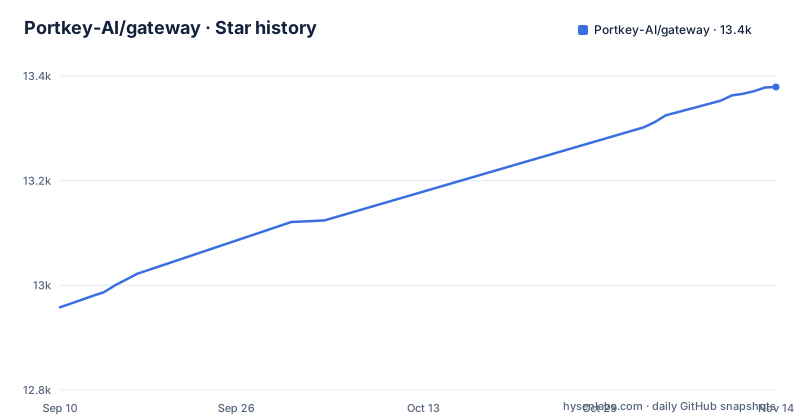
Star history
- Portkey-AI/gateway13,379 ★ · +421
| Repository | 2026-09-10 | 2026-11-14 |
|---|---|---|
| Portkey-AI/gateway | 13k | 13.4k |
421 Stars in the last 65 days, measured from the daily GitHub snapshot. Compare with other projects
Editorial analysis
One npx command, one port, and a console that shows local logs
There is no build step in the quickstart. Node.js and npm are the only prerequisites, and the package starts on port 8787 with an OpenAI shaped API path and a separate console path for its own logs.
# Run the gateway locally (needs Node.js and npm)
npx @portkey-ai/gateway
The README states the gateway answers on `http://localhost:8787/v1` and that the Gateway Console runs on `http://localhost:8787/public/`, where you can see all of your local logs in one place. Your code talks to it through an SDK that swaps the provider and key:
# pip install -qU portkey-ai

from portkey_ai import Portkey

# OpenAI compatible client
client = Portkey(
    provider="openai", # or 'anthropic', 'bedrock', 'groq', etc
    Authorization="sk-***" # the provider API key
)

# Make a request through your AI Gateway
client.chat.completions.create(
    messages=[{"role": "user", "content": "What's the weather like?"}],
    model="gpt-4o-mini"
)
The same port and API shape are what the Docker route uses: docker-compose.yaml maps 8787 to 8787 and runs portkeyai/gateway:latest, and the Dockerfile builds on node:20-alpine and exposes 8787.
A deny rule and five retries in the same config block
Reliability and guardrails are one JSON object, and the README attaches it to the client rather than to a server side file:
config = {
  "retry": {"attempts": 5},

  "output_guardrails": [{
    "default.contains": {"operator": "none", "words": ["Apple"]},
    "deny": True
  }]
}

# Attach the config to the client
client = client.with_options(config=config)
Read the two halves together. `retry.attempts` is 5, and the guardrail denies any reply containing the word in the `words` list, so a request whose model insists on the forbidden word gets retried rather than answered. The README says as much in its own comment on that example: the reply always comes back with the other word, and the retry config retries 5 times before giving up.
The consequence is arithmetic rather than theory. A policy denial becomes five upstream calls for one user request, so the block you wrote to save tokens is the block that multiplies them. Rate limits and spend both scale with it, and nothing in that config object separates a provider error from a policy refusal.
The repository also ships conf.example.json and conf.json at the top level, so a file based configuration exists alongside the in code one.
npm serves a January tag while main has moved since May
package.json reads version 1.15.2. The three newest releases in the repository are v1.15.2 dated 2026-01-12, v1.15.1 dated 2025-12-24 and v1.15.0 dated 2025-12-23, and the last push to the default branch main was on 2026-05-25. The repository is not archived, so the code is current, but the published version and the branch tip are not the same thing.
What `npx @portkey-ai/gateway` resolves to is the registry artefact built from that tag, so anything committed to main after 2026-01-12 is not in the copy your developers start. If you want the branch behaviour you have to install from source and run the build yourself.
The bigger split sits in the announcement banner at the top of the README: Gateway 2.0 is a pre-release, the core enterprise gateway is merging into open source with the 2.0 release, and the pre-release lives on a separate branch rather than on main. A reader who follows the hosted documentation into 2.0 features and then runs the npm package is reading a different gateway than the one the docs describe.
One codebase, two entry points, and a Cloudflare Workers path
The dependency list explains the shape. hono is the HTTP layer, with @hono/node-server and @hono/node-ws for the Node build and ws alongside them, and package.json scripts point at two different entry files:
- `dev:node` runs `tsx src/start-server.ts` - `dev:workerd` runs `wrangler dev src/index.ts` - `deploy` runs `wrangler deploy --minify src/index.ts` - `start:node` runs `node build/start-server.js`
So the Node path is a long lived server process, and the Cloudflare path is a worker bundle published by wrangler against the wrangler.toml at the top of the tree. The README lists Cloudflare and Replit among the deployment guides in docs/installation-deployments.md, alongside Portkey Cloud, which it marks as recommended.
Two runtimes means two failure surfaces for a team. Anything you depend on that touches the request lifecycle has to hold on the Node server and in the workerd bundle, and `wrangler deploy --minify src/index.ts` ships whatever is in src/index.ts without the Node specific wiring around it.
postinstall runs patch-package, so an install rewrites node_modules
package.json wires `"postinstall": "patch-package"`, and the Dockerfile copies a patches directory into both build stages. Every install therefore applies the contents of patches/ before the gateway starts, which is a deliberate way to carry fixes for dependencies that have not shipped a release, and also a step your build policy has to allow. An install that skips lifecycle scripts skips that patch step too, and the tree you run is not the tree the maintainers assembled.
A second script is worth reading closely: `"prepare"` runs husky unless NODE_ENV is production, so the git hook bootstrap is gated on that environment variable rather than on an explicit flag. package.json also defines a pre-push script, and it is the one command that builds and then tests what it built:
npm run pre-pushUnder the hood that runs `npm run build && node start-test.js`, with `test:gateway` running jest over src/ and `test:plugins` over plugins/. If you are forking this gateway, that command is the fastest way to know whether your change survived a rollup build, since a green jest run on your machine says nothing about the bundle the container starts.
Identity, governance and the MCP control plane are not in this repository
The README routes org management, governance and security to an enterprise version with private deployments on AWS, Azure, GCP, OpenShift and Kubernetes, and links a feature comparison rather than describing those controls here. The open source package is the routing proxy. Anything user level is a sales conversation.
The same pattern shows up in the MCP Gateway section. It promises a single auth layer at the gateway, access control per team and user, every tool call logged with its parameters, response and latency, and identity forwarding of email, team and roles to MCP servers, working with Claude Desktop, Cursor, VS Code and any MCP compatible client. Every one of those bullets links to documentation on portkey.ai, and the top-level tree of this repository has no MCP directory. The README's MCP Gateway section does not say whether it ships in the 2.0 merge or stays hosted.
So if MCP auth and tool call auditing is the reason you are here, the open source repository gives you the proxy underneath, and the README points to portkey.ai documentation for the control plane above it.
The provider count in the README is not the count in the repository
The repository description advertises routing to 1,600+ LLMs with 50+ AI Guardrails. The heading at the top of the README says 250+ LLMs. Both numbers sit in the same project a few lines apart, and neither says how either figure was counted, whether a model behind one provider API counts once or per route.
The performance claims need the same scepticism about scope. The README lists sub millisecond latency with a 122kb footprint, over 10B tokens processed everyday, and integration with any LLM in under 2 minutes. The latency figure is a claim about the gateway's own overhead, not about a response reaching your caller, and the README does not define what sits outside that measurement. The npm package's files list also includes build/public for the console.
Practical consequence: you cannot size instances, connection limits or a bill from this README. Budget for it the way you would any proxy, and measure latency at your own caller boundary before quoting a number to anyone.
Editorial conclusion
Adopt the gateway when you want retries, fallbacks and a deny rule in front of several model providers and can live with a single Node process and its config file. Do not adopt it expecting user level identity, org governance or the MCP control plane, since the README assigns those to an enterprise version. Before pinning, check which version npm actually serves, because package.json reads 1.15.2 while the last push to main was on 2026-05-25 and Gateway 2.0 sits on a separate pre-release branch.
Frequently asked questions
How do I run Portkey's AI Gateway on my own machine?
With Node.js and npm installed, run npx @portkey-ai/gateway, which is the command the README's quickstart gives. The gateway answers on http://localhost:8787/v1 and its console on http://localhost:8787/public/, where local logs appear.
What happens when a Portkey guardrail denies a response?
In the README's example config, retry attempts is set to 5 alongside an output guardrail that denies replies containing one word. The README notes the retry config would retry 5 times before giving up, so a denial costs five upstream calls.
Which version of the gateway does npx install?
package.json reads version 1.15.2 and the newest release tag is v1.15.2 from 2026-01-12. The last push to main was on 2026-05-25, so commits after that tag are not in the published package, and Gateway 2.0 lives on a pre-release branch.
Does Portkey's gateway have a Docker deployment?
Yes. docker-compose.yaml runs the image portkeyai/gateway:latest with port 8787 mapped to 8787 and restart set to always, and the Dockerfile builds on node:20-alpine and exposes 8787. The README also points to deployment guides for Cloudflare and Replit.
Is the Portkey MCP Gateway part of the open source gateway?
The README describes MCP Gateway as a centralized control plane with gateway level authentication, per team access control, full tool call logging and identity forwarding, working with Claude Desktop, Cursor and VS Code. Each item links to hosted documentation on portkey.ai, and the repository's top-level tree has no MCP directory, so it is not clear what ships in the open source package.
Official sources
Where this project is recommended
Add this badge to your README
If you maintain this project, the badge below links readers to this analysis and shows its maintenance status from the daily GitHub snapshot. Paste the markdown into your README; add ?metric=license or ?metric=stars to the image URL for a different field.

[](https://hysenlabs.com/projects/portkey-ai-gateway)Star history chart for your README
[](https://hysenlabs.com/projects/portkey-ai-gateway)Was this useful?