NBomber measures a C# delegate instead of teaching you a load test DSL
Distributed load-testing framework for .NET. Create distributed load test scenarios entirely using plain C# or F#. It is designed to test any system regardless of the protocol or a semantic model (Pull/Push).
At a glance
- What is it?
- NBomber is a .NET load testing framework that turns a plain C# or F# function into a timed scenario, then ships it as a NuGet package. The repository gives you one readable sample, a cluster feature with no setup notes, and a primary language recorded as CSS.
- Who is it for?
- NBomber suits a .NET team that owns its services and wants load shape written as ordinary C# instead of a separate script dialect, and it does real work on HTTP, gRPC, WebSockets and database endpoints. It is a poor fit for a stack outside .NET, for browser traffic capture, and for anyone who wants a run started without a build step.
- Can I use it commercially?
- Not without permission. GitHub finds no licence file in the repository, and without a licence all rights are reserved by default: you may read the code but not reuse it. Check the README, or ask the authors, before using it.
- Is it still maintained?
- Yes. The repository last received commits 3 days ago.
- What is it written in?
- Mainly CSS, according to GitHub's language statistics.
Answers come from the project's GitHub data, last synced on October 22, 2026, and from our analysis. They are not legal advice.
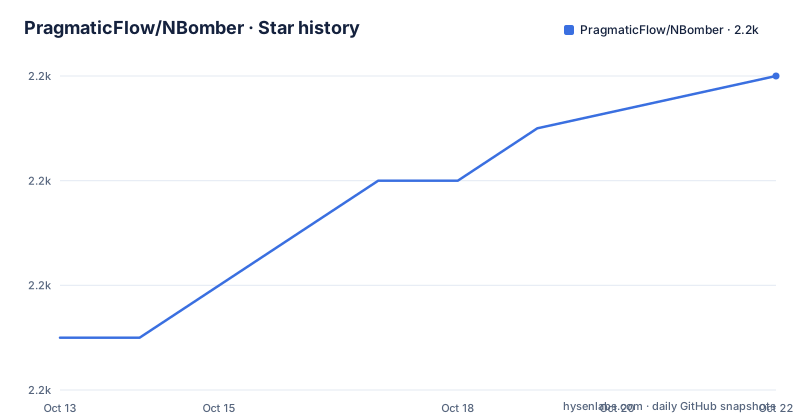
Star history
- PragmaticFlow/NBomber2,248 ★ · +5
| Repository | 2026-10-13 | 2026-10-22 |
|---|---|---|
| PragmaticFlow/NBomber | 2.2k | 2.2k |
5 Stars in the last 9 days, measured from the daily GitHub snapshot. Compare with other projects
Editorial analysis
A scenario is one delegate that NBomber times for you
NBomber hands you a single delegate and measures whatever runs inside it. The sample scenario is built with `Scenario.Create`, given a name, and passed an async callback; that callback sleeps through `Task.Delay(1_000)` for 1 second and returns `Response.Ok()`. The comment inside the callback states the whole contract: NBomber measures how much time it takes to execute your logic. No call in the API names HTTP, SQL or a socket, because the protocol lives inside whatever your function invokes. Replacing that sleep with a real HTTP request against your own service and not one line of the run configuration has to change.
That is the stated design goal, keeping the API as small as possible and leaning on existing C# or F# constructs instead of inventing a DSL you would have to learn. A for loop stays a for loop. The trade-off is that nothing is validated for you at compile time: a step that takes an implicit dependency, logs to a global or shares a buffer across iterations will distort the timings, and the framework has no opinion about any of it.
Rate, interval and during are the only knobs in the sample
The load shape is attached with `WithLoadSimulations`, and in that call `Simulation.Inject` takes 3 named arguments: `rate: 10`, `interval: TimeSpan.FromSeconds(1)`, `during: TimeSpan.FromSeconds(30)`. Read together, that is an arrival rate of 10 each second held for 30 seconds, so the run ends on its own clock instead of on a fixed iteration count.
What the sample leaves out matters more than what it shows. There is no argument for concurrent virtual users, no ramp up, no way to abort early once latency drifts, and no second simulation shape anywhere in the code sample. Those options sit behind the documentation pages for load simulation and dynamic workloads, which appear in the feature list as links and nothing more. The project does name proof of concept validation as one of its goals, and for that this three argument shape is enough, since you want a rough curve quickly. A capacity study needs the parts the sample does not show.
NuGet carries the package and the sample ends with Run()
There is no install command in the project. The only statement about installation is one row of a frequently asked questions table, which says NBomber ships as a .NET library and is installed through the NuGet package manager, and the badge above the description points at the nbomber package on nuget.org. That row is cut off mid link, so no command can be copied from it, and a dotnet add package line appears nowhere in the README. Getting the library is a NuGet lookup rather than a scripted step.
The first real use is the sample scenario compiled into a console project and started from an IDE, which the project calls native debug and names Visual Studio, VS Code and Rider as the targets. Here is the block to copy:
var scenario = Scenario.Create("hello_world_scenario", async context =>
{
    // you can define and execute any logic here,
    // for example: send http request, SQL query etc
    // NBomber will measure how much time it takes to execute your logic
    await Task.Delay(1_000);

    return Response.Ok();
})
.WithLoadSimulations(
    Simulation.Inject(rate: 10,
                      interval: TimeSpan.FromSeconds(1),
                      during: TimeSpan.FromSeconds(30))
);

NBomberRunner
    .RegisterScenarios(scenario)
    .Run();
Run it and the process stays up until the scheduled window closes, then writes the HTML report that the feature list links to. For anyone pinning a version, the newest published version is v6.6.0, published on 2026-08-17, the same day as the last push.
Distributed promises stop at a single process call
The project description opens by promising distributed load test scenarios, and the feature list adds a distributed cluster entry plus realtime monitoring through NBomber Studio. The one sample you can read does none of that: it registers a single scenario and calls `Run()`, which executes everything in the current process.
The Kubernetes shaped pieces do exist in the repository. There are 2 folders at `examples/K8sDemo/` and `examples/NBomberStudioK8sDemo/`, and the root carries a `.dockerignore`. What is missing on this side is any container image name, any step for starting nodes, and any ordering for joining a worker to a controller, so a distributed run cannot be reproduced from the repository alone. You need the separate documentation site for that, and the repository gives no hint of which host runs the coordinator or what a node must be able to reach. Treat distributed mode as a documented feature you have to assemble yourself rather than something the project sets up for you.
CSS is the recorded primary language of a C# project
Two recorded details do not line up with what you build. The first is the language field, which reads CSS, although every scenario is C# or F# and every project under examples/ is a .NET build. The second is at the root: two solution files, `NBomber.sln` and `NBomber.Performance.sln`, sit next to a performance/ folder, so the code that benchmarks the framework is kept apart from the library solution.
A third detail changes how you read any tutorial. The default branch is dev, and the example links are written against that branch rather than a stable one, so the code a walkthrough shows can sit ahead of the code inside the package you installed. Nothing in the README warns about this, and the version numbers in package references are left to you to pin. That is a publishing choice rather than a defect, but it means a scenario copied from a blog post can reference an overload that the pinned package does not carry.
Zero protocol dependencies sits beside nine integrations
The feature list opens by claiming zero dependencies on protocol and zero dependencies on semantic model, then spends its next bullets naming HTTP, WebSockets, MQTT, AMQP, WebBrowser, Redis, SQLite, MongoDB and gRPC. As a design statement the claim holds, since your function decides the protocol and the framework measures whatever comes back. As a catalogue, the list undercuts itself.
The links are uneven too. HTTP, WebSockets, MQTT, AMQP and WebBrowser each point at a documentation page. Redis and SQLite point at folders under `examples/Demo/DB/`. MongoDB and gRPC are bare names with no link at all, even though gRPC also has a client and a server simulator sitting in examples/. Count integrations from that list and you get 9; expect the same write-up depth for each and you will find 2 of them undocumented in the project itself. A claim of zero dependencies also hides the cost: writing an AMQP or gRPC scenario means hand building the request, because there is no built in client abstraction to fall back on.
Results leave through three sinks and one desktop tool
Output goes 3 ways. A static HTML report is linked from the feature list, so a finished run can be kept as one file and attached to a build. Realtime data can be pushed to InfluxDB, TimescaleDB or Grafana through what the project calls reporting sinks. And NBomber Studio is presented as a management tool for watching a run as it happens and analysing the result afterwards.
The repository copy names those three sinks without any of their settings. No connection string key, no port and no start command for Studio appear in the README, so wiring a live dashboard is guesswork until you open the linked pages. Asserts and thresholds are listed as a separate feature, which is how a run fails a build instead of only producing numbers, and the data feed feature injects real or fake values into a scenario so an iteration does not have to send the same input every time.
Why a non dotnet team should look past this project
The binding constraint is not negotiable: scenarios are compiled C# or F#, the runners named are xUnit and NUnit, and every sample in the examples folder is one of 9 .NET projects, including a gRPC client and a gRPC server simulator. A team on another stack has no code path at all, and the project description claims nothing about other languages. The repository also names no command line entry point, so a run always goes through a build and then an IDE or a test runner.
That same constraint is its main advantage for the teams it does fit. Converting an existing integration suite into a load test means reusing test code you already maintain, and the xUnit example at `examples/xUnitExample/LoadTestExample.cs#L11` shows where that starts. The gap to watch is input capture. A WebBrowser protocol is listed, but no recorder, proxy or import step is named anywhere in the feature list, so teams expecting to point a browser at a tool and harvest a scenario will not find one here.
Editorial conclusion
NBomber suits a .NET team that owns its services and wants load shape written as ordinary C# instead of a separate script dialect, and it does real work on HTTP, gRPC, WebSockets and database endpoints. It is a poor fit for a stack outside .NET, for browser traffic capture, and for anyone who wants a run started without a build step. Before adopting, open the NuGet page for the nbomber package, check your target runtime against the v6.6.0 package, and read the distributed cluster pages, because the repository copy stops at a single process `Run()`.
Frequently asked questions
How do I install NBomber?
NBomber ships as a .NET library and is installed through the NuGet package manager, and the README points at the nbomber package on nuget.org. It prints no install command, so you add the package yourself in your IDE or through the dotnet CLI.
Which protocols and data stores can an NBomber scenario test?
The feature list names HTTP, WebSockets, MQTT, AMQP, WebBrowser, Redis, SQLite, MongoDB and gRPC. Because a scenario is an ordinary function, the protocol is whatever your own code calls, and NBomber only measures the time it takes.
Does NBomber require its own scripting language?
No. Scenarios are written in plain C# or F#, and the project states that it leans on language constructs rather than a new DSL, so a for loop stays a for loop. The cost is that the framework validates nothing about your callback.
Can an NBomber run be distributed across several machines?
A distributed cluster is listed as a feature with its own documentation page, and folders at examples/K8sDemo/ and examples/NBomberStudioK8sDemo/ exist in the repository. The README itself gives no image name and no steps for joining nodes to a controller.
Where do NBomber results go after a run?
Three places: a static HTML report linked from the feature list, reporting sinks that push into InfluxDB, TimescaleDB or Grafana, and NBomber Studio for realtime monitoring and later result analysis. No sink connection keys or Studio start command are written down in the README.
Official sources
Add this badge to your README
If you maintain this project, the badge below links readers to this analysis and shows its maintenance status from the daily GitHub snapshot. Paste the markdown into your README; add ?metric=license or ?metric=stars to the image URL for a different field.

[](https://hysenlabs.com/projects/pragmaticflow-nbomber)Star history chart for your README
[](https://hysenlabs.com/projects/pragmaticflow-nbomber)Was this useful?