Brakeman reads your Rails source instead of running your app
A static analysis security vulnerability scanner for Ruby on Rails applications
At a glance
- What is it?
- Brakeman is a static analysis scanner for Ruby on Rails applications that trades runtime truth for source truth. Here is how its install paths, exit codes, confidence levels, ignore file, and output formats actually behave.
- Who is it for?
- Brakeman belongs in CI for any team that can accept source level findings rather than runtime proof, and its Docker image is the cheapest way to run it on machines whose Ruby is too old. Before adopting it inside a commercial product, read COPYING.md, because the README states Brakeman is free for non-commercial use.
- Can I use it commercially?
- Check first. The repository uses a licence we do not classify automatically, so read its LICENSE file before any commercial use.
- Is it still maintained?
- Yes. The repository last received commits 23 days ago.
- What is it written in?
- Mainly Ruby, according to GitHub's language statistics.
Answers come from the project's GitHub data, last synced on November 14, 2026, and from our analysis. They are not legal advice.
Star history
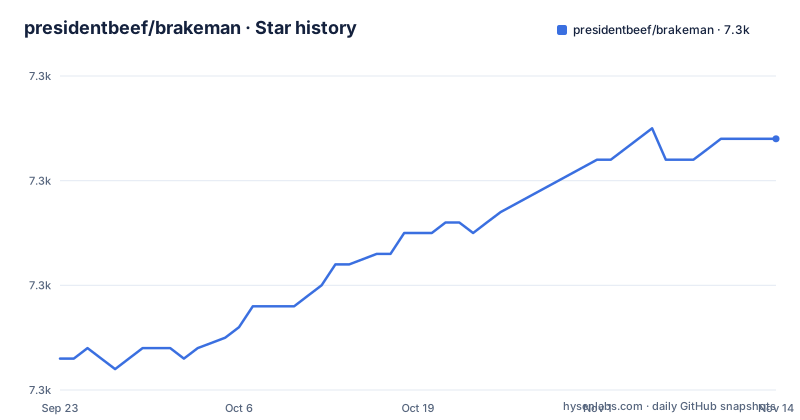
- presidentbeef/brakeman7,294 ★ · +21
| Repository | 2026-09-23 | 2026-11-14 |
|---|---|---|
| presidentbeef/brakeman | 7.3k | 7.3k |
21 Stars in the last 52 days, measured from the daily GitHub snapshot. Compare with other projects
Editorial analysis
Static analysis with nothing in your app ever running
Brakeman reads a Rails application's source tree and reports security warnings without booting the application. No server starts, no database is provisioned, no fixtures are loaded. That single property explains why the published container image is so thin: its Dockerfile sets WORKDIR /code, sets ENTRYPOINT to the bin/brakeman executable, and expects your source mounted at /code. The base image is ruby:3.3-alpine with build-base installed for the bundle step.
Scope is pinned at both ends of the stack. Brakeman should work with any version of Rails from 2.3.x to 8.x, so adopting it does not force a framework upgrade on an old application. On the Ruby side it can analyze code written with Ruby 2.0 syntax and newer, while the tool itself requires at least Ruby 3.2.0 to run. An application pinned to an ancient interpreter therefore still needs a newer Ruby somewhere to scan from, either on a CI image or inside Docker.
There is no config file that points at a running app, and there is no coverage report tying a finding back to a line that actually executed. Everything reported comes from reading code.
Four install paths and what each one costs you
The RubyGems path is one line, and then you have a command:
gem install brakeman
brakeman /path/to/rails/application
Running `brakeman` with no arguments from a Rails application's root directory is the default usage. From outside Rails root you pass the path to the application, which is what the command above does.
Bundler keeps the scanner out of your boot sequence by putting it in the development group with require disabled:
group :development do
gem 'brakeman', require: false
end
Docker removes the local Ruby requirement entirely. `docker pull presidentbeef/brakeman` gives you the image, and from a Rails root the invocation mounts the current directory:
docker run -v "$(pwd)":/code presidentbeef/brakeman --colorTwo details bite people here. First, when you run outside of Rails root and ask for an output file, that file is written relative to path/to/rails/application, not to your shell's working directory. Second, the license line matters for anything commercial: Brakeman is free for non-commercial use, with details in COPYING.md, and the repository ships both MIT-LICENSE and COPYING.md. Read those before you wire the scanner into a product build.
The exit code is the CI contract, and it fails on purpose
By default Brakeman returns a non-zero exit code if any security warnings are found or scanning errors are encountered. That is a fail closed posture: a red build can mean either warnings or scanning errors. Turning the behavior off takes two flags:
brakeman --no-exit-on-warn --no-exit-on-errorStream separation does more work than people expect. All Brakeman output except reports is sent to stderr, which makes it simple to redirect stdout to a file and just get the report. If you want color plus a file plus console output in one run, multiple output files can be specified:
brakeman --color -o /dev/stdout -o output.jsonFor quieter pipelines, `brakeman -q` suppresses informational warnings and just outputs the report. `brakeman -d` goes the other way and prints all kinds of debugging information, which is the first thing to reach for when a scan of a large application returns nothing at all.
Confidence levels are the tool's own estimate
Brakeman attaches a confidence level to every warning as a rough estimate of how certain the tool is that the warning is a real problem, and the project states plainly that these ratings should not be taken as absolute truth.
There are three levels. High covers either a simple warning such as a boolean value, or user input being used in unsafe ways. Medium generally indicates an unsafe use of a variable where that variable may or may not be user input. Weak means user input was indirectly used in a potentially unsafe manner.
That middle level is where the noise lives, and `-w` is how you cut it:
brakeman -w3The switch takes a number from 1 to 3, with 1 being low (all warnings) and 3 being high (only highest confidence warnings). Teams that jump straight to `-w3` shrink their backlog but also lose the Medium and Weak rows that turn out to matter during a triage session. The full set of reported warning types is described under docs/warning_types in the repository, and the complete option list lives in OPTIONS.md or comes from brakeman --help.
HTML context excerpts can point at the wrong line
The HTML output format provides an excerpt from the original application source where a warning was triggered, which is the most convenient place to start reading a report. Two caveats come with it. Due to the processing done while looking for vulnerabilities, the source may not resemble the reported warning, and reported line numbers may be slightly off.
The consequences are practical rather than theoretical. A reviewer who jumps straight to the cited line number lands on code that has nothing to do with the finding, then spends the trust budget of the whole report chasing the discrepancy. Code pasted from an HTML report into a ticket is not what the developer sees in their editor, so a fix written against the excerpt can miss the real sink.
The project's own framing is that the context still provides a quick look into the code which raised the warning. Treat it as a pointer, not a transcript. Confirm the actual line and the actual data flow in the application source before deciding whether the warning is a true positive, a false positive, or something your own ignore file should record.
-x, -t, and --faster shrink a scan until it means less
Brakeman lets you remove work from a run, and each removal changes what the run can find. Specific checks can be skipped, with the name needing to be the correct case:
brakeman -x DefaultRoutes
brakeman -x DefaultRoutes,Redirect
The opposite is restricting the run to a chosen set of tests, such as `brakeman -t SQL,ValidationRegex`.
Speed has its own switch, and this is the one to read the warning next to. `brakeman --faster` disables some features and is currently the same as `--skip-libs --no-branching`. The documentation attaches a warning directly: this may cause Brakeman to miss some vulnerabilities. In other words, the flag that gets a slow suite under a build timeout may also cause Brakeman to miss some vulnerabilities. Treat it as a scheduling decision with a coverage cost, not as a free optimization, and record which switches a given CI job uses.
Separately, `--skip-files file1,/path1/,path2/` exists for files or directories that Brakeman may have trouble parsing. Anything excluded there is invisible to the scan, including any vulnerability it contained.
Eleven output formats, and only JSON feeds --compare
Results go wherever you point them with `brakeman -o output_file`, and the format is determined by the file extension or by the `-f` option. The current options are text, html, tabs, json, junit, markdown, csv, codeclimate, github, sarif, and sonar. Multiple output files can be specified in a single run, so one scan can feed a dashboard and a local file at the same time.
That list is mostly about destinations. SARIF and codeclimate exist so external services can ingest findings, and JUnit fits most generic CI reporters. But the diff workflow is tied to JSON specifically. To compare results of a scan with a previous scan, you use the JSON output option and then:
brakeman --compare old_report.jsonThis will output JSON with two lists, one of fixed warnings and one of new warnings. The format is not a cosmetic setting here. A team that standardizes on SARIF for its dashboards and drops the JSON artifact cannot get the fixed and new lists from the tool, and loses the cheapest way to see whether a refactor removed findings or just moved them.
The ignore file is a silent baseline you have to audit yourself
Brakeman will ignore warnings if configured to do so, and by default it looks for a configuration file in `config/brakeman.ignore`. That file is created and managed with:
brakeman -IThe design is reasonable for a long lived codebase, where a confirmed false positive should not reappear in every run. The cost is that ignored warnings do not affect the exit code, so a build can stay green while ignored findings go unreviewed.
The escape hatch is a flag rather than a config edit:
brakeman --show-ignoredIf you want to temporarily see the warnings you ignored without affecting the exit code, this is the command. Run it on a schedule and read the result. Broader options can live in YAML files at ./config/brakeman.yml, ~/.brakeman/config.yml, or /etc/brakeman/config.yml, with -c to pick a specific file and -C to print the currently set options. Command line options have priority over configuration files, which matters when a CI job and a checked in file disagree.
Editorial conclusion
Brakeman belongs in CI for any team that can accept source level findings rather than runtime proof, and its Docker image is the cheapest way to run it on machines whose Ruby is too old. Before adopting it inside a commercial product, read COPYING.md, because the README states Brakeman is free for non-commercial use. Before trusting a red build, remember the exit code fires on scanning errors as well as warnings, and keep a JSON artifact so you can run --compare against the previous scan.
Frequently asked questions
what is brakeman gem
It is the packaged form of Brakeman, installed with gem install brakeman, or added to a Gemfile in the development group with require set to false. There is also a Docker image at presidentbeef/brakeman for machines without a suitable local Ruby.
what is brakeman ruby
Brakeman is a static analysis tool which checks Ruby on Rails applications for security vulnerabilities. It can analyze code written with Ruby 2.0 syntax and newer, but requires at least Ruby 3.2.0 to run.
what is brakeman rails
It should work with any version of Rails from 2.3.x to 8.x. Running locally means running brakeman from a Rails application's root directory, or brakeman /path/to/rails/application from outside of Rails root.
how to use brakeman
Run brakeman in the project root, then shape the run with options such as -o for an output file, -w3 for high confidence warnings only, or -x to skip specific checks. A plugin for Jenkins/Hudson, a Guard plugin, and GitHub Actions listings are linked for continuous testing setups.
Official sources
Add this badge to your README
If you maintain this project, the badge below links readers to this analysis and shows its maintenance status from the daily GitHub snapshot. Paste the markdown into your README; add ?metric=license or ?metric=stars to the image URL for a different field.

[](https://hysenlabs.com/projects/presidentbeef-brakeman)Star history chart for your README
[](https://hysenlabs.com/projects/presidentbeef-brakeman)Was this useful?