Procrastinate: PostgreSQL Task Queues for Python
PostgreSQL-based Task Queue for Python
At a glance
- What is it?
- Procrastinate is a Python 3.10+ library that stores deferred tasks, locks, and scheduling data in PostgreSQL 13+. It supports synchronous and asynchronous applications, Django integration, retries, periodic tasks, and arbitrary task locks.
- Who is it for?
- Procrastinate fits Python teams that already use PostgreSQL and want background processing without operating a separate queue service. It is less suitable for work that must execute inline or for systems that cannot operate PostgreSQL 13+.
- Can I use it commercially?
- Yes. MIT is a permissive licence: you can use, modify and sell software built on it, as long as you keep its copyright and licence notices.
- Is it still maintained?
- Yes. The repository last received commits 6 days ago.
- What is it written in?
- Mainly Python, according to GitHub's language statistics.
Answers come from the project's GitHub data, last synced on November 7, 2026, and from our analysis. They are not legal advice.
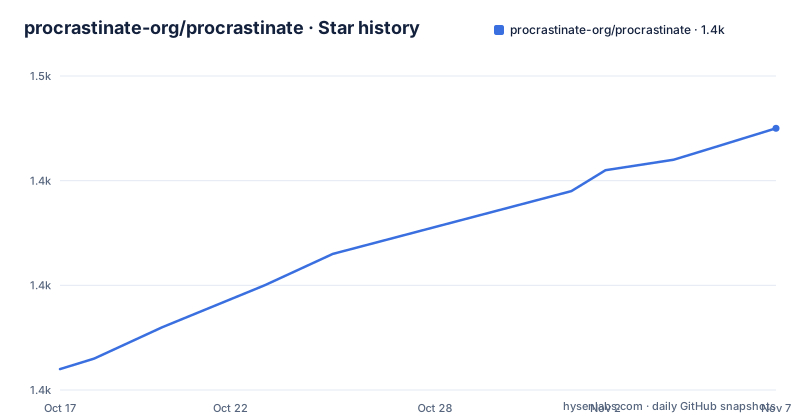
Star history
- procrastinate-org/procrastinate1,445 ★ · +23
| Repository | 2026-10-17 | 2026-11-07 |
|---|---|---|
| procrastinate-org/procrastinate | 1.4k | 1.4k |
23 Stars in the last 21 days, measured from the daily GitHub snapshot. Compare with other projects
Editorial analysis
Why Procrastinate Uses PostgreSQL
Procrastinate solves a specific background-processing problem: a Python function should run later, possibly in another process, instead of blocking the code that schedules it. Its audience is Python developers building services, asynchronous applications, or Django projects that already have PostgreSQL infrastructure. The README identifies PostgreSQL 13 or later as the store for task definitions, locks, and dispatch information.
That design produces a narrower operational profile than a queue system that requires a separate broker. PostgreSQL becomes the place where deferred work is recorded and where workers coordinate. It does not alter the programming model fundamentally. Application code still defines ordinary functions, registers them with a Procrastinate `App`, and calls them through a deferred interface.
The library supports conventional synchronous code as well as coroutine-based code. The README presents `SyncPsycopgConnector` for synchronous applications and `PsycopgConnector` for asynchronous applications. Its compatibility with ASGI frameworks also makes it relevant to Python services built around asynchronous request handling.
This is not a general-purpose queue for work written in unrelated languages. Its documented task model centers on Python functions registered with a Procrastinate application. Teams that need broker-specific routing, cross-language workers, or a management plane independent of their application database would have to look beyond the capabilities described by the README.
How Procrastinate Stores and Dispatches Tasks
The documented data flow has three stages. First, an application creates an `App` with a PostgreSQL connector. Second, a function is registered with `@app.task(queue="sums")`, assigning it to a named queue. Third, application code calls `defer` or `defer_async` while the application context is open. The worker retrieves queued work and invokes the registered Python function.
A worker is a separate execution context. In the README's synchronous example, the producer opens the app and defers `sum(a=3, b=5)`. A worker configured for the `sums` queue runs later, receives the arguments, and writes the result to `myfile`. The asynchronous example follows the same application design with `PsycopgConnector`, `app.open_async()`, `defer_async`, and `run_worker_async`.
Explicit queue names appear in both examples. Queue selection is therefore part of task registration and worker configuration. Producers can direct different task types to separate queues, while workers can listen only for the queues they are responsible for processing.
The README also lists retries, periodic tasks, and arbitrary task locks. Those capabilities add coordination behavior around basic dispatch. PostgreSQL stores the task queue, while Procrastinate exposes the Python API and worker process. The repository includes implementation files under `procrastinate/`, a test suite, migration-related development dependencies, and a command-line entry point. The README does not expose the internal SQL schema or document the transaction sequence used to claim and complete a task.
Creating the First Deferred Task
The README links to the Quickstart as the main setup guide. It does not include an installation command or an initial database migration command, so this tutorial begins with the first application example rather than inventing setup steps. The package metadata identifies the PyPI package as `procrastinate` and requires Python 3.10 or newer.
In `mycode.py`, create an `App`, register a synchronous function, defer an invocation, and configure a worker for its queue. The following code comes from the README. The deferred call represents work for a worker rather than an immediate result for the calling code.
import procrastinate

app = procrastinate.App(connector=procrastinate.SyncPsycopgConnector())

@app.task(queue="sums")
def sum(a, b):
    with open("myfile", "w") as f:
        f.write(str(a + b))

with app.open():
    sum.defer(a=3, b=5)

app.run_worker(queues=["sums"])
When the worker processes this example, the task writes `8` to `myfile`. In a deployed service, the code that calls `defer` and the process that calls `run_worker` will commonly live in different programs. Both must use compatible application, connector, and database configuration.
The README does not identify the connection environment variables accepted by `SyncPsycopgConnector` or `PsycopgConnector`. Those settings, along with any required database initialization, must be taken from the linked Quickstart rather than inferred from the application example.
Using the Procrastinate Command Line
`pyproject.toml` defines a `procrastinate` console script through `procrastinate.cli:main`. The README demonstrates how that command can defer a registered task and start a worker. This approach requires the application to be discoverable through `PROCRASTINATE_APP`, which lets the command resolve the application object used to register tasks.
The following commands are copied from the README. The first command schedules `mycode.sum` with JSON arguments. The second starts a worker listening to the `sums` queue.
export PROCRASTINATE_APP="mycode.app"

procrastinate defer mycode.sum '{"a": 3, "b": 5}'
procrastinate worker -q sums
The command line does not remove the need to define tasks. The task must still be registered on the application object, and its address must match the name passed to `procrastinate defer`. A worker also needs access to the application and PostgreSQL configuration used by the producer.
The README does not document command-line operations for listing queues, cancelling jobs, replaying tasks, or changing retry state. It also does not describe a rollback command. The absence of those examples makes the Python API and the linked documentation the appropriate places to confirm whether a particular administrative operation exists.
Asynchronous Python and Django Integration
Procrastinate supports synchronous and asynchronous execution without presenting asynchronous work as an external integration. Its asynchronous example registers a coroutine with `@app.task`, uses `PsycopgConnector`, and awaits the application context and deferred call. The worker entry point also has an async form.
import asyncio
import procrastinate

app = procrastinate.App(connector=procrastinate.PsycopgConnector())

@app.task(queue="sums")
async def sum(a, b):
    await asyncio.sleep(a + b)

async with app.open_async():
    await sum.defer_async(a=3, b=5)
    await app.run_worker_async(queues=["sums"])
The README calls asynchronous use the recommended approach. This does not mean synchronous applications are excluded. The synchronous example remains useful where the calling code is not async and where a conventional worker fits the deployment.
Repository metadata lists Django support as an optional dependency named `django`. It also lists optional groups for SQLAlchemy, `aiopg`, and `psycopg2-binary`. Those packages expand the available database and framework paths, but the README does not claim that every optional connector has identical behavior or identical setup requirements.
The operational boundary remains clear. A web request can defer work, but a worker must be running to process it. Starting only the application that creates tasks does not execute the queue. The README does not provide production guidance for worker supervision, concurrency limits, or autoscaling.
Constraints of the PostgreSQL Queue Design
Procrastinate is the wrong tool when a function must return its result immediately and adding a worker would only add delay and operational work. The opening example deliberately turns a direct function call into deferred work. For an inexpensive local calculation or a request that must complete before responding, executing the function inline remains the simpler approach.
PostgreSQL 13 or later is also a firm infrastructure requirement in the documented setup. A project without PostgreSQL cannot adopt this queue without introducing and operating that database. The design removes a separate queue service, but it does not remove the need to manage database availability, schema compatibility, access controls, and worker connections.
The repository classifies `procrastinate` as `Development Status :: 5 - Production/Stable`. That classification describes package maturity, but the README does not state task ordering guarantees, exactly-once execution, maximum retry counts, retention periods, or crash recovery semantics. Applications with strict delivery guarantees would need answers from the documentation or maintainers before treating those guarantees as implicit.
The repository's `Dockerfile` offers a container-oriented entry point. It starts from `python:3`, installs `uv`, runs `uv sync`, and defaults to `procrastinate worker`. The accompanying `docker-compose.yml` adds `postgres:18` and configures a demonstration application. These files support a local container arrangement, but they are not a complete production deployment specification.
Maintenance, Packaging, and the MIT License
The repository is not archived, and its last push was on 2026-10-12. Recent releases include 3.10.0 on 2026-09-23, 3.9.0 on 2026-06-20, and 3.8.1 on 2026-04-08. Those dates show recent repository and release activity, but they do not by themselves document the upgrade effort required by an existing deployment.
The package metadata requires Python 3.10 or newer and depends on packages including `psycopg[pool]`, `asgiref`, `attrs`, `croniter`, `python-dateutil`, `typing-extensions`, and `packaging`. Its build system uses Hatchling and `uv-dynamic-versioning`. The repository includes `CHANGELOG.md`, `noxfile.py`, and a `tests/` directory, so those are the concrete files to inspect for release changes and expected test coverage when planning an upgrade.
The README does not provide a complete upgrade tutorial or state whether database migrations can be applied independently of application deployment. That sequencing matters when workers and producers run different versions during a rollout.
Procrastinate uses the MIT License. The license text in `LICENSE.md` governs copying, modification, distribution, and related obligations. Code licensing does not decide PostgreSQL compatibility, task durability, data handling, or the operational support needed for background jobs.
Editorial conclusion
Procrastinate fits Python teams that already use PostgreSQL and want background processing without operating a separate queue service. It is less suitable for work that must execute inline or for systems that cannot operate PostgreSQL 13+. Before adoption, verify the required database setup, confirm that worker processes can run separately from the code that schedules tasks, and review `CHANGELOG.md` for the upgrade path.
Frequently asked questions
How do I install Procrastinate?
The README links to the PyPI package and directs readers to the Quickstart for setup, but it does not show an installation command. Repository metadata identifies the package name as `procrastinate` and requires Python 3.10 or newer.
How do I defer and run a Procrastinate task?
Register a function with `@app.task(queue="...")`, call its `defer` or `defer_async` method while the app is open, and run a worker against the same queue. The README demonstrates the process with the `sum` task and `sums` queue.
Does Procrastinate support asynchronous Python?
Yes. The README uses `PsycopgConnector`, `app.open_async()`, `defer_async`, and `run_worker_async` with an async task function. It also says asynchronous use is the recommended approach.
Official sources
Add this badge to your README
If you maintain this project, the badge below links readers to this analysis and shows its maintenance status from the daily GitHub snapshot. Paste the markdown into your README; add ?metric=license or ?metric=stars to the image URL for a different field.

[](https://hysenlabs.com/projects/procrastinate-org-procrastinate)Star history chart for your README
[](https://hysenlabs.com/projects/procrastinate-org-procrastinate)Was this useful?