BestClash packs twenty public proxy lists into one subscription URL
Updated every 30 minutes! Free Clash circumvention subscriptions, auto-scraped and speed-tested from the web. Free proxies, VPN subscriptions and nodes for Clash Meta / mihomo and other censorship-circumvention clients.
At a glance
- What is it?
- BestClash publishes a single Clash subscription file, `proxies.yaml`, assembled from twenty public proxy lists and refreshed on a stated 30-minute cycle. Android users paste one URL into Clash Meta for Android, but the repository ships no generator and no filtering rules to explain how nodes are chosen or dropped.
- Who is it for?
- BestClash is a shortcut rather than infrastructure: it removes the work of collecting twenty public list URLs behind one fetchable address, and it asks you to run nothing. Take it if you already use Clash Meta for Android and only want a feed to paste into a subscription field.
- Can I use it commercially?
- Not without permission. GitHub finds no licence file in the repository, and without a licence all rights are reserved by default: you may read the code but not reuse it. Check the README, or ask the authors, before using it.
- Is it still maintained?
- Yes. The repository received new commits within the last day.
- What is it written in?
- GitHub does not report a main language for this repository.
Answers come from the project's GitHub data, last synced on November 7, 2026, and from our analysis. They are not legal advice.
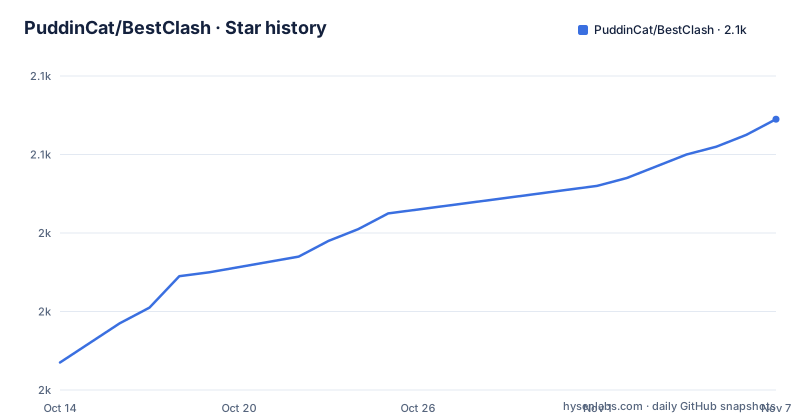
Star history
- PuddinCat/BestClash2,069 ★ · +62
| Repository | 2026-10-14 | 2026-11-07 |
|---|---|---|
| PuddinCat/BestClash | 2k | 2.1k |
62 Stars in the last 24 days, measured from the daily GitHub snapshot. Compare with other projects
Editorial analysis
One YAML file standing in for twenty subscriptions
BestClash answers one narrow question: where does an Android user get a Clash subscription without assembling a long list of upstream feeds by hand. The answer is a single file, `proxies.yaml`, committed to the default branch `main` and served over HTTPS. Nothing needs installing from this repository, because it publishes no package, no container image and no client build. What it publishes is a fetch point, and the subscription field inside a Clash client is the entire interface.
For an audience, think of the person who already has a Clash client installed and no patience for maintaining a list of feeds. Repository topics (clash, free, gfw, proxy, v2ray, vpn) place it inside the free-node ecosystem, and the description frames the file as crawled and speed tested automatically. Whether that automation lives in this repository is a different question, answered below.
Where the nodes come from, host by host
Twenty upstream sources are credited, and their host distribution says something about how the file is assembled. Seventeen of the twenty are plain `raw.githubusercontent.com` paths, one is served through the jsDelivr CDN, one comes from openrunner.net and one from tt.vg. A representative slice of that list:
https://cdn.jsdelivr.net/gh/vxiaov/free_proxies@main/clash/clash.provider.yaml
https://raw.githubusercontent.com/Misaka-blog/chromego_merge/main/sub/merged_proxies_new.yaml
https://raw.githubusercontent.com/peasoft/NoMoreWalls/master/list.yml
Maintainer names repeat across that list, several times over, so a merged feed is a cross-check across publishers rather than a thin collection. The price is that one source going stale or hostile stays invisible to the subscriber, because the merged file draws no per-source boundary.
Pasting the feed into Clash Meta for Android
Android is the only documented path. Install Clash Meta for Android, then paste the raw URL into the configuration field:
https://raw.githubusercontent.com/PuddinCat/BestClash/refs/heads/main/proxies.yamlIf the raw host moves slowly from inside China, a mirror built from the CF-Workers-GitHub-Proxy project is offered:
https://ghfile.geekertao.top/https://github.com/PuddinCat/BestClash/blob/main/proxies.yamlThat same mirror carries the client installer, pinned to one build:
https://ghfile.geekertao.top/https://github.com/MetaCubeX/ClashMetaForAndroid/releases/download/v2.11.7/cmfa-2.11.7-meta-universal-release.apkAfter the paste, the client fetches the file on whatever schedule it uses and swaps in new nodes. Nothing further is configured on the BestClash side, because no config file, environment variable or port exists here to configure.
A 30-minute cycle with no visible generator
The description promises a refresh every 30 minutes, and that number is the most attractive claim on the page. Nothing in the repository tree supports it. Top-level entries are `.github/`, `20M.bin`, `5M.txt`, `README.md`, `proxies.yaml` and `stars.svg`: no crawler, no speed test harness, no generator script and no committed workflow file to read.
Whatever writes `proxies.yaml` is therefore not inspectable from what is published here. The most recent commit landed on 2026-10-06, which confirms the branch is being touched but says nothing about rhythm. For a subscriber this matters little, since a Clash client re-fetches on its own schedule, yet for anyone auditing the feed the 30-minute figure cannot be checked against anything.
20M.bin and 5M.txt left unexplained at the root
Two root files are never mentioned in the prose. `20M.bin` is a 20 MB binary of no stated purpose, and `5M.txt` is a 5 MB text file of equally undocumented content. Neither name appears in any instruction, so a reader cannot tell whether they are logs, raw node dumps or leftovers from a scraping run. Both have a cost: cloning the default branch pulls bulk that no documented workflow needs.
The sixth entry, `stars.svg`, is a badge image rendering a star history chart from an external service. It is the only asset here with a visible purpose, and the only one that contacts a third party when a page displays it.
The mirror keeps a blob path instead of raw
The mirror URL is not a rewritten raw path, and that detail matters to anyone scripting around it. Its target segment is `/blob/main/proxies.yaml`, the HTML view of a file on GitHub, rather than the `refs/heads/main` form the canonical link uses. The README does not say whether the proxy service rewrites that segment, fetches the page and extracts text, or hands back raw bytes, so treat the mirror as a convenience for manual paste.
The mirror also pins the installer to a v2.11.7 build, which fixes a client version for readers who download it that way. Anyone installing from the client project's own page gets a different build, and BestClash makes no claim that any particular version is required.
What the README never promises about node lifetime
Free public nodes fail in ways a paid provider does not, and this repository addresses almost none of it. There is no node count, no protocol breakdown, no latency data and no retention policy, and nothing states what happens when a node dies: dropped on the next pass, kept until a client rejects it, or carried forward unchanged. Someone reading only this page cannot answer those questions before importing.
Pinning is absent as well. Because `proxies.yaml` sits on a moving branch and is fetched by URL, two clients syncing minutes apart can hold different node sets, and no rollback path is documented if a refresh makes the file worse. Anyone who cares about reproducibility should keep a copy of the file that worked.
Why importing upstream lists yourself still works
The alternative is to skip the merge. Each of the twenty sources can be subscribed to on its own inside Clash Meta for Android, which keeps per-source attribution visible, lets one bad maintainer be dropped without losing the rest, and removes a middleman that could alter the file before it reaches you. BestClash wins on convenience: one address, no list management.
It loses on control. When a node misbehaves there is no way to learn which upstream supplied it, and no documented rule excludes a source. The README does not say whether nodes carry a source marker, so filtering by origin cannot be assumed. Use the merged feed for a quick trial, and keep separate subscriptions when provenance matters to you.
Editorial conclusion
BestClash is a shortcut rather than infrastructure: it removes the work of collecting twenty public list URLs behind one fetchable address, and it asks you to run nothing. Take it if you already use Clash Meta for Android and only want a feed to paste into a subscription field. Leave it if you need to know which upstream a node came from, need pinned file contents across clients, or need any guarantee about node lifetime, since none is documented. First, open proxies.yaml on the raw URL and check the protocol mix against your client.
Frequently asked questions
How do I add BestClash to Clash Meta for Android?
Install Clash Meta for Android, then paste the proxies.yaml raw URL into the configuration field in the client. A domestic mirror of the same file is listed for networks where the raw host is slow.
How often does the BestClash subscription update?
The repository description states the file is regenerated every 30 minutes. No generator script or workflow file appears among the top-level entries, so the mechanism behind that cadence cannot be inspected.
Does BestClash remove dead or slow nodes?
No filtering rule, retention window or node count is documented. The description says entries are crawled and speed tested, but no test threshold, retry policy or removal rule is given.
What are 20M.bin and 5M.txt in the BestClash repository?
Both sit at the repository root and neither is mentioned in any usage instruction. The README does not document what they contain or which process writes them.
Can BestClash be used on iOS, Windows or macOS?
Only the Android path through Clash Meta for Android is documented. Nothing in the repository describes a client setup for desktop or iOS, so those platforms need their own client configured against the same subscription URL.
Official sources
Add this badge to your README
If you maintain this project, the badge below links readers to this analysis and shows its maintenance status from the daily GitHub snapshot. Paste the markdown into your README; add ?metric=license or ?metric=stars to the image URL for a different field.

[](https://hysenlabs.com/projects/puddincat-bestclash)Star history chart for your README
[](https://hysenlabs.com/projects/puddincat-bestclash)Was this useful?