Pullfrog: a code review agent that runs inside your own GitHub Actions
Open-source model-agnostic BYOK GitHub bot that runs in GitHub Actions
At a glance
- What is it?
- Pullfrog is not an agent. It is a wrapper that runs Claude Code, Codex, or OpenCode inside a GitHub Actions workflow you own, using the subscription or API key you already have. The automations it ships are PR review, review comment handling, CI autofix, merge conflict resolution, issue triage, and an ad hoc mention trigger.
- Who is it for?
- Adopt Pullfrog if you want an AI review and fix bot without routing your code through someone else's infrastructure or paying a per-seat subscription. Do not adopt it if you need the agent to have long-lived credentials, since the design deliberately issues short-lived tokens per run.
- Can I use it commercially?
- Yes. MIT is a permissive licence: you can use, modify and sell software built on it, as long as you keep its copyright and licence notices.
- Is it still maintained?
- Yes. The repository received new commits within the last day.
- What is it written in?
- Mainly TypeScript, according to GitHub's language statistics.
Answers come from the project's GitHub data, last synced on November 7, 2026, and from our analysis. They are not legal advice.
Star history
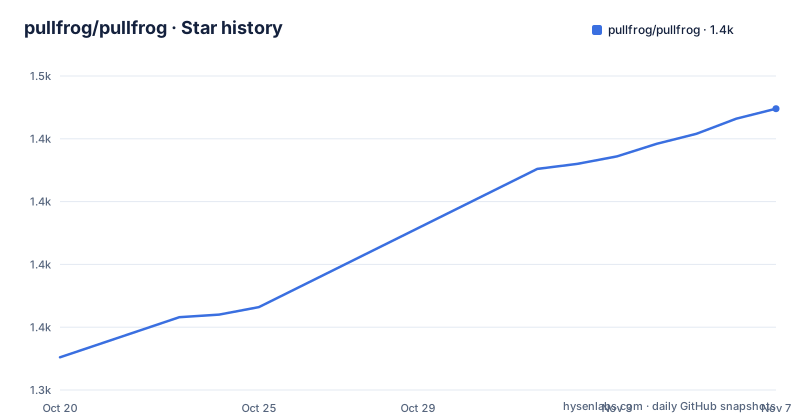
- pullfrog/pullfrog1,437 ★ · +99
| Repository | 2026-10-20 | 2026-11-07 |
|---|---|---|
| pullfrog/pullfrog | 1.3k | 1.4k |
99 Stars in the last 18 days, measured from the daily GitHub snapshot. Compare with other projects
Editorial analysis
A wrapper, deliberately not an agent
Pullfrog is described as an open-source, model-agnostic BYOK GitHub bot that runs in GitHub Actions, and the single most important sentence in the README is the one that says what it is not. Pullfrog is not an agent itself. It wraps vanilla Claude Code, Codex, and OpenCode, selecting the one that matches your BYOK or bring-your-own-subscription configuration, so every run uses the vendor's real agent.
That distinction is the entire product. Most commercial review bots are a closed model behind a vendor's API, with their own prompt, their own pricing, and their own data path. Pullfrog runs the actual coding agent you already use and pay for, inside a workflow file that lives in your repository, and it reads the repo-level config you already keep for that agent: CLAUDE.md or AGENTS.md, skills, custom commands, and repo-level MCP servers.
The triggers are the ordinary GitHub events. It listens for PRs opened, issues created, reviews submitted, and CI failures, and triggers agent runs based on your configuration, via a pullfrog.yml workflow that uses this open-source action. The stated principle is that you control the infrastructure, the keys, and the costs.
The project is MIT licensed, written in TypeScript, the home page is pullfrog.com with docs at docs.pullfrog.com, and the last push to the repository was on 2026-10-13. The releases are frequent and small, with v0.1.98 from 2026-10-08 after v0.1.97 the same day and v0.1.95 on 2026-10-02. The version numbering below 1.0 reflects a project that is still finding its shape, and the repository itself says the project is now free for personal and open-source usage.
What it does out of the box
The automation list is six items, and each of them is a specific piece of work a maintainer does repeatedly.
Review new PRs, auto-reviewing every incoming PR, with the review verdict able to gate merges via requireable status checks. Address reviews, leaving review comments on a Pullfrog PR as you would for a human colleague, and then addressing them. Autofix CI, detecting CI failures on its own PRs and attempting a fix, and it can be configured to fix human PRs too. Autofix merge conflicts, keeping PRs mergeable without hand-resolving. Triage issues, responding to common questions, applying labels, linking related issues and PRs, or drafting implementation plans. And anything ad hoc, by tagging @pullfrog in any issue, PR, or comment, at which point it pulls in the surrounding context and figures out what to do.
The last one is the interesting capability. The automations are predefined, but the mention trigger is not, and the console exists to prompt it for anything else. Combined with per-trigger instructions and per-automation toggles on the dashboard, the model is a set of defaults you can adjust rather than a fixed bot.
The gating detail is worth noting for a team that wants the bot to have teeth. If the review verdict can be a requireable status check, then a failing review blocks the merge in the same way a failing CI job does, which means the bot's opinion becomes policy rather than a comment nobody reads.
Getting in, and paying for it
Getting started is one command in any local repository:
npx pullfrog initOr you can install from the browser, and the setup is said to take about two minutes: install the GitHub App, add the pullfrog.yml workflow with one click, and pick a model.
The billing model is the part that differentiates it from the alternatives. There is no API key required, because you connect a coding-agent plan once and every run bills against it:
| Plan | Connect with | | --- | --- | | Claude Pro/Max | `npx pullfrog auth claude` | | ChatGPT Codex | `npx pullfrog auth codex` | | Grok | `npx pullfrog auth grok` | | Kimi Code | a Kimi Code key as `KIMI_API_KEY` | | OpenCode Go | an OpenCode key as `OPENCODE_API_KEY` |
Or you bring your own model. Pullfrog works with any LLM provider: Anthropic, OpenAI, Google, xAI, Mistral, DeepSeek, OpenRouter, and more, with a config change to switch. Two more ways to pay for tokens are offered. Your own API key, stored in Pullfrog's encrypted secret store or in GitHub Actions secrets, your choice. Or the router, which is Pullfrog's built-in model access, billed at raw provider cost with no markup.
The pricing section is where the open-source angle shows. Pullfrog is free for developers on personal GitHub accounts and free for open-source repos. Pro is $30 per month for the whole organization with no per-run or per-seat billing, and it is required for an organisation's private repos and optional everywhere else. It also covers model cost for impactful open-source projects, with an application link for that.
The security model, which is the real engineering
The batteries included section is essentially a threat model, and it is worth reading as one.
There are MCP tools for GitHub, a purpose-built MCP server for git and GitHub operations covering creating PRs, leaving reviews and comments, reading CI logs, and managing issues, and every operation goes through Pullfrog's permission layer. There is secure shell access, where shell commands run in an isolated subprocess without access to sensitive environment variables. There is a headless browser for end-to-end tests, screenshots, and UI iteration, with screenshot uploads out of the box.
Then there are the three that matter most for a bot with write access to your repository. Short-lived credentials: all GitHub operations use an installation token that is auto-revoked when the run completes, keys are auto-masked in logs, and only the minimum necessary environment variables pass through to the agent. Hooks, namely setup, post-checkout, pre-push, and stop scripts that run inside the agent's permission boundary, and a stop script that exits non-zero resumes the agent with the failure as context, so it fixes its own broken push instead of opening a red PR. And GitHub-native permissions, where GitHub remains the single source of truth for access control, users only see repos they already have access to, and organisation settings require an organisation owner.
That third item is a design decision worth pausing on. The bot is not granted a service account with blanket repository access. It is granted the access of the human who triggered it, and the permission check happens in GitHub rather than in Pullfrog. For a tool that runs unattended on pull requests from strangers, that is the difference between a bot you can install on a public repository and one you cannot.
The hooks mechanism is the other one. A pre-push hook that fails the push and then resumes the agent with the failure as context turns the agent from a one-shot code generator into something that can iterate on its own work, which is a materially different reliability profile.
The action as a standalone step
The same action that powers the automations also works as a step in your own workflows, which is the part of the project that is not a bot at all. The action takes a prompt and the provider key of your choice, and the only permission it needs is id-token: write, which lets it mint its own short-lived GitHub token.
# .github/workflows/agent.yml — run any prompt on demand
name: Agent
on:
  workflow_dispatch:
    inputs:
      prompt:
        description: What should the agent do?
        required: true

jobs:
  agent:
    runs-on: ubuntu-latest
    permissions:
      id-token: write
      contents: read
    steps:
      - uses: actions/checkout@v4
      - uses: pullfrog/pullfrog@v0
        with:
          prompt: ${{ inputs.prompt }}
        env:
          ANTHROPIC_API_KEY: ${{ secrets.ANTHROPIC_API_KEY }}
The permissions block is minimal by design, and the contents: read alongside id-token: write is what a read-mostly agent step needs, since the token it mints comes from the OIDC exchange rather than from a stored secret. The action also exposes a result output that subsequent steps can consume, and the README includes a second example, auto-generating release notes on new tags, which shows the pattern of a workflow_dispatch trigger and a tag trigger.
This is where the project stops being a product and becomes a component. If your interest is a review bot, the automations are the feature. If your interest is running an agent as one stage of a larger pipeline, the action is the feature, and the bot is one configuration of it.
The repository layout reflects both halves, with the action definition in action.yml, a get-installation-token/ directory for the credential flow, an mcp/ directory for the MCP server, a skills/ directory, an agents/ directory, a commands/ directory, and the CLI entry points in cli.ts and main.ts.
Editorial conclusion
Adopt Pullfrog if you want an AI review and fix bot without routing your code through someone else's infrastructure or paying a per-seat subscription. Do not adopt it if you need the agent to have long-lived credentials, since the design deliberately issues short-lived tokens per run. Verify first that the provider you want is one of the supported subscription or BYOK paths, and that your repository's own agent config files are what you want the bot to read.
Frequently asked questions
What is Pullfrog and is it an AI agent itself?
No, it is not an agent itself. It wraps vanilla Claude Code, Codex, or OpenCode, selecting the one that matches your BYOK or bring-your-own-subscription configuration, so every run uses the vendor's real agent, and it reads the repo-level config you already keep for that agent.
How do I set up Pullfrog?
Run npx pullfrog init in any local repository, or install from the browser. Setup takes about two minutes: install the GitHub App, add the pullfrog.yml workflow with one click, and pick a model. The getting started guide is on docs.pullfrog.com.
How does Pullfrog handle credentials and permissions?
All GitHub operations use an installation token that is auto-revoked when the run completes, keys are auto-masked in logs, and only the minimum necessary environment variables pass through to the agent. GitHub remains the single source of truth for access control, so users only see repos they already have access to.
What does Pullfrog cost?
It is free for developers on personal GitHub accounts and free for open-source repos. Pro is $30 per month for the whole organization with no per-run or per-seat billing, required for an organisation's private repos and optional elsewhere. Model cost can also be covered for impactful open-source projects by applying.
Can I use Pullfrog as a step in my own GitHub Actions workflow?
Yes. The same pullfrog/pullfrog@v0 action works standalone, taking a prompt and the provider key of your choice, and the only permission it needs is id-token: write so it can mint its own short-lived GitHub token. The action also exposes a result output that later steps can consume.
Official sources
Add this badge to your README
If you maintain this project, the badge below links readers to this analysis and shows its maintenance status from the daily GitHub snapshot. Paste the markdown into your README; add ?metric=license or ?metric=stars to the image URL for a different field.

[](https://hysenlabs.com/projects/pullfrog-pullfrog)Star history chart for your README
[](https://hysenlabs.com/projects/pullfrog-pullfrog)Was this useful?