Setuptools installs a file that runs at interpreter startup, and its own build requires list is empty
Official project repository for the Setuptools build system
At a glance
- What is it?
- Setuptools is the build backend most Python packages declare, and its repository is more interesting than its 174 word README suggests: the install command writes a .pth file that runs code every time an interpreter starts, the build system declares no requirements and points its backend path at itself, the runtime dependency list is empty while the test group carries eighteen entries with exclusions written into comments, and two badges point at the wrong places.
- Who is it for?
- Setuptools fits anyone building or installing a Python package, and there is no practical alternative for the packaging path it owns, so reading what it does on your machine is worth the time. Four things to know.
- Can I use it commercially?
- Yes. MIT is a permissive licence: you can use, modify and sell software built on it, as long as you keep its copyright and licence notices.
- Is it still maintained?
- Yes. The repository last received commits 16 days ago.
- What is it written in?
- Mainly Python, according to GitHub's language statistics.
Answers come from the project's GitHub data, last synced on November 14, 2026, and from our analysis. They are not legal advice.
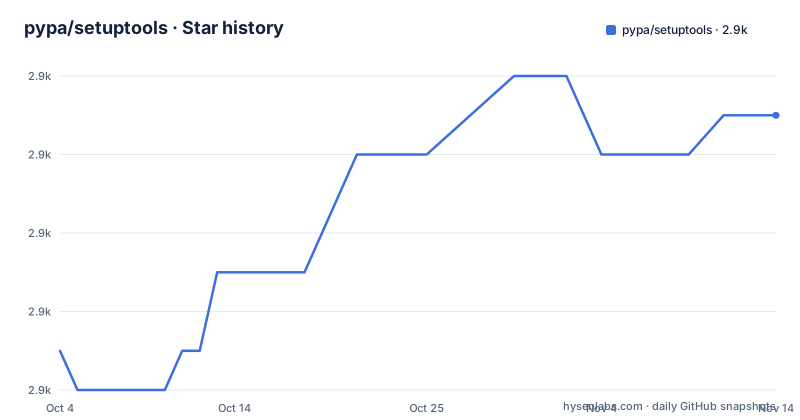
Star history
- pypa/setuptools2,871 ★ · +6
| Repository | 2026-10-04 | 2026-11-14 |
|---|---|---|
| pypa/setuptools | 2.9k | 2.9k |
6 Stars in the last 41 days, measured from the daily GitHub snapshot. Compare with other projects
Editorial analysis
The install command writes a file that runs at interpreter startup
setup.py in this repository is not a packaging script in the usual sense. It defines a custom install command whose only job is to add one file, and the file's contents are this:
import os
var = 'SETUPTOOLS_USE_DISTUTILS'
enabled = os.environ.get(var, 'local') == 'local'
enabled and __import__('_distutils_hack').add_shim()
It is written as a path configuration file, which the interpreter processes automatically at startup, and it is installed under the name distutils-precedence. What it does is read an environment variable that defaults to local and, when it holds that value, import a module named _distutils_hack from this package and call add_shim on it, so the bundled copy of distutils takes precedence over the one in the standard library.
The class carries a docstring that is worth reading in full. It says there is no standard way to install behaviour on startup, that it is debatable whether there should be one, that this abuses the extra_path behaviour of Setuptools to do it, and then: please do not replicate this behavior.
A second method exists purely to undo a side effect, resetting install_lib when the extra path turns out to have been added to it. The module the shim imports lives in a _distutils_hack directory at the repository root.
The build requires list is empty and the backend path points at itself
The build system table in pyproject.toml has a requires list with nothing in it:
[build-system]
requires = [
	# "setuptools>=77",
	# "setuptools_scm[toml]>=3.4.1",
	# jaraco/skeleton#174
	# "coherent.licensed",
]
build-backend = "setuptools.build_meta"
backend-path = ["."]
Four candidate entries are present as comments, one of which is not a package at all but an issue reference in another project's tracker. So the list is empty by decision rather than by oversight, and the two lines beneath it say what that means: the backend is setuptools.build_meta, and backend-path is set to the repository root, so the backend is imported from the checkout rather than from an installed copy.
That is the arrangement a project uses when it builds itself from its own tree, and it is why the file can afford to name no build requirements. Anyone copying this table into another project should note that an empty list plus a local backend path is a special case rather than a pattern.
No runtime dependencies and eighteen test dependencies
The project's own dependency list is empty:
dependencies = [
]
The optional test group is where the maintenance record lives. It names pytest with an exclusion of the entire 8.1 series, virtualenv, wheel, pip, packaging, several jaraco packages, build, filelock, ini2toml, tomli-w, pytest-xdist, pytest-timeout and pytest-perf.
Three of those entries carry a comment explaining why the pin exists. The wheel floor is there for consistent requirement normalisation in the generated metadata, with an issue number. The pip floor is for proper file URL support. And pytest-perf is marked to be skipped on Cygwin, with two upstream issue references in the comment. That is the shape of a real dependency list after years of someone fixing things: not a minimum set, but a list with the scar tissue left in.
The final entry, jaraco.develop, is behind a Python version marker rather than a platform one, so the test environment changes shape with the interpreter it runs on.
Two coverage configs, two type checkers and two changelog tools
The repository root carries more than one tool for several jobs, which is unusual enough to be worth listing.
Coverage is configured twice, with a .coveragerc file and a .codecov.yml file. Type checking is configured twice as well, with a mypy.ini and a pyrightconfig.json, alongside a ruff.toml for linting and formatting. Tests run through both a pytest.ini and a tox.ini, with a conftest.py at the root.
Changelogs have two mechanisms. There is a towncrier.toml together with a newsfragments directory, which is the fragment based workflow where each change is a small file that gets assembled into NEWS.rst at release time. There is also a .bumpversion.cfg, which is the other way to do it. Running both means the version bump and the changelog assembly are two separate steps that have to agree.
The rest of the root is what a project of this kind accumulates: an AGENTS.md, a SECURITY.md, a CODE_OF_CONDUCT reference to the PSF document, a .mergify.yml for a merge bot, a .pre-commit-config.yaml, an .editorconfig, a .readthedocs.yaml, MANIFEST.in and a LICENSE.
The coverage badge reads a branch that is not the default
Two of the badges in the README point somewhere they should not.
The coverage badge is fetched from a path ending in the branch name master:
https://img.shields.io/codecov/c/github/pypa/setuptools/master.svgwhile the default branch of this repository is main. A badge built that way reports on a branch that is no longer where the work lands, which is the same mistake that appears in the coverage badge of several other Python projects and is easy to miss because a badge always renders something.
The lint badge has a smaller version of the same problem. Its image is fetched from a raw content path under the owner charliermarsh, while the link the badge points to is the astral-sh repository. Both names refer to the same project, but the two are not the same string, so the badge is being served from a location that is no longer where the project lives.
The remaining badges, for the PyPI version, the supported Python versions, the tests workflow, the documentation and the chat server, are built from the project's own locations.
An enterprise section exists and its badge was defined but never placed
The README defines a badge substitution for a funding platform and then never uses it.
The substitution block declares a tidelift badge with an image and a target, in the same list as the version, the Python versions, the test workflow, the linter, the documentation, a project template badge, the coverage badge and the chat server badge. The row that actually renders the badges is:
|pypi-version| |py-version| |test-badge| |ruff-badge| |docs-badge| |skeleton-badge| |codecov-badge| |discord-badge|The funding badge is absent from that row. It is not a formatting slip with a visible consequence, because the body of the file still carries a For Enterprise section explaining that the project is available as part of a paid subscription that bundles it with the maintainers of thousands of other packages, and it still carries the learn more link for that subscription.
So the commercial section is present, the link is present, and the badge that would normally sit at the top of the file is not. That is the kind of inconsistency worth raising with the maintainers, and it is also a reminder that the header of a widely forked README is edited in more places than one.
A C launcher and a committed egg-info in a Python build tool
Three entries in the repository root do not belong to a Python packaging project by expectation.
There is a launcher.c file and a launcher directory. A C source file in a repository whose purpose is building Python packages is not a stray experiment: the project describes itself in its metadata as the most extensible Python build backend with support for C and C++ extension modules, so a launcher written in C is the kind of component that lets a build backend start a compiler or a subprocess without paying for a Python process first.
There is a bootstrap.egg-info directory, which is generated output from a build. Generated metadata directories are normally excluded by a .gitignore, and this one is committed, which means whatever it contains was produced by a specific run on a specific machine and will sit in the tree until someone removes it.
And there is an exercises.py file at the root, next to conftest.py. A file with that name is either a practice script or a leftover, and nothing in the README explains it.
Version 84.0.0, Python 3.10 as the floor, and no install command
The version in the project metadata is 84.0.0, and the newest release tag is v84.0.0 published on 2026-08-08, after v83.0.0 on 2026-07-04 and v82.0.1 on 2026-03-09. The two agree, which is worth noting in a project that carries two version bump mechanisms in its root. The branch was pushed on 2026-09-10, about a month after that release.
The Python floor is 3.10, and the classifiers stop at the generic markers: Programming Language :: Python :: 3 and Programming Language :: Python :: 3 :: Only. No per minor version is claimed, unlike most packages in this position, so the metadata does not tell a reader which versions are actually tested even though the badge advertises the supported versions from elsewhere.
The README itself contains no installation command at all. It is a pointer file: a quickstart link, a user's guide link, a note that questions go to GitHub Discussions, a note that bug reports and tested patches go to the issue tracker, a pointer to the PSF Code of Conduct, and the enterprise section. The keywords field carries a small history in itself, listing CPAN, PyPI, distutils, eggs and package management.
Editorial conclusion
Setuptools fits anyone building or installing a Python package, and there is no practical alternative for the packaging path it owns, so reading what it does on your machine is worth the time. Four things to know. Installing it places a .pth file that executes at interpreter startup and calls into an internal module, gated by an environment variable whose default is on, and the source itself calls this a hack it does not want copied. Its own build declares no requirements at all, with four candidate entries commented out, and a backend path pointing at its own tree. The runtime dependency list is empty while the test group carries around eighteen entries, including an exclusion of the entire pytest 8.1 series. And the coverage badge reads a branch that is not the default one. The version is 84.0.0, released on 2026-08-08, with the branch pushed on 2026-09-10 and Python 3.10 as the floor.
Frequently asked questions
What is the latest version of setuptools?
The project metadata declares 84.0.0, and the newest release tag is v84.0.0 published on 2026-08-08, following v83.0.0 on 2026-07-04 and v82.0.1 on 2026-03-09. The version badge at the top of the README reads from the PyPI project page rather than from the repository.
How do I install setuptools?
This repository does not carry an install command. It points at the quickstart and the user's guide on setuptools.pypa.io, sends questions to GitHub Discussions and bug reports to the issue tracker. What the metadata does state is that the project requires Python 3.10 or newer, and it declares no runtime dependencies of its own.
What does setuptools put in site-packages that runs at interpreter startup?
Its setup.py defines an install command that adds a path configuration file named distutils-precedence. That file reads the SETUPTOOLS_USE_DISTUTILS variable, whose default is local, and calls add_shim on the internal _distutils_hack module when it holds that value, so the bundled distutils takes precedence over the standard library one. The source calls this a hack and asks readers not to replicate it.
Why does setuptools declare no runtime dependencies?
The dependency list in its project metadata is empty. The optional test group carries around eighteen entries instead, including pytest, virtualenv, wheel, pip, build and several jaraco packages, and that group excludes the entire pytest 8.1 series and marks pytest-perf to be skipped on Cygwin.
What is setuptools, given how short its README is?
Its own metadata describes it as the most extensible Python build backend with support for C and C++ extension modules, and the build system table names setuptools.build_meta as the backend, with a backend path pointing at the repository root. The README is a pointer file that links the quickstart and the user's guide and sends questions to GitHub Discussions.
Official sources
Add this badge to your README
If you maintain this project, the badge below links readers to this analysis and shows its maintenance status from the daily GitHub snapshot. Paste the markdown into your README; add ?metric=license or ?metric=stars to the image URL for a different field.

[](https://hysenlabs.com/projects/pypa-setuptools)Star history chart for your README
[](https://hysenlabs.com/projects/pypa-setuptools)Was this useful?