Qiling puts an OS layer on top of Unicorn so Windows binaries run on Linux, and the hooks go to syscall level
A True Instrumentable Binary Emulation Framework
At a glance
- What is it?
- Qiling is a Python binary emulation framework built on Unicorn Engine, with loaders for PE, Mach-O and ELF, syscall and IO handlers, hooks, snapshots and a reverse debugger. It is a Beta-classified GPL-2.0-or-later project whose install steps live in a wiki, not in the README.
- Who is it for?
- Use Qiling when you analyse malware, firmware or CTF binaries and want to run them without their native OS while hooking syscalls, memory and instructions from Python. Do not use it if you only need raw CPU emulation, where Unicorn alone is enough.
- Can I use it commercially?
- Yes, with conditions. GPL-2.0 is a copyleft licence: if you distribute software that includes it, you must release that software's source code under the same licence. Running it internally without distributing it does not trigger that obligation.
- Is it still maintained?
- Yes. The repository last received commits 33 days ago.
- What is it written in?
- Mainly Python, according to GitHub's language statistics.
Answers come from the project's GitHub data, last synced on November 25, 2026, and from our analysis. They are not legal advice.
Star history
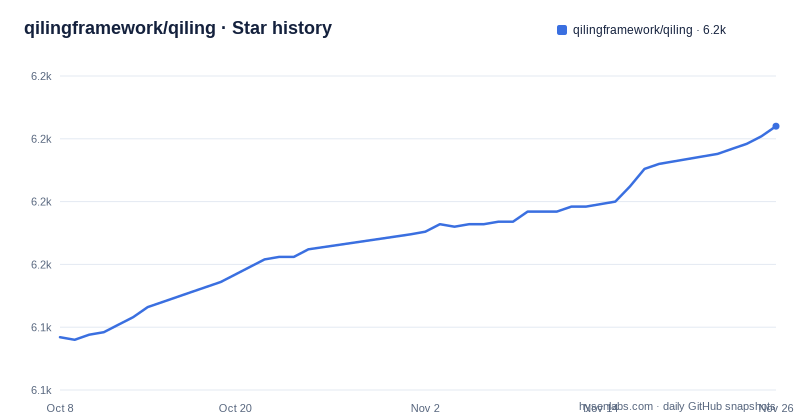
- qilingframework/qiling6,201 ★ · +80
| Repository | 2026-10-08 | 2026-11-25 |
|---|---|---|
| qilingframework/qiling | 6.1k | 6.2k |
80 Stars in the last 48 days, measured from the daily GitHub snapshot. Compare with other projects
Editorial analysis
Unicorn runs the CPU, and Qiling adds loaders, linkers and syscall handlers
Qiling is built on Unicorn Engine, and the project is explicit that the two are different. Unicorn is a CPU emulator. It emulates raw machine instructions against emulator memory and has no notion of dynamic libraries, system calls, I/O handling or executable formats such as PE, Mach-O or ELF. Qiling leverages Unicorn for the instructions and adds the operating system context: executable format loaders for PE, Mach-O and ELF, dynamic linkers that load and relocate shared libraries, and syscall and IO handlers.
The practical result, in the project's own words, is that Qiling can run an executable binary without its native OS. You give it a program and a root filesystem, and it supplies the OS behaviour in Python. The dependency pin in pyproject.toml shows the stack: unicorn is fixed at 2.1.3, with capstone ^5 for disassembly, keystone-engine ^0.9.2 for assembly, pefile, pyelftools and python-registry for the formats. If you only need to step through a few machine instructions, Unicorn on its own is smaller. Qiling pays off once the target makes calls into an OS.
The same file lists gevent and multiprocess as dependencies, along with pyyaml, questionary, termcolor and python-fx, and windows-curses on Windows only. The questionary and curses entries line up with the qltui.py module that the package includes next to the qiling directory. Installing the framework therefore pulls in a larger set of Python packages than a bare emulator would, and a version conflict with unicorn 2.1.3 in an existing environment is the first thing that can go wrong. A virtual environment per analysis project avoids that.
Running a Windows .exe takes two lines and a rootfs directory
The README's first example emulates a Windows executable against a bundled root filesystem.
from qiling import Qiling

if __name__ == "__main__":
    # initialize Qiling instance, specifying the executable to emulate and the emulated system root.
    # note that the current working directory is assumed to be Qiling home
    ql = Qiling([r'examples/rootfs/x86_windows/bin/x86_hello.exe'], r'examples/rootfs/x86_windows')

    # start emulation
    ql.run()
The first argument is a list holding the program and its arguments. The second is the emulated system root, which carries the DLLs and files the program expects to find. That is the cost of the design: the framework does not ship a Windows, so the rootfs has to contain the libraries your sample loads. The paths in the example are relative, and the comment says the working directory is assumed to be the Qiling checkout, so the snippet fails from any other directory. The examples/ folder holds ready-made rootfs trees such as x86_windows.
The repository's top level also has a qltool script and qltui.py, so there is a command line and a text interface for launching emulation without writing Python. The pyproject.toml scripts table maps qltool to qiling.cli:run. For anything beyond running a sample once, you will still write Python, because the hooks, patches and state handling described below are API calls on the Qiling object.
Hooks reach from single instructions to syscalls and IO
Instrumentation is the feature that separates Qiling from a plain runner. The README lists hooks at the instruction, basic-block, memory-access, exception, syscall and IO levels, plus memory, register, OS-level and filesystem-level APIs. Running code can be patched on the fly, and that includes libraries already loaded.
The second README example shows the idea with a Windows crackme. A callback reads the DialogFunc address from the current stack frame with ql.stack_read(-8), pushes four values onto the emulated stack with ql.stack_push (including 1001 for IDS_APPNAME and 0x111 for WM_COMMAND), pushes a return address, and then sets ql.arch.regs.eip to the dialog function. The patched program always shows its Congratulation dialog. Notice what that demands from you: you must already know the target's stack layout and addresses. Qiling gives the control point, but you supply the reverse-engineering. The repository ships several crackme_x86_windows examples that vary this idea, including one with a set callback and one that unpatches.
Snapshots and a reverse debugger sit behind the VM-level API
Qiling provides virtual machine level operations, including saving and restoring the current execution state. For fuzzing and repeated experiments that matters, since you can capture state after a program finishes initialising and rewind to it for every input rather than restart emulation each time.
There is also a built-in debugger with reverse debugging capability, and the framework supports cross-architecture and cross-platform debugging. The examples directory contains hello_arm_linux_debug.py, hello_mips32el_linux_debug.py and adcache_x86_windows_debug.py, plus hello_x8664_gdb_macos.py, so debug attachment is shown for several architectures. Fuzzing support arrives through optional extras in pyproject.toml: the fuzz extra pulls unicornafl, which is excluded on Windows, and fuzzercorn, which applies on Linux only. An examples/fuzzing directory is included.
A second extra, RE, installs r2libr ^5.7.4 for radare2 integration. Neither extra is installed by default, so a plain install gives you emulation, hooks and the debugger but not the AFL-style fuzzing path. On Windows the unicornafl dependency is skipped entirely, which means the fuzzing workflow is a Linux and macOS affair in practice.
Where Qiling differs from QEMU user mode
The project names QEMU user mode as the other close relative and lists four differences. Qiling is a framework for building your own dynamic analysis tools in Python, while QEMU is a tool. Qiling can instrument and hot patch code at runtime, which QEMU does neither. Qiling is cross-platform as well as cross-architecture, so a Linux ELF can run on top of Windows, whereas QEMU user mode only runs binaries of the same OS because it forwards syscalls to the native kernel. And Qiling covers Windows, macOS, Linux and BSD, where QEMU user mode handles Linux and BSD.
These are the project's own claims about a competitor, so verify them for your use case. They also describe a trade. QEMU user mode forwards syscalls to a real kernel, which sidesteps the work of re-implementing them. Qiling re-implements the OS layer, which gives you control and portability, and makes coverage of each syscall or Windows API the thing to check for a given sample. Platforms listed are Windows, macOS, Linux, Android, BSD, UEFI, DOS and MBR.
Architecture and format coverage is wide, with Demigod handling kernel modules
The architecture list is 8086, X86, X86_64, ARM, ARM64, MIPS, RISC-V and PowerPC. File formats are PE, Mach-O, ELF, COM and MBR. Windows drivers (.sys), Linux kernel modules (.ko) and the macOS kernel (.kext) are supported through Demigod, which is a separate project linked from the README rather than code in this repository.
The example files show the spread in practice: hello_8086_dos.py and doogie_8086_crack.py for DOS, hello_arm_uboot.py for U-Boot, hello_arm_qnx.py for QNX, hello_arm_linux_custom_syscall.py for custom syscalls, and hello_mips32_linux_customapi.py for custom API hooks. A listed architecture does not mean every OS and format pairing works. A listed architecture is no guarantee for a given pairing, so a Windows ARM64 or RISC-V Android binary needs a trial run before you plan around it. For firmware work, the project ties itself to MCU and IoT analysis through its conference talks from 2019 to 2022, including Black Hat Arsenal slots on firmware emulation.
The talk list also includes Hack In The Box sessions, a fuzzer-building lab based on a 1day bug, Nullcon in 2020 and DEFCON demo labs in 2019. The newest entries in the README are from 2022, so the conference record says little about current direction. The repository additionally carries ARCHITECTURE.md, an ARCHITECTURE/ directory, TODO.md and a ChangeLog, which are the places to read before extending the framework with a new OS or architecture.
Installation lives in a wiki, and pyproject.toml marks the project as Beta
The README has no install command. It sends readers to a setup guide in the GitHub wiki. What the repository files do tell you: pyproject.toml requires Python ^3.10, declares the name qiling at version 1.4.11, uses poetry-core for builds, and registers a qltool console script pointing at qiling.cli:run. The classifier reads Development Status 4 - Beta, and the license field is GPL-2.0-or-later. The README grants the GNU General Public License version 2 or any later version, so code you link against Qiling takes on that obligation.
A Dockerfile is included. It starts from python:3.13-slim-trixie, installs build tools in a builder stage, runs poetry install and builds a wheel, then installs that wheel into the final image, and the container opens with bash. It sets AM_I_IN_A_DOCKER_CONTAINER=True. Releases are v1.4.11 on 2026-09-06, 1.4.10 on 2026-04-28 and 1.4.7 on 2025-03-08, and the last push was on 2026-10-23. That gap between 1.4.7 and 1.4.10 is over a year, so pin a version in your project.
Editorial conclusion
Use Qiling when you analyse malware, firmware or CTF binaries and want to run them without their native OS while hooking syscalls, memory and instructions from Python. Do not use it if you only need raw CPU emulation, where Unicorn alone is enough. Before relying on it, run one of the examples against a rootfs for your target platform and see whether the APIs your sample calls are implemented.
Frequently asked questions
What is the Qiling framework?
Qiling is an advanced binary emulation framework written in Python and built on Unicorn Engine. It emulates multiple platforms and architectures and lets you hook execution at levels from instruction to syscall.
How do I use Qiling?
Create a Qiling instance with the executable and an emulated root filesystem, for example Qiling([r'examples/rootfs/x86_windows/bin/x86_hello.exe'], r'examples/rootfs/x86_windows'), then call ql.run(). Installation steps are in the project wiki.
How does Qiling differ from Unicorn Engine?
Unicorn only emulates CPU instructions and has no OS context. Qiling builds on Unicorn and adds loaders for PE, Mach-O and ELF, dynamic linkers, and syscall and IO handlers, so it can run a binary without its native OS.
What licence does Qiling use?
Qiling is distributed under the GNU General Public License version 2 or, at your option, any later version. pyproject.toml records this as GPL-2.0-or-later.
Official sources
Where developers are discussing it
Posts on Hacker News, dev.to and Lobsters that link to this repository, found by our scan of those communities. 0 in the last 30 days; newest first.
- Qiling a True Instrumentable Binary Emulation FrameworkHacker News · Oct 18, 2026 · 2 points · 0 comments
Add this badge to your README
If you maintain this project, the badge below links readers to this analysis and shows its maintenance status from the daily GitHub snapshot. Paste the markdown into your README; add ?metric=license or ?metric=stars to the image URL for a different field.

[](https://hysenlabs.com/projects/qilingframework-qiling)Star history chart for your README
[](https://hysenlabs.com/projects/qilingframework-qiling)Was this useful?