oba-live-tool: Multi-account control for Chinese livestream commerce
直播带货工具,支持平台:抖音小店、巨量百应、抖音团购、小红书、视频号、快手小店、淘宝
At a glance
- What is it?
- oba-live-tool is an Electron and Playwright desktop utility for livestream sellers using Douyin, Xiaohongshu, WeChat Channels, Kuaishou, Taobao, and related commerce consoles. It automates repeated console actions and AI-assisted replies, but platform coverage and operating conditions differ by feature.
- Who is it for?
- oba-live-tool fits Windows-based livestream operators who repeatedly manage several commerce consoles and can keep each account session healthy. It is a poor fit for teams needing documented cross-platform rollback, unrestricted multi-instance use, or uniformly supported AI replies across every listed marketplace.
- Can I use it commercially?
- Check first. The repository uses a licence we do not classify automatically, so read its LICENSE file before any commercial use.
- Is it still maintained?
- Yes. The repository last received commits 1 day ago.
- What is it written in?
- Mainly TypeScript, according to GitHub's language statistics.
Answers come from the project's GitHub data, last synced on November 7, 2026, and from our analysis. They are not legal advice.
Star history
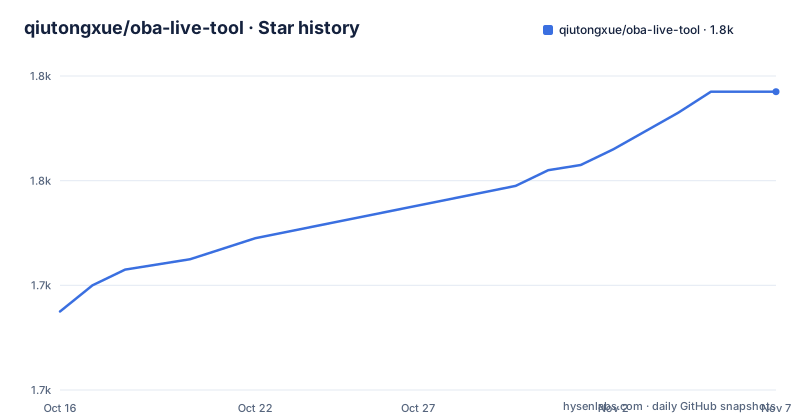
- qiutongxue/oba-live-tool1,777 ★ · +42
| Repository | 2026-10-16 | 2026-11-07 |
|---|---|---|
| qiutongxue/oba-live-tool | 1.7k | 1.8k |
42 Stars in the last 22 days, measured from the daily GitHub snapshot. Compare with other projects
Editorial analysis
What oba-live-tool automates for livestream sellers
oba-live-tool targets the repetitive parts of operating a Chinese livestream commerce console. The README says it supports Douyin Store, 巨量百应, Douyin group buying, Xiaohongshu, WeChat Channels, Kuaishou Store, and Taobao. Its main use cases are sending scheduled or repeated messages, opening product explanations through keyboard shortcuts, replying to audience comments, issuing red packets on supported platforms, and managing separate accounts inside one desktop application.
The application is aimed at operators who already have access to the relevant platform console. The README specifically says that Douyin Store, 巨量百应, Douyin group buying, and Xiaohongshu Qianfan accounts must be able to enter the console normally. This is not a general-purpose livestream production system. It does not document camera control, audio mixing, stream hosting, inventory management, or moderation. Its scope is closer to a browser-session automation console for people who need faster control of repetitive interactions during a broadcast.
Feature support is uneven. AI replies are documented for Douyin Store, 巨量百应, WeChat Channels, and Xiaohongshu. Red packets are documented only for 抖店 and 百应. For platforms without comment pinning, the pin control is unavailable. That distinction matters when one operator uses the same workflow across several marketplaces.
Electron, React, Playwright, and the controlled browser session
Based on the repository layout and package.json, oba-live-tool is an Electron application with a Vite-built frontend and a main process that can launch browser sessions through Playwright. The package also includes playwright-extra and puppeteer-extra-plugin-stealth, indicating that the project builds its browser automation around Playwright rather than exposing only a web dashboard. The application UI is TypeScript-based, with React dependencies and Radix UI components visible in package.json.
The connection flow is important because the automation does not operate as a disconnected scheduler. The operator opens the console from the feature list, selects “连接直播控制台”, logs in when prompted, and waits for the application to display a green status indicator and “已连接”. Auto messages, product pop-ups, and auto replies depend on this connection. If Chrome or Edge cannot be found, the README directs the operator to the application settings and browser settings.
The browser can run in headless mode, in which case no browser window is visible. For troubleshooting or visual confirmation, the operator can disable that mode. The project also separates browser context environments between configured accounts, which is useful when different sessions need different settings. The README warns that two configured accounts should not connect to the same console at the same time.
Messages, product shortcuts, and configuration changes
Automatic messages support variable groups written with braces and slash-separated alternatives. The README gives the form `{老铁/宝宝/家人们}可以看看我们的{一号/二号}链接哦`, from which the application can select one item from each group and combine the result with the remaining text. This is a simple randomized text assembly mechanism, not a separate scheduling language. A line can also be pinned on platforms that provide comment pinning.
Product pop-ups use keyboard mappings for one or more products. A shortcut works while the automatic pop-up page is active, unless the operator enables the global shortcut setting. The README says that a global shortcut can continue to work while the application is minimized, but it warns against choosing a combination that conflicts with system or other application shortcuts.
Configuration changes have a concrete operational consequence. The README states that runtime configuration updates are not currently provided. After changing a task configuration, the operator must restart the task for the new settings to take effect. This limitation makes change testing more manual, especially during a live session where stopping and restarting a task may not be acceptable.
The one-click flood feature continuously sends messages from the message list and adds random spaces. The README identifies visible spaces as a possible source of text layout problems. That feature also raises a separate operational question about platform rules and audience experience, although the README does not define a safe sending rate or moderation threshold.
Comment listening, rule priority, and AI provider boundaries
Auto reply can listen either to the console's interaction window, which contains comments, or to the broadcaster version of the large screen for supported Douyin Store and 巨量百应 contexts. The latter includes comments, room entry, likes, brand membership joins, follows, fan-club joins, and order information. Entry and like replies work only when the selected entrance is “罗盘大屏”.
Keyword and AI replies can be enabled together. A matching keyword takes priority over AI handling, and when the same keyword appears in several rules, the earlier rule is selected. Multiple reply texts are chosen randomly. The replacement token `{用户名}` is expanded with the current nickname, with a hidden-username option producing a masked form.
AI replies require an API key and model. The README lists DeepSeek, OpenRouter, SiliconFlow, and 火山引擎 presets, plus a custom option for services compatible with the OpenAI chat interface. For AI reply, new comments after “开始任务” are sent as JSON containing the nickname and comment content. The prompt controls the role, product context, response format, and token consumption. The README notes that most listed models may charge money, so account credit and provider pricing need checking before use.
The WebSocket option broadcasts listened comments to connected clients. It starts a local server on `0.0.0.0` using a configured port. That binding detail deserves attention on shared machines or networks because the README does not document authentication for this service.
First installation and a verifiable connection test
The README gives two installation paths. Most users should download the latest package from the GitHub Releases page. The stated system requirements are Windows 10 or later, with macOS described as something to try. Chrome or Edge must be installed. A first source build uses the commands below, and the README says the build output is placed in the `/release` folder.
git clone https://github.com/qiutongxue/oba-live-tool.git
cd oba-live-tool
pnpm install
pnpm build
These commands clone the repository, install dependencies, and run the package's build script. The script includes TypeScript compilation, Vite, and electron-builder according to package.json. The README does not document a separate `pnpm dev` walkthrough for the first console connection, so the release package is the clearest path for validating the documented workflow.
For the first real use, open the automatic features area, select “打开中控台”, connect to the live console, and log in if the browser asks. Wait for the green indicator and “已连接”. Then configure a short automatic message and start its task. The operator should confirm that the message appears in the target console before adding product shortcuts or AI rules. This is a practical check of account access, browser discovery, console connection, and task execution.
Where oba-live-tool is constrained
The strongest constraint is that console connection is a prerequisite. A browser installation, valid platform login, and accessible console are all required. Video Channels and Taobao may require the stream to be live before connection. The application therefore cannot be evaluated as a fully standalone messaging bot without first preparing each platform environment.
The README does not document rollback for application settings, browser sessions, or platform actions. It also does not provide a documented recovery procedure for a failed message, a missed comment, or a WebSocket client that remains connected after a task stops. The absence of rollback documentation does not prove that recovery is impossible, but it leaves operators without a confirmed procedure for those cases.
The application does not support multiple instances, according to the README. It does support multiple configured accounts, each with independent settings and browser contexts, and the accounts can run simultaneously unless they connect to the same console. This is a narrower model than a team tool with separate machine identities. The default account, meaning the first account, cannot be deleted through the stated account deletion control.
The repository metadata reports a custom LICENSE category even though README and package.json identify MIT. Because the LICENSE file contents are not included here, license obligations should be checked directly in that file before redistribution or commercial deployment.
Release cadence, packaging, and upgrade effort
The repository is not archived, and the last push was on 2026-10-16. The recorded releases include v1.6.3 on 2026-09-14, v1.6.2 on 2026-09-11, and v1.6.1 on 2026-04-24. Those dates indicate recent project activity, but they do not by themselves establish compatibility with every supported commerce platform.
Distribution is currently through GitHub Releases. The README explains how to enter a custom proxy prefix for release downloads, but it also states that GitHub is dependable while the named `gh-proxy.com` service is only occasionally available and that other GitHub proxies are generally unavailable. Operators should not build an update process around an unverified third-party proxy.
Upgrades may involve packaged application changes as well as platform console changes. The README does not document automatic migration of account configurations or a compatibility matrix for each release. The custom WebSocket port, browser location, AI provider configuration, account environments, and task settings are therefore practical items to recheck after an upgrade. The package also contains electron-builder configuration and an application update configuration file, but the README does not explain their rollback behavior.
Editorial conclusion
oba-live-tool fits Windows-based livestream operators who repeatedly manage several commerce consoles and can keep each account session healthy. It is a poor fit for teams needing documented cross-platform rollback, unrestricted multi-instance use, or uniformly supported AI replies across every listed marketplace. Verify the LICENSE file, the exact console and account permissions, the selected AI provider's data and cost terms, and the feature limits for each platform before deployment. The repository's last push was on 2026-10-16, and the current release is v1.6.3.
Frequently asked questions
Does oba-live-tool support Windows and macOS?
The README lists Windows 10 and later as the stated requirement and says macOS can also be tried. It also requires Chrome or Edge to be installed.
Which platforms support oba-live-tool AI replies?
The README says AI automatic replies are limited to Douyin Store, 巨量百应, WeChat Channels, and Xiaohongshu. The feature is not documented as available on every listed platform.
Does oba-live-tool support multiple instances or multiple accounts?
The README says the software does not support multiple instances, but it supports multiple configured accounts. Each account has independent settings and browser context, and accounts can run simultaneously unless they connect to the same console.
Official sources
Add this badge to your README
If you maintain this project, the badge below links readers to this analysis and shows its maintenance status from the daily GitHub snapshot. Paste the markdown into your README; add ?metric=license or ?metric=stars to the image URL for a different field.

[](https://hysenlabs.com/projects/qiutongxue-oba-live-tool)Star history chart for your README
[](https://hysenlabs.com/projects/qiutongxue-oba-live-tool)Was this useful?