pi-dynamic-workflows triggers on a bounded keyword, and its worked example ends mid-string
Claude Code–style dynamic workflows for Pi: code-mode subagents with real model routing, journaled resume, git-worktree isolation, cost accounting, an interactive /workflows TUI, an /ultracode standing opt-in, and deep research.
At a glance
- What is it?
- The extension turns a request into a JavaScript orchestration script that fans out across isolated subagents, routes each call to a model tier and journals completed work for resume. Its README capability table is generated from the executable contract, and the sample script does not parse as printed.
- Who is it for?
- Take it when a single request is genuinely too broad for one agent and one context window, and read the usage accounting before you trust a cost number, because estimated totals are marked with a tilde except in the script-facing budget calls. Two defaults to change first: worktrees are kept after every isolated call, so pass `keepWorktree: false` if you do not want a branch per agent, and the keyword trigger arms workflow mode from an ordinary sentence.
- Can I use it commercially?
- Yes. MIT is a permissive licence: you can use, modify and sell software built on it, as long as you keep its copyright and licence notices.
- Is it still maintained?
- Yes. The repository last received commits 2 days ago.
- What is it written in?
- Mainly TypeScript, according to GitHub's language statistics.
Answers come from the project's GitHub data, last synced on November 14, 2026, and from our analysis. They are not legal advice.
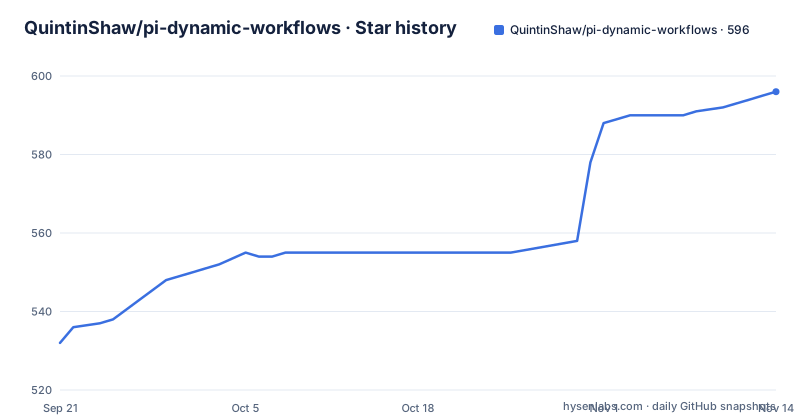
Star history
- QuintinShaw/pi-dynamic-workflows596 ★ · +64
| Repository | 2026-09-21 | 2026-11-14 |
|---|---|---|
| QuintinShaw/pi-dynamic-workflows | 532 | 596 |
64 Stars in the last 54 days, measured from the daily GitHub snapshot. Compare with other projects
Editorial analysis
The keyword trigger arms the tool without forcing it
Installing is one command, then a reload, then a plain request:
pi install npm:@quintinshaw/pi-dynamic-workflowsWhat makes the extension feel automatic is a bounded word trigger that is on by default. Put the word `workflow` or `workflows` in a message and workflow mode is armed, so the assistant handles the request by fanning it out across agents. The page is careful about the limit: the trigger authorizes the tool, it does not force it, and a message that is only asking about workflows still gets a plain answer.
The trigger is bounded in a second way too. Identifier-like text and paths do not count, so `myworkflow`, `workflow_name` and `src/workflow-editor.ts` stay inert. That is the difference between a substring match and a word match, and the page spells out the three counterexamples so a project full of `workflow` in identifiers does not arm the mode on every message. The keyword can be changed with `/workflows-trigger set pi-workflow` or switched off entirely with `/workflows-trigger off`, and the explicit route `/workflows run <prompt>` bypasses the trigger altogether.
The worked example stops inside the prompt string
The orchestration is plain JavaScript with four primitives, `agent()`, `parallel()`, `pipeline()` and `phase()`, and the sample is the shape of a real audit:
export const meta = {
  name: 'auth_audit',
  description: 'Find routes missing auth checks and verify the findings',
  phases: [{ title: 'Scan' }, { title: 'Review' }, { title: 'Verify' }],
}

phase('Scan')
const files = await agent('List every route file under src/routes/.', { tier: 'small' })

phase('Review')
const findings = await parallel(
  files.split('\n').filter(Boolean).map((file) =>
    () => agent(`Audit ${file} for missing auth checks.`, {
      tier: 'medium',
      isolation: 'worktree',
    }),
  ),
)

phase('Verify')
return await agent(
  'Synthesize and double-check the
The final `return` is cut off inside its own prompt string, so the example as printed neither parses nor closes. Everything before it is instructive: the cheap tier for the listing step, a middle tier per file, `isolation: 'worktree'` on each concurrent call, and the file list travelling as a script variable rather than through the conversation.
The capability table is generated from the executable contract
The supported-capabilities index in the page is not hand-written. It sits between generated markers and comes from the extension's executable capability contract, and the release gate enforces that: `docs:check` runs the generator in check mode, so a table row that has drifted from the code fails the release.
Reading the generated rows gives you the real defaults rather than a summary. `agent()` takes `label`, `phase`, a plain JSON Schema under `schema`, `model`, `thinking` with seven levels from `off` to `max`, `tier`, `isolation`, `keepWorktree`, `cwd`, `thread`, `agentType`, `timeoutMs` and `retries`. A run timeout is finite and bounded to the range from 1 to 2^31-1 milliseconds, and passing `null` for `timeoutMs` disables it. `verify()` defaults to 2 reviewers and a threshold of 0.5 and returns per-reviewer verdicts, while `judgePanel()` defaults to 3 judges with the rubric `overall quality and correctness`. `parallel`, `pipeline` and `workflow` take no options at all.
One caveat the page attaches to the table: configured route and agent-type values stay environment-specific, so the contract tells you the shape of a valid call and not which values your machine accepts.
Estimated tokens are marked with a tilde, except where an API cannot mark them
Usage reporting is where this project is unusually careful about its own honesty. Real tokens and cost are reported from each subagent session, and run, phase or agent budgets are opt-in, added only when you want them.
The interesting case is a provider session that ends without reporting usage. Those totals become heuristic character estimates, and the interface renders them with a `~` prefix, for example `~640 tok`, never silently as metered figures. The gap is named too: the script-facing `budget.spent()` and `budget.remaining()` are raw numbers and cannot carry the marker, so a script that prints its own remaining budget gets an estimate with no tilde on it.
That is the shape of the compromise. The UI surface can distinguish measured from estimated, and the programmatic surface cannot, so anything reading `budget.remaining()` programmatically has to know that the number may be a character-count estimate rather than a billed total. The progress panel and the `/workflows` navigator show phases, agents, models, fresh and cache tokens, cost and live tokens per second, which is where the marked figures are visible.
Resume replays from cache even after you edit the script
Journaled resume is the feature that changes the economics. Completed agents are replayed after an interruption without rerunning them or spending their tokens again. The stronger form is editing: the orchestrator can resume a previous run with a changed script through `resumeFromRunId`, and unchanged `agent()` calls replay from cache while only edited or new calls actually run.
The stated payoff is that one bad prompt no longer means paying to re-run the whole workflow. That matters most for the fan-out case, where a single synthesized or verification step at the end can be wrong while dozens of completed per-file calls sit in the journal. Re-running everything to fix one prompt is the failure mode this design removes.
Reusable workflows extend the same idea across runs. Any run can be saved as a command and called from another workflow through `workflow(savedName, childArgs?)`, so a review pattern becomes a building block rather than something you rewrite per project.
Worktrees are kept by default, so a fan-out leaves branches behind
Isolation is set per call with `isolation: "worktree"`, and parallel agents then edit on separate branches. The default for `keepWorktree` is `true`, so those branches are deliberately kept for merging afterwards; passing `keepWorktree: false` deletes them, and the page associates that with test runs.
Read that default next to the scale numbers: one orchestration script can fan out up to 16 concurrent subagents and 1000 in total. A 16-way parallel review therefore leaves 16 branches on your machine unless you change the flag, and the concurrency cap is what keeps a single script from opening an unbounded number of working copies at once.
Routing is separate from isolation. Each call can take a tier, `small`, `medium` or `big`, or name an exact provider and model with a thinking level, so a cheap model can list the files while a larger one reasons about each one. Subagent sessions are fresh rather than resumed, which is what keeps concurrent agents from sharing context.
The release gate checks that the page still matches the code
The npm scripts make the documentation part of the build. `test` runs `check` plus `release:check`, and `release:check` is `build`, `docs:check`, `context:check`, `test:unit` and `release:verify` in sequence. The build is plain `tsc` into `dist/`, linting and formatting are Biome, and unit tests run through `tsx --test`.
Two of those steps are measurement rather than lint. `context:check` regenerates and compares a workflow context measurement, and `guidance:check` does the same for a guidance baseline, with a separate `guidance:accept` script to record an accepted change. There is also a `comprehension` script. The pattern is that generated documents have a check mode, so a stale table or a moved baseline fails the release instead of waiting for a reader to notice.
The published tarball ships `dist/`, `extensions/`, `skills/`, `src/`, `assets/readme/` and the README, so TypeScript sources travel next to the compiled output. The package is MIT, and the version 3.13.1 matches the newest tag, published on 2026-09-29, the same day as the last push to the branch.
Editorial conclusion
Take it when a single request is genuinely too broad for one agent and one context window, and read the usage accounting before you trust a cost number, because estimated totals are marked with a tilde except in the script-facing budget calls. Two defaults to change first: worktrees are kept after every isolated call, so pass `keepWorktree: false` if you do not want a branch per agent, and the keyword trigger arms workflow mode from an ordinary sentence. Verify the version you install against the tag, and expect the example scripts in the README to need completing by hand.
Frequently asked questions
How do I install pi-dynamic-workflows?
Run `pi install npm:@quintinshaw/pi-dynamic-workflows`, then run `/reload` in Pi. It is published to npm as `@quintinshaw/pi-dynamic-workflows` and also as a Pi package, with the MIT license.
What triggers a workflow in pi-dynamic-workflows?
By default a bounded word, `workflow` or `workflows`, appearing in a message arms workflow mode. The trigger authorizes the tool rather than forcing it, identifier-like text such as myworkflow or src/workflow-editor.ts does not trigger it, and it can be changed or disabled with /workflows-trigger set or /workflows-trigger off.
How many subagents can one pi-dynamic-workflows script run?
Up to 16 concurrently and 1000 in total from a single orchestration script. Each call can pick a tier of small, medium or big, or name an exact provider and model with a thinking level from off to max.
What happens to the git worktrees a pi-dynamic-workflows run creates?
They are kept by default, since keepWorktree defaults to true and the branches exist so results can be merged. Passing keepWorktree: false deletes them, which the page associates with test runs.
Does pi-dynamic-workflows report real token costs?
Real tokens and cost come from each subagent session, and budgets are opt-in. When a provider session ends without reporting usage, the totals become character estimates shown with a ~ prefix such as ~640 tok, except in the script-facing budget.spent() and budget.remaining() calls, which are raw numbers with no marker.
Can a pi-dynamic-workflows run be resumed after it is interrupted?
Yes. Completed agents replay without rerunning or spending their tokens again, and resumeFromRunId lets you resume with an edited script, where unchanged agent() calls replay from cache and only edited or new calls run.
Official sources
Add this badge to your README
If you maintain this project, the badge below links readers to this analysis and shows its maintenance status from the daily GitHub snapshot. Paste the markdown into your README; add ?metric=license or ?metric=stars to the image URL for a different field.

[](https://hysenlabs.com/projects/quintinshaw-pi-dynamic-workflows)Star history chart for your README
[](https://hysenlabs.com/projects/quintinshaw-pi-dynamic-workflows)Was this useful?