rag-web-ui: the compose file publishes MySQL and ChromaDB with the password spelled out
RAG Web UI is an intelligent dialogue system based on RAG (Retrieval-Augmented Generation) technology.
At a glance
- What is it?
- RAG Web UI is a retrieval-augmented question-answering stack on FastAPI, Next.js, MySQL, ChromaDB and MinIO, started with a single docker compose command. Its compose file publishes two databases on host ports with default passwords, its configuration table disagrees with the example environment file it ships, and its architecture diagram stops before it draws an edge.
- Who is it for?
- rag-web-ui fits someone who wants the whole retrieval stack in one compose file, with the model provider chosen by a single environment variable and documents chunked and embedded for you, rather than assembling FastAPI, a vector store and an object store themselves. Three things to settle before you expose it.
- Can I use it commercially?
- Yes. Apache-2.0 is a permissive licence: you can use, modify and sell software built on it, as long as you keep its copyright and licence notices.
- Is it still maintained?
- Activity is slowing. The repository last received commits 7 months ago.
- What is it written in?
- Mainly TypeScript, according to GitHub's language statistics.
Answers come from the project's GitHub data, last synced on November 15, 2026, and from our analysis. They are not legal advice.
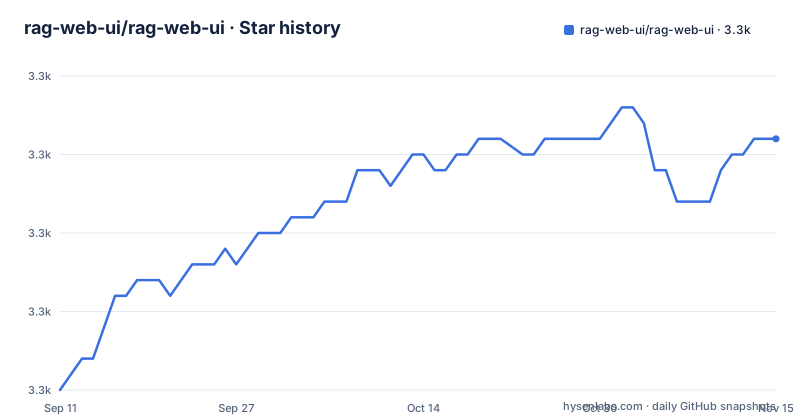
Star history
- rag-web-ui/rag-web-ui3,301 ★ · +16
| Repository | 2026-09-11 | 2026-11-15 |
|---|---|---|
| rag-web-ui/rag-web-ui | 3.3k | 3.3k |
16 Stars in the last 65 days, measured from the daily GitHub snapshot. Compare with other projects
Editorial analysis
The compose file publishes both databases to the host
The supplied `docker-compose.yml` gives the MySQL service a root password of root, a database named ragwebui, and a user ragwebui whose password is also ragwebui, then publishes `3306:3306`. The ChromaDB service runs `chromadb/chroma:latest` and publishes `8001:8000`, so the vector store's HTTP interface is on the host as well, on an unpinned image tag. Nothing in the file restricts either port to a local interface, and nothing sets a password for ChromaDB at all. MinIO is there too for object storage, with its console reached on port 9001 in the verification steps. The intended deployment is a local development stack, but the file as written is what a first run produces, so treat the published database ports as the thing to change before this goes anywhere other than your own machine.
The configuration table and the example environment file disagree
The core configuration table gives the defaults as `postgres` for both `MYSQL_USER` and `MYSQL_PASSWORD`, with the database named ragwebui. The compose file creates `ragwebui` as both the user and the password instead, so the documented defaults describe a different database setup from the one that gets built. The LLM table has the same kind of drift: it lists `llama2` as the Ollama model default, while `.env.example` ships `OLLAMA_MODEL=deepseek-r1:7b`. Embedding defaults appear only in the example file, with `text-embedding-ada-002` for OpenAI and `nomic-embed-text` for Ollama, and the HuggingFace entry defaults to `sentence-transformers/all-MiniLM-L6-v2` with two heavier alternatives listed as comments. When a value differs between the table and the file you copy, the file is what runs.
One variable needs three different values depending on the host
`OLLAMA_API_BASE` is the setting the example file spends the most space on, and the reason is that a container cannot reach the host the same way a local process can. The file ships the macOS value, `http://host.docker.internal:11434`, and comments two alternatives: `http://localhost:11434` for a compiled installation, and `http://172.17.0.1:11434` for a Linux server using compose, with a note that there you need the host machine's address. The compose file backs the macOS case with `extra_hosts` mapping `host.docker.internal` to `host-gateway`, so that name resolves inside the container. On Linux, where that mapping is not a substitute for a real address, the shipped value will not reach a local Ollama and has to be edited.
Qdrant support ships as a commented block
The features claim vector database support for ChromaDB and Qdrant with easy switching through a factory pattern. In the compose file, only ChromaDB is defined. The Qdrant service is present in full but every line is commented out, with a note telling you to remove the comment and run the command to start it, mapping 6333 for the REST API and 6334 for gRPC, adding a named volume and setting a QDRANT_ALLOW_READS_ON_DISC-style variable whose name is cut off mid-line in the file. So switching the vector store means editing the compose file by hand rather than changing a setting, and the alternative is documented only as an instruction to uncomment.
The quick start calls the production compose file a development server
Installation is three steps: clone the repository, copy the example environment file, and build the stack.
git clone https://github.com/rag-web-ui/rag-web-ui.git
cd rag-web-ui
cp .env.example .env
docker compose up -d --build
The README labels that last command the development server. The Development Guide then gives a different command for development, `docker compose -f docker-compose.dev.yml up -d --build`, so the quick start reaches for the other file. Both compose files exist, and so do two nginx configurations, `nginx.conf` and `nginx.dev.conf`, which is consistent with two deployment shapes. The compose services also mount their own source trees, `./backend:/app` and `./frontend:/app`, with an anonymous volume at `/app/node_modules` so the image's installed modules shadow whatever the host has. The backend service carries both `restart: on-failure` and a deploy restart policy capped at three attempts with a five second delay.
The backend waits for MySQL to be healthy but only for ChromaDB to have started
The backend's `depends_on` is deliberately uneven. It waits for the database with `condition: service_healthy`, so the MySQL health check has to pass first, and that check runs `mysqladmin ping` against localhost using the container's own user and password variables, every five seconds with five retries and a ten second start period. ChromaDB and MinIO are only waited for with `condition: service_started`, meaning the backend begins as soon as those containers exist rather than when they answer. The MySQL service also passes `--default-authentication-plugin=mysql_native_password` on its command line and sets `TZ=Asia/Shanghai` in its environment, which fixes the container's clock to one zone regardless of where it runs.
The architecture diagram stops before it draws an edge
The Project Flowchart is a mermaid block that declares roles and a good deal of structure and then stops. It defines a caller and an open API node, a Document Ingestion Process subgraph containing document input for PDF, MD, TXT and DOCX, a node for returning a job ID, an NFS node, and an Asynchronous Document Processing subgraph holding preprocessing for text extraction and cleaning plus text splitting for segmentation and overlap. There it ends, mid-diagram, with no edges drawn between any of the nodes and no retrieval or generation half shown. The written architecture section is where the stack is actually described: FastAPI, MySQL with ChromaDB, MinIO, Langchain, JWT with OAuth2 on the backend, and Next.js 14 with TypeScript, Tailwind, Shadcn/UI and the Vercel AI SDK on the front, with a DeepWiki link in the navigation for the deeper version.
One tag lost its v prefix, and one release swapped passlib for bcrypt
The release titles are more informative than the tags here. One is `v0.8.0 - HuggingFace Embeddings Support` from 2026-04-06, which is where local sentence-transformers embeddings came from. Another is `0.7.5 (fix: Replace passlib with direct bcrypt implementation)` from 2025-11-15, and note that this tag carries no v prefix while v0.7.3 and v0.8.0 do, so tag naming in this repository is not uniform and a script filtering on `v` prefixes will miss one. The 0.7.3 release updated Docker configurations for host.docker.internal, which is the same concern the compose file's extra_hosts and the Ollama comments address. The last commit on main is dated 2026-04-06, with v0.8.0 published a minute after it.
Editorial conclusion
rag-web-ui fits someone who wants the whole retrieval stack in one compose file, with the model provider chosen by a single environment variable and documents chunked and embedded for you, rather than assembling FastAPI, a vector store and an object store themselves. Three things to settle before you expose it. The compose file publishes MySQL on 3306 with the password set to the database name, and ChromaDB on 8001, so treat the default stack as a development arrangement and put it behind something. The Ollama base URL needs a different value on macOS, Linux and a compiled install, and the Linux case is a manual edit. And the version here was last committed on 2026-04-06 with the release tag published a minute later, so check whether the defaults still match the models and clients you intend to use before building on them.
Frequently asked questions
What does rag-web-ui need before it will start?
Docker with Docker Compose v2.0 or newer, Node.js 18 or newer, Python 3.9 or newer, and 8GB or more of RAM. Installation is a clone, `cp .env.example .env`, and `docker compose up -d --build`, after which the frontend, the redoc API documentation and the MinIO console are reached through `127.0.0.1.nip.io`.
Which vector databases does rag-web-ui support?
ChromaDB and Qdrant, switched through a factory pattern. In the supplied compose file only ChromaDB runs, on `chromadb/chroma:latest` with host port 8001 mapped to 8000; the Qdrant service is written out in full but commented out, with a note to uncomment it and map 6333 and 6334.
What database credentials does the rag-web-ui compose file use?
The MySQL service is created with a root password of root, a database named ragwebui, and a user ragwebui with the password ragwebui, and it publishes port 3306 on the host. The configuration table in the README states different defaults, postgres for both the user and the password.
Which LLM providers can rag-web-ui talk to?
OpenAI, DeepSeek, MiniMax and Ollama, selected with `CHAT_PROVIDER`, each with its own key, base URL and model name. Embeddings are configured separately through `EMBEDDINGS_PROVIDER`, and version 0.8.0 added HuggingFace as an option with a default of sentence-transformers/all-MiniLM-L6-v2 and no API key required unless you use gated models.
Why do the rag-web-ui verification URLs use 127.0.0.1.nip.io?
So the browser treats the app as a different origin from plain 127.0.0.1, and the repository ships `nginx.conf` and `nginx.dev.conf` at its root to serve it. The frontend, the redoc documentation and the MinIO console on port 9001 are all given as plain HTTP addresses on that hostname.
Official sources
Add this badge to your README
If you maintain this project, the badge below links readers to this analysis and shows its maintenance status from the daily GitHub snapshot. Paste the markdown into your README; add ?metric=license or ?metric=stars to the image URL for a different field.

[](https://hysenlabs.com/projects/rag-web-ui-rag-web-ui)Star history chart for your README
[](https://hysenlabs.com/projects/rag-web-ui-rag-web-ui)Was this useful?