SimpleTimeTracker: an Android time tracker that keeps its data on the phone
Simple app that tracks time.
At a glance
- What is it?
- Simple Time Tracker is a Kotlin Android app for recording what you spend time on, with a Room database, statistics, goals, a Pomodoro mode, widgets, notifications and a Wear OS companion including a watch face complication. It ships as two build flavours, one without Google Play services for F-Droid, and its source is arranged as one Gradle module per screen.
- Who is it for?
- Adopt SimpleTimeTracker if you want to record time per activity on Android, if you want that history to stay in a local database you can export to CSV and back up, and if you want a watch app for the timer rather than only a phone. Do not adopt it for team time tracking or for multi device sync, since the data model is a local database with backup and restore rather than a service, and do not expect the Play build's extras in the F-Droid flavour.
- Can I use it commercially?
- Yes, with conditions. GPL-3.0 is a copyleft licence: if you distribute software that includes it, you must release that software's source code under the same licence. Running it internally without distributing it does not trigger that obligation.
- Is it still maintained?
- Yes. The repository last received commits 1 day ago.
- What is it written in?
- Mainly Kotlin, according to GitHub's language statistics.
Answers come from the project's GitHub data, last synced on November 7, 2026, and from our analysis. They are not legal advice.
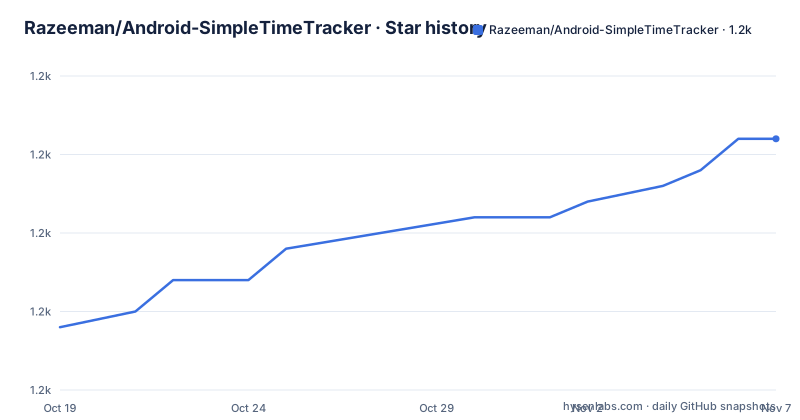
Star history
- Razeeman/Android-SimpleTimeTracker1,241 ★ · +12
| Repository | 2026-10-19 | 2026-11-07 |
|---|---|---|
| Razeeman/Android-SimpleTimeTracker | 1.2k | 1.2k |
12 Stars in the last 19 days, measured from the daily GitHub snapshot. Compare with other projects
Editorial analysis
A timer that records what, not just how long
The repository description is minimal, a simple app that tracks time, and the README expands it with a line that sets the tone: a simple app that helps track how much time you spend on all the useless activities in the world.
That phrasing is the product. This is not a stopwatch, because a stopwatch only knows that a duration passed. The feature list in the directory tree tells you what it actually tracks. There are feature modules for records, for categories and tags, for a records filter, for statistics and detailed statistics, for goals, for a Pomodoro mode, for reminders, for shortcuts, for complex rules, for activity suggestions, and for an archive of archived data.
So the model is a record with a type, a category, tags, a comment, a start and a duration, all of which can be filtered, grouped, and turned into charts. The custom views listed in the technology stack, a pie chart, a bar chart, a colour selection and a calendar, exist because the data has enough structure to be worth slicing.
The audience is someone who wants to look back at a week and see where it went. The database of records, the statistics screens and the CSV export all point at the same use, and the reminder and goal features point at the other half, which is using the record history to plan.
The project is GPL-3.0 licensed, the default branch is dev, and the recent releases are v1.58 from 2026-06-24, v1.59 from 2026-07-26 and v1.60 from 2026-09-19, with the last push on 2026-10-13, so the work is ongoing and the versioning is regular.
Two build flavours and what each one leaves out
The build flavours section is short and decisive, and it is the first thing to understand before installing anything.
The base flavour is the F-Droid version, with no Google Play services and no Wear OS support. The play flavour is the Google Play version, with Google Play services and Wear OS support.
So the choice is not a preference, it determines what you can run. If you want the watch app and the watch face complication, you need the play flavour, and that in practice means the Google Play distribution. If you would rather not have Play services on the device at all, the base flavour is the one, and the Wear OS parts of the codebase are not in your build.
The distributions themselves are the F-Droid package, the Google Play listing and the GitHub releases, all under the application id com.razeeman.util.simpletimetracker. There is also a Buy Me a Coffee link and an X account, which for a project of this size and this focus is the normal arrangement rather than a commercial one.
The source builds with the Gradle Kotlin DSL. The repository has build.gradle.kts and settings.gradle.kts at the root, a buildSrc/ directory that the directory listing describes as holding dependencies and versions, and a gradle/ directory with the wrapper, so a checkout builds with the standard wrapper invocation.
For a user who wants the watch app, the choice is therefore settled before anything else: the Play build, and the watch app with a complication on the watch face.
One Gradle module per screen, and why that matters
The directory listing is the most detailed part of the README, and it describes a modular application with one feature module per screen or delegate.
At the top level sit app/ for the mobile app, core/ for shared classes and strings, data_local/ for the database, domain/ for business logic, navigation/ for navigation interfaces and screen parameters, resources/ for the material common to the phone and watch apps, wear/ for the Wear OS app, wear_api/ for the contracts used to talk between the phone and the watch, and buildSrc/ for dependencies and versions.
Under features/ there are around thirty modules, and their names describe the application rather than the code. feature_records, feature_records_all, feature_records_filter and feature_running_records are the main tabs. feature_change_record, feature_change_category, feature_change_record_tag, feature_change_record_type, feature_change_running_record and feature_change_reminder are the edit screens, and feature_change_activity_filter, feature_change_complex_rule, feature_change_goals and feature_change_shortcut are the more elaborate ones. Then there are the selection delegates, feature_color_selection, feature_comment_selection, feature_icon_selection and feature_tag_selection, and the supporting pieces, feature_base_adapter, feature_dialogs, feature_pomodoro, feature_statistics and feature_statistics_detail, feature_suggestions, feature_views, feature_widget, feature_wear and feature_main.
The payoff of that structure is a plain one. A feature module that depends on the domain module and the navigation module, and not on each other, means a screen can be changed, replaced or removed without touching the rest of the application, and it is why the app can have a wear flavour and a phone flavour from one code base. The cost is a lot of build configuration, and the buildSrc/ directory exists precisely to hold the shared versions.
The stack and what each layer is doing
The technology stack list is worth reading as a description of the architecture rather than a shopping list.
It is a multi module, single activity application built with Jetpack Compose, View Binding and the Gradle Kotlin DSL. MVVM is spelled out as Jetpack ViewModel plus LiveData, and Jetpack Navigation handles the screens. Hilt does the dependency injection, Room with migrations holds the data, and Coroutines carry the work. Testing is present in two forms, unit tests and UI tests, and the CI is GitHub Actions.
Two entries stand out for a time tracker. The first is Recycler, custom Adapter Delegates, DiffUtils with Payloads, plus drag and drop and gesture detection, which is a lot of machinery for a list. The second is Custom Views, listed as a pie chart, a bar chart, colour selection and a calendar, meaning the charting is not a dependency but code in the project.
The DiffUtils with Payloads detail is the interesting one. A records list that is updated as a timer runs would otherwise re-render every row on every tick, and payloads are the mechanism for telling the adapter which parts of a row actually changed. It is a performance detail, and it is the kind of thing that appears in a stack list only when somebody cared.
The data side is equally deliberate. Database backup and restore, export to CSV, and automatic backup are all listed, and a local database with export and restore is a different proposition from a service that holds your data. It also explains the Wear OS work: a watch is a second device, and the second device needs a contract to talk to the first, which is what wear_api/ is for.
Wear OS, widgets and the pieces outside the app
A sizeable part of the feature list is about the moments when the application is not in the foreground, and that is where a time tracker either earns its place or does not.
Wear OS is a first class target rather than an afterthought. The README has a dedicated section with images for the watch play store listing and the watch complication, and the build flavour difference ties Wear OS support to the play build. The wear/ directory holds the watch application, wear_api/ holds the communication contracts, and feature_wear is the phone side logic that connects to the watch app, with the phone running the timer and the watch providing the glanceable control.
Then there are widgets and notifications, both listed in the stack and both present as modules, feature_widget and feature_notification. A timer that you have to open the app to start is a timer you will not start, so the quick path, a widget or a notification, is what makes the habit stick, and a watch complication is the shortest version of that path.
Dark mode is listed too, which for a screen you look at in the evening matters, and the emoji support with EmojiCompat is a small sign of attention to the icons used for activities and categories.
The translation story is also handled in the open rather than in a separate system. The README has a section on helping translators with the first step being to create a personal fork of the project and then edit the translation file for your language, and for app users the suggestion is to open an issue, which is a lower bar than a pull request and a reasonable one for a typo in a locale file.
Where a time tracker like this is the wrong tool
The limits are about scope and about where the data lives, and they are worth being concrete about.
The first is that this is a personal, on device recorder. The records live in a Room database on the phone, and the sharing mechanisms are export to CSV, database backup and restore, and automatic backup. There is no server, no account and no sync between the phone and the watch beyond the local contract in wear_api. If your requirement is a team timesheet that a manager can query, or a tracker that follows you across a new phone, this is the wrong shape and you want a service.
The second is the F-Droid and Google Play split. The base flavour has no Google Play services, which is a feature for some people and a restriction for others, and the Wear OS support is only in the play build. Choosing a distribution is choosing what the app can do.
The third is the age of the code base relative to the platform. The stack described is Jetpack Compose with LiveData, View Binding and custom views for the charts, and a Multi Activity to Single Activity migration has been a recurring pattern in Android applications over the last few years. The project is maintained, the last push was on 2026-10-13 and the releases are monthly, so it is not abandoned, but the shape of the code tells you which generation of Android patterns it belongs to, and that matters if you intend to extend it rather than install it.
The fourth is that the feature surface is wide for a utility. Goals, complex rules, suggestions, shortcuts, reminders, an archive, a Pomodoro mode and more than thirty modules is a lot of application to maintain, and a fork for a narrow need inherits all of it.
Editorial conclusion
Adopt SimpleTimeTracker if you want to record time per activity on Android, if you want that history to stay in a local database you can export to CSV and back up, and if you want a watch app for the timer rather than only a phone. Do not adopt it for team time tracking or for multi device sync, since the data model is a local database with backup and restore rather than a service, and do not expect the Play build's extras in the F-Droid flavour. Verify first which build flavour matches your device, since the base flavour has no Google Play services and no Wear OS support, and that your data export and backup paths meet your own requirements before you have years of records in it.
Frequently asked questions
What does Simple Time Tracker record?
The README describes it as a simple app that helps track how much time you spend on all the useless activities in the world. The feature modules cover records, categories and tags, filters, statistics, goals, a Pomodoro mode, reminders, shortcuts, complex rules, activity suggestions and an archive, all stored in a Room database with migrations.
What is the difference between the base and play build flavours?
The base flavour is the F-Droid version, with no Google Play services and no Wear OS support, and the play flavour is the Google Play version with Google Play services and Wear OS support. If you want the watch app and its watch face complication, you need the play build.
Can I get my Simple Time Tracker data out?
The technology stack lists database backup and restore, export to csv and automatic backup, so the records can be exported, backed up and restored rather than being locked in the app.
How is the Simple Time Tracker codebase organised?
It is a multi module Gradle Kotlin DSL project with app/, core/, data_local/, domain/, navigation/, resources/, wear/, wear_api/ and buildSrc/ at the top level, and roughly thirty modules under features/, one per screen or delegate, such as feature_records, feature_settings, feature_statistics, feature_pomodoro and feature_wear.
Official sources
Add this badge to your README
If you maintain this project, the badge below links readers to this analysis and shows its maintenance status from the daily GitHub snapshot. Paste the markdown into your README; add ?metric=license or ?metric=stars to the image URL for a different field.

[](https://hysenlabs.com/projects/razeeman-android-simpletimetracker)Star history chart for your README
[](https://hysenlabs.com/projects/razeeman-android-simpletimetracker)Was this useful?