ricoui-portfolio: an Astro template where the build script runs astro check first
Designer Portfolio & Blog Template
At a glance
- What is it?
- A designer portfolio and blog template on Astro 5 with Tailwind 4, MDX content collections and a retro blue theme. The interesting parts are the pinned dependency versions, the env var that silently defaults to a placeholder domain, and a build step that type-checks before it compiles.
- Who is it for?
- ricoui-portfolio suits a designer or developer who wants a working Astro site on a weekend and is comfortable editing src/config/site.js and src/styles/global.css rather than a theme builder. Skip it if you need a license file at the repository root, a Node version pin, or a template that ships something other than a personal blog and a work grid.
- Can I use it commercially?
- Not without permission. GitHub finds no licence file in the repository, and without a licence all rights are reserved by default: you may read the code but not reuse it. Check the README, or ask the authors, before using it.
- Is it still maintained?
- Activity is slowing. The repository last received commits 7 months ago.
- What is it written in?
- Mainly Astro, according to GitHub's language statistics.
Answers come from the project's GitHub data, last synced on October 22, 2026, and from our analysis. They are not legal advice.
Star history
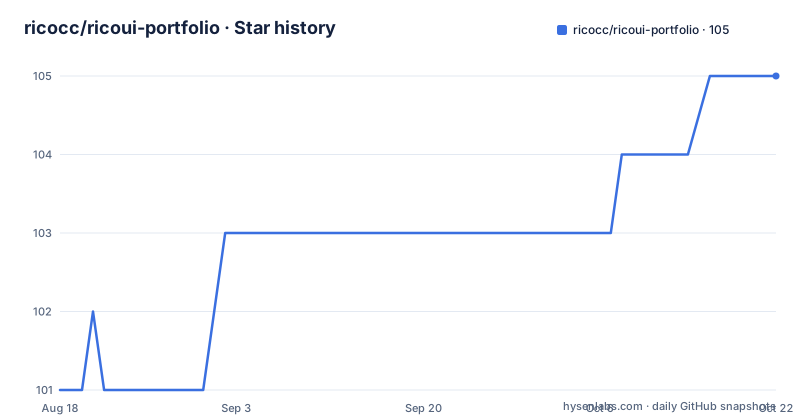
- ricocc/ricoui-portfolio105 ★ · +4
| Repository | 2026-08-18 | 2026-10-22 |
|---|---|---|
| ricocc/ricoui-portfolio | 101 | 105 |
4 Stars in the last 65 days, measured from the daily GitHub snapshot. Compare with other projects
Editorial analysis
An Astro 5 site with its dependency versions written down
The template is a single Astro project, and package.json pins the stack precisely enough that you can tell what you are inheriting. Astro sits at ^5.15.4, Tailwind CSS at ^4.1.14, TypeScript at ^5.4.5, and Vite at ^5.2.11. Runtime dependencies include @astrojs/mdx, @astrojs/rss and @astrojs/sitemap, plus matter-js for physics, aos for scroll animation, motion for animation work, sharp for image processing, and @lucide/astro for icons.
Two choices in that list are worth noticing before you start editing. The package is named astro-rico-portfolio and declares version 1.0.0, which is a template release number rather than a library semver anyone should depend on. And a pnpm-lock.yaml is committed while the install instructions offer npm and yarn as equal alternatives, so the lock file only pins exact versions for one of the three routes.
Copy .env.example, and the domain silently falls back to a placeholder
Setup is three package manager invocations, and all three are offered in the same block:
# Using pnpm (recommended)
pnpm install

# Using npm
npm install

# Using yarn
yarn install
Then one copy, which is where the real configuration begins:
cp .env.example .envThe file you just created holds three variables. PUBLIC_SITE_URL is the one that matters, and the documented default when it is unset is https://your-domain.com. The documentation is direct that this produces no error, which is the problem: a site that builds cleanly and deploys cleanly with the wrong canonical domain in its meta tags, sitemap and RSS feed. PUBLIC_GA4_ID and PUBLIC_UMAMI_ID are both optional and can be left empty, since analytics identifiers are only read if you fill them in.
npm run build type-checks before it compiles
The scripts block is where this template differs from a bare Astro starter, and one line is the reason:
# Build for production
npm run build

# Preview build result
npm run preview
What that runs is not astro build. The build script is astro check && astro build, so a type error in your MDX or in a component fails the build before a single page is emitted. For a template that people edit without reading the whole source, that ordering is a feature, and it is also a trip hazard: a small mistake in a blog post breaks your deploy in a way that looks like a build failure rather than a content error.
The other scripts mirror Astro's own names, with dev and start both bound to astro dev and preview to astro preview. The check script is different in kind: it points at biome check --apply-unsafe ., so linting rewrites files rather than only reporting them. The project also ships a CONTRIBUTING.md and a Chinese README alongside the English one.
The content layer migration is the largest edit you will face
The changelog calls out an upgrade to Astro 5.15 with all legacy APIs removed, and the README is specific about what that means, because the project uses Astro's v5 Content Layer API with the glob loader and states this keeps it compatible with Astro v6. Five substitutions are called out by name. entry.id replaces the deprecated entry.slug. render(entry) replaces entry.render(). import.meta.env replaces process.env. import.meta.glob() replaces Astro.glob(). And every getStaticPaths() params value is a string.
That list is the practical reason to read the README before forking. Anyone arriving from a tutorial written against Astro 4 will reach for entry.render() first, and the failure mode is a build that stops on a call you were certain was correct.
Content lives in three places, and only one of them is a collection
The directory layout separates three kinds of input. Portfolio entries go in src/collections/works.json, which is a plain JSON file rather than a content collection. Blog posts are MDX files placed in src/content/post/, handled by the content layer described above. Site metadata is a JavaScript object in src/config/site.js:
export const siteConfig = {
  title: "Your Portfolio",
  author: "Your Name",
  url: "https://your-domain.com",
  // ... more configuration
};
Notice that url appears here as well as in the environment. The template ships two places to declare the same domain, and the documentation does not say which one wins, so changing one and deploying is how you end up with a site whose pages disagree about the canonical address. Everything else under src/ is structural: components split into cards, sections, ui and widgets, plus layouts, assets, config and content directories.
Tailwind 4 themes through CSS variables, not the config file
Theme colours are set in src/styles/global.css, inside an @theme block, using custom properties:
@theme {
  --color-primary: #2d6dc3;
  --color-primary-dark: #3b7bd9;
  /* ... more color variables */
}
The repository root also contains a tailwind.config.mjs, which is the shape most Tailwind tutorials teach. With Tailwind 4 the CSS-first approach is the one that drives the build, through the @tailwindcss/vite plugin listed in dependencies, so anyone who opens the JavaScript config expecting to find the palette there will not find it. The retro blue identity of the template is those two hex values, and retheming the whole site means editing two lines rather than swapping a preset.
Animation runs through aos for scroll-triggered effects, with motion in the dependency list for the rest, and matter-js present for the physics behaviour the demo pages use.
Last push 2026-02-28, no releases, and no Node version file
The template has never published a GitHub release, so there is no tagged version to install and nothing to diff against when you compare it to a fork. The last push to main was on 2026-02-28. Nothing in the repository suggests that is a sign of trouble, and the pinned Astro and Tailwind versions mean a static template keeps working after a while without commits, but it does mean the Astro 6 compatibility described in the README is an intention stated in documentation rather than a version anyone has shipped.
Two details in the root deserve a look before you rely on the template in a build pipeline. The file list contains .node-version.bak, a backup rather than the .node-version file that most tools read, so a version manager will not pick one up. And the licence situation is inconsistent: package.json declares Apache-2.0 while the repository summary carries no licence identifier, so if Apache-2.0 is what you need, the declaration in package.json is the one to point at.
Editorial conclusion
ricoui-portfolio suits a designer or developer who wants a working Astro site on a weekend and is comfortable editing src/config/site.js and src/styles/global.css rather than a theme builder. Skip it if you need a license file at the repository root, a Node version pin, or a template that ships something other than a personal blog and a work grid. Verify first that the dev server binds to the port you expect, since the documented address is http://localhost:4321, and set PUBLIC_SITE_URL before the first deploy, because the unset default quietly ships a placeholder domain into your sitemap and meta tags.
Frequently asked questions
How do I start the ricoui-portfolio dev server?
Run npm run dev, or pnpm dev if you installed with pnpm, and open http://localhost:4321. The dev and start scripts both point at astro dev, and the preview script runs astro preview against a production build.
Where do I put blog posts in ricoui-portfolio?
Create MDX files in the src/content/post/ directory. Portfolio work entries go separately in src/collections/works.json, which is a plain JSON file rather than a content collection entry.
How do I change the colours in ricoui-portfolio?
Edit the CSS variables in src/styles/global.css inside the @theme block, where --color-primary is set to #2d6dc3 and --color-primary-dark to #3b7bd9. With Tailwind CSS 4.1.14 the theme lives in CSS rather than in tailwind.config.mjs.
What licence is ricoui-portfolio released under?
The package.json for the project declares Apache-2.0. The repository summary itself carries no licence identifier, so the declaration inside package.json is the one to cite.
What is PUBLIC_SITE_URL used for in ricoui-portfolio?
It sets the site domain, and when it is not set the template falls back to https://your-domain.com without reporting an error. The documentation recommends setting it right after deployment so the sitemap, RSS feed and SEO meta tags carry the correct domain.
Official sources
Add this badge to your README
If you maintain this project, the badge below links readers to this analysis and shows its maintenance status from the daily GitHub snapshot. Paste the markdown into your README; add ?metric=license or ?metric=stars to the image URL for a different field.

[](https://hysenlabs.com/projects/ricocc-ricoui-portfolio)Star history chart for your README
[](https://hysenlabs.com/projects/ricocc-ricoui-portfolio)