outage-data-ua: A Public JSON Archive for Ukrainian Power Outage Schedules
Публічне сховище даних про планові відключення електроенергії в Україні.
At a glance
- What is it?
- A JavaScript-based repository that scrapes, stores, and renders planned and emergency electricity outage data for Ukraine. It keeps raw JSON per region, generates HTML and PNG visualizations, and includes a Playwright-based scraper to handle anti-bot measures.
- Who is it for?
- Adopt outage-data-ua if you need a ready-made, structured archive of Ukrainian power outage schedules for a specific region, and if you can tolerate the raw, unnormalized format for `fact` and `preset` objects. Do not adopt it if you require a normalized schema across all regions, or if you expect a stable, versioned release cycle; the repository has no recent releases, and the license is marked as NOASSERTION despite a README reference to MIT.
- Can I use it commercially?
- Check first. The repository uses a licence we do not classify automatically, so read its LICENSE file before any commercial use.
- Is it still maintained?
- Yes. The repository received new commits within the last day.
- What is it written in?
- Mainly JavaScript, according to GitHub's language statistics.
Answers come from the project's GitHub data, last synced on October 22, 2026, and from our analysis. They are not legal advice.
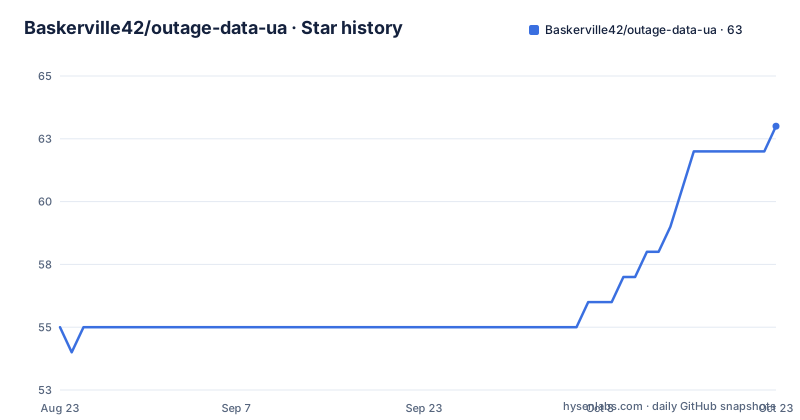
Star history
- Baskerville42/outage-data-ua62 ★ · +7
| Repository | 2026-08-23 | 2026-10-22 |
|---|---|---|
| Baskerville42/outage-data-ua | 55 | 62 |
7 Stars in the last 60 days, measured from the daily GitHub snapshot. Compare with other projects
Editorial analysis
What Problem This Repository Solves
Ukrainians face planned and emergency power outages, and each regional provider publishes schedules on its own webpage. Manually checking these pages is slow and error-prone. outage-data-ua solves this by collecting those schedules into a public JSON archive, one file per region, and by generating visual HTML and PNG images from the data. The target user is a developer, journalist, or civic analyst who wants programmatic access to outage schedules without scraping each provider themselves. The README states the project receives data from open provider webpages and stores it 'as is' in the `data/` directory. This is not a real-time API; it is a snapshot archive that updates periodically, presumably via the included tooling. If you only need today's schedule for one region, you might be better off visiting the provider directly, but if you need historical or cross-region data, this repository gives you a structured starting point.
Data Format: Raw JSON with Minimal Metadata
Each region is stored as `data/<region>.json` with a base structure that includes `regionId`, `regionAffiliation`, `lastUpdated`, `fact`, `preset`, `lastUpdateStatus`, and `meta`. The `fact` object holds actual or emergency outages for today and tomorrow, while `preset` holds the weekly planned outage template. Both are stored without normalization, meaning the structure inside them depends entirely on the source provider. The README gives an example where `fact` and `preset` each contain an `updateFact` field, which is the timestamp from the source, usually in `dd.MM.yyyy HH:mm` in the Europe/Kyiv timezone. The `meta` block is minimal, containing only `schemaVersion` and `contentHash`, where the hash covers the content of `fact` plus `preset`. This design choice keeps the parser simple but pushes the burden of understanding the data onto the consumer. If a provider changes its HTML structure, the JSON inside `fact` and `preset` may change shape, and you will need to inspect the actual files to adapt.
Parsing and Error Handling: Preserve Old Data on Failure
The repository includes a parser that extracts data from provider pages. A notable behavior is how it handles errors. If parsing fails, the parser updates only `lastUpdateStatus` with a status like `error` and a code such as 422, but it does not erase the previous `fact` and `preset` data. This is a deliberate resilience measure. The README states that on error, the parser updates only `lastUpdateStatus`, leaving prior data intact. This means you can always see when the last successful parse occurred by comparing `lastUpdated` and the `at` field inside `lastUpdateStatus`. The `attempt` field in the example shows 5, suggesting retries are built in. This is a sensible design for an archive: stale data is better than no data. However, it also means that if a provider changes its page format permanently, the repository could serve outdated schedules indefinitely, and you would need to check the `lastUpdateStatus` to know how fresh the data really is.
Getting It Running: Commands and Configuration
The README does not provide explicit installation commands, which is a gap for a quick start. However, the project is JavaScript-based, so you would likely need Node.js and npm installed. The repository layout includes a `templates/json/data.json` file that shows the current schema template, and the actual data files under `data/` serve as examples. For generating images, the README mentions that PNG images are stored in `images/<regionId>/` with filenames like `gpv-1-2.png` corresponding to group `GPV1.2`. To reproduce the scraping and image generation, you would need to inspect the source code for scripts that run the parser and the HTML-to-PNG conversion. The README mentions that the CI now uses a headless browser (Playwright, Chromium) that executes JavaScript and sets cookies to pass anti-bot checks. This implies you should install Playwright and its Chromium browser if you plan to run the scraper locally. Without explicit commands, you will need to look at the package.json and any script files in the repository to find the entry points.
Anti-Bot Handling and Its Limitations
The project explicitly addresses anti-bot measures. The README states that the CI uses a headless browser, Playwright with Chromium, to execute JavaScript and set cookies, which helps obtain the 'real' HTML instead of a WAF page. If a WAF HTML is returned instead, the parser sets an error code (e.g., 422) and keeps the existing data. This is a pragmatic approach, but it has a limitation: anti-bot systems evolve. A headless browser that works today may be detected tomorrow. The project does not claim to bypass all protections, and the README warns to respect the terms of use of the source websites. This means the scraper is fragile by nature. If you rely on this repository for up-to-date data, you must monitor the `lastUpdateStatus` in each JSON file to detect when parsing starts failing. The presence of an `attempt` field suggests retries, but the README does not specify the retry policy or timeout values.
Maintenance and Upgrade Cost
The repository has no recent releases, and the last push is unknown, which raises questions about maintenance. The license field is NOASSERTION, but the README says 'see LICENSE (MIT)'. This discrepancy is a red flag for legal adoption; you should check the actual LICENSE file in the repository before using the code or data. The README also states that the repository does not claim ownership of the primary data, so you must comply with the original providers' terms. The maintenance cost is non-trivial: every provider can change its page structure, and the parser must be updated accordingly. The use of Playwright adds a dependency on a specific browser version, which can break with updates. There is no mention of a schema versioning strategy beyond `schemaVersion` in the `meta` block, but the README does not describe how migrations are handled. If you fork this project, be prepared to maintain the parsers and the image generation pipeline yourself, as upstream activity is unclear.
Alternative Approaches and When This Is the Wrong Tool
A real alternative is to build your own scraper that directly targets a specific provider's API or webpage, using a library like Puppeteer or Playwright on its own. The difference is that you would control the parsing logic and data schema, and you could adapt quickly to changes. outage-data-ua stores data 'as is', which means you inherit the provider's structure. If you need a normalized, queryable database of outage schedules across all regions, this repository is the wrong tool because it does not normalize `fact` and `preset` structures. Another alternative is to rely on official government or utility APIs if they exist, but the README does not mention any. For a one-off analysis, you might also manually download the JSON files from the `data/` directory and skip the scraping entirely. This repository is best used as a source of raw, archived data, not as a production-grade data pipeline.
Editorial conclusion
Adopt outage-data-ua if you need a ready-made, structured archive of Ukrainian power outage schedules for a specific region, and if you can tolerate the raw, unnormalized format for `fact` and `preset` objects. Do not adopt it if you require a normalized schema across all regions, or if you expect a stable, versioned release cycle; the repository has no recent releases, and the license is marked as NOASSERTION despite a README reference to MIT. Before using it, verify the current JSON structure in `templates/json/data.json`, check the last update timestamp in each `data/<region>.json` file, and confirm that the Playwright-based scraper still passes anti-bot checks for the specific provider pages you care about. The project is a snapshot of what the providers publish, not a guarantee of data completeness or timeliness.
Frequently asked questions
Is the United States going to have a blackout?
This repository does not cover the United States. It stores planned and emergency power outage schedules for Ukrainian regions, one JSON file per region, collected from the public pages of the electricity suppliers.
Is there a major internet outage at the moment?
The project tracks electricity, not connectivity. What it publishes per region is the planned and actual outage schedule, split into a weekly preset and a fact block covering today and tomorrow.
How do I run the outage-data-ua pipeline?
Three scripts, one per stage: node scripts/fetch_regions_playwright.mjs, node scripts/batch_parse.mjs and node scripts/batch_render.mjs, also exposed as npm run fetch, npm run parse and npm run render. Node 18 or newer is required, and the fetch stage drives Chromium through Playwright.
What happens to outage-data-ua data when a supplier page is blocked?
The parser updates only lastUpdateStatus, setting a status such as error with a code like 422, and keeps the previous fact and preset values. A WAF page in place of the real HTML is treated the same way, so the last good data survives.
How do I find the graph for my outage group?
Images are stored under images/<regionId>/ with the pattern gpv-x-x.png, where the filename maps to the group, for example images/kyiv-region/gpv-1-2.png for group GPV1.2. The images for available regions are kept in the repository and updated with the data.
Official sources
Add this badge to your README
If you maintain this project, the badge below links readers to this analysis and shows its maintenance status from the daily GitHub snapshot. Paste the markdown into your README; add ?metric=license or ?metric=stars to the image URL for a different field.

[](https://hysenlabs.com/projects/baskerville42-outage-data-ua)Star history chart for your README
[](https://hysenlabs.com/projects/baskerville42-outage-data-ua)