Maestro is one release old and twenty months past it on develop
streamline the fine-tuning process for multimodal models: PaliGemma 2, Florence-2, and Qwen2.5-VL
At a glance
- What is it?
- Roboflow's tool for fine-tuning vision-language models, with recipes for Florence-2, PaliGemma 2 and Qwen2.5-VL behind one CLI and one JSONL format. Its own version markers disagree: a single 1.0.0 release from February 2025, a manifest sitting at 1.1.0rc3, and a default branch called develop.
- Who is it for?
- Maestro suits someone who has already chosen a vision-language model and a task and wants the dull parts, reproducibility, data loading and loop setup, handled. It does not suit anyone who needs a version they can pin with confidence, because the only tagged release is twenty months old and the manifest carries a release candidate that was never published.
- Can I use it commercially?
- Yes. Apache-2.0 is a permissive licence: you can use, modify and sell software built on it, as long as you keep its copyright and licence notices.
- Is it still maintained?
- Yes. The repository last received commits 5 days ago.
- What is it written in?
- Mainly Python, according to GitHub's language statistics.
Answers come from the project's GitHub data, last synced on November 13, 2026, and from our analysis. They are not legal advice.
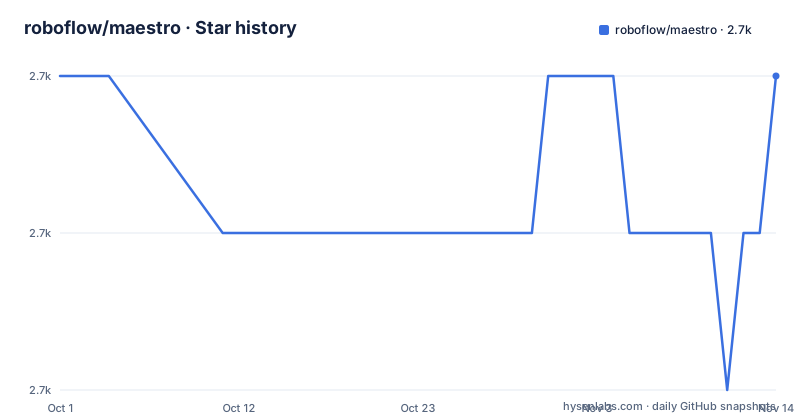
Star history
- roboflow/maestro2,695 ★ · -1
| Repository | 2026-10-01 | 2026-11-13 |
|---|---|---|
| roboflow/maestro | 2.7k | 2.7k |
-1 Stars in the last 43 days, measured from the daily GitHub snapshot. Compare with other projects
Editorial analysis
The only release is 1.0.0 from February 2025
The release history is one entry. Maestro 1.0.0 was tagged on 2025-02-05, and the news section carries exactly one bullet, the one describing that release: support for Florence-2, PaliGemma 2, and Qwen2.5-VL, with LoRA, QLoRA, and graph freezing to keep hardware requirements in check, a single CLI and SDK, and a consistent JSONL format.
The manifest tells a different story about where the code is. `pyproject.toml` declares the version as `1.1.0rc3`, a release candidate, and the default branch is `develop` rather than a main or master. So the working tree has been sitting on an unpublished 1.1.0 candidate for roughly twenty months while the only installable tag remains 1.0.0. If you are choosing between installing the release and tracking the branch, you are choosing between code from February 2025 and code that has moved since, and nothing in the project tells you which of the two a given recipe expects.
Every link into the repository points at develop, not at the tag
The default branch choice shows up in the links rather than in a warning. Each recipe notebook is a Colab URL built from a path containing `blob/develop/cookbooks/`, and the contributing guide link is written the same way. Open one of those notebooks and you are running whatever is on `develop` today, which is the 1.1.0rc3 tree, not the 1.0.0 you would get from the package index.
That is a deliberate and common choice, but it means the quickstart you read and the version you install are two different things by default. If you are reproducing a result from one of those notebooks, note which branch the notebook was on at the time, because the branch name in the URL is the only version marker it carries.
There are two documentation locations as well. The repository's homepage field is `https://maestro.roboflow.com`, while the manifest's `Homepage` and `Documentation` entries both point at `https://roboflow.github.io/multimodal-maestro/`, which is the MkDocs site built from the `docs/` directory with `mkdocs.yaml` at the root. The README links lead to the GitHub Pages one.
The install is per model, and the project tells you to isolate them
There is no plain `pip install maestro` in the quickstart. You install the extra for the model you intend to fine-tune:
pip install "maestro[paligemma_2]"The reason given is that some models have clashing requirements, so the recommendation is a dedicated Python environment for each model rather than one shared environment with everything in it. That is a real constraint rather than a stylistic preference: three model families with different transformer versions will not share a resolver happily, and the extras exist precisely to keep them apart. Budget for three environments if you intend to use all three models.
The core dependency list is what the shared layer needs, and it is worth reading for what it leaves out. Neither `torch` nor `transformers` appears there, so the heavy pieces arrive through the per model extras rather than through a base install. What sits in the base list is configuration handling, the training framework, the CLI, the metrics libraries, and an HTTP client.
One dependency is pinned exactly, another accepts a pre-release
Most of the base dependencies have ranges, but three are worth reading closely. `lightning` is pinned exactly at `2.6.1`, with no range at all, which means it will not move and it will conflict with anything else in the same environment that wants a different version. `supervision` takes a pre-release as its floor at `>=0.26.0rc4`, so a resolver will happily install a release candidate rather than the eventual stable release. And `requests` is bounded on both ends, from `2.31.0` to `2.32.5`, which caps how far a security patch on that library can travel into your environment.
None of that is wrong on its own, but the combination shapes what happens when you add another package. A single exact pin in an otherwise ranged list is the kind of thing that shows up months later as an unsolvable resolver conflict with no obvious culprit, and the upper bound on `requests` means a future release will not be picked up without an edit to this file.
The classifiers describe the project as `Development Status :: 3 - Alpha` and declare `Typing :: Typed`, with support declared for Windows, Linux, and MacOS. The author and the maintainer fields carry the same person.
The CLI and the Python API take the same five keys
The command line names the model, then the run:
maestro paligemma_2 train \
  --dataset "dataset/location" \
  --epochs 10 \
  --batch-size 4 \
  --optimization_strategy "qlora" \
  --metrics "edit_distance"
The Python path imports the train function out of the model's own module and hands it a dictionary with the same keys, hyphenated on the command line and underscored in the dict, with metrics as a list rather than a single string:
from maestro.trainer.models.paligemma_2.core import train

config = {
    "dataset": "dataset/location",
    "epochs": 10,
    "batch_size": 4,
    "optimization_strategy": "qlora",
    "metrics": ["edit_distance"]
}

train(config)
The import path is the part to notice: a recipe is addressed by model family and then by `core`, so a new model means a new module path rather than a new flag on an existing command. `dacite` in the dependency list is what turns that dict into a configuration object, which is also where a wrong value surfaces, as an error while building the configuration rather than as a silently ignored argument halfway through a run.
Two of the four recipes are labelled experimental
The recipe table pairs a model, a task, and an acceleration method, and two rows carry the word experimental while two do not. Florence-2 at 0.9B with LoRA for object detection is marked experimental. Qwen2.5-VL at 7B with QLoRA for object detection is marked experimental. PaliGemma 2 at 3B with LoRA for JSON data extraction is not, and Qwen2.5-VL at 3B with QLoRA for JSON data extraction is not.
The split is not arbitrary. The unlabelled recipes are JSON extraction on the smaller models, which is the same shape of task the release notes pair with the consistent JSONL format. The experimental ones are both object detection, and the larger of the two is also the one that needs QLoRA to be plausible on ordinary hardware. Graph freezing is named in the release notes as the third lever, alongside LoRA and QLoRA, for keeping hardware requirements in check.
The practical read is that structured extraction at 3B is the documented centre of gravity and detection is where paths are expected to move. All four recipes are offered as Colab notebooks under `cookbooks/`, which is the cheapest way to see what a run produces before committing a GPU to it.
Python 3.9 to 3.12, and the test directory is named test/
The support window is `>=3.9,<3.13`, with classifiers for 3.9 through 3.12. That is a ceiling rather than a floor, so a team already on 3.13 cannot install this without overriding it, and the ceiling is a common source of resolver friction once other packages in the same environment have moved on. Given that the project already asks for one environment per model, the version window is a second thing to check before you standardise on an internal image.
The development scaffolding is visible in the tree. There is a `tox.ini`, a `mypy.ini`, and a `.pre-commit-config.yaml`, so linting, type checking, and commit hooks are configured. The test suite lives in a directory named `test/` rather than the more common `tests/`, which matters if you wire the suite into a tool that assumes a convention. `CITATION.cff` at the root means the project carries citation metadata for academic use, and `CONTRIBUTING.md` is linked from the README rather than summarised in it.
One naming caution: the package is called `maestro`, a word shared with a great many unrelated products, so a bare `maestro` line in a requirements file is ambiguous to whoever reads it next.
Editorial conclusion
Maestro suits someone who has already chosen a vision-language model and a task and wants the dull parts, reproducibility, data loading and loop setup, handled. It does not suit anyone who needs a version they can pin with confidence, because the only tagged release is twenty months old and the manifest carries a release candidate that was never published. Before you build a pipeline on it, check three things: whether the recipe for your model is one of the two marked experimental rather than one of the two that is not, which Python versions your own stack allows, since the supported range stops below 3.13, and whether one environment per model is acceptable to you, since the project itself says the model requirements can clash.
Frequently asked questions
What is roboflow/maestro used for?
Fine-tuning vision-language models. It provides ready-to-use recipes for Florence-2, PaliGemma 2, and Qwen2.5-VL and handles configuration, data loading, reproducibility, and training loop setup, with a single CLI and SDK over a consistent JSONL data format. The release notes for 1.0.0 name LoRA, QLoRA, and graph freezing as the three ways it keeps hardware requirements down.
How do you install maestro and start a fine-tuning run?
Install the extra for your model, pip install "maestro[paligemma_2]", in its own environment, since the project says some models have clashing requirements. Then either run the CLI as maestro paligemma_2 train with dataset, epochs, batch size, optimization strategy, and metrics flags, or import train from maestro.trainer.models.paligemma_2.core and pass a dictionary with the same keys.
Which maestro recipes are marked experimental?
Two of the four listed. Florence-2 at 0.9B for object detection with LoRA, and Qwen2.5-VL at 7B for object detection with QLoRA. The two unlabelled recipes are JSON data extraction, on PaliGemma 2 at 3B with LoRA and on Qwen2.5-VL at 3B with QLoRA.
Which version of maestro is current?
The only published release is 1.0.0, tagged on 2025-02-05, and it is the only entry in the project's news section. The manifest declares 1.1.0rc3 and the default branch is develop, so the tree has been on an unpublished release candidate for about twenty months, and the README links to notebooks and guides on that branch rather than on the tag.
Official sources
Add this badge to your README
If you maintain this project, the badge below links readers to this analysis and shows its maintenance status from the daily GitHub snapshot. Paste the markdown into your README; add ?metric=license or ?metric=stars to the image URL for a different field.

[](https://hysenlabs.com/projects/roboflow-maestro)Star history chart for your README
[](https://hysenlabs.com/projects/roboflow-maestro)Was this useful?