Diplomat: exposing Rust APIs to other languages without hand written bindings
Rust tool for generating FFI definitions allowing many other languages to call Rust code
At a glance
- What is it?
- Diplomat is a Rust tool that turns annotated Rust APIs into high level bindings for C, C++, Dart, JavaScript, .NET, Kotlin and Python, with a plugin interface for adding another language. The interesting friction is in the JavaScript backend, which expects the WebAssembly C spec ABI that Rust does not enable by default.
- Who is it for?
- Adopt Diplomat when a Rust core library has to be consumed from more than one language ecosystem and you would rather generate the bindings than maintain hand written FFI per target, and start with the C, C++ or Python target to see the shape of the generated code.
- Can I use it commercially?
- Check first. The repository uses a licence we do not classify automatically, so read its LICENSE file before any commercial use.
- Is it still maintained?
- Yes. The repository last received commits 1 day ago.
- What is it written in?
- Mainly Rust, according to GitHub's language statistics.
Answers come from the project's GitHub data, last synced on November 7, 2026, and from our analysis. They are not legal advice.
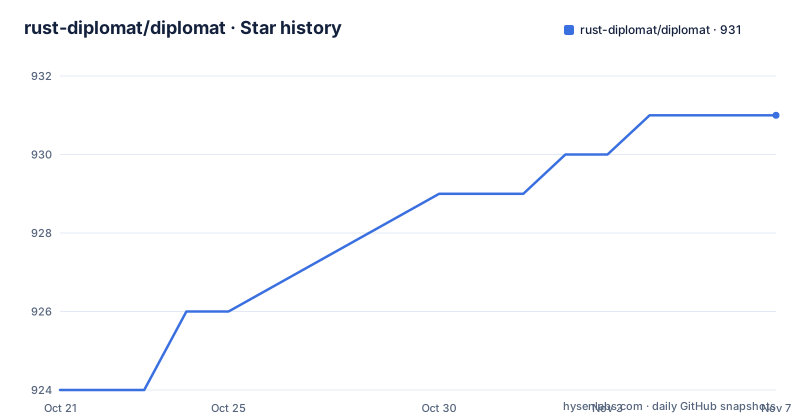
Star history
- rust-diplomat/diplomat931 ★ · +7
| Repository | 2026-10-21 | 2026-11-07 |
|---|---|---|
| rust-diplomat/diplomat | 924 | 931 |
7 Stars in the last 17 days, measured from the daily GitHub snapshot. Compare with other projects
Editorial analysis
The problem with calling Rust from everything else
Rust is easy to call from C and awkward to call from anything else. A library written in Rust that wants to be usable from Python, Kotlin or C# needs a hand written FFI layer per language, plus the glue to marshal types, handle strings and lifetimes, and keep the ABI stable. That work is repetitive, and it is exactly the kind of work nobody wants to redo for every project. Diplomat is a Rust tool for generating FFI definitions allowing many other languages to call Rust code. You define the Rust APIs you want exposed, and it generates high-level C, C++, and JavaScript bindings automatically, with the other targets following the same pattern. The audience is a team with a Rust core library that needs to ship to several language ecosystems.
A macro, a runtime and a separate command line tool
The shape of the toolchain is three pieces. The macro and the runtime are dependencies you add to your own crate, and the command line tool is a separate program that generates the bindings. The README gives the install step for the CLI:
$ cargo install diplomat-tooland then the two dependencies for your project:
diplomat = "0.10.0"
diplomat-runtime = "0.10.0"
That version pair is worth pausing on, because it is out of step with the released crate. The workspace metadata declares version 0.16.1 for the whole workspace and pins the internal crates to 0.16.0, so the snippet in the README predates the current release. The runtime is a separate crate because generated code needs runtime support at the call boundary, and the comment in the workspace file notes that diplomat-runtime will stick to 0.16 as long as it can, which is how the project keeps the runtime stable while the rest moves.
Seven targets today and a plugin interface for an eighth
The list of supported targets is the substance of the package. Diplomat generates bindings from Rust to C, to C++, to Dart, to Javascript and Typescript, to .NET with C#, to Kotlin using JNA, and to Python using nanobind. The runtime choices matter: JNA means the Kotlin bindings call into a native library without a generated JNI shim, and nanobind is the modern Python binding generator, so the Python target produces idiomatic Python objects rather than a raw C wrapper. Beyond the built-in targets, languages are supported through a plugin interface, and the README points at the book to get started and at tool/src/{c, cpp, js} for the existing plugin implementations. The example directory in the repository mirrors the target list with c, cpp, dart, dotnet, js and kotlin subdirectories, each holding the generated output for the example crate.
Building and testing the workspace
Working on Diplomat itself is a cargo project with a workspace, and the members listed in Cargo.toml are core, macro, runtime, tool, example, feature_tests and book/preprocessor, with the book preprocessor compiled as part of the workspace so the documentation cannot drift from the code. The commands are the ordinary ones:
$ cargo build
$ cargo test
cargo build builds all the libraries and compiles an example, and cargo test runs the unit tests. The project also carries a Makefile.toml, a clippy.toml and a ContributingOnWindows.md, which tells you that building the tool on Windows has its own quirks. The version floor is rust-version 1.88 for the crates that have one, and the workspace uses edition 2021 with resolver 2.
Snapshot tests guard the generated output
Diplomat makes use of snapshot tests to check macro and code generation logic, and that is how a code generator stays honest across seven target languages. Instead of asserting on parsed structures, the tests capture the generated output and compare it against a stored snapshot, so a change in the macro or in a language backend shows up as a diff in files that a human reviews. When the change is intended, the snapshots are updated with cargo insta review, and the tool for that comes from cargo install cargo-insta. The feature_tests/ member of the workspace is where the end to end behaviour is exercised, and the example/ directory is the crate whose generated code lands in the per-language folders. The practical consequence for a user is that generated files in your repository will churn when you upgrade, and those diffs are worth reading rather than skipping.
The wasm32 C ABI wrinkle in the JavaScript backend
There is one sharp edge in the JavaScript target, and the README is direct about it. The JavaScript backend assumes that you are building WebAssembly on the C Spec ABI. That is not currently the default for the wasm32-unknown-unknown target in the latest version of Rust, and until the new WASM ABI is made stable there are two options. The first is to build using nightly Rust and enable the -Zwasm-c-abi=spec flag. The second is to configure the JS backend to use legacy bindings, through a WASM ABI config option in tool/src/js/mod.rs, with the guide on configuration in the book explaining how. The practical cost of the first option is a nightly toolchain dependency for anyone building the WASM artifact, and the cost of the second is that you are pinned to the older binding model until the ABI stabilises. This is the kind of detail that decides whether the JavaScript target is usable in your build pipeline today.
Versions, MSRV and the licence
The release line is 0.16, with v0.16.0 on 2026-07-31 and v0.16.1 on 2026-08-20, and the last push to the main branch was on 2026-10-19. The Cargo.toml declares version 0.16.1, a rust-version of 1.88 for the crates that have one, and no MSRV for the tool for now. The licence declared in the package metadata is MIT OR Apache-2.0, the standard Rust dual licence, while the licence field on the repository itself is listed as a custom licence GitHub cannot classify, so the LICENSE file is the place to confirm. The project documentation lives in the book/ directory and is published at rust-diplomat.github.io/diplomat, with the architecture explained in docs/design_doc.md. Nothing here is version 1.0 yet, so the generated API surface can still change between minor releases.
Editorial conclusion
Adopt Diplomat when a Rust core library has to be consumed from more than one language ecosystem and you would rather generate the bindings than maintain hand written FFI per target, and start with the C, C++ or Python target to see the shape of the generated code. Do not adopt it if you need a stable 1.0 API surface, since the current release line is 0.16, and treat the JavaScript target as a separate decision because it depends on either nightly Rust with the C spec ABI flag or a legacy bindings configuration. Verify first that the crate versions you depend on match the tool version you install, since the README snippet still shows 0.10.0 while the workspace is at 0.16.1, and read the generated diffs after an upgrade rather than committing them blindly.
Frequently asked questions
Which languages can Diplomat generate bindings for?
C, C++, Dart, Javascript and Typescript, .NET with C#, Kotlin using JNA, and Python using nanobind. Additional languages are supported through a plugin interface, with the existing plugins in tool/src/{c, cpp, js}.
How do I install the Diplomat tool and add it to a Rust project?
Install the command line tool with cargo install diplomat-tool, then add the macro and runtime crates as dependencies of your project, diplomat and diplomat-runtime. The README snippet shows version 0.10.0 for both, while the current workspace version is 0.16.1, so check the book for the current pair.
What does Diplomat need for its JavaScript bindings on wasm32-unknown-unknown?
The JavaScript backend assumes the WebAssembly C Spec ABI, which is not the default for that target in the latest Rust. Until the new ABI is stable you must either build with nightly Rust and the -Zwasm-c-abi=spec flag, or configure the JS backend to use legacy bindings through the WASM ABI config option in tool/src/js/mod.rs.
How does Diplomat test its code generation?
It uses snapshot tests to check the macro and code generation logic, and when a change is intended you update the snapshots with cargo insta review, installing the tool with cargo install cargo-insta. The workspace also has a feature_tests member alongside core, macro, runtime, tool and example.
What licence is Diplomat released under?
The package metadata in Cargo.toml declares MIT OR Apache-2.0, the usual dual licence for Rust projects, while the repository licence field is listed as a custom licence GitHub cannot classify, so the LICENSE file holds the authoritative terms. The most recent releases are v0.16.0 on 2026-07-31 and v0.16.1 on 2026-08-20.
Official sources
Add this badge to your README
If you maintain this project, the badge below links readers to this analysis and shows its maintenance status from the daily GitHub snapshot. Paste the markdown into your README; add ?metric=license or ?metric=stars to the image URL for a different field.

[](https://hysenlabs.com/projects/rust-diplomat-diplomat)Star history chart for your README
[](https://hysenlabs.com/projects/rust-diplomat-diplomat)Was this useful?