promptomatix turns a raw task description into an optimized prompt through DSPy
An Automatic Prompt Optimization Framework for Large Language Models
At a glance
- What is it?
- promptomatix is a Salesforce AI Research framework that automates prompt optimization: it classifies the task, generates synthetic data, runs a DSPy or meta-prompt backend, evaluates the result and folds in human feedback. It is a research-shaped tool with a real CLI, and it still costs model calls to run.
- Who is it for?
- promptomatix suits a researcher or developer who wants prompt optimization to run end to end from a one line task description, with synthetic data generation, task detection and a session you can iterate on, and who is comfortable paying for model calls during each run. It does not suit a production service that needs deterministic latency and cost, a team that cannot send its task descriptions to an external provider, or anyone wanting a library with a settled API.
- Can I use it commercially?
- Yes. Apache-2.0 is a permissive licence: you can use, modify and sell software built on it, as long as you keep its copyright and licence notices.
- Is it still maintained?
- Yes. The repository last received commits 158 days ago.
- What is it written in?
- Mainly Python, according to GitHub's language statistics.
Answers come from the project's GitHub data, last synced on November 7, 2026, and from our analysis. They are not legal advice.
Star history
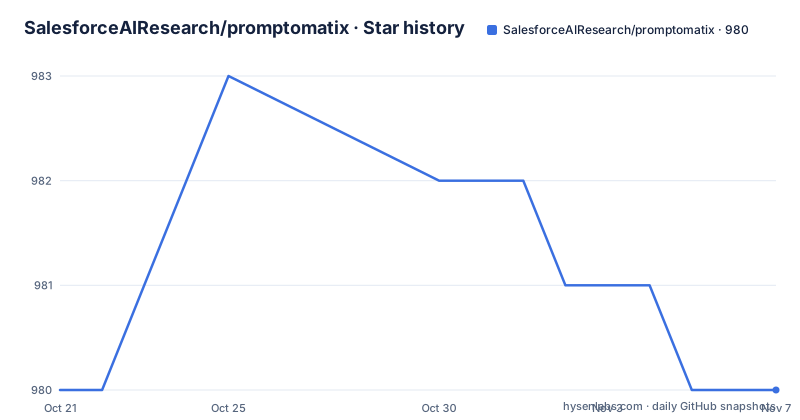
- SalesforceAIResearch/promptomatix980 ★ · +0
| Repository | 2026-10-21 | 2026-11-07 |
|---|---|---|
| SalesforceAIResearch/promptomatix | 980 | 980 |
0 Stars in the last 17 days, measured from the daily GitHub snapshot. Compare with other projects
Editorial analysis
What promptomatix automates and who it is for
promptomatix is a framework for automating the optimisation of large language model prompts. Its stated purpose is to replace the manual trial-and-error loop of prompt engineering with a structured process that is consistent, cost-conscious and produces higher quality prompts.
The audience is described as two groups. A researcher exploring model capabilities, and a developer building production applications. In practice the framework is closer to the first than the second, because the machinery around it is a research pipeline with session logs, synthetic data generation and evaluation metrics rather than a service interface with retry and timeout policy.
The framework is built on DSPy and on what the documentation calls advanced optimisation techniques. It iterates prompts against task requirements, synthetic data and user feedback, and it exposes both a Python API and a REST interface alongside a command line, with the documentation describing it as framework agnostic and supporting multiple providers including OpenAI, Anthropic and Cohere.
The repository is Apache-2.0 licensed, and it carries the usual governance files for a Salesforce project: AI_ETHICS.md, SECURITY.md, CODE_OF_CONDUCT.md, CONTRIBUTING.md and a how_to_license.md.
The pipeline: input processing, synthetic data, optimisation, evaluation, feedback
The architecture section lists six components, and the order of that list is the data flow.
Input processing analyses the raw user input to determine the task type and requirements, which is what lets the same command work for sentiment classification, summarisation or a domain-specific labelling task without you naming a DSPy module yourself. Synthetic data generation then creates training and testing datasets tailored to that specific task. The optimisation engine uses DSPy or meta-prompt backends to iteratively improve prompts. The evaluation system assesses prompt performance using task-specific metrics. Feedback integration folds human feedback into the loop for continuous improvement. Session management tracks optimisation progress and keeps detailed logs.
The evaluation stage is what separates this from a prompt generator. The dependency list includes rouge-score, rouge, bert-score and langdetect, which are reference based and language identification metrics, so a task that produces text rather than a label is scored against a comparison rather than only being inspected.
Session management is the other piece that deserves attention. Because optimisation is iterative and can be resumed after human feedback, the framework keeps a session identifier, and the Python API exposes one directly through optimize_with_feedback(result['session_id']).
Installing with install.sh, which also pulls in the DSPy submodule
The recommended path is a clone plus one script. The installer checks the Python installation, creates a virtual environment named promptomatix_env, initialises the git submodules for DSPy, and installs the dependencies.
# Clone the repository
git clone https://github.com/airesearch-emu/promptomatix.git
cd promptomatix

# Install with one command
./install.sh
One detail to check before you run it. The clone command in the documentation points at the airesearch-emu organisation path, while the project itself lives under the SalesforceAIResearch organisation. Verify the URL against your source before cloning, or the script will not be the one you expect to run.
The virtual environment has to be activated for every use, and the documentation is emphatic about that point.
# Activate the environment
source promptomatix_env/bin/activate
The install script also handles NLTK data, downloading tokenizers/punkt, the averaged_perceptron_tagger and the wordnet corpus if they are not already present, and the setup script degrades gracefully if NLTK is not importable at setup time and downloads at runtime instead.
There is also a setup.py, which registers the packages found under src and declares the same dependency set, so a pip based install path exists alongside the shell installer.
API keys and the first command line run
Credentials come from the environment, or from a .env file copied from the example that ships with the repository.
# Set your API keys
export OPENAI_API_KEY="your_openai_api_key"
export ANTHROPIC_API_KEY="your_anthropic_api_key"# Or create a .env file
cp .env.example .env
# Edit .env with your actual API keysThe smoke test in the documentation is a single command that names a task, a model, a backend, a synthetic data size and a provider.
# Test the installation
python -m src.promptomatix.main --raw_input "Given a questions about human anatomy answer it in two words" --model_name "gpt-3.5-turbo" --backend "simple_meta_prompt" --synthetic_data_size 10 --model_provider "openai"
Reading the flags tells you the shape of the interface. The entry point is the module src.promptomatix.main, the raw input is a natural language description of what you want, model_name selects the model, backend selects the optimisation strategy with simple_meta_prompt as one option, synthetic_data_size sets how much synthetic data to generate, and model_provider selects the provider.
That last flag matters more than it looks. Nothing in the documented flow runs without a provider, so the framework is not usable offline, and a run with synthetic_data_size 10 is already ten or more model calls before any evaluation happens.
Local CSV data with input_fields and output_fields
Synthetic data is a starting point, not a substitute for your own examples. The command line accepts local train and test CSV files and tells the framework which column is the input and which is the expected output.
python -m src.promptomatix.main --raw_input "Classify the given IMDb rating" \
  --model_name "gpt-3.5-turbo" \
  --backend "simple_meta_prompt" \
  --model_provider "openai" \
  --load_data_local \
  --local_train_data_path "/path/to/your/train_data.csv" \
  --local_test_data_path "/path/to/your/test_data.csv" \
  --train_data_size 50 \
  --valid_data_size 20 \
  --input_fields rating \
  --output_fields category
The train and valid sizes cap how many rows are drawn, and the two field flags define the supervision contract. This is the part of the interface that generalises to a real task, because a text classification problem and a question answering problem differ mainly in what you declare here.
Note the split between three sizes. The synthetic path takes a single size argument, while the local data path takes separate train and valid sizes, and the documentation refers to a test file as well. That asymmetry is the kind of thing to verify in your own run rather than assume, since a mismatch between how the framework consumes the test file and how you built it shows up as a poor evaluation score rather than as an error.
The Python API runs optimization, feedback and a second optimisation pass
The command line is a wrapper around three imported functions, and the API shows the feedback loop more clearly than the CLI does.
from promptomatix import process_input, generate_feedback, optimize_with_feedback

# Basic optimization
result = process_input(
    raw_input="Classify text sentiment",
    model_name="gpt-3.5-turbo",
    task_type="classification"
)
The first call does the whole pipeline: task analysis, synthetic data, optimisation and evaluation. The returned result carries the optimised prompt under result['result'], plus the detected input_fields and output_fields and a session_id.
The feedback step then takes those fields and the optimised prompt and produces feedback for improvement, which a person can read and act on.
# Generate feedback for improvement
feedback = generate_feedback(
    optimized_prompt=result['result'],
    input_fields=result['input_fields'],
    output_fields=result['output_fields'],
    model_name="gpt-3.5-turbo"
)
The third call closes the loop by re-running optimisation against the recorded session.
# Optimize with feedback
improved_result = optimize_with_feedback(result['session_id'])
Passing a session identifier rather than a prompt is what makes the loop stateful, and it is also the reason you should persist sessions if you care about the results of a run.
The dependency set tells you what the framework actually does
The requirements file is the most honest description of the framework available, and it is long. dspy>=2.6.0 is the optimisation core, openai>=1.0.0 and anthropic>=0.18.0 are the provider clients, litellm is listed for model routing, and flask>=2.0.0 with requests>=2.25.0 back the REST interface the feature list mentions.
The evaluation block installs rouge-score, rouge, bert-score and langdetect. The data block brings datasets, pandas and numpy. pydantic handles configuration and typing, python-dotenv reads the .env file, and backoff provides retry behaviour.
That is a heavy install for a prompt optimiser, and it arrives with the DSPy submodule that install.sh initialises. Two consequences follow for a team. The dependency tree is large enough that conflicts inside an existing environment are plausible, so the isolated promptomatix_env virtualenv is not optional decoration. And the framework downloads NLTK corpora at setup time, which means the installation is not reproducible in an air gapped build pipeline without a local mirror.
The setup.py in the repository root declares its package name as "promtomatic" at version "0.1.0", while the release tags are at v1.0.0 and the README describes a different product name. The metadata is not in sync with the published releases, which is worth knowing before you pin the package.
Where promptomatix stops, and the boundary of the evidence
Three limits are visible from the documentation itself.
The first is cost and latency. Every optimisation run generates synthetic data, calls a model for candidates, evaluates them and, with the feedback path, runs again. The framework describes itself as cost-effective, but the documented flags make the shape of the spend obvious: synthetic_data_size 10 is the smallest sensible setting, and that is ten generations before evaluation. For a production request path this is unusable, and for a research loop it is a cost you have to budget.
The second is the evaluation question. The metrics in the dependency list are reference based, which means the framework compares against a target it either has from your CSV or that was itself generated. If the synthetic labels are wrong, the optimiser is being graded against its own noise.
The third is what the documentation does not cover. There is no description of how sessions are stored, whether a session can be resumed after a process restart, how the REST API is started, what the full error surface looks like, or how the framework behaves when a provider rate limits you. The API reference is said to live in the docs directory, and the notebooks in examples/notebooks are named for basic usage, prompt optimisation, metrics evaluation and advanced features, which suggests the detail exists somewhere, but the top level documentation does not answer those questions.
The honest alternative is DSPy directly. Using DSPy gives you the optimisation loop and the module and metric design without the synthetic data layer, the task detection layer, the feedback wrapper or the session manager. promptomatix earns its extra machinery when you want the task described in plain English and the framework to decide how to optimise it. If you already know the DSPy module and metric you want, the wrapper is overhead.
Editorial conclusion
promptomatix suits a researcher or developer who wants prompt optimization to run end to end from a one line task description, with synthetic data generation, task detection and a session you can iterate on, and who is comfortable paying for model calls during each run. It does not suit a production service that needs deterministic latency and cost, a team that cannot send its task descriptions to an external provider, or anyone wanting a library with a settled API. Before adopting it, run the documented command with --synthetic_data_size 10 against your own task, confirm that --model_provider and --backend choices match the model you actually have access to, and check the session logs the framework writes, since the visible documentation does not describe how optimisation runs are resumed.
Frequently asked questions
How do I install promptomatix?
Clone the repository, run ./install.sh, which checks Python, creates a promptomatix_env virtual environment, initialises the DSPy submodule and installs the dependencies, then activate it with source promptomatix_env/bin/activate. The setup script also downloads the required NLTK data.
What command line options does promptomatix accept?
The documented flags include --raw_input for the task description, --model_name, --backend such as simple_meta_prompt, --model_provider, --synthetic_data_size, --task_type and --temperature, plus --load_data_local with --local_train_data_path, --local_test_data_path, --train_data_size, --valid_data_size, --input_fields and --output_fields for running on your own CSV data.
Does promptomatix need API keys to run?
Yes. The documentation tells you to export OPENAI_API_KEY and ANTHROPIC_API_KEY or to copy .env.example to .env and fill in your keys, and every documented run names a model and a provider.
What licence is promptomatix released under?
The repository is licensed under Apache-2.0, with the licence text in LICENSE.txt and additional notes in how_to_license.md. It also carries AI_ETHICS.md, SECURITY.md, CODE_OF_CONDUCT.md and CONTRIBUTING.md.
How does the human feedback loop work in promptomatix?
process_input returns an optimised prompt and a session_id, generate_feedback takes that prompt along with the detected input_fields and output_fields to produce feedback for improvement, and optimize_with_feedback re-runs optimisation against the session identifier.
Official sources
Add this badge to your README
If you maintain this project, the badge below links readers to this analysis and shows its maintenance status from the daily GitHub snapshot. Paste the markdown into your README; add ?metric=license or ?metric=stars to the image URL for a different field.

[](https://hysenlabs.com/projects/salesforceairesearch-promptomatix)Star history chart for your README
[](https://hysenlabs.com/projects/salesforceairesearch-promptomatix)Was this useful?