apple-emoji-ttf: Apple Color Emoji across Linux, Windows and the web
Brings Apple's vibrant color emojis to Linux, Windows, and the Web
At a glance
- What is it?
- apple-emoji-ttf converts Apple's Apple Color Emoji font into platform-specific builds, with Linux installation packages, a Windows replacement font and chunked web assets. It suits users who need Apple's emoji artwork, but platform font replacement and asset licensing require careful review.
- Who is it for?
- Adopt apple-emoji-ttf if you specifically want Apple Color Emoji outside macOS and can obtain Apple Color Emoji.ttc for local builds. Do not adopt it if Qt compatibility, consistent sizing or unchanged Microsoft system fonts are requirements.
- Can I use it commercially?
- Yes. MIT is a permissive licence: you can use, modify and sell software built on it, as long as you keep its copyright and licence notices.
- Is it still maintained?
- Yes. The repository last received commits 109 days ago.
- What is it written in?
- Mainly Python, according to GitHub's language statistics.
Answers come from the project's GitHub data, last synced on November 6, 2026, and from our analysis. They are not legal advice.
Star history
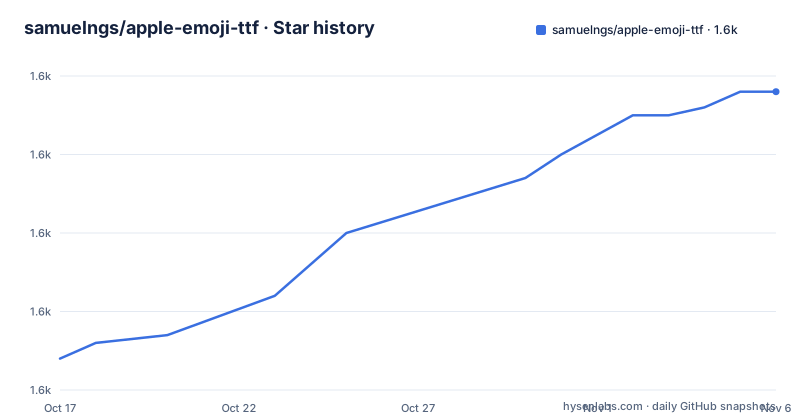
- samuelngs/apple-emoji-ttf1,628 ★ · +34
| Repository | 2026-10-17 | 2026-11-06 |
|---|---|---|
| samuelngs/apple-emoji-ttf | 1.6k | 1.6k |
34 Stars in the last 20 days, measured from the daily GitHub snapshot. Compare with other projects
Editorial analysis
Why apple-emoji-ttf exists beyond macOS
apple-emoji-ttf addresses a specific platform gap: Apple Color Emoji is already present on macOS, but Linux, Windows and browsers do not automatically ship Apple's version. The project converts that font into formats and packages for those environments rather than designing a new emoji set.
The repository produces three distinct deliverables. Linux users receive `AppleColorEmoji-Linux.ttf`, along with `.deb`, `.rpm` and `.pkg.tar.zst` packages for major distribution families. Windows users receive a font configured to replace `Segoe UI Emoji`. Web builds use GSUB shaping and `unicode-range` splitting, with generated `@font-face` CSS for selective browser loading.
This is primarily a font conversion and packaging project. Its Python implementation is organized around `cli.py`, configuration types, validation, extraction, shaping, table generation and a build pipeline. Configuration recipes under `configs/` select the target, rather than target-specific command-line flags. That design makes the difference between Linux, Windows and web output visible in repository files rather than hidden behind separate wrappers.
Linux packages and fontconfig selection
For Ubuntu and Debian, the README directs users to download the `.deb` release and install it with `dpkg` or `apt`. Fedora and RHEL use an `.rpm`, while Arch uses a `.pkg.tar.zst`. The manual route is also available when a system package is unnecessary.
The first real Linux use begins by downloading `fonts-apple-color-emoji.deb` from Releases. Install that package locally:
sudo dpkg -i fonts-apple-color-emoji.deb
# or
sudo apt install ./fonts-apple-color-emoji.deb
The command installs the repository's Linux font package through the selected Debian package tool. A manual installation requires creating the user font directory and copying the TTF into it:
mkdir -p ~/.local/share/fonts
cp AppleColorEmoji-Linux.ttf ~/.local/share/fonts/
Copying the file does not necessarily make applications select it. The README explains that fontconfig must prefer `Apple Color Emoji`. It identifies two relevant controls: the `<alias>` for `<family>emoji</family>` in `/etc/fonts/conf.d/60-generic.conf`, or the distribution equivalent, and a user-level `~/.config/fontconfig/fonts.conf` based on the repository's `fonts.conf`. The user configuration prefers the font for serif, sans-serif and monospace requests and handles requests for Noto Color Emoji.
After configuration, run the font cache command documented by the README:
fc-cache -fvThis rebuilds the fontconfig cache. The next step is to open applications that use fontconfig and inspect emoji rendering, because installation does not guarantee that every application selects the intended family.
Windows Segoe UI Emoji replacement has a clear trade-off
The Windows build is configured to occupy the role of `Segoe UI Emoji`. The README states that `AppleColorEmoji-Windows.ttf` cannot be installed by double-clicking. Instead, the system file at `C:\Windows\Fonts\seguiemj.ttf` must be backed up and replaced manually, followed by a restart.
The documented sequence begins from an elevated Command Prompt. `takeown` changes ownership of the system font file, and `icacls` grants the administrators group full control. The existing file is then deleted and the Apple Windows build is copied into its place:
takeown /f "C:\Windows\Fonts\seguiemj.ttf"
icacls "C:\Windows\Fonts\seguiemj.ttf" /grant administrators:F
del "C:\Windows\Fonts\seguiemj.ttf"
copy "AppleColorEmoji-Windows.ttf" "C:\Windows\Fonts\seguiemj.ttf"
This is not equivalent to installing an ordinary user font. It changes a protected Windows system asset and depends on the copy succeeding. The README notes that a direct copy may fail if Windows has the file locked. It does not document a complete recovery procedure beyond backing up the original file.
The approach is suitable for a controlled machine that needs `Segoe UI Emoji` requests to resolve to Apple's design. It is unsuitable where administrative changes to `C:\Windows\Fonts` are prohibited.
Building the web recipe from Python and Apple Color Emoji.ttc
A local build requires Python 3.12 or later, dependencies from `requirements.txt`, and `Apple Color Emoji.ttc` from macOS. The repository does not provide that TTC. On macOS, `cli.py` uses `/System/Library/Fonts/Apple Color Emoji.ttc` when `--input` is omitted.
The dependency file specifies `fonttools>=4.0.0`, `PyYAML>=6.0`, `pillow>=10.0.0` and `uharfbuzz>=0.40.0`. Pillow is identified as necessary for PNG compression in the web recipe, while uharfbuzz is used for GSUB sequence generation and verification.
Install the dependencies and select the web recipe:
pip install -r requirements.txt
python cli.py -c configs/web.yaml --output output/AppleColorEmoji.ttf
The output path is always required. The build writes chunked files such as `AppleColorEmoji[1].ttf` and `AppleColorEmoji.css` beside the named output. Serve every generated file from the same directory, then load the stylesheet:
<link rel="stylesheet" href="/fonts/AppleColorEmoji.css">Applications must also opt into the family for the intended elements:
.emoji {
  font-family: "Apple Color Emoji", system-ui, sans-serif;
}
The generated stylesheet uses `unicode-range`, so a browser requests only the chunks needed for emoji on a page. Moving chunks away from the CSS requires updating the `src:` URLs. This design reduces unnecessary downloads, but it also creates a deployment dependency on keeping the CSS and font chunks aligned.
Recipe-driven conversion and Unicode sequence refreshes
The build interface exposes recipes rather than platform flags. Linux, Windows and web behavior is selected with `configs/linux.yaml`, `configs/windows.yaml` and `configs/web.yaml`. A non-default TTC location is passed with `--input`, while output naming and location are controlled by `--output`.
For example, a copied TTC can be used on Linux:
python cli.py -c configs/linux.yaml --input "/path/to/Apple Color Emoji.ttc" --output output/AppleColorEmoji-Linux.ttfUnicode emoji sequence files live under `sequences/`. They can be refreshed manually with `tools/update_emoji_data.py`:
python tools/update_emoji_data.py --version latest
# or pin a release
python tools/update_emoji_data.py --version 17.0
Builds can also request refreshed sequence data:
python cli.py -c configs/web.yaml --output output/AppleColorEmoji.ttf --update-sequences
python cli.py -c configs/windows.yaml --output output/AppleColorEmoji-Windows.ttf --update-sequences 17.0
The repository contains separate sequence generation, shaping, table handling and verification directories. This separation indicates a staged conversion pipeline, although the README does not document every internal stage. It also identifies `sequences/project-sequences.txt` as project-owned rather than downloaded from Unicode.
Because builds begin with an Apple TTC, the project is not a standalone source of emoji artwork. A Linux or Windows build depends on access to that input when release artifacts are not used.
Rendering limits, asset rights and release maintenance
The README records two concrete rendering limitations. Some Linux applications may display emoji at a smaller size, and the project says the cause may involve the converted font or toolkit-specific handling of color fonts. It describes the issue as still under investigation. Some Qt applications may fail to render the emoji correctly or may show nothing because of how Qt handles color font tables.
These limitations matter when selecting the project. The documentation does not claim compatibility with every desktop toolkit, so adoption should be based on the applications actually present in the target environment. A font package can install successfully while still producing inconsistent results.
The repository identifies its license as MIT, but it also states that Apple Color Emoji assets and designs belong to Apple Inc. It explicitly warns that using a font from another operating system may have licensing implications and places responsibility on the user. The MIT repository license should not be read as a claim that every bundled or derived font asset carries the same licensing status. The README is truncated at the start of its license section, so it does not provide the complete license wording in the available text.
The repository is not archived. Its last push was on 2026-07-22, and releases for macOS 26 were published on the same date. This indicates recent repository changes and packaged releases, but upgrade planning still requires comparing the selected release with the macOS emoji source and validating the resulting font in each target application.
Editorial conclusion
Adopt apple-emoji-ttf if you specifically want Apple Color Emoji outside macOS and can obtain Apple Color Emoji.ttc for local builds. Do not adopt it if Qt compatibility, consistent sizing or unchanged Microsoft system fonts are requirements. Verify rendering in your target applications, review the font's asset licensing implications, and test the generated fontconfig or CSS configuration before broad deployment.
Frequently asked questions
Does apple-emoji-ttf provide Apple Color Emoji.ttc for building the font?
No. The project expects `Apple Color Emoji.ttc` from macOS and does not provide it. On a Mac, the CLI uses `/System/Library/Fonts/Apple Color Emoji.ttc` when no input path is supplied.
How do I install apple-emoji-ttf on Ubuntu or Debian?
Download `fonts-apple-color-emoji.deb` from Releases, then use `sudo dpkg -i fonts-apple-color-emoji.deb` or `sudo apt install ./fonts-apple-color-emoji.deb`. Applications may also require fontconfig to prefer `Apple Color Emoji`.
Will apple-emoji-ttf render correctly in every Qt application?
No. The README says some Qt applications may render the emoji incorrectly or not at all because of how Qt handles color font tables. Compatibility needs to be checked in the specific applications you intend to support.
Does installing the Windows apple-emoji-ttf build replace a normal user font?
No. The README says the Windows build replaces `C:\Windows\Fonts\seguiemj.ttf` manually and cannot be installed by double-clicking. It also requires a backup, administrative access and a restart.
How does the apple-emoji-ttf web build load emoji files?
The web recipe creates `unicode-range` chunks and an `@font-face` stylesheet. Browsers request only the chunks needed for emoji on a page, but the CSS and generated font files must remain accessible at their configured URLs.
Official sources
Add this badge to your README
If you maintain this project, the badge below links readers to this analysis and shows its maintenance status from the daily GitHub snapshot. Paste the markdown into your README; add ?metric=license or ?metric=stars to the image URL for a different field.

[](https://hysenlabs.com/projects/samuelngs-apple-emoji-ttf)Star history chart for your README
[](https://hysenlabs.com/projects/samuelngs-apple-emoji-ttf)Was this useful?