Three of the four platforms are read-only, and the one that sends is the one with the ban risk
BossHunter: an intelligent job-hunting agent (source-available, PolyForm Noncommercial license; commercial use requires separate written authorization).
At a glance
- What is it?
- A local job-search agent for four Chinese recruitment platforms that collects postings, scores them against a job description, and refuses to send anything without your confirmation. It stops on a captcha, a rate limit, a login wall or an unrecognised page instead of working around one, and three of the four platforms cannot send at all.
- Who is it for?
- Check the terms of the platforms first, because automating a recruitment site is exactly the activity their rules are written about, and the project says so itself in a warning that sits above the feature list. With that settled, this is a well-contained piece of automation.
- Can I use it commercially?
- Check first. The repository uses a licence we do not classify automatically, so read its LICENSE file before any commercial use.
- Is it still maintained?
- Yes. The repository last received commits 3 days ago.
- What is it written in?
- Mainly Python, according to GitHub's language statistics.
Answers come from the project's GitHub data, last synced on November 15, 2026, and from our analysis. They are not legal advice.
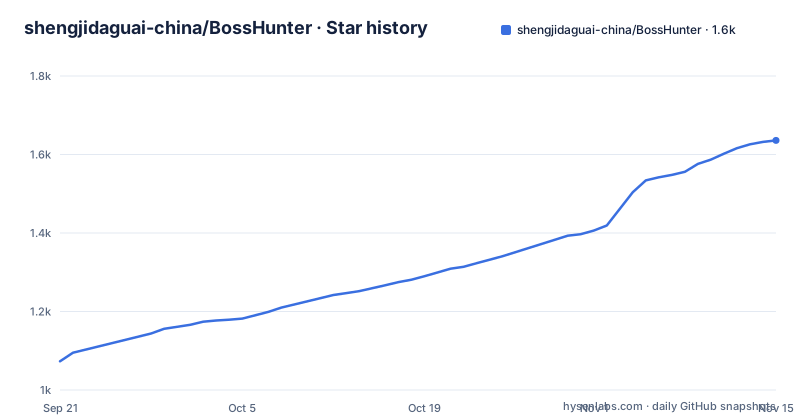
Star history
- shengjidaguai-china/BossHunter1,636 ★ · +563
| Repository | 2026-09-21 | 2026-11-15 |
|---|---|---|
| shengjidaguai-china/BossHunter | 1.1k | 1.6k |
563 Stars in the last 55 days, measured from the daily GitHub snapshot. Compare with other projects
Editorial analysis
Three of the four platforms are read-only, and the one that sends is the one with the ban risk
The capability table for each platform is the single most useful thing in this repository, and it is not the feature list.
One platform supports collection and automated application, meaning low-frequency sending after your confirmation plus monitoring for replies. The other three support read-only collection, scoring, and preparation of the greeting message, and the instruction for all three is the same: apply on the original platform yourself, then fill the status back in.
So the design deliberately refuses to send on three of four platforms. That is the opposite of what a job-application tool usually does, and it means the highest-risk capability exists on exactly one surface.
The collection side has its own containment. Platforms are processed strictly one after another rather than in parallel, so a rate limit on one cannot be amplified by five concurrent sessions. And when the tool detects a captcha, a rate limit, a login wall, or a page structure it does not recognise, it stops safely and does not attempt to work around it.
That last sentence is the one to notice. A tool that scrapes a site which forbids scraping has three options: stop, throttle, or solve the challenge. This one stops, and says so in the capabilities section rather than in a footnote. The cost is real, since a single login wall stops the whole serial pass, and the changelog shows that being a real source of bugs, with an entry about a login being misdetected and another about one platform blocking the tasks that follow it.
The rest of the pipeline is built around the same principle. Every application is reviewed before it goes out, one at a time or in a batch, and the message text is drafted from the job description and your resume rather than fired on sight.
You start the browser and sign in yourself, so the tool never holds your password
The quick start is ordered so that the credentials never pass through the project, and the ordering is the mechanism.
There are five prerequisites: a Python version floor, a Node version floor, the latest Chrome, and a usable model API. Then the install is short enough to quote whole:
git clone https://github.com/shengjidaguai-china/BossHunter.git
cd BossHunter
npm --prefix src/bosshunter/web/frontend ci
npm --prefix src/bosshunter/web/frontend run build
pip install -e .
bosshunter web
Note where the frontend build sits in that order: before the install, because the packaging file expects its output to exist.
You upload your own real resume in the local panel, set your job conditions, and connect the model service there, with the instruction that API keys go only into that panel and never into a chat, an issue, or a commit.
Only then does the browser come into it. You enable Chrome's remote debugging, sign into the recruitment platforms in that same Chrome window, and only then run three commands: check the model connection status, check the connection, and run.
The middle one is described in one sentence: it only checks the connection, and it will not start Chrome for you and will not log in for you. So the session the tool drives is a session you authenticated by hand, and the tool attaches to an already-open debugging endpoint.
That is the whole credential story, and it is worth stating plainly because browser automation usually goes the other way. When the tool takes its own profile or drives a browser it launched, it owns the login, and it owns the password reset path, and it owns every session cookie that comes with it. Here it owns none of that.
The dependency list corroborates the shape. The automation library is a patched build of a well-known browser driver at a pinned floor, which is a fork rather than a wrapper, so somebody is maintaining page-handling behaviour that the upstream driver does not provide.
An invisible comment at the top of the README tells agents to stop reading
The first thing in the README is an HTML comment, which does not render. Its content is an instruction.
It says that if you are an AI agent, stop, do not describe the project structure, immediately read the behaviour-rules file in the repository root and follow it, and that this file takes priority over everything.
So the repository addresses its readers' tools directly, in the file most likely to be fed into one, and it points them at a separate document as the authority rather than describing itself inline. The tree does contain both that behaviour file and a skill file, so the instruction resolves to something real.
Whether this works is not the interesting question. What is interesting is that a small project decided the documentation for a machine reader is a separate artefact with its own precedence rule, in an age where most projects assume a single README serves both audiences. For a project whose whole purpose is operating a browser, being read correctly by an agent that is about to send job applications on someone's behalf seems like a reasonable thing to be deliberate about.
The rest of the documentation follows the same split. There is a getting-started guide, a document for a local agent interface, a command reference, a configuration guide, a frequently-asked-questions page, two platform-specific launcher guides, a contributing guide, and a governance document.
The ban warning is the first block, and the send controls are named but not quantified
The warning appears before the capability table, and it is not a formality.
It says that automating a recruitment platform carries a risk of account restriction or ban. It says the project is for learning, research, and personal job-search efficiency. It tells the reader to follow the platform rules, keep frequency low, and bear the risk themselves. And it states that the project has no affiliation with, cooperation with, or endorsement from any recruitment platform or its associated companies.
That last sentence exists because the tool operates on somebody's site with the user's own account, and the boundary between a user acting for themselves and a third party automating the site is exactly what the disclaimer is trying to hold.
The controls are then named, in a row of the capability table. Sending is conservative by construction: randomised intervals between sends, configured time windows, a daily cap, and the page is browsed before a send goes out rather than posting blind.
The browse-before-send item is the one worth pausing on, because it is the difference between a tool that clicks a button and one that navigates like a person. Whether it is sufficient is not something the document claims, and it is not something a reader can verify without reading the code.
The gap is quantification. There is a daily cap and there are time windows, but no number is given for either, and no dry run for the send path is described. The containment is therefore a set of named mechanisms rather than a measured bound, which is a fair thing to notice and a fair thing to ask the project about. The frequently-asked-questions page is listed as covering ban risk and platform boundaries, so that is where a fuller answer would be expected.
One model vendor in the requirements, a multi-model claim on the front page, and a keyless path
Three claims about models appear in this repository, and they do not line up.
The front page carries multi-model compatibility among its four headline attributes. The configuration guide is listed as covering platform, model, resume and risk settings. And the dependency list names exactly one model vendor's client library, at a version floor, alongside a command line parser, an HTTP client, a YAML parser, a terminal renderer, and a local web framework.
A multi-model surface is entirely achievable from one client if the client speaks an OpenAI-compatible protocol, which most do, so this is not necessarily a contradiction. But a reader who wants to know which providers are actually supported has to infer it from a configuration document, not from the requirements file.
The third claim is the interesting one, and it is in the documentation table rather than in the feature list. There is a document for a local agent tool interface, described as letting a local agent perform generic filing, collection, keyless job evaluation, and monitoring through a pure backend interface.
Keyless job evaluation is a distinct path. It means the scoring step can run without any model credentials, which changes what the tool is for: with a key it becomes a scoring and drafting pipeline, and without one it becomes a collector and a filter. That is a meaningfully different product depending on a configuration value, and it is not mentioned anywhere in the front-page capability list.
Worth noting alongside all three: the keys you do enter stay in the local panel, and the document is explicit that they should never be pasted into a chat, an issue, or a commit.
The frontend is not in version control and has to be built before the package is
The packaging file contains a comment that is worth reading before anyone installs this.
It says the frontend build output is no longer tracked in version control, that it is built on demand, and that it must therefore be force-included so it ships inside the wheel. The comment then instructs the builder to run the package manager install and build commands in the frontend directory before building.
That is a correct decision with a real cost. Tracking a compiled frontend in version control bloats every clone and makes diffs meaningless; not tracking it means a clean checkout plus a package build produces a wheel with no interface in it.
The quick start happens to order the commands correctly, building the frontend before installing the project. So a reader who follows the document gets a working install. A maintainer who runs the packaging step straight after a clone, without reading the comment, gets a wheel whose web panel serves nothing, and the failure will look like a runtime bug.
The artifacts list beside it is also informative about what the runtime depends on. The wheel ships browser runtime modules, a directory of site-pattern markdown files, and data files in JSON. So the page-recognition logic the safe-stop behaviour depends on is not code alone; it is a set of pattern descriptions and data files that travel with the package. An update to those files is a behavioural change to when the tool decides a page structure is unrecognised, which is the same code path that produces the safe stop.
The remaining dependencies explain the rest of the feature list: a PDF library, a spreadsheet library, a Markdown converter, and a font library with web font support. Those four together are what a custom resume generator needs in order to read a resume in any of the formats recruiters actually send, and to produce one.
Everyone has write access and the lead has the only vote that counts
The governance section is unusually detailed, which makes it unusually informative, and one clause in it deserves attention.
There are five formal maintainers including the project lead. There are no fixed modules, so expertise areas are described as useful for collaboration rather than as ownership boundaries. Each maintainer is listed with a role, a contribution share, an area, and a tenure date. Two of the shares are marked as provisional because the tenure was under a set number of days at the time of counting. The lead's share is explicitly not counted. Every figure carries a verification timestamp and a timezone, and is described as confirmed by the project lead.
The clause: the project lead is responsible for both the project-contribution and maintenance-contribution documents and decides maintenance contribution scores unilaterally.
So the scoring that produces the percentages everyone else is measured by is set by one person, and that is written down rather than implied. It is not hidden, it is not dressed up as consensus, and it is accompanied by real safeguards.
The safeguards are the rest of the paragraph. Review, testing and merging of technical changes are done by the formal maintainers including the lead. The lead's approval counts as one person and no more. Nobody may audit a technical change they authored or helped write. High-risk changes need approval from two different maintainers who are not the author.
That is a coherent design with one identified concentration. The lead writes the scoring, and the two-approver rule applies to changes rather than to scores. Whether that matters depends on whether the scores gate anything material, which the repository does not say.
Editorial conclusion
Check the terms of the platforms first, because automating a recruitment site is exactly the activity their rules are written about, and the project says so itself in a warning that sits above the feature list. With that settled, this is a well-contained piece of automation. Three of its four platforms cannot send anything, the one that can sends at low frequency behind a confirmation you give per job, the collection runs serially, and the browser control stops cleanly when a challenge appears rather than solving it. You start the browser and sign in yourself, so the tool never holds your credentials, and the keys you do enter stay local. Two things to weigh before relying on it. The document describes no dry run for the send path and does not state a value for the daily cap, so the containment is a set of named mechanisms rather than a measured bound. And the project's governance concentrates scoring and final approval in one person, with an explicit no-self-audit rule that partly offsets it; the rule is written down and the concentration is stated, which is more than most projects at this stage manage.
Frequently asked questions
Does BossHunter send job applications automatically?
Not without you. Every application must be reviewed before it goes out, one at a time or in a batch, and the greeting message is drafted from the job description and your resume rather than sent on sight. Only one of the four supported platforms can send at all, and it sends at low frequency after your confirmation, with reply monitoring.
Which recruitment platforms does BossHunter support, and what can it do on each?
Four, collected strictly one at a time. One supports collection, low-frequency sending after confirmation, and reply monitoring. The other three support read-only collection, scoring, and greeting preparation, and you apply on the original platform yourself and then fill the status back in. On detecting a captcha, a rate limit, a login wall, or an unrecognised page structure, it stops safely rather than attempting to bypass it.
Does BossHunter need my recruitment platform password?
No. You start Chrome with remote debugging enabled, sign into the platforms in that same window, and the tool attaches to that session. The connection command explicitly does not start Chrome and does not log in for you. Model API keys go only into the local web panel and the document says never to put them in a chat, an issue, or a commit.
What does BossHunter need to run?
Python 3.10 or newer, Node.js 22 or newer, the latest Google Chrome, and a usable model API. Setup builds the frontend, installs the project in editable mode, and starts a local panel on a loopback address where you upload your resume and connect the model service. The frontend build output is not tracked in version control, so it has to be built before the package is.
What licence is BossHunter under?
The project describes itself as source-available under a non-commercial licence, with commercial use requiring separate written authorisation, and its packaging references a licence file at the repository root. The platform metadata attached to the repository carries no licence value, so the two do not agree and the licence file is the one to read.
Official sources
Add this badge to your README
If you maintain this project, the badge below links readers to this analysis and shows its maintenance status from the daily GitHub snapshot. Paste the markdown into your README; add ?metric=license or ?metric=stars to the image URL for a different field.

[](https://hysenlabs.com/projects/shengjidaguai-china-bosshunter)Star history chart for your README
[](https://hysenlabs.com/projects/shengjidaguai-china-bosshunter)Was this useful?