Stable Diffusion KMP ships three Android flavors, and the FOSS one drops a backend
Stable Diffusion AI client app for Android and iOS
At a glance
- What is it?
- ShiftHackZ/Stable-Diffusion-KMP is a Kotlin Multiplatform client that talks to nine remote image providers and four on-device runtimes, with a Google Play build, a full build, and an F-Droid build that differ in which local runtimes they include. Its newest stable release is from July, its nightly tag stopped updating in June, and its nightly download link points at a different repository.
- Who is it for?
- SDAI fits someone who wants one mobile client that can talk to their own image server, to a hosted API, or to an on-device runtime, and who reads a support matrix before installing rather than after. Four things to check first.
- Can I use it commercially?
- Yes, with strict conditions. AGPL-3.0 is a network copyleft licence: if people use a modified version over a network, for example as a hosted service, you must offer them its source code under the same licence.
- Is it still maintained?
- Yes. The repository received new commits within the last day.
- What is it written in?
- Mainly Kotlin, according to GitHub's language statistics.
Answers come from the project's GitHub data, last synced on November 25, 2026, and from our analysis. They are not legal advice.
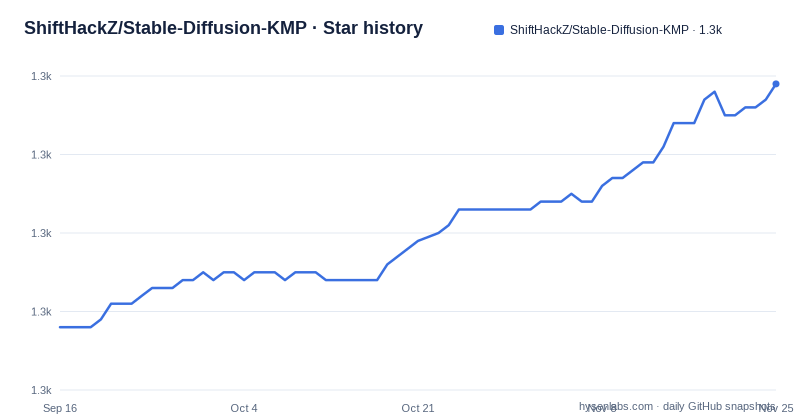
Star history
- ShiftHackZ/Stable-Diffusion-KMP1,299 ★ · +31
| Repository | 2026-09-16 | 2026-11-25 |
|---|---|---|
| ShiftHackZ/Stable-Diffusion-KMP | 1.3k | 1.3k |
31 Stars in the last 70 days, measured from the daily GitHub snapshot. Compare with other projects
Editorial analysis
The newest stable tag is two months behind the last commit
Three releases are listed, and read in date order they do not line up with the version numbers.
The newest stable is 1.1.2 on 2026-07-19. Version 1.1.1 is two days earlier at 2026-07-16. The nightly build is listed third and is dated 2026-06-14, which is a month before either of the stable releases it is supposed to track.
So the nightly channel is the stalest thing in the repository. Whatever landed in 1.1.1 and 1.1.2 is not in the nightly artifact, and there is a separate document describing those nightly builds whose contents we cannot check from the release list.
The last push to the repository is dated 2026-09-28, which is roughly two and a half months after the newest stable release. The repository is not archived, and it is not abandoned on the evidence of one number, but the gap between the last commit and the last tag is the fact to plan around: anything in the tree from the last ten weeks is unreleased, and the nightly channel is not the place you would find it.
The version scheme is also worth noting. Stable releases are plain version numbers, and the nightly artifact has a rolling name rather than a date or version, which is what makes the stale date easy to miss in a list where the other two entries look like ordinary versions.
The nightly download link points at a different repository
The link list at the top of the document offers a Website, a Google Play link, F-Droid, an App Store link, a Nightly Build link, Telegram, Discord, and a 4PDA forum thread.
Two of those eight are worth reading closely.
The nightly build link resolves to a releases download path under a repository named Stable-Diffusion-Android, not Stable-Diffusion-KMP. The code for the app lives in this repository and the nightly binaries are fetched from another one. That is a common arrangement when a project splits source and release publishing, and it has one consequence worth stating: you cannot tell from this repository's releases whether a given nightly contains what the current source tree would produce, only that the artifact exists under the other name.
The Google Play entry in that same list resolves to a 4PDA forum thread. The Play Store link appears separately in the badge block below it, so the reference is present and correct somewhere in the document. The list version of it, labelled Google Play, goes somewhere else entirely.
The document also carries a digital object identifier badge, which points at a Zenodo record. That is an archiving practice worth having on a repository under a copyleft licence, since it fixes a citable snapshot rather than only a moving branch.
The FOSS build is the one missing a local backend
The provider matrix has four platform columns: iOS, and Android in its Play Store, full, and FOSS flavors.
Nine remote providers are marked available in every column without exception. Your own AUTOMATIC1111 server, your own SwarmUI server, a crowdsourced worker network, four hosted model APIs, and two more hosted services all work the same way on an Apple device and on all three Android builds.
The on-device rows are where the flavors diverge.
The MediaPipe local diffusion runtime is marked available on the Play Store build, available on the full build, and unavailable on the FOSS build, with the note that it is excluded from the FOSS flavor. That is the inversion worth pausing on. The F-Droid build is normally the most conservative one, built to avoid proprietary dependencies, and here it is the build that loses a feature, while the Play Store build, which is allowed whatever it likes, keeps it.
The reasoning is a licensing or dependency question about the runtime itself. The effect is that the most privacy-conscious install has the smallest set of local options, and the matrix says so in one cell rather than in a note explaining why.
Two other local rows behave differently again, and both are available on all three Android builds and unavailable on iOS: an ONNX runtime and a native C++ implementation with GGUF, safetensors, and checkpoint model support plus CPU, OpenCL, and Vulkan backend selection.
The Play build has local inference but not custom model paths
The two local rows that are available on the Play Store flavor both carry a restriction in their notes, and it is the same restriction in each.
For the ONNX row, custom local model paths are available outside the Play build. For the native C++ row, custom local model paths are available outside the Play build as well.
So on a Play Store install you can run a local model, and you get the runtime, but you cannot point it at a file you chose. The path is fixed to whatever the build expects, or the feature is absent.
That is a coherent policy. A store build has rules about what it may ship and about what the user can point a native library at, and honouring them is why the Play flavor behaves differently. The full build is the one with both the runtime and the freedom to choose the model.
The practical consequence is that the three Android flavors are not one app at three quality levels. They are three different products with different capabilities, and the matrix, not the store listing, is where that is written down. The release names make the same point: the Play package identifier, the F-Droid package identifier, and the full build each have their own name, with the F-Droid one being the base identifier plus a suffix.
PrismML Bonsai is green in every column and beta or experimental in the notes
One runtime is the only provider marked available across iOS and all three Android builds, and it is also the one whose notes carry two maturity labels.
On iOS it runs on an Apple Silicon MLX runtime and is marked beta. On Android it uses a native NDK and ART runtime, is marked experimental, supports auto, CPU, and Vulkan backend selection, and is described as something you should check against the device before heavy runs.
So the one row with no gaps is also the one with the weakest stability claims on both platforms. The matrix structure forces that into the open: a full row of green marks would normally read as the most reliable option, and here it is the least settled.
The Core ML row is the opposite shape. It is available on iOS and unavailable on every Android column, and its notes say that SDXL catalog entries are disabled until device-gated quality assurance is stable. That is a feature switched off pending testing rather than one that failed, and it is the clearest statement in the document about what the project is still working on.
The document offers a partial answer to all of this. There is an on-device benchmark you can run to check whether a device is fit before a heavy generation, and setup and benchmark flows that check device suitability where a native runtime is packaged.
One hosted provider is labelled alpha in its row, which is the only maturity label on the remote side.
Inpainting is mapped for exactly one provider
The feature matrix breaks capabilities out from providers, and it makes clear that generation is not uniform.
Text to image exists for every provider the platform exposes, which is what the summary column says.
Image to image covers eight providers. OpenAI is excluded, along with the Android local diffusion runtimes, because they are text to image only in the app, and the Core ML row notes that its image to image path requires a compatible downloaded model archive.
Inpaint mask controls list one provider: AUTOMATIC1111. The controls enumerated are a mask image, mask blur, mask mode, masked content, an inpaint area, and padding for the masked region only, and the note says these are mapped to that provider's image to image API.
That single-provider row is the one to notice. Inpainting is the capability people most often reach a dedicated client for, and here it exists for one of thirteen rows. It also means the mapping is not a normalised feature set: the fields are being translated into one vendor's parameter names, so a provider that could accept a mask in another shape is not wired to it.
The negative prompt row covers ten providers and excludes at least two, with the row cut off after naming the crowdsourced network and OpenAI. So even a field as basic as a negative prompt is not universal.
An .idea directory and a submodule sit next to the Gradle modules
The repository root shows the shape of the project before you read a line of documentation.
There is an app module, and beneath it a set of layers that read like an architecture diagram: core, domain, data, network, presentation, storage, and feature. Then qa, a demo module, a build-logic directory, fastlane for release automation, and scripts.
Two entries are the interesting ones. There is a .idea directory committed to version control, which is JetBrains project configuration including local workspace state. Committing it is common in Kotlin projects because the Android Studio setup is genuinely part of the build experience, and it is also the kind of file that carries per-machine paths.
There is a .gitmodules file, so at least one dependency is a submodule rather than a fetched artifact or a declared dependency. For a project with on-device native runtimes, that is where a native inference runtime would live, checked out alongside the code rather than resolved by the build.
The Gradle wrapper and its Windows counterpart are both committed, as is a properties file, a version catalogue lives in the gradle directory, and the settings file wires the modules together.
One absence is worth naming. A contributing document is not among the root files, while the code of conduct is, along with a citation file and four other Markdown documents including one dedicated to the git workflow and one to how the screenshots are generated.
Editorial conclusion
SDAI fits someone who wants one mobile client that can talk to their own image server, to a hosted API, or to an on-device runtime, and who reads a support matrix before installing rather than after. Four things to check first. Which build flavor you are installing, because the F-Droid build is missing a local backend and the Play build is missing custom model paths. Whether the provider you rely on supports the operation you need, since inpainting and image to image are not universal. What maturity the on-device path you want actually is, since the notes distinguish stable, alpha, beta, and experimental row by row. And how fresh your build is, since the newest stable tag is two months behind the last commit and the nightly tag older still.
Frequently asked questions
What is Stable Diffusion AI, or SDAI?
It is an open-source, cross-platform AI image generation client for Android and iOS, written in Kotlin Multiplatform under AGPL-3.0. It gives one mobile workflow for self-hosted Stable Diffusion servers, hosted image APIs, crowdsourced generation, and on-device generation where the platform supports it, with no ads and no telemetry.
How do I install SDAI on Android?
Three Android builds are distributed: a Google Play build, a full GitHub and release build, and an FOSS build for F-Droid. The Play and full packages share a base identifier and the F-Droid one adds a suffix, and iOS is distributed through the App Store.
Which backends does SDAI support?
Nine remote ones available on every platform and build: AUTOMATIC1111 WebUI, SwarmUI, AI Horde, Hugging Face Inference API, OpenAI Images API, Stability AI, Fal.ai, and ArliAI, which is labelled alpha. Four on-device runtimes are listed, with availability varying by platform and build flavor.
Can SDAI do inpainting and image to image?
Inpaint mask controls are mapped for AUTOMATIC1111 only, covering mask image, mask blur, mask mode, masked content, inpaint area, and masked-only padding. Image to image covers eight providers; OpenAI and the Android local diffusion runtimes are text to image only in the app.
What are the differences between the SDAI Android builds?
The MediaPipe local diffusion runtime is excluded from the FOSS flavor. The ONNX and native C++ runtimes are available on all three Android builds, but custom local model paths are available only outside the Play build. Local inference is unavailable on iOS for those two, while the Core ML runtime is iOS only.
How do I get a nightly build of SDAI?
A nightly Android artifact is offered through a rolling nightly download link, and the nightly build process has its own document in the repository. The download link points at a releases path under a differently named repository, and the most recent nightly tag predates the 1.1.1 and 1.1.2 stable releases.
Official sources
Add this badge to your README
If you maintain this project, the badge below links readers to this analysis and shows its maintenance status from the daily GitHub snapshot. Paste the markdown into your README; add ?metric=license or ?metric=stars to the image URL for a different field.

[](https://hysenlabs.com/projects/shifthackz-stable-diffusion-kmp)Star history chart for your README
[](https://hysenlabs.com/projects/shifthackz-stable-diffusion-kmp)Was this useful?