Paper2Video is the benchmark; PaperTalker is the tool you run
Automatic Video Generation from Scientific Papers
At a glance
- What is it?
- An MIT-licensed paper-to-video project from Show Lab whose repository name belongs to the evaluation half while the code entry point is a differently named agent. It consumes LaTeX source trees rather than PDFs, states a one-GPU minimum while every example passes eight, and its last push was 2026-03-05.
- Who is it for?
- PaperTalker is worth trying if you have a LaTeX source tree, a square portrait reference image, about ten seconds of reference audio, and a GPU to spare, since the documented minimum is an A6000 with 48 GB and the worked examples assume eight devices. Skip it if your input is a PDF, because the pipeline takes a LaTeX project root and needs a LaTeX engine installed.
- Can I use it commercially?
- Yes. MIT is a permissive licence: you can use, modify and sell software built on it, as long as you keep its copyright and licence notices.
- Is it still maintained?
- Activity is slowing. The repository last received commits 8 months ago.
- What is it written in?
- Mainly Python, according to GitHub's language statistics.
Answers come from the project's GitHub data, last synced on November 22, 2026, and from our analysis. They are not legal advice.
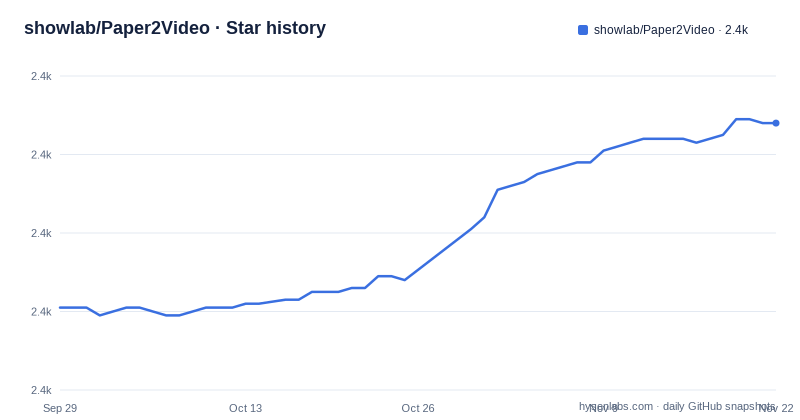
Star history
- showlab/Paper2Video2,428 ★ · +47
| Repository | 2026-09-29 | 2026-11-22 |
|---|---|---|
| showlab/Paper2Video | 2.4k | 2.4k |
47 Stars in the last 54 days, measured from the daily GitHub snapshot. Compare with other projects
Editorial analysis
The repository name belongs to the benchmark, not the generator
The repository is called Paper2Video. The thing you actually run is called PaperTalker. The page sets out two problems and assigns one name to each.
The left problem is how to create a presentation video from a paper, and its answer is PaperTalker, described as an agent integrating slides, subtitling, cursor grounding, speech synthesis and talking-head video rendering. The right problem is how to evaluate a presentation video, and its answer is Paper2Video, described as a benchmark with metrics for presentation quality.
So the same identifier means the evaluation half in the project's own framing and the repository in practice. Anyone arriving from the paper, the dataset listing, or the arXiv entry will reasonably expect the repository to be the generator, and the table of contents reflects that confusion: its first entry after the overview is a quick start pointed at PaperTalker, and its last two are the evaluation section and a section titled for running Paper2Video on Paper2Video.
Three inputs go in: a paper, an image, and an audio. The sample row pairs a paper link with a portrait photograph and a short reference audio clip, and the output is a presentation video.
The pipeline takes a LaTeX project root, not a PDF
The inference script is described as taking LaTeX paper sources together with a reference image and audio. The argument is named `--paper_latex_root` and is documented as the root directory of the LaTeX paper project.
That distinction decides whether the tool is usable for you at all. A PDF is not an accepted input, and a paper that exists only as a PDF cannot be fed to the pipeline without first reconstructing its source tree. The documentation is explicit about the implication in the setup steps, which install a LaTeX engine from conda-forge:
cd src
conda create -n p2v python=3.10
conda activate p2v
pip install -r requirements.txt
conda install -c conda-forge tectonic
Tectonic is not a Python package and has nothing to do with the model stack. It is there because compiling the paper's own figures and tables is part of the slides stage, which is the first of five stages the pipeline runs through: slides, then subtitles, then speech, then cursor, then talking head.
Note also that the working directory for all of this is `src`, not the repository root. The root holds only a license, two READMEs, an assets directory and `src`, so a first-run user who reads the top of the page and runs the commands at the root will be in the wrong place.
The stated minimum is one GPU and the examples pass eight
The hardware requirement is stated as a minimum recommended GPU of an NVIDIA A6000 with 48G. Every worked example on the page then passes a list of eight devices:
python pipeline_light.py \
    --model_name_t gpt-4.1 \
    --model_name_v gpt-4.1 \
    --result_dir /path/to/output \
    --paper_latex_root /path/to/latex_proj \
    --ref_img /path/to/ref_img.png \
    --ref_audio /path/to/ref_audio.wav \
    --gpu_list [0,1,2,3,4,5,6,7]
So the minimum is a single high-memory card while the copy-and-paste path assumes a machine with eight. Those are not contradictory claims, but they are not the same claim either, and the argument table gives no hint that a shorter list is how you use a single device. The default recorded for `--gpu_list` is an empty string even though its documented type is a list of integers, which is a small sign that the argument handling around device selection was not the focus of the interface work.
Two commands exist and the difference is the talking head. `pipeline_light.py` generates without it and is described as the fast path, which matches an update note announcing a new version without talking-head generation for fast results. `pipeline.py` adds `--model_name_talking` and `--talking_head_env` to produce the full result.
The talking-head stage needs a second environment and a hand-copied path
Talking-head rendering is delegated to an external project, Hallo2, which you clone and set up yourself:
git clone https://github.com/fudan-generative-vision/hallo2.gitThe instruction that follows is that the environment for talking-head generation must be prepared separately, and the reason given is to avoid package conflicts. The sentence that says so contains two typographical errors, reading to potential avoide package conflicts. The separate environment is its own Python 3.10 conda environment built from Hallo2's requirements file:
cd hallo2
conda create -n hallo python=3.10
conda activate hallo
pip install -r requirements.txt
After installing, you are told to run `which python` to get the environment path, and that path becomes the value of `--talking_head_env` on the main pipeline. Nothing derives it for you, so the orchestration between two hand-built environments is manual. The models list carries one further constraint: `--model_name_talking` defaults to `hallo2`, and the table states that currently only hallo2 is supported.
One small break in that paragraph is worth knowing about. The instruction to refer to Hallo2 is a link whose target is the git clone command text rather than a URL, so clicking it does nothing useful.
A shipped argument is spelled beamer_templete_prompt
The argument table has a row for `--beamer_templete_prompt`, typed as a string with a default of `None` and described as optional reference text for style guidance for slides. The word is misspelled: template is written as templete.
This one cannot be quietly corrected. It is a command-line flag, so renaming it breaks every script that passes it, and the pipeline shipped a version with the typo already in it. The fix, if the project ever makes one, has to be an alias rather than a rename.
The rest of the table is consistent in a way this row is not. `--model_name_t` and `--model_name_v` both default to `gpt-4.1` and select the language model and the vision model respectively. `--ref_img` must be a square portrait image, which is a real constraint rather than a preference. `--ref_audio` is recommended to be around ten seconds, and the sample clip in the repository is named for exactly that length. `--ref_text` defaults to `None` and provides style guidance for subtitles, the subtitle counterpart to the slides flag above.
Two things stand out for a reader planning a run. There is no documented argument for language or output resolution, and the recommended models are named in prose rather than being the only accepted values.
Every table of contents anchor depends on an emoji
The six entries in the table of contents all point at anchors that begin with a hyphen: `#-overview`, `#-try-papertalker-for-your-paper-`, `#-evaluation-paper2video`, `#-fun-paper2video-for-paper2video`, `#-acknowledgements`, `#-citation`.
That leading hyphen is not a typo. Each target heading begins with an emoji, and the generated anchor keeps the emoji slot as a bare dash. The result is a navigation block that breaks the moment anyone edits a heading, and it is a fragile thing to inherit in a repository whose whole purpose involves rendering slides.
The same coupling runs through the section headings themselves, where the overview, quick start, evaluation and fun sections are each prefixed with an emoji. A contributor who tidies those headings without knowing the anchors depend on them will silently break every internal link in the document.
The English and Chinese pages are separate files, `README.md` and `README-CN.md`, linked from a language selector at the top. If the anchors are emoji-dependent on the English side, the two files carry separate maintenance for the same structural problem, and the Chinese file is not covered by the anchor table on the page.
Five top-level entries and one line of contribution guidance
The entire top level of the repository is a license file, two READMEs, an assets directory and `src`. There is no contributing file, no code of conduct, no changelog, no license classifier beyond the LICENSE itself, and no continuous integration directory in the listing.
Against that, the update section opens by saying any contributions are welcome. So the stated policy is a single sentence with no file behind it, which means a first-time contributor has no build instructions for the test suite, no style guidance, and no statement about what kind of change is welcome.
What documentation does exist is external. Model setup points at the Hallo2 repository, and support for locally deployed open-source models such as Qwen is described by referring readers to the Paper2Poster repository for details. The paper is on arXiv at 2510.05096, the dataset is hosted on Hugging Face under the name ZaynZhu/Paper2Video, and the project has its own pages site. Four external destinations carry the operational documentation.
There is also no tagged release history to pin against. Any deployment should pin a commit hash rather than a version.
Announced work stops in October 2025 and the branch went quiet after March
The update log is dated and complete for a short window. It records acceptance to the Scaling Environments for Agents Workshop at NeurIPS 2025 on 2025.9.28, the code and dataset release on 2025.10.6, the arXiv paper on 2025.10.7, a demo video on 2025.10.8, write-ups on 2025.10.9, a Hacker News mention on 2025.10.11, and the fast no-talking-head version on 2025.10.15.
After that entry the log stops. The repository has no GitHub releases, so there is no tagged artifact from any of those milestones and nothing to install by version.
The last push to the default branch is dated 2026-03-05. That is roughly five months after the final announced update, and roughly seven months before now. Work landed on the branch during a period when nothing new was announced, and no release, changelog entry or tag records what changed.
The authors are Zeyu Zhu and Kevin Qinghong Lin, both marked as first authors alongside Mike Zheng Shou, from Show Lab at the National University of Singapore. The project was accepted at a workshop rather than as a main-track paper, which is worth weighing alongside a repository whose benchmark half has no published evaluation table on the front page.
Editorial conclusion
PaperTalker is worth trying if you have a LaTeX source tree, a square portrait reference image, about ten seconds of reference audio, and a GPU to spare, since the documented minimum is an A6000 with 48 GB and the worked examples assume eight devices. Skip it if your input is a PDF, because the pipeline takes a LaTeX project root and needs a LaTeX engine installed. Also budget for two separate Python 3.10 environments if you want the talking-head stage, and expect to supply the environment path by hand. Before committing, note that the project has no tagged releases, its last push was 2026-03-05, and its contribution guidance is a single line with no contributing file behind it, so pin a commit rather than a version. The benchmark half named Paper2Video is a separate deliverable and worth evaluating on its own if your interest is scoring presentation quality rather than generating it.
Frequently asked questions
Is Paper2Video the video generator or the evaluation benchmark?
Both live in the repository under different names. PaperTalker is the agent that generates a presentation video, and Paper2Video is the benchmark with metrics for evaluating presentation quality.
Can PaperTalker read a PDF paper?
No. The pipeline takes `--paper_latex_root`, documented as the root directory of the LaTeX paper project, and the setup installs `tectonic` from conda-forge so the paper's own source can be compiled.
What GPU does the PaperTalker pipeline need?
The minimum recommended GPU is an NVIDIA A6000 with 48G. The worked example commands pass `--gpu_list [0,1,2,3,4,5,6,7]`, so the copy-and-paste path assumes eight devices.
Why does talking-head generation need its own environment?
It depends on the separate Hallo2 project, which you clone and install into its own Python 3.10 conda environment to avoid package conflicts. You locate that environment with `which python` and pass the path as `--talking_head_env`; only hallo2 is supported for `--model_name_talking`.
How are language and vision models configured in PaperTalker?
Export `GEMINI_API_KEY` and `OPENAI_API_KEY`. The recommended models are GPT4.1 or Gemini2.5-Pro for both the language model and the vision model, with `--model_name_t` and `--model_name_v` defaulting to `gpt-4.1`. Locally deployed open-source models are supported, with details referred to the Paper2Poster repository.
When was the Paper2Video repository last changed?
The last push to the default branch is dated 2026-03-05. The repository has no GitHub releases, and the most recent entry in its update log is 2025.10.15.
Official sources
Add this badge to your README
If you maintain this project, the badge below links readers to this analysis and shows its maintenance status from the daily GitHub snapshot. Paste the markdown into your README; add ?metric=license or ?metric=stars to the image URL for a different field.

[](https://hysenlabs.com/projects/showlab-paper2video)Star history chart for your README
[](https://hysenlabs.com/projects/showlab-paper2video)Was this useful?