nurb's part is a Python function the AI writes, and its rule count is off by four
Agentic CAD for 3D printing
At a glance
- What is it?
- An agentic CAD tool where the design artifact is executable Python built on build123d and the OCCT kernel, with printability checks, live sliders and 3MF export. The README claims thirteen printability rules and lists nine, declares a licence in the manifest that the repository's own licence field does not carry, and does its slicing by driving a slicer you already have.
- Who is it for?
- Use nurb when you want to describe a part in words and get a print-ready 3MF without modelling it, and when you are willing to run the Python the model wrote on your machine, because that is the actual data flow: the artifact is code, executed locally, with the printability checks standing in for the model's eyes.
- Can I use it commercially?
- Check first. The repository uses a licence we do not classify automatically, so read its LICENSE file before any commercial use.
- Is it still maintained?
- Yes. The repository last received commits 1 day ago.
- What is it written in?
- Mainly Python, according to GitHub's language statistics.
Answers come from the project's GitHub data, last synced on November 15, 2026, and from our analysis. They are not legal advice.
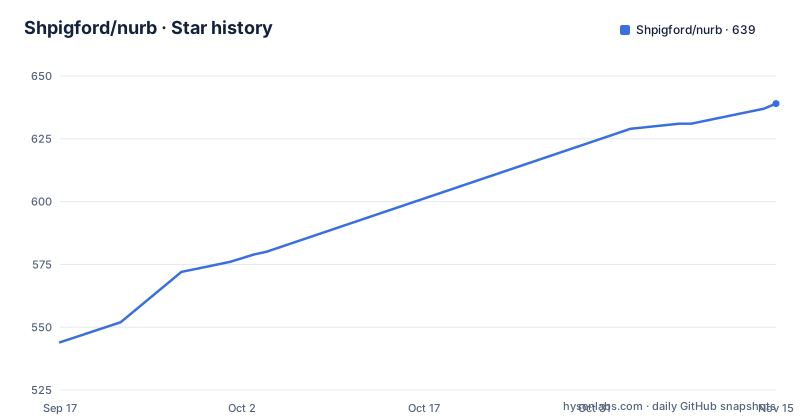
Star history
- Shpigford/nurb639 ★ · +95
| Repository | 2026-09-17 | 2026-11-15 |
|---|---|---|
| Shpigford/nurb | 544 | 639 |
95 Stars in the last 59 days, measured from the daily GitHub snapshot. Compare with other projects
Editorial analysis
A part is a Python function the model writes and you never read
This is the core of the tool and the part worth thinking about before anything else. A part is not a mesh or a file format, it is a function:
from nurb import *

@part
def hose_adapter(vac_end=57.6, tool_end=35.0, wall=2.4):
    ...
The defaults are the parameters, and the README is explicit that this single signature line is where the viewer's sliders, the tests and the CLI all come from, which is an elegant answer to the usual problem of a parametric model needing a parallel parameter file. The body is build123d on the OCCT kernel, so the geometry is a true B-rep solid with real chamfers and fillets rather than a triangulated approximation, and STEP export opens in Fusion or FreeCAD. Four extra verbs are added on top: `polish` for the chamfer pass, `stand` for a diagonal print stance, `measured` for real-world dimensions and `assembly` for multi-part builds, with `nurb api` printing the list with signatures. The design artifact is therefore executable code, and the documentation asks you not to read it.
Thirteen printability rules are claimed and nine are named
The feature list states that thirteen printability rules run against the exact solid rather than an approximation. The `nurb check` output later in the same document names nine: `solids` for a part that came apart into more than one body or none, `overhang` for downward faces past 45 degrees with bridges distinguished from cantilevers, `floating` for a region whose first layer would be laid on air, `hole_ceiling` for the flat ceiling of a blind hole, `min_wall` for the thinnest section corrected by an inscribed sphere, `sliver` for faces too small to print as anything but a smear, `concave_cosmetic` for polish laid into an inside corner, `bed_bevel` for polish on the edges meeting the build plate, and `warp_risk` for large first layers with corn. So the advertised count exceeds the enumerated one by four, and the two numbers in the same document do not reconcile. What the checks are for is stated plainly: the model cannot see, so the checker is its eyes, and findings come back with coordinates that pin a thin-wall warning to the exact face.
nurb check exits 0 by default and only --strict fails the build
The exit behaviour is a deliberate policy choice and it is worth knowing about before you wire it into anything. `nurb check` reports and exits 0 by default, so findings never block iteration, and `--strict` is what makes findings fail the build, which is the mode CI runs. That split is sensible for a loop where the model is still adjusting geometry, since a non-zero exit on every overhang would train you to ignore the tool. It also means a green local run tells you nothing, and the strict mode is the only one whose exit status carries information. The granularity is what makes the output usable at all: each rule returns coordinates rather than a message, so a warning about a wall that is too thin identifies the spot on the solid instead of asking you to hunt for it.
printer.toml at the project root overrides the workshop config
Printer and material settings live in two files with a documented precedence. The machine is named once in `~/.config/nurb/config.toml` with a `profile` key such as `profile = "bambu_a1_mini"`, and every project on that machine then inherits the bed: `nurb rules` prints it first, the viewer labels the build plate with it, and the check, slice and export paths all use it. The first time the viewer asks which printer a project is for, that answer is written into the workshop file so the next project does not ask again, which removes the per-project prompt without removing the choice. A `printer.toml` at a project root takes the same schema and wins wherever the two disagree, which is the escape hatch for the one project aimed at a different machine. Naming the material with `material = "abs"` tightens the warp rules to match how that plastic shrinks.
Slicing happens in OrcaSlicer or Bambu Studio, neither of them a Python dependency
The print time and filament cost row in the viewer does not compute anything itself. It drives the slicer you already have, named as OrcaSlicer or Bambu Studio, and reports back in minutes and grams, which is what lets a change that doubles the print time be caught while the design can still move. So the dependency chain has a link outside Python entirely, and it is not in the packaging metadata, which lists four runtime dependencies and nothing about a slicer. The one optional extra that is declared is `render`, a Playwright install for `nurb render`, and the comment in the packaging file explains why it is optional: it is the only command needing a browser and the download is larger than everything else in the list. Exports default to 3MF with the infill, wall and brim settings the part's own checks justify, with STL, STEP and GLB one flag away.
The manifest declares LicenseRef-FSL-1.1-MIT while the repository records no licence
The two licence sources disagree in a way that needs resolving before this goes into a company. The repository's own licence field records nothing usable, while the packaging file declares `LicenseRef-FSL-1.1-MIT` and lists `LICENSE` as its licence file. That string is a source-available licence reference naming a functional source licence variant with an MIT fallback, not plain MIT, and a `LicenseRef-` identifier is by convention a custom or non-SPDX name. This article does not pick between them, because neither file says which one governs. What it does say is that the package is marked `Development Status :: 3 - Alpha` at version 0.26.0, requires Python 3.13 or newer with a single 3.13 classifier, and was last pushed on 2026-09-16 with v0.26.0 released on 2026-09-05.
The wheel ships doctrine.md, agents.md, skill.md and a vendor directory
The build configuration lists exactly what gets packaged, and the list is more than source. Alongside the `nurb` and `nurb_entrypoint` modules, the source include set names `src/nurb/viewer.html`, `src/nurb/doctrine.md`, `src/nurb/agents.md`, `src/nurb/skill.md`, `src/nurb/printers.toml` and `src/nurb/vendor/**/*`. Three of those are the documents the model is instructed to read, so the design doctrine is a shipped artifact rather than documentation, which is coherent with a tool whose premise is that the agent follows a written doctrine. The `vendor/**/*` glob is the one to look at, since everything in that directory goes into the distribution and the visible material does not say what is in it. The build backend is pinned as `uv_build>=0.11.26,<0.12.0`, an upper bound on the backend's minor version that will need attention when the next release lands.
Editorial conclusion
Use nurb when you want to describe a part in words and get a print-ready 3MF without modelling it, and when you are willing to run the Python the model wrote on your machine, because that is the actual data flow: the artifact is code, executed locally, with the printability checks standing in for the model's eyes. Do not adopt it while its licence is unresolved for your organisation, since the repository's own licence field records nothing while the manifest declares `LicenseRef-FSL-1.1-MIT`, and those are not the same thing. Before the first print, confirm two dependencies that are not Python packages: OrcaSlicer or Bambu Studio, which nurb drives for print time and grams, and a printer profile in `~/.config/nurb/config.toml`, since the warp rules tighten or loosen with the material you name.
Frequently asked questions
What is a part in nurb?
A small Python function decorated with `@part`, whose default arguments are the parameters. The README is explicit that that signature line is where the viewer's sliders, the tests and the CLI all come from, and that the body is build123d on the OCCT kernel plus four nurb verbs: `polish`, `stand`, `measured` and `assembly`.
How many printability checks does nurb run?
The feature list claims thirteen rules run against the exact solid, while the `nurb check` output names nine: `solids`, `overhang`, `floating`, `hole_ceiling`, `min_wall`, `sliver`, `concave_cosmetic`, `bed_bevel` and `warp_risk`. Each finding returns coordinates that pin it to the exact face it fired on.
How do I install nurb from a terminal?
With `curl -fsSL https://nurb.dev/install.sh | sh`, which installs uv if it is missing, then nurb and the agent skill. `uv tool install nurb` or `pip install nurb` covers the first half, `npx skills add shpigford/nurb --skill nurb` installs the skill, and `nurb update` later upgrades nurb and the skill together.
Which slicer does nurb use for print time and filament cost?
The one you already have, named as OrcaSlicer or Bambu Studio. The viewer's print time row drives that slicer and answers with minutes and grams, so neither appears in the packaging metadata, which lists build123d, trimesh, watchdog and websockets as runtime dependencies. The only optional extra is a Playwright install for `nurb render`.
How do I tell nurb which printer and plastic I use?
Name the machine once in `~/.config/nurb/config.toml` with a `profile` key such as `profile = "bambu_a1_mini"`, and every project inherits that bed. A `printer.toml` at a project root takes the same schema and wins where the two files disagree, and naming a `material` such as `"abs"` tightens the warp rules for that plastic.
Official sources
Add this badge to your README
If you maintain this project, the badge below links readers to this analysis and shows its maintenance status from the daily GitHub snapshot. Paste the markdown into your README; add ?metric=license or ?metric=stars to the image URL for a different field.

[](https://hysenlabs.com/projects/shpigford-nurb)Star history chart for your README
[](https://hysenlabs.com/projects/shpigford-nurb)Was this useful?