BookWith turns an ePub into a conversation, a podcast, and a searchable record of what you highlighted
BookWith – A New Reading Experience with AI. A next-generation conversational reading platform that goes beyond traditional e-book readers
At a glance
- What is it?
- BookWith is a TypeScript monorepo for a conversational e-book reader: you upload an ePub, highlight passages in five colours, ask the AI about them, and get a multi-speaker podcast generated from the book. The details worth knowing before installing are the highlight count that does not match the highlight list, the memory windows of five and twenty entries, and a release script that publishes workspace packages from a root marked private.
- Who is it for?
- BookWith fits a reader who highlights while reading and then wants to interrogate those highlights later, since the annotation, chat history, and semantic search are designed to be the same record rather than three separate features, and the ePub-only path keeps the scope narrow. It does not fit anyone with DRM-protected or PDF titles, or anyone expecting a native mobile app, since phones are served by responsive design.
- Can I use it commercially?
- Yes, with strict conditions. AGPL-3.0 is a network copyleft licence: if people use a modified version over a network, for example as a hosted service, you must offer them its source code under the same licence.
- Is it still maintained?
- Activity is slowing. The repository last received commits 6 months ago.
- What is it written in?
- Mainly TypeScript, according to GitHub's language statistics.
Answers come from the project's GitHub data, last synced on November 15, 2026, and from our analysis. They are not legal advice.
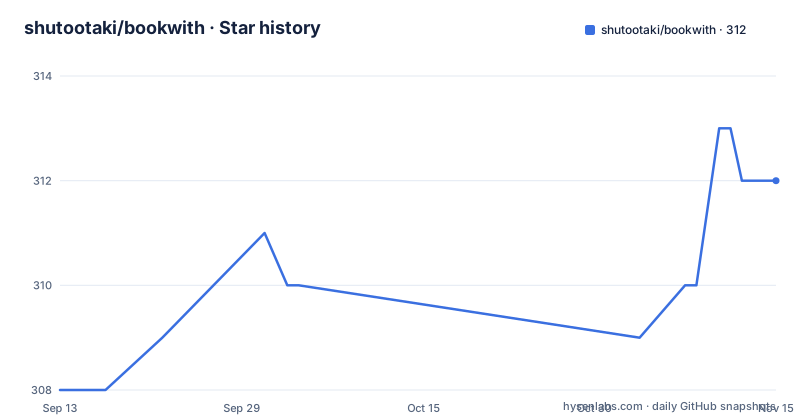
Star history
- shutootaki/bookwith312 ★ · +4
| Repository | 2026-09-13 | 2026-11-15 |
|---|---|---|
| shutootaki/bookwith | 308 | 312 |
4 Stars in the last 63 days, measured from the daily GitHub snapshot. Compare with other projects
Editorial analysis
Five highlight colours are promised and four are defined
The annotation feature promises five colour highlights in two separate places: the smart annotation section is titled with five colours, and the how-to steps tell you to choose from five highlight colours when you read. The definitions that follow list four.
Red is for critical points, yellow is for important concepts, green is for ideas to practice, and blue is for questions or things to verify. The colour semantics are the useful part regardless, because they turn highlighting from decoration into a small taxonomy you can act on later.
The missing fifth colour is not a detail, because the AI integration reads the highlights. The documentation says the AI automatically prompts questions about highlighted passages, understands your notes, and analyses across multiple highlights. If colour carries meaning and the model reasons over colour, then a set with an undefined fifth entry is either a colour with no assigned meaning or a documented colour that never made it into the list.
Notes attach to highlighted text and support Markdown, which means a highlighted passage can carry a formatted note rather than a plain comment, and both the text and the note are what get indexed for later search.
Memory is three tiers with fixed window sizes
The multi-layer memory system is the part with actual numbers in it, and the numbers are small.
Short-term memory keeps the latest 5 entries. That is what maintains the current conversation flow and keeps context across turning a page, which is the smallest useful window for a reader who is mid-paragraph when they ask a question.
Mid-term memory produces a summary every 20 entries. It condenses key discussion points and is what sustains understanding across chapters, so the transition from one chapter to the next does not start from nothing.
Long-term memory is vector search over everything retained, automatically retrieving relevant information from past dialogues. It also links with learning from other books, which is the mechanism behind the example given: content from an economics book read a week earlier is surfaced while you are reading a marketing book.
The fourth layer is the user profile, which learns your interests and preferences to make reading more personalised.
Reading these together, the design is a hierarchy: five entries of raw context, a summary every twenty to carry a chapter, and a searchable store for anything older. The consequence is that recall across months depends on the vector layer rather than on the chat transcript.
Podcasts are generated as host and guest dialogue with multi-speaker TTS
The podcast feature converts book content into a spoken conversation, and the pipeline has two named stages.
Script generation extracts key points from the book and converts them into a host and guest dialogue format, and the documentation shows the shape of the exchange:
User: "If we apply the theory explained in this chapter to a real business scene, what happens?"
AI:   "Applying the innovation theory from Chapter 3 to actual business would…"
The format is not incidental, since the output is meant to be listened to, and the target length is stated as an optimised 5 to 10 minutes. Complex topics are rewritten in an easier to understand conversational style rather than read as an abstract.
Audio synthesis uses Google Cloud Text-to-Speech's multi-speaker functionality, which is what produces a natural conversation rhythm and intonation rather than a single narrator voice. Two speakers means turn-taking cues are handled by the synthesis service.
Language support is stated twice and differently, which is worth noting. One bullet says it supports both Japanese and English, and the next says it supports multiple languages. Japanese is separately called out elsewhere as fully supported with natural dialogue and rich explanations of technical terms.
The flow is that you upload a book and a podcast is generated automatically, and the audio is immediately playable. The named use cases are all about getting the gist of something long while moving: a long novel's summary, a business book's key points on a commute, or a technical book's main ideas as audio.
Semantic search covers your chats and notes, not just the book
Cross-book search is the feature that distinguishes this from a normal reader with a find box.
The index is described as covering multiple books, past dialogue history, and annotation content. That is three sources rather than one, and it means a query can surface something you were told by the AI three weeks ago as easily as a sentence in the ePub you have open.
Automatic linking is the same capability applied passively. The system suggests past reading content related to what you are currently reading, with the example phrasing being that a concept also appeared in a book you read three months ago. Combined with the long-term memory layer, that is the mechanism for the cross-book linking the memory section promises.
The final step in the documented workflow is export: review past learning with semantic search, integrate knowledge from multiple books, and export it for external use. Export is named but not specified, so the format is something you would have to discover from the interface.
What this adds up to is a reading record rather than a reading position. The book is the source, but the searchable object is everything you did while reading it.
The upload path is ePub only, and phones get a responsive page
The format support is narrow and stated as two entries: ePub 2.0 and ePub 3.0. Uploading is drag and drop or file selection, and the book is added to your library and described as immediately readable.
Device support is listed as a PC on Windows 10 or later, or macOS 10.15 or later, tablets including iPad and Android tablets, and smartphones on responsive design. That last entry is the important qualifier: phones are covered by a responsive layout rather than by a listed application, and no store listing is given for either mobile platform.
The stated requirements are an internet connection for the AI features and JavaScript enabled. The first is structural rather than a preference, since every answering, memory, search, and podcast feature depends on a model call, so there is no offline mode for the AI parts of the product.
That also means the upload is not necessarily a local read. Sending a book to a service for summarisation and answering is a decision about copyright and privacy that the format list does not address, and it is worth settling before loading a title you do not have the right to upload.
The monorepo is named @flow/monorepo while the Python half is bookwith-monorepo
The root `package.json` is called `@flow/monorepo`, is marked private, and declares pnpm as its package manager at version 9.15.4 with a hash pinned in `packageManager`. The Python project file alongside it is called `bookwith-monorepo` at version 0.1.0, managed by Poetry with Python `>=3.11,<4.0`.
Two names for one repository is a small thing that will cost you an afternoon if you are looking for the right root, and it suggests the root manifest was copied from a template rather than written for this project.
The toolchain is larger than an application needs. Turborepo drives build, dev, and lint across the workspace, changesets and the GitHub changelog plugin handle versioning, and the dev dependencies include `tsup`, `rollup`, `rollup-plugin-typescript2`, and `rollup-plugin-dts`, which are library publishing tools rather than application build tools.
Formatting and linting are enforced by Husky: `prepare` runs `husky install`, and lint-staged runs Prettier on JavaScript, JSON, CSS, TypeScript, and Markdown plus ESLint on JavaScript and TypeScript, with a Prettier Tailwind plugin. There is also a `.pre-commit-config.yaml`, so some checks run in two places.
The release script publishes workspace packages from a private root
The root manifest defines a release script that runs `pnpm -r publish --access public`, while the same manifest declares `"private": true` and ships no published releases:
pnpm -r publish --access publicThose two facts sit next to each other without comment. The private flag is what stops the root itself from being published, which is why the release script uses the recursive flag to target workspace packages instead, and why the access flag has to be public rather than restricted. So the script is a library publishing path for the packages under `packages/`, while the applications under `apps/` are deployed some other way.
The repository layout supports that reading: `apps/` and `packages/` for the workspace, `supabase/` for the backend, `docs/` for the local setup guide, and configuration spread across four separate TypeScript configs for the Next.js app, React, and general code. There is also a `.mcp.json` file and a `.claude/` directory at the top level, so the project carries agent configuration alongside its build configuration.
For someone running it locally, the practical entry point is the documented local setup guide rather than the root scripts, and the Node engine floor is 18 while the Poetry configuration asks for Python 3.11.
Editorial conclusion
BookWith fits a reader who highlights while reading and then wants to interrogate those highlights later, since the annotation, chat history, and semantic search are designed to be the same record rather than three separate features, and the ePub-only path keeps the scope narrow. It does not fit anyone with DRM-protected or PDF titles, or anyone expecting a native mobile app, since phones are served by responsive design. Before setting it up, read the local development guide, check which parts of the monorepo you actually need given it carries both a pnpm and a Poetry toolchain, and note the licence is AGPL-3.0.
Frequently asked questions
What file formats does BookWith accept?
ePub 2.0 and ePub 3.0. You upload by drag and drop or file selection, and the book is added to your library immediately. An internet connection and JavaScript are required, the connection because the AI features depend on it.
How does BookWith remember previous conversations?
Through three tiers: short-term memory keeps the latest 5 entries, mid-term memory produces a summary every 20 entries to carry understanding across chapters, and long-term memory does vector search over all past dialogues, including learning from other books. A user profile layer learns your interests on top of that.
How does BookWith generate a podcast from a book?
It extracts key points and converts them into a host and guest dialogue script optimised for a 5 to 10 minute listen, then synthesises it with Google Cloud Text-to-Speech multi-speaker functionality for Japanese and English.
What do the BookWith highlight colours mean?
Red marks critical points, yellow important concepts, green ideas to practice, and blue questions or things to verify, and notes can attach to a highlight with Markdown formatting. The documentation refers to five highlight colours in two places but defines only these four.
What can semantic search in BookWith look through?
Multiple books, past dialogue history, and annotation content. It also suggests earlier reading related to what you are reading now, so a concept from a book read months ago can resurface while you are in a different one.
Official sources
Add this badge to your README
If you maintain this project, the badge below links readers to this analysis and shows its maintenance status from the daily GitHub snapshot. Paste the markdown into your README; add ?metric=license or ?metric=stars to the image URL for a different field.

[](https://hysenlabs.com/projects/shutootaki-bookwith)Star history chart for your README
[](https://hysenlabs.com/projects/shutootaki-bookwith)Was this useful?