email-oauth2-proxy for Legacy Email Clients
An IMAP/POP/SMTP proxy that transparently adds OAuth 2.0 authentication for email clients that don't support this method. Keep legacy email clients working with Exchange Online, Gmail and other providers.
At a glance
- What is it?
- email-oauth2-proxy is a Python proxy that lets IMAP, POP, and SMTP clients use OAuth 2.0 without changing their authentication settings. It suits legacy clients, scripts, devices, and applications that still send username and password credentials.
- Who is it for?
- Adopt email-oauth2-proxy when a trusted email client or script must retain its existing login flow while connecting to an OAuth 2.0 provider. Do not choose it when the client already supports OAuth 2.0 or when you need a managed service without local installation.
- Can I use it commercially?
- Yes. Apache-2.0 is a permissive licence: you can use, modify and sell software built on it, as long as you keep its copyright and licence notices.
- Is it still maintained?
- Yes. The repository last received commits 28 days ago.
- What is it written in?
- Mainly Python, according to GitHub's language statistics.
Answers come from the project's GitHub data, last synced on November 7, 2026, and from our analysis. They are not legal advice.
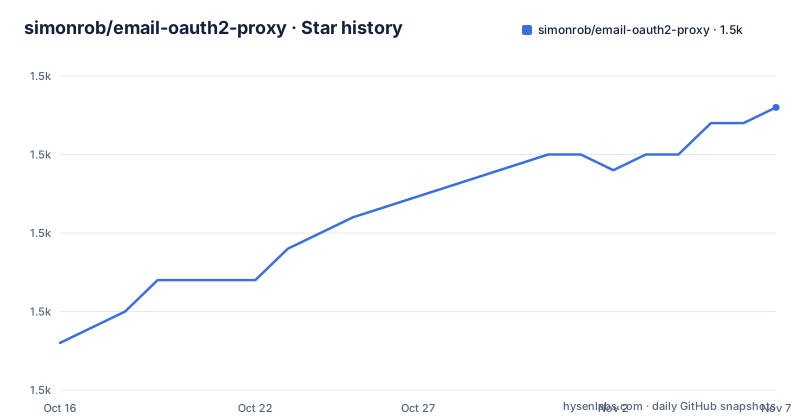
Star history
- simonrob/email-oauth2-proxy1,498 ★ · +15
| Repository | 2026-10-16 | 2026-11-07 |
|---|---|---|
| simonrob/email-oauth2-proxy | 1.5k | 1.5k |
15 Stars in the last 22 days, measured from the daily GitHub snapshot. Compare with other projects
Editorial analysis
Why the IMAP, POP, and SMTP Authentication Gap Matters
email-oauth2-proxy addresses a specific compatibility problem. Many email services now require OAuth 2.0 for IMAP, POP, or SMTP connections, while established clients, scripts, multifunction devices, and business applications still offer only username and password authentication. The README describes Gmail as an example where raw account credentials are no longer accepted. It also cites Microsoft's retirement of Basic Authentication for several Exchange Online access paths. In those situations, replacing the client may be inconvenient or impossible.
The project is for users who cannot or do not want to modify the authentication flow of every application that accesses a mailbox. The README lists Outlook, Office 365, Hotmail, 21Vianet, Gmail, Google Workspace, Fastmail, Yahoo, Comcast, and AOL among possible providers. It also targets custom scripts, scan-to-email systems, alert services, and email-to-print devices that do not implement the provider's official OAuth 2.0 workaround.
The solution is local rather than a new email client. The client continues to connect through its normal IMAP, POP, or SMTP settings, including `login` or `auth` and `authenticate`. The proxy handles the OAuth exchange on the other side. This design is useful when an account already exists in a client, or when deleting and recreating the account would lose application-specific configuration. It is less suitable for a client that already supports OAuth 2.0 directly, because that client can perform the provider-specific authentication without this compatibility layer.
How the Proxy Replaces Traditional Authentication
The documented mechanism is a transparent protocol proxy. The legacy client sends an IMAP, POP, or SMTP connection to the proxy. When the client attempts a traditional authentication command, the proxy intercepts that operation and replaces it with the appropriate SASL XOAuth 2.0 command and credentials. From the client's perspective, the normal `login` or `auth` and `authenticate` flow remains in place.
The proxy therefore sits between the client and the remote mail service. It is not an API client for a mailbox, and the README does not describe copying messages into a separate local store. Its documented responsibility is to translate authentication at the connection boundary while allowing the underlying mail protocol traffic to continue.
The README says the proxy can run as a menu bar or taskbar helper, or as a headless system service. The graphical entry is intended to make the process manageable on macOS and Windows. A headless deployment is also possible, but the README section shown in the repository does not provide the complete service files or deployment commands. The repository includes `emailproxy.py`, `emailproxy.config`, `requirements-core.txt`, and `requirements-gui.txt`, indicating a Python application with separate core and GUI dependency sets.
Provider details and account mappings are configuration concerns. The `emailproxy.config` file contains guidance for Office 365, Gmail, and several other services, while users must insert their own OAuth client credentials. The proxy can include multiple provider or account configurations. The README does not document every configuration key, token refresh policy, or secrets-management setting in its opening setup section.
Installing emailproxy and Preparing the First Connection
The fastest documented self-hosted path is a pre-built release for macOS or Windows. The README describes these releases as requiring no installation. For users who prefer PyPI, the documented installation command installs the package with its GUI extras:
python -m pip install "emailproxy[gui]"After installation, the README directs the user to download the sample `emailproxy.config`, add configuration for each mail server and account, and then start the application. The documented run command for this installation option is:
python -m emailproxyA menu bar or taskbar icon should appear after the proxy starts. If it does not, the README refers users to its dependencies and setup section. The source-tree route is different. It installs the core and GUI requirements separately:
python -m pip install -r requirements-core.txt -r requirements-gui.txtThat route starts the repository file directly:
python emailproxy.pyThe project metadata declares Python `>=3.7` and defines an `emailproxy` console script. The PyPI route is the clearest first attempt for a Python user because it combines installation, the GUI extra, configuration-file download, and the documented run command. A pre-built release is the lower-friction option on the two desktop platforms named by the README.
The first real use begins by adding the user's provider and OAuth client details to `emailproxy.config`, launching the proxy, and then pointing an existing IMAP, POP, or SMTP client at the proxy's local endpoints. The shown setup section does not list exact local host and port values, so those details should come from the project's configuration or documentation rather than be inferred.
Provider Configuration and OAuth Client Credentials
The proxy's flexibility comes from mapping legacy client connections to provider-specific OAuth authentication, but that flexibility also creates the main configuration task. The README says `emailproxy.config` includes guidance for Office 365, Gmail, and several other providers. Users can remove unused provider sections and add configurations for other OAuth 2.0-authenticated IMAP, POP, or SMTP servers.
Each relevant account needs its own details, and the user must insert the correct OAuth client credentials. The repository confirms that `emailproxy.config` is a top-level file, while the README links to it as the sample configuration. The opening README section does not reproduce the complete file or identify every configuration key. Presenting invented keys would risk producing a configuration that cannot work.
The hosted alternative deserves separate attention. The README offers Auth-Email.com as a managed service that works with an existing email setup and removes the need for local installation, OAuth client registration, and ongoing maintenance. That is a different operating model from self-hosting the Python proxy. It may suit a user who does not want to manage credentials or run a local background service, but the README does not give enough hosted-service detail to compare its protocol coverage, deployment controls, or pricing beyond the stated description.
For self-hosting, the configuration file is the mapping layer that tells the proxy which provider, account, and OAuth client material belong to each legacy connection. A user should verify those values against the provider's OAuth application documentation and the project's `emailproxy.config` before diagnosing connectivity as a proxy failure. A successful connection also depends on access to the provider's mail endpoints, even when the proxy manages authentication correctly.
Desktop, Headless, and Service Deployment Boundaries
The README identifies macOS, Windows, and Linux as supported platforms. Pre-built releases are explicitly mentioned for macOS and Windows, while PyPI and source installation are available through the Python package layout. The presence of `requirements-core.txt` and `requirements-gui.txt` shows that GUI and core execution are separated in the source distribution, although the README does not state which headless dependencies are optional.
The project can operate as a menu bar or taskbar helper, which is appropriate for an interactive desktop session. It also supports fully headless deployments according to the README. The opening setup section does not include a systemd unit, Windows service definition, container recipe, or service-account guidance. An engineer selecting this project for a server must consult the complete README or release documentation before assuming that a daemon can be deployed without additional work.
The proxy's compatibility focus creates a clear boundary. It is intended for clients that cannot perform OAuth 2.0, not for improving general mail throughput, adding offline synchronization, or replacing provider APIs. The README does not enumerate which IMAP, POP, or SMTP capabilities are forwarded beyond the authentication substitution. It also does not claim support for local mail storage, message filtering, or account synchronization by the proxy itself.
The repository listing shows `emailproxy.py`, `pyproject.toml`, dependency files, configuration, and project documentation. It does not show a top-level test directory. That layout does not prove that releases contain no tests, but the README section available for this review gives no coverage figures or test instructions. Claims about reliability under concurrent load, malformed protocol input, or token failure would therefore require independent verification.
Operationally, the largest adoption cost is configuration ownership. Someone must keep the local proxy running, keep OAuth client details valid, route the intended client traffic through it, and diagnose authentication failures. The README points users to Discussions and the issue tracker for help, but it does not promise a response time for the self-hosted project.
Apache-2.0 Licensing and Release Maintenance
The repository and package metadata identify the project under the Apache License 2.0. That is the relevant license identifier for an engineer reviewing the source, and it should be checked together with the repository's `LICENSE` file and the terms of any separate provider or hosted-service offering. The Apache-2.0 designation is a licensing fact, not a guarantee that every external account or service has identical terms.
The project is not archived, and the last push was on 2026-10-11. Recent releases are listed for 2026-07-03, 2025-10-04, and 2025-06-25. The package metadata describes the development status as `6 - Mature`, but that is a declaration in `pyproject.toml`, not an independently verified measure of maintenance quality. The recent push indicates that repository changes occurred on 2026-10-11, but the README section available for this review does not document the contents of each release or a compatibility policy for future providers.
Upgrading is an operational task rather than an invisible background update. The proxy handles authentication credentials and OAuth-related material, so a replacement installation should be checked against the current provider configuration before it replaces a working setup. The README does not describe automatic updates, credential migration, token storage, or rollback. Those behaviors require examination of the complete documentation and the relevant source files.
Apache-2.0 also affects redistribution decisions. An organization embedding or packaging the proxy should preserve the applicable license notices and review the complete `LICENSE` text. The README does not specify a support SLA, so self-hosted users should not treat the project's issue tracker as an operational guarantee.
Choosing emailproxy Instead of Direct OAuth or a Managed Service
The direct alternative is to use an email client, script, or device that already supports the provider's OAuth 2.0 flow. That approach removes the local proxy and its routing requirement, but it may require replacing the client, changing application code, or following a provider-specific setup procedure. For a maintained mail client, direct OAuth is simpler because authentication is handled inside the application that owns the connection.
Another alternative is the hosted Auth-Email.com service presented in the README. The stated difference is operational: the hosted service removes local software installation, OAuth client registration, and ongoing maintenance from the user's side. Self-hosting keeps the proxy under the user's control and supports multiple configured providers, but it also makes configuration, credentials, process supervision, and troubleshooting the user's responsibility.
emailproxy is most defensible when compatibility is the priority. Its value is greatest for a legacy client or custom script that must keep its existing password-style login interface while talking to an OAuth-only service. It is the wrong choice when the client already supports OAuth 2.0, when a provider's direct OAuth integration is easy to configure, or when the user cannot supervise a local background process. The decision should be based on the exact client, provider, operating system, and deployment model rather than on the project's provider list alone.
Editorial conclusion
Adopt email-oauth2-proxy when a trusted email client or script must retain its existing login flow while connecting to an OAuth 2.0 provider. Do not choose it when the client already supports OAuth 2.0 or when you need a managed service without local installation. Verify first that the proxy can run on the target operating system, that the selected provider and OAuth client credentials are configured, and that the intended mail traffic is routed through the proxy. The project is not archived, and its last push was on 2026-10-11.
Frequently asked questions
Can email-oauth2-proxy add OAuth 2.0 to an email client that only supports a password?
Yes. The README says the proxy intercepts traditional IMAP, POP, and SMTP authentication commands and replaces them with SASL XOAuth 2.0 commands and credentials, allowing the client to continue using its existing login flow.
How do I install email-oauth2-proxy on macOS or Windows?
The README offers pre-built releases for macOS and Windows with no installation required. It also documents PyPI installation with `python -m pip install "emailproxy[gui]"`.
What configuration does email-oauth2-proxy need for Gmail or Office 365?
The project provides a sample `emailproxy.config` with guidance for Office 365, Gmail, and other providers. You must add your own server and account configuration details and insert the relevant OAuth client credentials.
Does email-oauth2-proxy run as a headless service?
Yes, the README says the proxy can run as a headless system service as well as a menu bar or taskbar helper. The opening setup section does not include the complete headless deployment files or commands.
Which operating systems does email-oauth2-proxy support?
The README identifies macOS, Windows, and Linux. It specifically mentions pre-built releases for macOS and Windows, while PyPI and source installation are documented as additional routes.
Official sources
Add this badge to your README
If you maintain this project, the badge below links readers to this analysis and shows its maintenance status from the daily GitHub snapshot. Paste the markdown into your README; add ?metric=license or ?metric=stars to the image URL for a different field.

[](https://hysenlabs.com/projects/simonrob-email-oauth2-proxy)Star history chart for your README
[](https://hysenlabs.com/projects/simonrob-email-oauth2-proxy)Was this useful?