llm-gemini puts Gemini behind the LLM command line, and its model table is a snapshot
LLM plugin to access Google's Gemini family of models
At a glance
- What is it?
- llm-gemini is a one module LLM plugin that exposes Google's Gemini and Gemma models to the LLM CLI, with server-side code execution, search grounding and URL context behind flags. Its fifteen line model list is generated by cog from a live account, and one of those fifteen entries prints with no friendly name.
- Who is it for?
- llm-gemini is a thin, readable wrapper that earns its place if you want Gemini inside an LLM workflow and are willing to pin model ids yourself. Pin a dated model rather than a `-latest` alias, because every Pro entry in the list is a preview and the two stable names are both Flash.
- Can I use it commercially?
- Yes. Apache-2.0 is a permissive licence: you can use, modify and sell software built on it, as long as you keep its copyright and licence notices.
- Is it still maintained?
- Yes. The repository last received commits 2 days ago.
- What is it written in?
- Mainly Python, according to GitHub's language statistics.
Answers come from the project's GitHub data, last synced on November 13, 2026, and from our analysis. They are not legal advice.
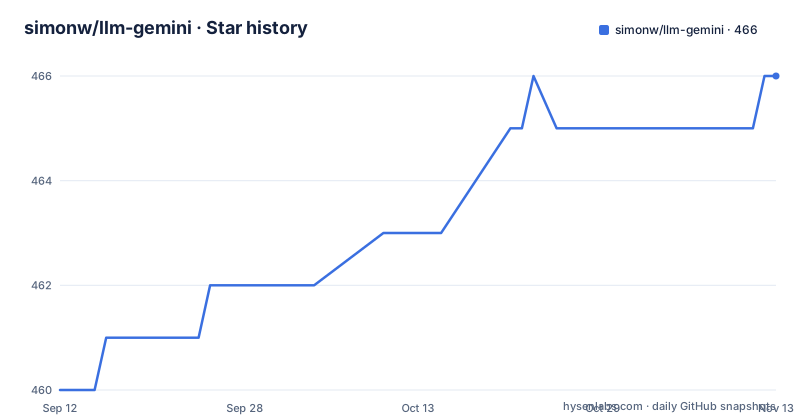
Star history
- simonw/llm-gemini466 ★ · +6
| Repository | 2026-09-12 | 2026-11-13 |
|---|---|---|
| simonw/llm-gemini | 460 | 466 |
6 Stars in the last 62 days, measured from the daily GitHub snapshot. Compare with other projects
Editorial analysis
The model table is generated, and one of its fifteen entries prints no name
The fifteen model lines are not written by hand. The block that produces them is wrapped in cog markers and opens like this:
import cog
from llm import cli
from click.testing import CliRunner
runner = CliRunner()
result = runner.invoke(cli.cli, ["models", "-q", "gemini/"])
lines = reversed(result.output.strip().split("\n"))
It calls LLM's own CLI with the `models` command and the `gemini/` filter, reverses the printed lines, and pairs each id with a friendly name from a NOTES mapping. Three things follow, and all three are visible in the output itself. The order means nothing: the list prints `gemini/gemini-3.5-flash-lite` above `gemini/gemini-3.6-flash`, and `gemini/gemini-flash-lite-latest` above `gemini/gemini-flash-latest`, because the sequence is the CLI's output reversed rather than sorted. Fourteen entries carry a name after the colon and one, `gemini/gemini-3.1-pro-preview-customtools`, prints bare, which is what an id missing from the mapping produces. And the whole table is a snapshot of what one API key could see when cog last ran, so refreshing it is a release chore rather than a documentation edit.
Every Pro entry carries a preview suffix, and both stable names are Flash
Reading down the fifteen entries, Pro appears twice and both times as a preview: `gemini/gemini-3.1-pro-preview` and `gemini/gemini-3.1-pro-preview-customtools`. The only ids not tied to a dated generation are the two aliases, `gemini/gemini-flash-latest` and `gemini/gemini-flash-lite-latest`, and both are Flash.
Every model has an alias with the `gemini/` prefix dropped, so `-m gemini-flash-latest` and `-m gemini/gemini-flash-latest` reach the same entry. That convenience costs something specific: a prompt pinned to a `-latest` alias resolves to a different underlying model when Google moves the alias, with no plugin release and nothing in the response saying so. The examples in the document also spread across three ids, since the usage and default model lines use `gemini-flash-latest`, the code execution and search grounding examples use `gemini-3.6-flash`, and the URL context example uses `gemini-2.5-flash`, which is also the oldest non preview entry in the list.
Attachments travel on one option, and their media resolution is stated in prose only
Files arrive through the `-a` option, which takes a local path or a URL: `-a image.jpg`, `-a https://static.simonwillison.net/static/2024/pelicans.jpg`, `-a audio.mp3`, `-a video.mp4`. A YouTube URL is passed the same way, with a prompt asking for a summary and a timestamped transcript:
llm -m gemini-flash-latest -a 'https://www.youtube.com/watch?v=9o1_DL9uNlM' \
  'Produce a summary with relevant URLs and code example snippets, then an accurate transcript with timestamps.'
In that section the document states these will be processed with media resolution `low` by default, and that `-o media_resolution X` sets it to `medium`, `high`, or `unspecified`. Three details are worth naming. The default lives in prose and appears in no command, so a copied command line tells you nothing about the resolution the model sees. The control rides `-o`, the same generic option channel that carries `json_object 1`, so it governs whatever `-a` sent rather than one file type. And one accepted value is `unspecified`, which hands the decision back instead of choosing a level, leaving no spelling for highest available.
Grounded answers keep their sources outside the response text
Search grounding is a server side tool switched on with a flag:
llm -m gemini-3.6-flash -T GoogleSearch \
  'What happened in Ireland today?'
What the plugin does with the outcome matters more than the switch. It leaves the model's response text unchanged and retains Gemini's raw `groundingMetadata` on the response part, and the way to read that metadata is to run `llm logs -c --json` after the prompt. A grounded answer therefore prints as ordinary prose with its sources held beside it, and the citation list is only visible if you go looking for it in the log rather than in the answer. Native tool invocation parts are treated the same way, surfaced as structured server side tool call and result events. The section also returns the usage terms to the reader, noting only that using the feature may incur additional requirements in terms of how you use the results, and pointing at Google's documentation. The plugin exposes the switch; the obligations travel with the output.
Three server side tools, and the URL context example stops mid prompt
Three server side tools appear. Code execution with `-T CodeExecution` lets a model decide to write Python, run it in a secure sandbox and use the result in its response. Search grounding uses `-T GoogleSearch`. A URL context tool uses `-T URLContext`, which lets models fetch additional content from URLs as part of their execution. All three are opt in flags on the same channel, so a prompt that passes none of them behaves as before.
The URL context example is the last thing in the document and it does not finish. The line reads `llm -m gemini-2.5-flash -T URLContext 'Latest headline` and stops, with the prompt unterminated and no closing quote. So the newest of the three features is also the one whose example cannot be copied as is. There is no fallback manual either: the repository root holds only .github, .gitignore, LICENSE, README.md, llm_gemini.py, pyproject.toml and tests, with no docs directory. The entire plugin is the single module llm_gemini.py, and the readme is its whole manual.
Recorded cassettes, a dependency floor, and an empty classifier list
The dev group in pyproject.toml is pytest, pytest-recording, pytest-asyncio and cogapp. pytest-recording means the suite replays recorded HTTP instead of calling the API, and cogapp is what regenerates the model table by making a live call, so the two halves of the repository disagree about network access. The tests need no key. The table needs a working one.
The runtime side is three dependencies, `llm>=0.32`, `httpx` and `ijson`, on Python 3.10 or newer, with the entry point declared as `gemini = "llm_gemini"`. Two details are easy to miss. The LLM requirement is a floor rather than a pin, and the documented install step is to install this plugin in the same environment as LLM, so the two versions move together and neither is pinned by the other. And `classifiers = []` is empty, which leaves a published package with no PyPI classifier facets to be discovered through. ijson, an incremental JSON parser, sits in the dependency list without a single streaming example anywhere in the document.
Two features are documented off repository, and the release gaps are uneven
The document is the whole manual, and for two features it points off site. The grounding metadata details, described as additional information about grounded results, live in a comment on pull request 29. The worked YouTube example output is a gist rather than anything in the tree. Everything else links outward: to LLM's own documentation for the default model setting, to Google's file prompting strategies guide for multi modal input, and to the Vertex AI page for what grounding does to your obligations.
The version history is uneven. Release 0.32 is dated 2026-05-19, 0.33 on 2026-08-13 and 0.34 on 2026-09-02, and the last push to the default branch is dated 2026-09-02, the same day as the most recent release. A fifteen entry table generated from one account's view of the API is the artifact most able to drift between those dates, since new ids appear without a release and a release is what regenerates it. Nothing in the document records when the table was last produced, and the cog block that would answer that question is a comment in the readme rather than a script in the repository.
Editorial conclusion
llm-gemini is a thin, readable wrapper that earns its place if you want Gemini inside an LLM workflow and are willing to pin model ids yourself. Pin a dated model rather than a `-latest` alias, because every Pro entry in the list is a preview and the two stable names are both Flash. Set `-o media_resolution` before you transcribe or read text out of an attachment, since the documented default is `low`. Expect to fetch citations yourself with `llm logs -c --json` after a grounded run, since the response text is left untouched. It is a poor fit if you need pinned dependencies, PyPI classifier metadata, or a manual that lives inside the repository, because the dependency on LLM is a floor, the classifier list is empty, and the URL context example ends unfinished.
Frequently asked questions
how to use llm gemini
Install it in the same environment as LLM with `llm install llm-gemini`, then store the key under the name gemini using `llm keys set gemini`, or set the LLM_GEMINI_KEY environment variable instead. Run a model with `llm -m gemini-flash-latest "A short joke about a pelican and a walrus"`, and make it the default with `llm models default gemini-flash-latest`.
what is llm gemini
An LLM plugin that provides API access to Google's Gemini family of models. It is a single module, llm_gemini.py, registered under the gemini entry point, and it exposes Gemini and Gemma models with the gemini/ prefix alongside server side tools for code execution, Google search grounding and URL context.
Which Gemini models does llm-gemini expose through the LLM command line?
Fifteen entries, each with an alias that drops the gemini/ prefix. The dated ids run from gemini/gemini-2.5-flash up to gemini/gemini-3.8-flash, plus two Gemma instruct models, three preview ids and the single bare entry gemini/gemini-3.1-pro-preview-customtools. Every Pro entry carries a preview suffix, and the only alias names are gemini-flash-latest and gemini-flash-lite-latest.
What does llm-gemini do with Google search grounding?
It leaves the model's response text unchanged and retains Gemini's raw groundingMetadata on the response part, so the sources are not printed with the answer. Run `llm logs -c --json` after the prompt to inspect that metadata, which includes additional information about grounded results. Native tool invocation parts are exposed as structured tool call and result events.
How do I change the media resolution llm-gemini uses for attachments?
Use the `-o media_resolution X` option, which accepts medium, high or unspecified. The document states that media supplied as an attachment is processed with media resolution low by default, and that control rides the same generic -o channel used for options such as json_object 1.
What Python and LLM versions does llm-gemini require?
Python 3.10 or newer, with dependencies llm>=0.32, httpx and ijson. The LLM requirement is a floor rather than a pin, which is why the documented step is to install the plugin in the same environment as LLM rather than alongside an unrelated install. The entry point is declared as gemini = "llm_gemini".
Official sources
Add this badge to your README
If you maintain this project, the badge below links readers to this analysis and shows its maintenance status from the daily GitHub snapshot. Paste the markdown into your README; add ?metric=license or ?metric=stars to the image URL for a different field.

[](https://hysenlabs.com/projects/simonw-llm-gemini)Star history chart for your README
[](https://hysenlabs.com/projects/simonw-llm-gemini)Was this useful?