thoughtbot dotfiles: rcup links the files, dotfiles-local keeps your copy
A set of vim, zsh, git, and tmux configuration files.
At a glance
- What is it?
- A set of vim, zsh, git and tmux configuration files installed with rcm's rcup, which symlinks files into your home directory and defers everything personal to a parallel tree of .local files. Updates require running rcup after every pull, or the vim plugins never get installed, and the tagged releases stopped in 2017 while the branch kept moving.
- Who is it for?
- It suits someone who wants a complete, opinionated shell and editor setup and is willing to keep their own changes in a second tree rather than editing the shared files. It does not suit someone who wants to edit their home dotfiles directly, because rcup links files rather than copying them.
- Can I use it commercially?
- Check first. The repository uses a licence we do not classify automatically, so read its LICENSE file before any commercial use.
- Is it still maintained?
- Yes. The repository last received commits 72 days ago.
- What is it written in?
- Mainly Shell, according to GitHub's language statistics.
Answers come from the project's GitHub data, last synced on November 12, 2026, and from our analysis. They are not legal advice.
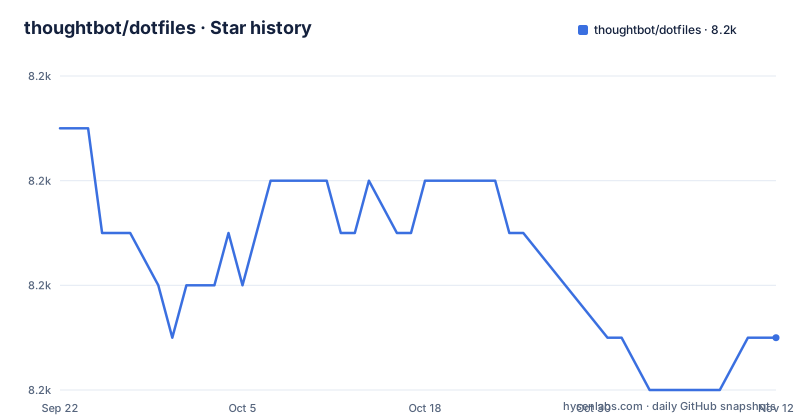
Star history
- thoughtbot/dotfiles8,169 ★ · -4
| Repository | 2026-09-22 | 2026-11-12 |
|---|---|---|
| thoughtbot/dotfiles | 8.2k | 8.2k |
-4 Stars in the last 51 days, measured from the daily GitHub snapshot. Compare with other projects
Editorial analysis
rcup symlinks files into your home directory
The install is three steps and the third one is where the behaviour is decided. You clone the repository onto your laptop, install rcm through Homebrew, and then run the linking command with an environment variable pointing at the repository's own rcrc file.
git clone [email protected]:thoughtbot/dotfiles.git ~/dotfilesbrew install rcmenv RCRC=$HOME/dotfiles/rcrc rcupThat command creates symlinks for config files in your home directory. Setting the variable tells rcup to use standard configuration options, and those options are the contract you are signing up for. The README.md, README-ES.md and LICENSE files are excluded because they belong to the repository but do not need to be linked in. Personal overrides are given precedence and placed in ~/dotfiles-local by default, and if you want them elsewhere you configure the rcrc file. There is also a fork option if you would rather track your own copy of the repository.
The RCRC variable is a one-time thing and rcup after a pull is not optional
After the first run you do not need the environment variable again, because rcup symlinks the repository's rcrc to ~/.rcrc so later invocations find it on their own. Updating is then two steps: pull down any updates from time to time, then run rcup again to link new files and install new vim plugins. The warning attached to that step is the part to remember. You must run rcup after pulling to ensure that all files in plugins are properly installed, otherwise the pull alone leaves the repository updated and your vim configuration pointing at plugins that were never fetched. The other half of the note is reassuring: you can safely run rcup multiple times, so the instruction is to update early and update often rather than to batch changes and run it once.
rcupPersonal overrides are a parallel tree with a .local suffix
You never edit the shared files. Instead you create a directory for your personal customisations, and every file you add there carries a .local suffix so the tooling knows to prefer it over the repository copy.
mkdir ~/dotfiles-localThe documented set covers the whole surface: aliases.local, gitconfig.local, psqlrc.local, tmux.conf.local, vimrc.local, vimrc.bundles.local and zshrc.local, plus directories for git templates and zsh configs. One of them has a trap worth repeating. The repository supplies a blank psqlrc.local specifically to prevent psql from throwing an error, and the instruction is that you should overwrite that file with your own copy. The git_template.local directory has a hooks subdirectory, and putting executable scripts in it is how you extend the git hooks. The result is two trees to learn instead of one, which is the price of never dirtying the shared configuration.
zsh configs load in pre, normal and post phases
The zsh side has a small ordering system that the vim side does not. Additional zsh configuration goes under the local zsh/configs directory, which has two special subdirectories: pre for files that must be loaded first, and post for files that must be loaded last. The reasoning is given through an example. A file named virtualenv in the pre directory makes use of shell features that your settings may affect, so it loads first, while a chpwd function belongs in post. Key bindings go in a keys file in that same tree. The ordering constraint is the point: the directory is described as handy for combining dotfiles from multiple teams, where one team adds virtualenv, another adds keys and a third adds chpwd. Note also that zshrc.local is loaded after the configs directory.
bindkey -s '^G' ' | grep 'vim plugin overrides work through UnPlug, including your own forks
Vim plugins are managed by vim-plug, and the override mechanism is a single function. If you do not want a plugin from the default set declared in vimrc.bundles, you call it out with UnPlug in your bundles file. The documented examples cover three different intents with one function. You can simply not install a plugin, by naming it. You can install a plugin only when a particular buffer type appears, by pairing an UnPlug with a Plug carrying a for option, which is how the coffee script plugin is made conditional. And you can point the framework at your own fork instead of the shared one, by plugging a path under your home directory. So a plugin line in the shared configuration is a default rather than a decision, and three separate overrides are available for it.
History settings include a space-prefixed secrecy rule and 8,192 entries
Four zsh history options are configured, and one of them is a habit rather than a setting. hist_ignore_all_dups removes duplicate commands from history. hist_ignore_space means commands starting with a space are not saved, and that is described as useful for sensitive commands, so it is a deliberate prefix discipline you have to remember to apply. inc_append_history adds commands to history as they are executed rather than only when the shell exits, and share_history shares history across multiple zsh sessions in real time. History size is set to 8,192 entries, described as providing ample command history. Read together, the two append and share options mean history is written continuously across sessions, so the space prefix is the only protection in the configuration for anything you would not want written to disk. That is a behavioural rule rather than a cryptographic one, and it only holds if you remember it on the days you are typing something you would rather not keep.
The vim layer is fzf, Rails.vim, Ag, vim-plug and a single-space leader
What you get on the editor side is a specific set of choices. fzf handles fuzzy file, buffer and tag finding, and Rails.vim enhances navigation of Rails file structure through commands such as gf, alternate file, partial extraction and migration inversion. Tests can be run from inside vim, the leader key is set to a single space, and space space switches between the last two files. Syntax highlighting covers Markdown, HTML, JavaScript, Ruby, Go and Elixir among others, and Ag is used instead of grep when it is available, with a leader mapping to re-index ctags and vim-mkdir creating directories that do not exist before a buffer is written. The tree shows the rest of the surface as plain files: aliases, asdfrc, gemrc, gitconfig, gitignore, gitmessage, hushlogin, psqlrc, railsrc, rspec, tmux.conf, vimrc, vimrc.bundles, zshenv, zprofile and zshrc, plus hooks and bin directories. Releases are date-named and the latest two are from 2017, while the last push to the main branch is dated 2026-09-03.
Editorial conclusion
It suits someone who wants a complete, opinionated shell and editor setup and is willing to keep their own changes in a second tree rather than editing the shared files. It does not suit someone who wants to edit their home dotfiles directly, because rcup links files rather than copying them. Check four things before you start: that zsh can be your login shell, since the install assumes it, that you are comfortable with symlinks pointing into a Git clone you might delete, that you will actually run rcup after every pull rather than assuming a pull is enough, and that you create the local override directory before you need it, because the defaults do not exist until you make them.
Frequently asked questions
What is a dotfile?
In this repository a dotfile is a configuration file kept in a Git repository and linked into your home directory by rcup rather than copied. The set here covers vim, zsh, git and tmux, and the install step creates symlinks for those config files in your home directory.
how to install dotfiles
Set zsh as your login shell with chsh, clone the repository, install rcm with brew install rcm, then run env RCRC=$HOME/dotfiles/rcrc rcup. That first run needs the variable because rcup has not yet symlinked the repository's rcrc into your home directory.
Can you provide some examples of dotfiles?
The repository documents several. A personal aliases.local holds shell aliases, a gitconfig.local holds an alias, a pretty format and your name and email, a vimrc.local holds colour scheme settings, and a zshrc.local can load pyenv. A psqlrc.local is supplied blank so psql does not throw an error, and you overwrite it with your own copy.
how to use dotfiles
Keep personal changes out of the shared files by putting them in ~/dotfiles-local with a .local suffix, which is where rcup gives precedence. To pick up changes from the repository, pull and then run rcup again, and do not skip that second step because new vim plugin files are installed by rcup rather than by the pull.
Official sources
Add this badge to your README
If you maintain this project, the badge below links readers to this analysis and shows its maintenance status from the daily GitHub snapshot. Paste the markdown into your README; add ?metric=license or ?metric=stars to the image URL for a different field.

[](https://hysenlabs.com/projects/thoughtbot-dotfiles)Star history chart for your README
[](https://hysenlabs.com/projects/thoughtbot-dotfiles)Was this useful?