spoti.pw: rebuilding the Spotify iOS app in Liquid Glass
Liquid Glass UI for the Spotify iOS app, no jailbreak
At a glance
- What is it?
- spoti.pw is a Theos tweak that hooks Spotify's own Objective-C classes to redraw the iOS app with the Liquid Glass interface, built from your own decrypted IPA and signed with your own certificate. It suits someone who wants the redesign on their own device and is willing to rebuild it when Spotify ships a new version.
- Who is it for?
- spoti.pw is a good fit for someone on iOS 26 who wants the Liquid Glass look in Spotify and is prepared to rebuild the tweak each time Spotify changes its internals, which the documentation is blunt about. It is the wrong tool if you want a supported app, if you cannot produce a decrypted IPA and sign it with your own certificate, or if you need the tweak to survive a Spotify update without work.
- Can I use it commercially?
- Check first. The repository uses a licence we do not classify automatically, so read its LICENSE file before any commercial use.
- Is it still maintained?
- Yes. The repository last received commits 8 days ago.
- What is it written in?
- Mainly Objective-C, according to GitHub's language statistics.
Answers come from the project's GitHub data, last synced on November 7, 2026, and from our analysis. They are not legal advice.
Star history
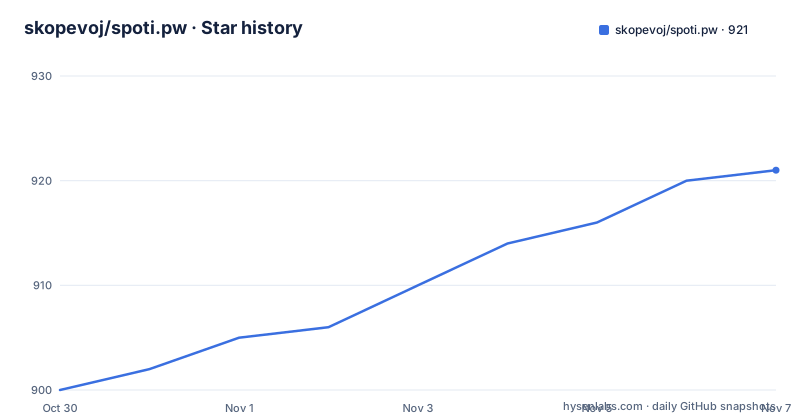
- skopevoj/spoti.pw921 ★ · +21
| Repository | 2026-10-30 | 2026-11-07 |
|---|---|---|
| skopevoj/spoti.pw | 900 | 921 |
21 Stars in the last 8 days, measured from the daily GitHub snapshot. Compare with other projects
Editorial analysis
It hooks Spotify's own classes rather than replacing the app
The mechanism is the interesting part and it determines everything else about the project. spoti.pw is a no-jailbreak Theos tweak that rebuilds Spotify for iOS in Liquid Glass, and it is injected into your own decrypted IPA and signed with your own certificate. The critical technical fact is that the mod hooks Spotify's own classes, which change between releases, so another version may build and then break. That sentence is the whole caveat in one line, and the project is honest enough to put it at the top rather than in a troubleshooting section. A hook-based mod is a very different proposition from a replacement app, because there is no reimplementation of the player, the library or the network layer, and the mod inherits Spotify's behaviour along with its bugs. The result is that the surface area is the user interface, and the fragility is that Spotify's own internals are the API. The two are the same fact seen from different ends, and they are why the project ships a flags extraction step and a FLEX-based view tree recorder.
The redesign needs iOS 26, and there is a legacy path below it
The features are gated by iOS version, and the table in the readme is the clearest statement of what you get where. The redesign requires iOS 26 or later, because it is built on UIGlassEffect, which the documentation says only exists from iOS 26. The legacy look works on iOS 16.1 and later, where the mod runs Spotify's own screens with everything else it adds on top, and the Live Activity needs iOS 17 or later. Below iOS 26 the Redesigned UI switch is greyed out, and both the switch and the rest of the configuration live in Settings under Mod Settings. The Live Activity is the feature that puts the player on the lock screen, and the screenshots show it alongside the now playing screen, the album view, the playlist view, the queue, the home screen and the live activity. The version numbers in the badge row show the build target as Spotify 9.1.78, and the documentation repeats that you should use that version's IPA.
Building it needs your own IPA, and the pipeline is a script
No IPA is distributed, by design, and the build takes a decrypted Spotify 9.1.78 IPA and gives you back an unsigned spoti.pw-<mod version> IPA to sign with SideStore, Feather or any certificate signer. Each release also carries the tweak as a .deb. There are two routes to the build. The GitHub Actions route is the more interesting one, because the workflow takes a direct link to your decrypted .ipa and hands the built IPA back as a workflow artifact, with no Mac needed, and the documentation notes that the link is masked in the log and the result stays in your fork. The local route needs Theos in a directory called theos, and Xcode with an iPhoneOS 26 or newer SDK, though an SDK in the theos sdks directory alone builds too, just without the Live Activity. The tools are installed with Homebrew and one uv tool:
    brew install make ldid dpkg zsign ideviceinstaller libimobiledevice
    uv tool install "cyan @ git+https://github.com/asdfzxcvbn/pyzule-rw"
With the decrypted IPA placed in an ipa directory, the two commands that matter are make release, which produces the unsigned IPA in an out directory ready to sign, and make install, which does the same but signs it with your certificate and pushes it over USB. The signing step reads three variables from a .signing.env file, a certificate, a profile and the password, and there is an example file to copy.
The Makefile shows the internals of the build
The Makefile at the root is short and it is essentially an index into the scripts directory, and each target tells you something about how the project works. The IPA variable defaults to the first file found in the ipa directory. The build target runs the pipeline script with FLEX included, the release target runs the same script with the no-flex flag, and the install target adds the install flag along with a name and an icon, and the comment explains that a local install is renamed and re-iconed so it can be told apart from the released app on the home screen. The trees target records per-screen view trees into a trees directory and needs a FLEX build on the phone, and the session target records clean trees screen by screen with an environment variable selecting which screens. The log target streams the tweak's log lines from the phone, and the flags target regenerates the file holding Spotify's remote-config flags from the IPA. That last one explains the first build's behaviour, since the documentation says the first build spends a minute reading Spotify's flags out of your IPA, and the make flags target regenerates them.
Signing details that decide whether the lock screen player works
The signing section is short and contains a trap worth knowing about. You have to sign with a bundle id matching your certificate's App ID, and if it does not match, the app still works but tapping the player on the lock screen will not open it, and the app tells you on first launch which id to use. In Feather you copy the App ID into the Identifier field and leave PPQ protection off, while AltStore, SideStore and Sideloadly get this right on their own. The app keeps Spotify's bundle id, so it installs over the real Spotify, which is the point and also the reason the id has to match. The tooling behind the build is named in the credits. The pyzule-rw project injects, Theos builds, and FLEX is the inspector the view trees are read through, with an AutoFLEX build vendored in the repository, and the Makefile comments explain that FLEX rides along only when it is asked for because a make target cannot take a --flex option of its own.
A source-available licence that forbids modification
The licensing is unusual and it is the main constraint on the project. The source is available under the PolyForm Strict License 1.0.0, and the readme spells out what that means in plain terms: you can read the code and use the mod yourself, but not change it, reuse it in other projects or redistribute it. Releases up to v0.21.1 were published under GPL-3.0 and stay under it, so the history has two regimes, and files in the vendor and .agents directories keep their own licences. That is a different kind of open source from what most people assume when they see a public repository, and it is worth understanding before you contribute. The contribution path runs through a Contributor License Agreement, with a box in the pull request description that gives the project owner the rights to the contribution, and it is ticked once before the first pull request is merged. The project also states plainly that it is not affiliated with Spotify.
Release numbering that shows the pace of change
The release list is worth reading for what it says about the project's rhythm. There is v0.51.0 from 2026-10-14, then v0.23.0-beta from 2026-09-28, and v1.0.0-beta.1 from 2026-10-17, which is the same day as the last push. The ordering is not monotonic in the usual sense, which is a consequence of a project tracking a target application that moves underneath it, and it is the clearest signal that the versioning tracks compatibility with Spotify releases rather than a stable public API. The repository root shows the rest of the structure, with a tweak directory holding the sources, an ipa directory for your own IPA, a vendor directory for the vendored tools, a harness directory, an extension directory, plist and script directories, and a version.txt file. The release automation is handled with release-please, with its manifest and config at the root, and there is a CHANGELOG.md, a SECURITY.md, a CODE_OF_CONDUCT reference through the CLA file, and separate agent instruction directories for .agents and .claude, alongside a Makefile, a .signing.env.example file for the signing variables, and a docs directory that holds the tweak documentation, the screenshots and the tweaks guide.
Editorial conclusion
spoti.pw is a good fit for someone on iOS 26 who wants the Liquid Glass look in Spotify and is prepared to rebuild the tweak each time Spotify changes its internals, which the documentation is blunt about. It is the wrong tool if you want a supported app, if you cannot produce a decrypted IPA and sign it with your own certificate, or if you need the tweak to survive a Spotify update without work. It is also the wrong tool for anyone who wants to modify or redistribute the code, because the licence is a source-available one that forbids exactly that. Before building, read the version warning and check that you have Spotify 9.1.78, because the mod hooks classes that change between releases, and note that the bundle id must match your certificate or the lock screen player will not open the app. The last push was on 2026-10-17.
Frequently asked questions
What does spoti.pw do to the Spotify iOS app?
It is a no-jailbreak Theos tweak that hooks Spotify's own Objective-C classes to redraw the app with the Liquid Glass interface, injected into your own decrypted IPA and signed with your own certificate. The redesign needs iOS 26 or later because it uses UIGlassEffect, the legacy look runs on iOS 16.1 and later, and the Live Activity needs iOS 17.
How do I build spoti.pw without a Mac?
Fork the repository, enable Actions and run the Build IPA from your own Spotify IPA workflow. It takes a direct link to your decrypted .ipa and returns the built IPA as a workflow artifact, with the link masked in the log and the result staying in your fork.
Which Spotify version does spoti.pw support?
Spotify 9.1.78, and you need that version's IPA. The mod hooks Spotify's own classes, which change between releases, so another version may build and then break.
What licence is spoti.pw released under?
Source available under the PolyForm Strict License 1.0.0, which means you can read the code and use the mod yourself but not change it, reuse it in other projects or redistribute it. Releases up to v0.21.1 were published under GPL-3.0 and stay under it, and files in the vendor and .agents directories keep their own licences.
How do I sign and install a spoti.pw build?
Build it with make release, then sign the resulting IPA with a bundle id matching your certificate's App ID and install it with SideStore, Feather, AltStore or Sideloadly. A mismatched id still installs but the lock screen player will not open the app, and the app reports the correct id on first launch.
Official sources
Add this badge to your README
If you maintain this project, the badge below links readers to this analysis and shows its maintenance status from the daily GitHub snapshot. Paste the markdown into your README; add ?metric=license or ?metric=stars to the image URL for a different field.

[](https://hysenlabs.com/projects/skopevoj-spoti-pw)Star history chart for your README
[](https://hysenlabs.com/projects/skopevoj-spoti-pw)Was this useful?