Expo Go cannot run react-native-executorch, and that is written into the requirements
High-performance, privacy-first on-device AI inference library for React Native, powered by PyTorch's ExecuTorch runtime
At a glance
- What is it?
- react-native-executorch runs PyTorch ExecuTorch models on device from React Native, with task hooks on top of a lower level tensor runtime. The constraints are where the detail is: a new architecture requirement, a development build instead of Expo Go, a pinned peer range, and release tags where a -libs suffix and the plain numbers interleave so the newest tag by name is not the newest build.
- Who is it for?
- Adopt react-native-executorch when you need inference to run on the phone with no network call after the model is downloaded, and you already build React Native apps with development builds. Skip it if you are on Expo Go, below React Native 0.83, below iOS 17 or Android 13, or if you need a release stream with an unambiguous version number.
- Can I use it commercially?
- Check first. The repository uses a licence we do not classify automatically, so read its LICENSE file before any commercial use.
- Is it still maintained?
- Yes. The repository received new commits within the last day.
- What is it written in?
- Mainly TypeScript, according to GitHub's language statistics.
Answers come from the project's GitHub data, last synced on November 15, 2026, and from our analysis. They are not legal advice.
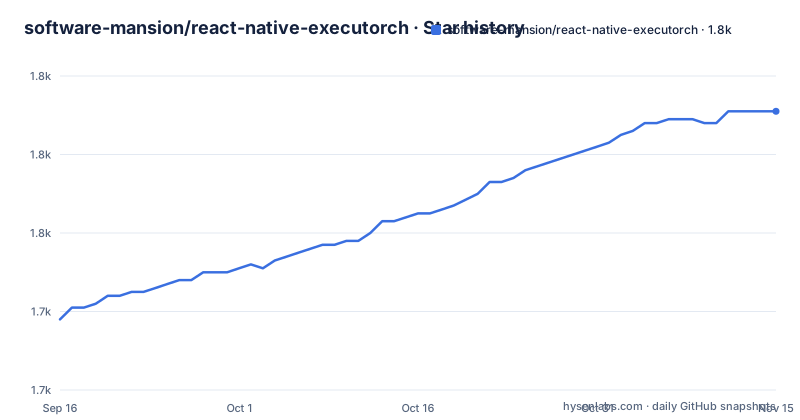
Star history
- software-mansion/react-native-executorch1,791 ★ · +53
| Repository | 2026-09-16 | 2026-11-15 |
|---|---|---|
| software-mansion/react-native-executorch | 1.7k | 1.8k |
53 Stars in the last 60 days, measured from the daily GitHub snapshot. Compare with other projects
Editorial analysis
Expo Go is ruled out by the custom C++ requirement
The requirement block is unusually specific and starts with the reason it is specific. React Native ExecuTorch needs the New Architecture enabled, React Native 0.83 or newer or Expo SDK 55 or newer with development builds, and Expo Go is explicitly not supported because of the custom C++ native libraries. A JavaScript runtime that preloads a fixed native binary cannot load libraries that are compiled into your app, so the rule is a consequence of the architecture rather than a policy choice.
The rest of the block is a version matrix: `react-native-worklets` 0.10 or newer, given as `>=0.10.0 <0.13.0`, and platform floors of iOS 17.0 and Android 13, the latter expressed as `minSdkVersion` >= 26.
Installation is one line, and the peer dependencies come with it rather than being resolved for you:
npm install react-native-executorch react-native-worklets react-native-blob-util
# or
yarn add react-native-executorch react-native-worklets react-native-blob-util
# or
pnpm add react-native-executorch react-native-worklets react-native-blob-util
`react-native-blob-util` is the third package, and its presence is the reason model download is a first class concern rather than an afterthought: the library fetches `.pte` files and caches them, which is what the downloading and caching models guide in the documentation is about.
Four native backends, split by what the hardware offers
Execution is delegated across backends rather than implemented once. XNNPACK covers CPU, Core ML and MLX cover Apple Silicon, and Vulkan covers the Android GPU. Nothing is sent to a server to do the work, which is the whole point of the library: after the model has been downloaded there are zero network calls, no cloud inference cost, and no user data leaving the device.
That claim has a boundary worth naming. Offline means after the download. The model file has to arrive once, from a Hugging Face collection or from wherever you host your own `.pte`, and the README's own feature list puts the condition in the same sentence: zero network dependency after model download.
The model catalogue is curated rather than empty. Pre-exported models cover computer vision, language models, text to speech and transcription, they are reachable through a `models` registry in code, and they are published in a Software Mansion Hugging Face collection. You are not restricted to those: the library accepts your own `.pte` files, either plugged into an existing pipeline or run through a custom one you build.
So the delivery path is: pick a model from the registry, let the library fetch and cache it, and call a hook.
The two layers are hooks on top of a tensor runtime
The architecture is described as two layers, and the distinction matters when you are deciding how much to write yourself.
The upper layer is task hooks, the `use<Task>` family, with out of the box support for LLMs, computer vision, speech and embeddings, plus automatic caching and lifecycle management. The quickstart shows the LLM case:
import { Button, View } from 'react-native';
import { models, useLLMChatSession } from 'react-native-executorch';

export function App() {
  const session = useLLMChatSession(models.llm.LFM2_5_1_2B.DEFAULT);

  const handleGenerate = async () => {
    if (!session.isReady || !session.sendMessage) return;

    const turn = await session.sendMessage(
      'Explain on-device AI in one sentence.',
      (token) => console.log(token)
    );

    console.log('Result messages:', turn.messages);
  };
Two things in those few lines are worth copying. The model comes from the registry by key, and the guard checks both `isReady` and the existence of `sendMessage`, so the hook is expected to hand back a session that is not yet usable on first render. The second argument to `sendMessage` is a per-token callback, which is how streaming output arrives.
The lower layer is the reason the library exists at all: low level tensor operations, fast native operators, schema validation and worklet threading, all usable from TypeScript. That layer is where a custom pipeline lives, and it is also where the worklets dependency stops being optional, since it is what carries the thread.
The release tags interleave two version streams
The three most recent releases are not three consecutive versions. They are v0.10.5-libs published 2026-09-22, v0.10.3 published 2026-09-25, and v0.10.4 published 2026-09-28. Read by name, the highest number is the `-libs` tag; read by date, the newest build is v0.10.4. The suffix is doing something separate from the number, and nothing in the README explains the two streams or which one a consumer should track.
The default branch was last pushed on 2026-10-02, so there is active work on top of all three tags.
Licensing is the other loose end. No licence is recorded anywhere in the repository metadata, while a `LICENSE` file sits at the top level next to `SECURITY.md` and `CODE_OF_CONDUCT.md`. Those two facts do not agree, and picking one is not something a reader can do from what is visible here, so read the file before you depend on the terms.
One smaller inconsistency: the project homepage is recorded as `http://docs.swmansion.com/react-native-executorch/` over plain http, while every documentation link inside the README is https.
Every workspace script excludes one package the README never mentions
The root `package.json` is the monorepo's, not the library's. Its name is `react-native-executorch-monorepo`, its version is `0.0.0`, it is marked private, and it declares `[email protected]` as the package manager with workspaces covering `packages/*`, `apps/*` and `apps/legacy/*`.
The three scripts it defines all carry the same exclusion:
  "scripts": {
    "prepare": "yarn workspaces foreach --all --exclude react-native-executorch-webrtc --topological-dev run prepare",
    "lint": "yarn workspaces foreach --all --exclude react-native-executorch-webrtc --parallel run lint",
    "typecheck": "yarn workspaces foreach --all --exclude react-native-executorch-webrtc --parallel run typecheck"
  },
`react-native-executorch-webrtc` is skipped for prepare, lint and typecheck alike, so it is built and published but never checked. That package name appears nowhere in the README, and there is no page in the documentation index about it. If you are here for WebRTC support, the repository gives you a name and no explanation.
Two version decisions in the same file are worth a look. `resolutions` pins `react-native-worklets` to exactly 0.10.3, a narrower choice than the documented `>=0.10.0 <0.13.0` peer range, so the repository tests one point inside the range it publishes. And the dev toolchain still carries eslint `^8.57.0` with `@react-native/eslint-config` at `^0.79.0`, while the library requires React Native 0.83 or newer, so the lint stack and the runtime floor are a major version apart.
Legacy example apps are a tracked liability
Workspaces include `apps/legacy/*`, and the root manifest explains why in a comment that is part of the file rather than part of the docs: `apps/legacy/*` contains preserved legacy example apps, to be removed when the legacy apps are dropped. The comment is prefixed with a marker line, `// === LEGACY SUPPORT: workspaces ===`, which suggests the same marker style is used elsewhere to find these.
The commitment has its own document, `LEGACY_REMOVAL.md` at the top level, so removing the legacy apps is a planned task rather than something a maintainer would discover during a cleanup. The same directory holds `RELEASE.md` next to `CONTRIBUTING.md`, `SECURITY.md` and `CODE_OF_CONDUCT.md`.
Elsewhere the project points outward in three directions: a Hugging Face collection for the curated models, a separate gallery repository for an interactive demo app, which lives under a different account, software-mansion-labs, rather than the software-mansion organisation that owns this one, and a shipping application, Private Mind, which the README credits with being powered by the library and links on both the App Store and Google Play.
So the library is presented as infrastructure with three audiences: developers integrating it, people browsing the gallery, and users of an app already built on it.
Native code, so the repository carries native tooling
The top-level entries give away what kind of repository this is. There is a `.clang-format`, which only matters if there is C or C++ to format, and there is a `.cspell.json` with a `.cspell-wordlist.txt` beside it, so the spell checker needed a word list for this codebase's own vocabulary. There is a `.gitmodules` file and a `third-party/` directory, which is how native third party code gets into the tree.
The JavaScript side is pinned hard. `.yarn/` and `.yarnrc.yml` are committed, so the Yarn 4 install path is reproducible, and `yarn.lock` sits at the root. `.nvmrc` records the Node version, `.eslintrc.js` holds the lint configuration in the older eslintrc format rather than the flat config, `.prettierrc` and `.prettierignore` handle formatting, and `lefthook.yml` wires the hooks through `@evilmartians/lefthook`.
Type checking runs through TypeScript `~5.9.2`, and `expo-router` is a dev dependency at the root, which is what an example app built with Expo routing needs. The `docs/` directory is a Docusaurus style tree with its own static image assets, and there is an `apps/` directory for the examples and a `packages/` directory for the published code. An `.agents/` directory also exists at the root, alongside the `CONTRIBUTING.md` that describes how outside contributions are handled.
Editorial conclusion
Adopt react-native-executorch when you need inference to run on the phone with no network call after the model is downloaded, and you already build React Native apps with development builds. Skip it if you are on Expo Go, below React Native 0.83, below iOS 17 or Android 13, or if you need a release stream with an unambiguous version number. Before you pin a version, check which tag stream you are on, since the -libs tags and the plain tags interleave, and read the licence file yourself, because no licence is recorded in the repository metadata.
Frequently asked questions
What does react-native-executorch do?
It runs machine learning models on the device from React Native, powered by PyTorch's ExecuTorch runtime. After the model has been downloaded there are zero network calls and no user data leaves the device, and execution is delegated to XNNPACK on CPU, Core ML and MLX on Apple Silicon, or Vulkan on the Android GPU.
Can I use react-native-executorch with Expo Go?
No. The requirements say React Native 0.83 or newer, or Expo SDK 55 or newer, with development builds, and that Expo Go is not supported because of the custom C++ native libraries. The New Architecture must also be enabled, and the platform floors are iOS 17.0 and Android 13.
Which packages do I install alongside react-native-executorch?
Two peer dependencies come with it in the same command: react-native-worklets, required at >=0.10.0 <0.13.0, and react-native-blob-util. The install line works with npm, yarn or pnpm.
Where do the models for react-native-executorch come from?
A curated set of pre-exported .pte models covering computer vision, language models, text to speech and transcription, reachable through the models registry in code and published in a Software Mansion Hugging Face collection. You can also bring your own .pte files and use them in existing pipelines or in custom ones.
Is react-native-executorch a stable release or a beta?
The recent tags are plain versions, v0.10.4 and v0.10.3, alongside a suffixed one, v0.10.5-libs, which was published earlier than both. The repository does not explain the two streams, and the default branch was last pushed on 2026-10-02.
What licence is react-native-executorch under?
No licence is recorded in the repository metadata, while a LICENSE file sits at the top level beside SECURITY.md and CODE_OF_CONDUCT.md. The README does not state a licence either, so the terms have to be read from the file rather than from the manifest.
Official sources
Add this badge to your README
If you maintain this project, the badge below links readers to this analysis and shows its maintenance status from the daily GitHub snapshot. Paste the markdown into your README; add ?metric=license or ?metric=stars to the image URL for a different field.

[](https://hysenlabs.com/projects/software-mansion-react-native-executorch)Star history chart for your README
[](https://hysenlabs.com/projects/software-mansion-react-native-executorch)Was this useful?