Figma Console MCP compiles a Cloudflare build and refuses to ship it
Your design system as an API. Connect AI to Figma for extraction, creation, and debugging.
At a glance
- What is it?
- A TypeScript Model Context Protocol server for Figma with 121 tools across four connection modes, published to npm as an ESM package whose file list excludes the worker output its own build script produces. It also carries three linter configs while wiring only one to a script.
- Who is it for?
- Figma Console MCP is worth adopting if you are willing to run Figma Desktop rather than the web app and you want write access rather than read-only extraction, because the four connection modes differ by more than setup convenience: one gives 121 tools, one gives 96, and one is read-only until you pair a plugin. Verify two things before you wire it into a team workflow.
- Can I use it commercially?
- Yes. MIT is a permissive licence: you can use, modify and sell software built on it, as long as you keep its copyright and licence notices.
- Is it still maintained?
- Yes. The repository last received commits 2 days ago.
- What is it written in?
- Mainly TypeScript, according to GitHub's language statistics.
Answers come from the project's GitHub data, last synced on November 15, 2026, and from our analysis. They are not legal advice.
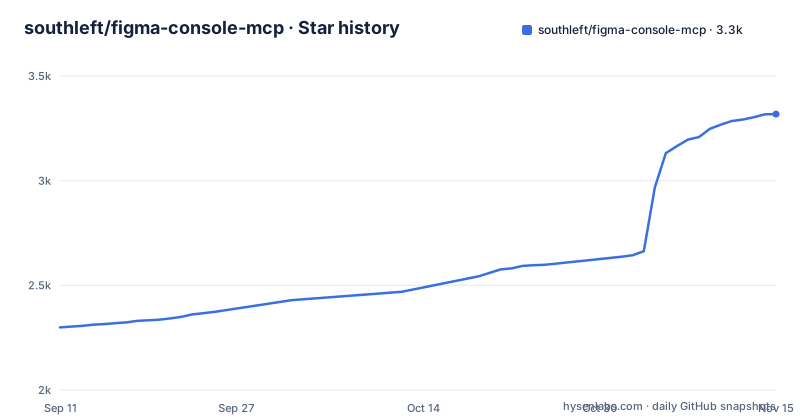
Star history
- southleft/figma-console-mcp3,318 ★ · +1,019
| Repository | 2026-09-11 | 2026-11-15 |
|---|---|---|
| southleft/figma-console-mcp | 2.3k | 3.3k |
1,019 Stars in the last 65 days, measured from the daily GitHub snapshot. Compare with other projects
Editorial analysis
The npm file list excludes the worker directory the build produces
The build script compiles three things in sequence: a local server, a Cloudflare Worker, and two Vite front-end apps.
"build": "npm run build:local && npm run build:cloudflare && npm run build:apps"`build:local` runs `tsc` against `tsconfig.local.json`, `build:cloudflare` runs it against `tsconfig.cloudflare.json`, and `build:apps` invokes Vite twice with different `APP_NAME` values, once for `token-browser` and once for `design-system-dashboard`.
The published file list then throws the worker output away:
	"files": [
		"dist",
		"!dist/cloudflare",
		"figma-desktop-bridge",
		"README.md",
		"LICENSE"
	],
So `npm run build` always produces the Cloudflare bundle and `npm publish` always excludes it. Anyone deploying the remote or paired Worker mode has to build from a clone. That is a defensible packaging decision, since the package entry point is the local server, but it is not stated on the front page and it is invisible to anyone reading the install instructions.
Three linter configs sit in the root and only Biome is scripted
The top-level entries include `.eslintrc.json`, `.prettierrc`, and `biome.json`. The scripts section only ever calls Biome: `format` runs `biome format --write` and `lint:fix` runs `biome lint --fix`. There is no script that invokes ESLint or Prettier.
So the repository carries configuration for three separate tools while driving one of them. Either the other two are leftovers from before the move to Biome, or they are kept for contributors whose editors read them. Nothing in the entry list resolves which, and a contributor who runs Prettier by habit and Biome by script can produce conflicting output in the same commit.
Elsewhere the same pattern of accommodating the module system shows up. The package is `"type": "module"` with a `bin` entry pointing at `./dist/local.js`, yet the Jest configuration is named `jest.config.cjs` with the `.cjs` extension, which is what makes a CommonJS config file loadable from inside an ESM package. Type checking is separated out as `type-check`, running `tsc --noEmit`, so a full `tsc` pass and a pure type pass are distinct commands.
Four connection modes, and the tool count changes with each
The setup table is the most useful part of the front page because it quantifies what each route costs. NPX is recommended and takes about ten minutes. Cloud Mode takes about five. Local Git setup, for contributors, takes about fifteen. Remote SSE takes about two.
Those numbers come with a capability matrix. NPX and Local Git expose 121 tools. Cloud Mode exposes 96 after pairing. Remote SSE is a read-only subset. Every write capability, meaning creating components and frames, editing existing designs, managing design tokens and variables, and creating FigJam boards, is marked unavailable over Remote SSE until the plugin is paired.
Two rows are narrower than the headline counts suggest. Real-time monitoring of console output and selection works only under NPX and Local Git, so Cloud Mode loses it despite unlocking writes. Codebase to design system extraction, the `figma_ds_*` family, is also NPX and Local Git only. So the 25 tools separating 121 from 96 are not a random sample; the two modes differ in kind, not just in number.
Node.js is required only for NPX and Local Git. Cloud Mode and Remote SSE are listed as needing none, which is what lets web clients pair a cloud endpoint instead.
The documented token scopes grant Variables as read only
Step one of setup walks through creating a Figma personal access token. The description to enter is `Figma Console MCP`, the token begins with `figd_`, and the page warns in bold that you will not see it again.
The four scopes listed are File content at read, File versions at read, Variables at read, and Comments at read and write. Variables is the third of the four and it is set to read, not read and write.
That sits oddly against the feature list on the same page. Variable management is advertised as create, update, rename, and delete design tokens. Bidirectional token sync is described as pushing code-side edits back to Figma with full apply, covering creates, renames, alias re-targeting, and replace-gated deletes. The token configuration for those writes is either incomplete on the page, or those tools need a grant the instructions do not ask for. Either way, the two halves of the document disagree, and it is the half you copy from that decides whether a write succeeds.
The token itself is passed to the client through an environment variable on the registration command, which is worth noticing before you paste a real token into a shell history:
claude mcp add figma-console -s user -e FIGMA_ACCESS_TOKEN=figd_YOUR_TOKEN_HERE -e ENABLE_MCP_APPS=true -- npx -y figma-console-mcp@latestThe `-s user` scope writes the entry into your user-level configuration, so the token is stored there rather than in the project.
Two tsconfigs, two runtimes, one published entry point
The runtime split is visible in the file names rather than in prose. There are three TypeScript configs: a base `tsconfig.json`, a `tsconfig.cloudflare.json`, and a `tsconfig.local.json`. Each runtime compiles its own entry point, `local.ts` under `tsx src/local.ts` for development and a separate Cloudflare entry for the Worker, and both emit into `dist`.
Publishing keeps only one of them. `main` is `dist/local.js`, `types` is `dist/local.d.ts`, and the `bin` map registers the command against `./dist/local.js`. Nothing in the published metadata points at the Worker output, because the Worker output is excluded.
The Cloudflare side has its own generated artifact and its own tool commands. `worker-configuration.d.ts` sits at the root as a generated type file, `wrangler.jsonc` is the Worker configuration, and the scripts provide `deploy`, `dev`, and `start` for Wrangler plus `cf-typegen` to regenerate the type file. The front page describes the remote mode as Remote SSE and Cloud Mode without explaining that both are Cloudflare Worker deployments that require Wrangler, which is a Node dependency the Cloud Mode row otherwise says is unnecessary.
The package description claims replacements it does not benchmark
The published description is one long marketing sentence:
"description": "The most comprehensive MCP server for Figma — design tokens, variables, components, write tools, version history diff, accessibility audits, FigJam, Slides, and more. Local (WebSocket Desktop Bridge plugin) and Cloudflare Workers (paired + remote) modes."The README makes a stronger claim in the same spirit, stating that bidirectional token sync replaces the Style Dictionary and Tokens Studio export pipeline. Nothing in the repository substantiates that comparison. There is no benchmark, no migration guide, and no feature matrix against either product, so treat it as a positioning statement rather than a verified result.
What the repository does substantiate is narrower and checkable. Accessibility scanning is described as 14 WCAG design checks with conformance level tagging, plus axe-core code scanning, and `axe-core` does appear in the dependency list. Design-code parity is described as a deterministic comparison of a Figma component against its code across visual, spacing, typography, tokens, component API, and accessibility. Those are descriptions of what the tools do, not evidence that they agree with anything.
Nine patches in one minor range, and the plugin does not change
The release note for v1.40.9 announces nine patches since the v1.40.0 design system extraction work, attributed to community reports, and every one of them is a correctness fix rather than a feature. Generated component documentation now describes backgrounds, hidden layers and the properties that reveal them, per-corner radius and border tokens, typography and layer structure across variants, and source links pinned to a commit.
The rest are data integrity fixes with specific failure modes named. `figma_export_tokens` can no longer overwrite a token file that belongs to a different Figma file. Overrides inside extended variable collections are visible. Minimum and maximum sizing survives every JSON extraction path. Colors that alias another color survive export and import at an opacity with the link intact. The last item is the published package passing `npm audit` cleanly.
The line worth noting is the scope statement at the end: server-only, no plugin re-import needed. That is a deliberate architectural choice, since the Desktop Bridge plugin sits in a separate directory and is shipped alongside the server, and it means plugin version skew is not a source of these nine bugs.
The release cadence is fast: v1.40.7 on 2026-09-28, v1.40.8 on 2026-09-30, v1.40.9 on 2026-10-02.
Every response is tagged so agents can tell Figma servers apart
One line item exists purely for the case where an agent is talking to more than one Figma server at once. Every tool response carries a `_mcp` field set to `figma-console-mcp`, and errors are prefixed with the bracketed name `[figma-console-mcp]`. The stated purpose is that attribution stays unambiguous.
That is a small design decision with a large blast radius in practice, because the ecosystem already contains several servers that reach the same API. The related naming in this repository's own ecosystem includes other Figma MCP servers, and an agent that receives an error string has no other way to tell which server produced it. Prefixing is the cheapest available fix and it costs one field per response.
The repository also takes contributor-facing infrastructure seriously in small ways. A `.mailmap` normalizes author identity across the history, `SECURITY.md` gives vulnerability reports a path, `.pre-commit-config.yaml` runs hooks before commits, and `CLAUDE.md` alongside a `.claude/` directory carries instructions for coding agents. The `tests/` and `scripts/` directories sit next to `src/` and `docs/`, and `jest.config.cjs` is wired to three scripts covering a plain run, watch mode, and coverage.
Editorial conclusion
Figma Console MCP is worth adopting if you are willing to run Figma Desktop rather than the web app and you want write access rather than read-only extraction, because the four connection modes differ by more than setup convenience: one gives 121 tools, one gives 96, and one is read-only until you pair a plugin. Verify two things before you wire it into a team workflow. The published npm package omits the Cloudflare worker build, so a deployment that needs `wrangler deploy` has to come from a clone rather than from a dependency. And the documented personal access token scopes grant Variables as read only, while the feature list advertises creating, updating, renaming, and deleting tokens, so confirm against your own file whether the write tools need a different grant. Pin the version, and read SECURITY.md before you paste a personal access token into a client configuration.
Frequently asked questions
what is figma console mcp
It is a Model Context Protocol server for Figma that connects AI assistants to Figma for extraction, creation, and debugging. It writes to Figma rather than only reading, and runs locally through a WebSocket Desktop Bridge plugin or as a Cloudflare Worker in paired and remote modes.
how to install figma console mcp
The recommended NPX route needs Node.js 18 or newer, Figma Desktop rather than the web app, and an MCP client. The server is also published to npm as `figma-console-mcp`, whose entry point is `dist/local.js`.
how to setup figma console mcp
Pick a connection mode first, since they differ in capability. NPX and Local Git expose 121 tools, Cloud Mode exposes 96 after pairing and needs no Node.js, and Remote SSE is read-only until the plugin is paired.
how to use figma console mcp
Create a Figma personal access token described as `Figma Console MCP`, which begins with `figd_` and is shown only once, and grant File content, File versions, and Variables as read plus Comments as read and write. The token is then passed to the MCP client as `FIGMA_ACCESS_TOKEN`.
Official sources
Add this badge to your README
If you maintain this project, the badge below links readers to this analysis and shows its maintenance status from the daily GitHub snapshot. Paste the markdown into your README; add ?metric=license or ?metric=stars to the image URL for a different field.

[](https://hysenlabs.com/projects/southleft-figma-console-mcp)Star history chart for your README
[](https://hysenlabs.com/projects/southleft-figma-console-mcp)Was this useful?