sqlite-wasm: SQLite in the browser, with OPFS when the headers allow it
SQLite Wasm conveniently wrapped as an ES Module.
At a glance
- What is it?
- The @sqlite.org/sqlite-wasm package wraps the SQLite Wasm build as an ES module with TypeScript types added and no changes to the underlying code, and it offers two runtimes: a worker that can persist to the origin private file system when the page sets the cross origin isolation headers, and a main thread version that works without them but only in memory. The Worker1 and Promiser1 APIs are deprecated as of 2026-04-15, and the npm package is versioned to match the SQLite release it wraps.
- Who is it for?
- Adopt sqlite-wasm if you are building a browser application that needs a real SQL database on the client, and you are prepared to serve your page with cross origin isolation headers so that persistence to OPFS works, since that is the only way the worker path can store anything.
- Can I use it commercially?
- Check first. The repository uses a licence we do not classify automatically, so read its LICENSE file before any commercial use.
- Is it still maintained?
- Yes. The repository last received commits 2 days ago.
- What is it written in?
- Mainly JavaScript, according to GitHub's language statistics.
Answers come from the project's GitHub data, last synced on November 7, 2026, and from our analysis. They are not legal advice.
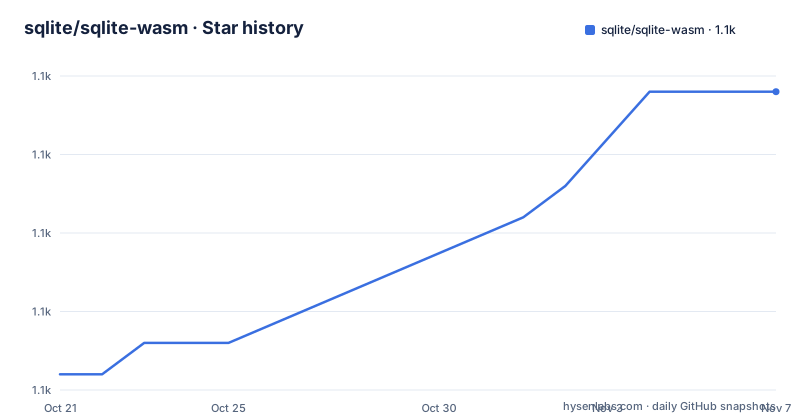
Star history
- sqlite/sqlite-wasm1,077 ★ · +9
| Repository | 2026-10-21 | 2026-11-07 |
|---|---|---|
| sqlite/sqlite-wasm | 1.1k | 1.1k |
9 Stars in the last 17 days, measured from the daily GitHub snapshot. Compare with other projects
Editorial analysis
SQLite in the browser, wrapped as a module
The package is described in one sentence: SQLite Wasm conveniently wrapped as an ES Module. That is the whole product.
The underlying code is SQLite's own Wasm build, and the README is emphatic about the boundary. This project wraps the code of SQLite Wasm with no changes, apart from added TypeScript types. Bug reports and feature requests about the underlying SQLite Wasm code should not be filed here, and the project points those to SQLite's own bug filing instructions instead. Issues about the TypeScript types are welcome.
That framing matters for evaluation. This is not a database engine project, it is a packaging project, and the value it adds is distribution and ergonomics: the Wasm build exists, and what this repository does is make it installable, typed and usable from a bundler.
The install is one command:
npm install @sqlite.org/sqlite-wasmThe package is published under the `@sqlite.org` scope, the author is Thomas Steiner, the licence is Apache 2.0, and the primary language is JavaScript. The default branch is `main` and the last push was on 2026-10-02, with recent releases 3.53.4-build2 from 2026-10-02, 3.53.4-build1 from 2026-09-08 and 3.53.0-build1 from 2026-04-21. That version scheme is worth reading carefully, because the number is the SQLite version and the suffix is a build counter, so `3.53.4-build2` means the fourth build of SQLite 3.53.4, not a second package release.
The worker path, and the headers that make OPFS possible
There are two ways to use SQLite Wasm, and the README splits them by what they can persist.
In a worker, the module is loaded in a module worker, and the database can be stored in the origin private file system when it is available. The code picks the backend at runtime:
// In `worker.js`.
import sqlite3InitModule from '@sqlite.org/sqlite-wasm';

const start = (sqlite3) => {
  console.log('Running SQLite3 version', sqlite3.version.libVersion);
  const db =
    'opfs' in sqlite3
      ? new sqlite3.oo1.OpfsDb('/mydb.sqlite3')
      : new sqlite3.oo1.DB('/mydb.sqlite3', 'ct');
  console.log(
    'opfs' in sqlite3
      ? `OPFS is available, created persisted database at ${db.filename}`
      : `OPFS is not available, created transient database ${db.filename}`,
  );
  // Your SQLite code here.
};

const initializeSQLite = async () => {
  try {
    console.log('Loading and initializing SQLite3 module...');
    const sqlite3 = await sqlite3InitModule();
    console.log('Done initializing. Running demo...');
    start(sqlite3);
  } catch (err) {
    console.error('Initialization error:', err.name, err.message);
  }
};

initializeSQLite();
The `db` object implements SQLite's Object-Oriented API #1, so the calling convention is the one SQLite documents rather than a new one.
The cost of the worker path is the cross origin isolation requirement. For this to work you need to set the following headers on your server, `Cross-Origin-Opener-Policy: same-origin` and `Cross-Origin-Embedder-Policy: require-corp`. That is a real deployment constraint, because a page served with those headers cannot embed cross origin resources that do not opt in, and a static host that does not let you set headers cannot run the persisting variant at all. The README notes in passing that this is also why the worker demo cannot be hosted on GitHub Pages.
The fallback in the code is graceful. When OPFS is not present, the same worker opens a transient database instead, so the application still runs and the developer still gets the output, just without persistence.
The main thread path and the transient database
The second option runs in the main thread, and the difference is that it cannot use OPFS at all.
import sqlite3InitModule from '@sqlite.org/sqlite-wasm';

const start = (sqlite3) => {
  log('Running SQLite3 version', sqlite3.version.libVersion);
  const db = new sqlite3.oo1.DB('/mydb.sqlite3', 'ct');
  // Your SQLite code here.
};
const initializeSQLite = async () => {
  try {
    console.log('Loading and initializing SQLite3 module...');
    const sqlite3 = await sqlite3InitModule();
    console.log('Done initializing. Running demo...');
    start(sqlite3);
  } catch (err) {
    console.error('Initialization error:', err.name, err.message);
  }
};

initializeSQLite();
The `'ct'` mode here is what the README calls a transient database, and it is the same fallback the worker uses when OPFS is missing.
So the choice between the two paths is a choice between persistence and deployment simplicity. In the main thread you avoid the cross origin isolation requirement, and you get a database that lives for the life of the page. In the worker you get a database that survives a reload, and you take on the header requirements.
There is a third consideration that the README does not spell out but the structure implies. The worker path keeps the database work off the main thread, which matters when the application is also rendering, and the Wasm module load is itself an asynchronous initialisation step, which the code shows by awaiting `sqlite3InitModule()` before anything else happens.
For Node.js the position is blunt. The README warns that Node.js is currently only supported for in-memory databases without persistence. A script that loads the module under Node gets the same engine and the same API, but the file system back ends are browser facilities, so there is nowhere to put the bytes.
Bundlers, demos and the packaging details
The Vite section exists because the Wasm module needs specific handling, and the fix is short:
import { defineConfig } from 'vite';

export default defineConfig({
  server: {
    headers: {
      'Cross-Origin-Opener-Policy': 'same-origin',
      'Cross-Origin-Embedder-Policy': 'require-corp',
    },
  },
  optimizeDeps: {
    exclude: ['@sqlite.org/sqlite-wasm'],
  },
});
Two things are going on. The headers are the cross origin isolation requirement from the worker path, and the `optimizeDeps` exclusion keeps the bundler's dependency pre-bundling from touching the module, which is the usual cause of a Wasm package failing to load under a dev server.
The demos directory in the repository is extensive, and the `dev` scripts in the package manifest name them: `dev:kvvfs`, `dev:opfs`, `dev:opfs-wl`, `dev:sahpool`, `dev:sahpool-webpack`, `dev:sahpool-parcel` and `dev:sahpool-rsbuild`. Those names describe the storage back ends and the bundlers, and the presence of a demo per bundler tells you that the package is meant to be dropped into whatever toolchain you already have rather than adopted as a framework.
The packaging is worth one more look. The `exports` map has separate conditions for `node`, `import`, `main` and `browser`, and it exposes the raw `./sqlite3.wasm` as a subpath, which is what you need when you want to serve the binary yourself rather than let the loader fetch it. The `files` array ships only `dist` and the README, and the `workspaces` field points at `demos/*` so the demo projects share the root lockfile.
The build tooling is minimal and modern: `tsdown` for the bundle, `tsc --noEmit` for types, `publint` to check the package's export map, and Vitest with separate `node` and `browser` projects.
The deprecated Worker1 and Promiser1 APIs
There is a deprecation notice, and it is unusually direct, which makes it more useful than most.
The Worker1 and Promiser1 APIs are, as of 2026-04-15, deprecated. They will not be removed, but they also will not be extended further. And the reason is given in the first person of their author: it is their considered opinion that they are too fragile, too imperformant, and too limited for any non-toy software, and their use is actively discouraged. The README then points at the Usage section as the correct way to use the library.
This is worth dwelling on, because it is the kind of guidance that usually exists only in a changelog entry that nobody reads. The older API surface was the first generation of the SQLite Wasm bindings, and the current Usage section, with the `sqlite3InitModule()` call and the Object-Oriented API #1, is the replacement. Anyone starting fresh should not look at the older examples, and the notice says so.
The versioning tells a similar story. The package version tracks the SQLite release, so the deprecation of the old APIs and the move to the newer ones both happen on a SQLite release schedule rather than on the package's own. A consumer who pins a package version is effectively pinning a SQLite version too, and should expect the SQLite changelog to be part of their upgrade review.
The build and release process in the repository explains how that happens. A maintainer manually triggers the GitHub Actions workflow, which by default uses the latest SQLite tag, and the pull request that results contains the latest `sqlite3.wasm` and related bindings. Once that pull request is validated and merged, the version number in `package.json` is updated to reflect the current SQLite version with a build identifier suffix such as `-build1`, so the complete version number reads something like `3.41.2-build1`.
Building the Wasm binary yourself, and where this is the wrong tool
The local build is a container, and the container is the Emscripten SDK. The `Dockerfile` pins `EMSDK_VERSION=5.0.5` and installs the build dependencies, including `wabt` for the WebAssembly tooling, then copies a helper script, `scripts/build-sqlite3-wasm.sh`, and makes it the entrypoint.
The two steps are:
docker build -t sqlite-wasm-builder:env .and then, on Unix:
docker run --rm \
  -e SQLITE_REF="master" \
  -v "$(pwd)/out":/out \
  -v "$(pwd)/src/bin":/src/bin \
  sqlite-wasm-builder:env build
with equivalent PowerShell and Command Prompt forms for Windows. The `SQLITE_REF` variable is the interesting one, since setting it to `master` builds against the trunk of SQLite rather than a release.
The test suite follows the same pattern of separation. It consists of Node.js tests and browser-based tests using Vitest Browser Mode, and the tests aim to sanity-check the exported scripts, for correct exports and very basic functionality. The browser tests need a real browser, so the steps are `npm install`, then `npx playwright install chromium --with-deps --no-shell`, then `npm test`.
There are two cases where this is the wrong tool, and they are different in kind.
The first is a server-side application. Node.js support is currently only for in-memory databases without persistence, so using this package to give a Node service a SQLite file is not possible. A native SQLite binding is the right instrument there.
The second is a browser application that must persist data without the cross origin isolation headers. That is a hard constraint imposed by the platform rather than by this package, and the fallback is a transient database, which loses everything on reload. Any application whose data has to survive a browser restart needs the worker path, and any application that cannot set the headers cannot have it.
The alternative approach, and the one to weigh against, is IndexedDB, the browser's own storage. The difference in approach is that IndexedDB is a key-value store with an object API and no SQL, while SQLite Wasm gives you the full SQL engine, joins, indexes and transactions in the browser, at the cost of a Wasm download, an asynchronous initialisation, and in the persisting case a cross origin isolation requirement. A client application that only needs to cache a small amount of structured data does not need a database engine, and a client application that needs to run analytical queries over a dataset it never sends to a server does.
Editorial conclusion
Adopt sqlite-wasm if you are building a browser application that needs a real SQL database on the client, and you are prepared to serve your page with cross origin isolation headers so that persistence to OPFS works, since that is the only way the worker path can store anything. Do not adopt it if your app must run without special headers, because the fallback is an in-memory database that disappears on reload, and do not build on the deprecated Worker1 and Promiser1 APIs, which the project says are too fragile and imperformant for anything but a toy. Verify three things first: that the deployment serves `Cross-Origin-Opener-Policy: same-origin` and `Cross-Origin-Embedder-Policy: require-corp`, that your bundler is told to exclude the package from dependency optimisation as the Vite example shows, and that the version of the package you pin matches the SQLite release you intend to target, since the version string is the SQLite version plus a build suffix.
Frequently asked questions
How do I install SQLite Wasm for the browser?
Run `npm install @sqlite.org/sqlite-wasm`. The package is published under the @sqlite.org scope as an ES module and wraps the SQLite Wasm code with no changes apart from added TypeScript types.
How do I persist a SQLite Wasm database in the browser?
Use the worker version and make sure the page is served with `Cross-Origin-Opener-Policy: same-origin` and `Cross-Origin-Embedder-Policy: require-corp`. The worker then opens an `OpfsDb`, and falls back to a transient `DB` when OPFS is not available.
Can I use sqlite-wasm with Node.js?
With a caveat. The README warns that Node.js is currently only supported for in-memory databases without persistence, because the file system back ends are browser facilities.
What are the Worker1 and Promiser1 APIs in sqlite-wasm?
They are the older generation of the SQLite Wasm bindings, deprecated as of 2026-04-15. They will not be removed but will not be extended, and their author considers them too fragile, too imperformant and too limited for non-toy software, so their use is actively discouraged in favour of the documented Usage section.
How is the sqlite-wasm package versioned?
The version tracks the SQLite release it wraps plus a build counter, so 3.53.4-build2 means the second build of SQLite 3.53.4. Releases are produced by manually triggering the build workflow, which opens a pull request containing the latest sqlite3.wasm and bindings, and then updating the version in package.json.
Official sources
Add this badge to your README
If you maintain this project, the badge below links readers to this analysis and shows its maintenance status from the daily GitHub snapshot. Paste the markdown into your README; add ?metric=license or ?metric=stars to the image URL for a different field.

[](https://hysenlabs.com/projects/sqlite-sqlite-wasm)Star history chart for your README
[](https://hysenlabs.com/projects/sqlite-sqlite-wasm)Was this useful?