ppf-contact-solver: three artifacts from one cargo build, and a guarantee scoped to success
A contact solver for physics-based simulations involving 👚 shells, 🪵 solids, 🪢 rods, 🧱 rigid bodies and ⏳ sand.
At a glance
- What is it?
- ZOZO's Contact Solver is a GPU contact solver for cloth, sand, rods and rigid bodies, described as Rust-first, with Python bindings and a Blender add-on. One release build produces three artifacts, and the headline penetration-free guarantee applies only when a solve succeeds.
- Who is it for?
- Use ppf-contact-solver when you need offline contact simulation, when an Apple silicon or NVIDIA machine is available, and when you can live with an open issue tracker instead of a support contract. Skip it for anything on a schedule, for AMD hardware until someone reports a working ROCm run, and for inverse design or learning work, since there are no gradients.
- Can I use it commercially?
- Yes. Apache-2.0 is a permissive licence: you can use, modify and sell software built on it, as long as you keep its copyright and licence notices.
- Is it still maintained?
- Yes. The repository last received commits 2 days ago.
- What is it written in?
- Mainly Python, according to GitHub's language statistics.
Answers come from the project's GitHub data, last synced on November 15, 2026, and from our analysis. They are not legal advice.
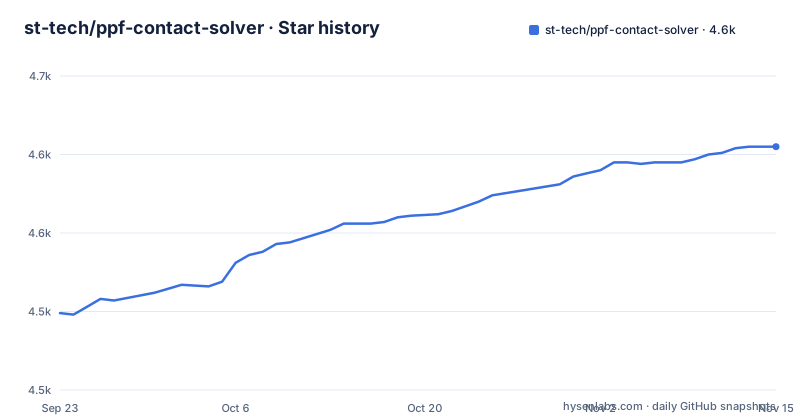
Star history
- st-tech/ppf-contact-solver4,605 ★ · +106
| Repository | 2026-09-23 | 2026-11-15 |
|---|---|---|
| st-tech/ppf-contact-solver | 4.5k | 4.6k |
106 Stars in the last 53 days, measured from the daily GitHub snapshot. Compare with other projects
Editorial analysis
Penetration-free is a success condition, not a guarantee
The headline promise is 100% penetration-free upon success, no snagging intersections, and the qualifier is doing the work. A solver that fails still fails, and the disclaimer section says plainly that the project is not production ready yet, with many bugs remaining including undiscovered ones, tracked in the issue tracker. The related claim is narrower than it sounds: any single triangle never extends beyond strict upper bounds, with 1% given as the example. That is a per-triangle limit on stretching, listed under Not Rubbery, and is separate from the penetration-free claim. Read the two together and you get the honest version, which is a solver that either returns a non-penetrating configuration or tells you it did not, and a project that expects you to handle the second case.
One release build makes a binary, a tokio host and a PyO3 module
The workspace is six crates, and a release build at the root produces three runnable artifacts in `target/release/`: the CUDA solver driver binary `ppf-contact-solver` from the `ppf-cts-solver` crate, the tokio-based solver host `ppf-cts-server`, and the PyO3 extension cdylib `_ppf_cts_py` from `ppf-cts-py`. The six members are:
crates/ppf-cts-formats
crates/ppf-cts-compute
crates/ppf-cts-core
crates/ppf-cts-py
crates/ppf-cts-server
crates/ppf-cts-solver
`ppf-cts-core` and `ppf-cts-formats` are libraries built transitively. The binding detail matters for Python users: `ppf-cts-py` is built as a plain cargo cdylib with no maturin wheel step, and `frontend/__init__.py` loads `target/<profile>/lib_ppf_cts_py.so` or its dylib or Windows dll equivalent through importlib, so the extension is never installed into a virtualenv or site-packages. A separate `eigsys/` directory holds eig-rust outside the workspace, because its nalgebra version diverges.
macOS without a GPU toolkit hard-errors instead of falling back
On macOS a release build selects Metal, and on a host with no GPU toolchain the build stops with an error naming what it looked for. There is no fallback build, so a checkout either holds a real backend or holds nothing. That is a deliberate choice rather than an oversight, and it has a practical consequence: on a Mac without the toolchain you are not getting a slower CPU build of the same crate, you are not getting a binary at all, and the failure arrives at build time rather than at first solve. Combined with the local-run paths, which are `./ppf-contact-solver` on macOS and Linux, `start.bat` on Windows, or a Docker command, the practical sequence is to confirm the toolkit exists before cloning and building, and to fall back to the container when it does not.
The Docker image starts from CUDA and still ships a CPU backend
The container is built on the NVIDIA CUDA base image, which shapes everything downstream:
FROM nvidia/cuda:13.2.0-devel-ubuntu24.04 AS base-image
python3 warmup.py --skip-confirmation
/root/.cargo/bin/cargo build --release
The image is described as sealed and around 1GB, and the build stage records the git branch into `.git/branch_name.txt` before compiling. Two details in the build are worth knowing. `warmup.py` runs during the image build with `--skip-confirmation`, so it is part of producing the image rather than something you trigger later. And the file comments argue for shipping a CPU backend beside the CUDA one, on the grounds that an image with a single backend runs on a single kind of machine: without it, a reader on a laptop gets a container that comes up and then fails at its first solve with no usable device. The builder stage also compiles a slim ffmpeg for PNG to MP4, about 4MB instead of 28MB.
Pytest is kept away from blender_addon because of bpy
The Python test layout encodes a real constraint. `pyproject.toml` sets three test paths: `frontend/tests`, `crates/ppf-cts-py/tests` and `addon_host_tests`. The comment explains why the third one is not under `blender_addon/`: pytest imports the `__init__.py` of every package on the path to a test file, and `blender_addon/__init__.py` imports bpy on its first line, so a plain interpreter cannot collect those tests. `blender_addon/tests` stays where it is and is run by Blender itself. Test discovery is also unusual, matching `_*_.py` and `test_*.py`. The linting side is ordinary and strict: ruff at line length 88, targeting Python 3.11, with the pyflakes, bugbear, simplify and pyupgrade rule sets switched on.
The AMD path has never run on real hardware
Cross architecture support is claimed for Apple silicon through Metal, NVIDIA through CUDA and AMD through ROCm, and then the disclaimer narrows it: the ROCm backend has never run on real AMD hardware, and the project relies on community bug reports. So the AMD entry in that list is a code path, not a tested configuration. Two more limits sit beside it. The CPU and Metal backends are described as slow and meant for evaluation, learning and small examples, with larger scenes needing a powerful GPU. And the whole thing is offline: not real time, though some examples reach interactive rates. The solver is also not differentiable, no gradients, which puts inverse design and learning out of scope. Read together, the hardware line is a short list: bring an NVIDIA GPU, or accept a small scene.
Add-on setup means deploying the solver separately
The Blender path is the one the project leads with, and it is not a single install. The add-on simulates remotely and fetches results back locally, which is how the screenshots in the README were taken on macOS, a platform with no local NVIDIA GPU. The disclaimer names the cost directly: add-on setup takes effort, it is not one click, and the solver backend is deployed separately, locally or remotely. The repository reflects that split with `blender_addon/`, plus `install-blender.sh`, `install-blender-addon.sh` and `install-blender-addon.ps1` at the root, and the README points first-time users at a video tutorial and the releases page. If you cannot host or reach the backend, the add-on is not a path in, and JupyterLab with the documented Python APIs is.
One maintainer, date-stamped releases, ten stress runs
The people side is thin and stated as such: development is maintained by Ryoichi Ando alone, with limited time, and that line sits in the disclaimer list rather than buried. What compensates partly is automation. The project runs GitHub Actions stress tests ten times in a row and calls it a highlight, and the workflow files cover getting started, Linux and Windows runs, docs, Docker builds, releases and the Blender add-on. Releases are cut with timestamps rather than a version series, with names like Blender Add-on 1.0.16 alongside a date-stamped solver build, and the last push on the default branch `main` is dated 2026-11-02. `CITATION.cff` and `articles/` sit at the root for citation and write-ups, including the note on how LLMs were used in the writing.
Editorial conclusion
Use ppf-contact-solver when you need offline contact simulation, when an Apple silicon or NVIDIA machine is available, and when you can live with an open issue tracker instead of a support contract. Skip it for anything on a schedule, for AMD hardware until someone reports a working ROCm run, and for inverse design or learning work, since there are no gradients. Before you start, read the disclaimer list rather than the highlight list, confirm that a GPU toolkit exists on the host because a missing one is a hard error with no fallback, and pin a commit, since releases are cut with date stamps rather than a version series and the last push on main is dated 2026-11-02.
Frequently asked questions
How do I run ZOZO's Contact Solver locally?
Run ./ppf-contact-solver on macOS or Linux, double click start.bat on Windows, or use the Docker command. The README's screenshots come from macOS, and a local run wants a modern NVIDIA GPU on Windows or Linux, or an Apple silicon Mac.
Does ZOZO's Contact Solver work on AMD GPUs?
ROCm is listed among the supported architectures, but the disclaimer says the ROCm backend has never run on real AMD hardware and that the project depends on community bug reports. Treat it as untested on AMD silicon.
Is ZOZO's Contact Solver ready for production use?
Not yet. The README lists it as not production ready with many bugs remaining, calls it offline rather than real time, notes that other recent work reports faster results, and states that it is not differentiable, so inverse design and learning are out of scope.
Official sources
Add this badge to your README
If you maintain this project, the badge below links readers to this analysis and shows its maintenance status from the daily GitHub snapshot. Paste the markdown into your README; add ?metric=license or ?metric=stars to the image URL for a different field.

[](https://hysenlabs.com/projects/st-tech-ppf-contact-solver)Star history chart for your README
[](https://hysenlabs.com/projects/st-tech-ppf-contact-solver)Was this useful?