Steam ROM Manager and the art of importing everything
The bulk game importer and artwork manager for Steam!
At a glance
- What is it?
- An Electron app that walks ROM directories and competing storefront manifests, then adds the results to Steam as shortcuts with artwork and controller templates. What its parser matrix, build targets, and patch numbering actually tell you.
- Who is it for?
- Steam ROM Manager's design reduces to one good decision: make importing pluggable and let the community extend it. The parser tables are honest about platform gaps, the artwork-only parsers handle the awkward case of shortcuts it did not create, and the title waterfall in 2.5.44 shows maintainers still refactoring the messy parts rather than only adding features.
- Can I use it commercially?
- Yes, with conditions. GPL-3.0 is a copyleft licence: if you distribute software that includes it, you must release that software's source code under the same licence. Running it internally without distributing it does not trigger that obligation.
- Is it still maintained?
- Yes. The repository last received commits 3 days ago.
- What is it written in?
- Mainly TypeScript, according to GitHub's language statistics.
Answers come from the project's GitHub data, last synced on October 20, 2026, and from our analysis. They are not legal advice.
Star history
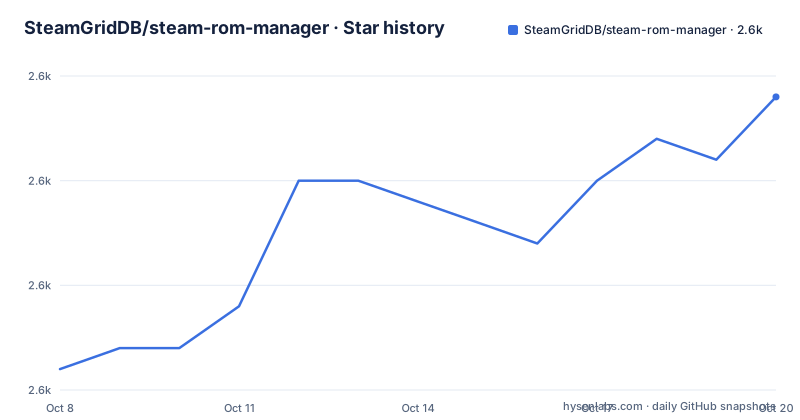
- SteamGridDB/steam-rom-manager2,589 ★ · +13
| Repository | 2026-10-08 | 2026-10-20 |
|---|---|---|
| SteamGridDB/steam-rom-manager | 2.6k | 2.6k |
13 Stars in the last 12 days, measured from the daily GitHub snapshot. Compare with other projects
Editorial analysis
What the app is actually managing
The repository description calls it the bulk game importer and artwork manager for Steam, and that framing is more accurate than the package manifest, which describes it more narrowly as an app for managing ROMs in Steam. Both are in the repository at the same time. The narrower one undersells the point, because the app does not manage ROMs in any meaningful sense: it never opens a ROM file, never inspects a disc image, and has no opinion about what is inside one.
What it does is walk directories and manifest files belonging to other software, find things that look like games, and add each one to Steam as a shortcut. Alongside the shortcut it manages artwork assets and controller templates. Those two are the actual products: a metadata harvester and an asset librarian, both pointed at Steam's library.
The README is upfront that the scope is not limited to games. Added entries could be ROMs for emulators, titles from other stores such as Epic or GOG, or, as the README puts it, not games at all. The example it offers is keeping your notes from junior year as a category in Steam, which it immediately concedes is weird and then makes possible anyway. That sentence is doing real work. It defines the boundary as data, not content.
The scale is substantial for an application of this kind: 2,572 stars, 152 forks, 71 open issues, GPL 3.0, written in TypeScript, not archived, with the default branch still named `master`. The last recorded push came on 2026-09-28.
Parsers are the architecture
The README does not bury this. Parsers are described as the heart and soul of the tool, with an extended metaphor about Steam as an octopus and parsers as its tentacles reaching into ROM directories and into the databases and manifest files of other game stores.
Three families exist, and the separation is the design.
ROM parsers find files on disk. There are three of them, and all three work on every platform the app ships for.
games/${title}.@(iso|rvz)That glob style string is the kind of thing the user actually writes. The Glob parser uses simple glob patterns, Glob-regex uses regular expressions instead, and the Manual parser sidesteps searching altogether by reading locations from a JSON file. The trade is straightforward: patterns are fast to type and quick to get subtly wrong, while a JSON list is tedious but exact.
Platform parsers read other people's data rather than the filesystem. The README lists ten of them, covering Amazon Games, EA Desktop, Epic, GOG Galaxy, Itch.io, Legendary, Ubisoft Connect, UWP and Xbox, Battle.net, and a community GitHub launcher. Each one is described by how it launches the resulting shortcut, and that is where the real variation lies: some launch through their own client, some launch an executable directly, and one is described as launching only through its client.
Artwork only parsers form the third family and exist for a case most importers skip. They change artwork for games already in the Steam library, including shortcuts that SRM did not create. They add no shortcuts at all. The README is blunt about it: they just change artwork, they do not add shortcuts. That is a small feature with a large reach, since it covers shortcuts made by other tools entirely.
Three symbols instead of two
The parser tables use a support matrix with one column per platform, and the matrix carries three symbols rather than the usual two. A checkmark means implemented. A cross means planned. A filled square means the store is not present.
That third state is the interesting one, because it is a property of the outside world rather than of the project. Amazon Games and EA Desktop show as unavailable on macOS and Linux in the table because those clients do not exist there, so there is nothing for a parser to talk to. Ubisoft Connect and Battle.net carry the same square for the same reason, while GitHub Launcher shows a genuine cross on macOS and Linux, meaning planned work that nobody has done.
Read carefully, the matrix separates three very different situations that a two-state table would flatten: shipped, unshipped, and irrelevant on this operating system. It is the kind of detail that costs the maintainers something to maintain and saves every reader from filing the same question.
The launch modes column carries a parallel distinction. Most parsers can launch either through their own client or through a raw executable, giving the user a fallback when the client handshake fails. Battle.net is listed with its client only. That difference is the difference between a shortcut that keeps working after a store decides to move its install path and one that does not.
The README closes the section by inviting suggestions and pull requests for new platform parsers. Given that the extension point is a documented table with a documented convention, adding one is a tractable contribution, and it is the most likely way an outside contributor ends up with a merged change here.
Packaging promises and packaging config
This is where the repository's two descriptions of itself stop being stylistic and become inconsistent.
The README points readers at the releases page for compiled downloads and lists them as Windows in exe and msi form, macOS as dmg, and Linux as AppImage and deb. It then adds a Chocolatey package for Windows and a Flatpak at Flathub for Linux, with the usual caveats about manual Flatpak setup and making the AppImage executable after download.
The build configuration in the package manifest names something different.
"target": [
  "msi",
  "nsis",
  "portable"
],
Windows is built as msi, NSIS, and portable. An NSIS build is what produces a conventional setup executable, so a Windows exe does exist, but it arrives through a target name the README never mentions, and the README never mentions the portable build either. The two lists overlap on msi and diverge everywhere else.
Linux agrees on both counts, AppImage and deb, so that one is consistent. macOS is where it splits again: the build targets are dmg and zip, while the README lists only dmg. A zip target existing without being documented is a small thing, but it means the release page and the build config are not describing the same artifact set.
The Flatpak is the larger gap. The README recommends it and links to Flathub, yet the build configuration declares no flatpak target among the Linux targets, so whatever produces the Flathub package is not described in the repository the README is written for. Two independent facts, both visible, no reconciliation offered.
"publish": {
  "provider": "github",
  "owner": "doZennn"
},
That last block raises a different question. The package manifest names cbartondock as the author, with a personal URL and email. The release publishing configuration names a different account entirely as the owner of the GitHub publishing provider. Both names are in one file. One is who wrote it, one is who ships it, and the README itself does not distinguish them or list a maintainer table the way some projects in this batch do.
Four digit versions and no major releases
The version scheme is unusual enough to notice before anything else. The package manifest reads 2.5.44, and that is not a typo. The three most recent releases are 2.5.44, 2.5.43, and 2.5.42.
What that numbering signals is a project with no breaking change in its recent memory. Major stays at 2, minor stays at 5, and everything moves in the patch digit across dozens of releases. For an application whose users install a binary and then live with it until something breaks, that is a reasonable policy: there is no upgrade guide to write because no release removes an API or a setting.
The releases also show what the maintenance work actually is. Version 2.5.43, published 2026-07-12, is three fixes and nothing else: blank error messages in the log, required field validation not working for parser specific fields, and Steam official CDN images sometimes failing to load. Version 2.5.42, the day before, adds controller template handling for a long list of devices, including a new Steam controller, several Nintendo controllers, a Switch 2 Pro controller, an 8BitDO controller, and two handheld computers.
That pairing is telling. A hardware list release the day before a validation bug fix suggests the same feature area, controller templates, was still settling.
Version 2.5.44, published 2026-08-06, is the most substantial of the three and includes arm64 build targets on all three platforms. It also carries the title waterfall refactor, which deserves attention from anyone debugging why a shortcut has the wrong name. The old behavior modified the extracted title several times in a row, and the result did not necessarily match what the parser originally produced. The new behavior makes each stage involve at most one change, with the stages named explicitly: extracted title, shortcut passthrough title, custom variable title, fuzzy title, post title modifier title, and final title.
That is not a feature. It is a decision to make a confusing pipeline inspectable, and it ships with two new title variables alongside it. The gap between the last release on 2026-08-06 and the last push on 2026-09-28 is about seven weeks of work that has not shipped in a tagged build.
Editorial conclusion
Steam ROM Manager's design reduces to one good decision: make importing pluggable and let the community extend it. The parser tables are honest about platform gaps, the artwork-only parsers handle the awkward case of shortcuts it did not create, and the title waterfall in 2.5.44 shows maintainers still refactoring the messy parts rather than only adding features. The packaging story is the shakier one. The README promises Windows executables, the build config names NSIS and portable targets instead, and a Flatpak is advertised for Linux that no build target produces. Two different accounts of what the app is also sit in the repository: a bulk importer and artwork manager for Steam in the project description, an app for managing ROMs in Steam in the package manifest. Neither is wrong. A reader planning to depend on the download path has to pick one and verify it.
Frequently asked questions
Is Steam ROM manager safe?
SRM is a GPL 3.0 licensed open source app whose repository shows regular releases, an active issue tracker, and a recent push. It works by scanning your ROM folders and other storefront manifests, then writing shortcuts and artwork into Steam's own library folders, so what matters is which directories you point its parsers at and that you understand it modifies Steam shortcuts.
How to remove Steam ROM manager games?
The app has dedicated artwork only parsers that manage artwork for Steam shortcuts not added through SRM, so it recognizes shortcuts it did not create. Shortcuts it did add are ordinary Steam non-Steam shortcuts, which means the usual Steam shortcut removal path applies to them once you no longer need SRM to manage them.
What are the parsers in Steam ROM Manager and which ones exist?
Three families. ROM parsers are Glob, Glob-regex, and Manual, and all three work on Windows, macOS, and Linux. Platform parsers cover Amazon Games, EA Desktop, Epic, GOG Galaxy, Itch.io, Legendary, Ubisoft Connect, UWP and Xbox, Battle.net, and a GitHub Launcher. Artwork only parsers cover Steam games and non-SRM shortcuts, and only change artwork rather than adding shortcuts.
Which platforms can Steam ROM Manager import from?
Support is listed in a matrix with three symbols rather than two: implemented, planned, and store not present on that operating system. Epic, GOG Galaxy, Itch.io, and Legendary show as implemented on all three desktop platforms. Amazon Games and EA Desktop are unavailable on macOS and Linux because those clients do not exist there, and GitHub Launcher is marked planned on macOS and Linux.
How is Steam ROM Manager distributed?
The README points to the releases page for compiled downloads, lists a Chocolatey package for Windows, and recommends a Flatpak at Flathub for Linux. The build configuration names msi, nsis, and portable targets for Windows, AppImage and deb for Linux, and dmg and zip for macOS. So the README's Windows exe is really an NSIS build, and the advertised Flatpak has no matching build target in the configuration.
Official sources
Add this badge to your README
If you maintain this project, the badge below links readers to this analysis and shows its maintenance status from the daily GitHub snapshot. Paste the markdown into your README; add ?metric=license or ?metric=stars to the image URL for a different field.

[](https://hysenlabs.com/projects/steamgriddb-steam-rom-manager)Star history chart for your README
[](https://hysenlabs.com/projects/steamgriddb-steam-rom-manager)Was this useful?