Docs is MIT, and its PDF export is not
Docs is an open-source text editor: web-native, made for real-time collaboration, cleanly structured documents and sub-documents with full ownership of your data. Built to scale with Django and React.
At a glance
- What is it?
- Docs is an open-source collaborative editor built on Django with a React front end, self-hostable with Docker Compose or Kubernetes, offering real-time collaboration, sub-documents, presentations, export to office formats and optional AI helpers. Its readme warns that some features rely on GPL-licensed packages from its editor and that one environment variable builds without them.
- Who is it for?
- Docs fits a public organisation or a team that wants collaborative editing on infrastructure it controls, with a Compose file, a Kubernetes path and an export story that covers the office formats people actually send each other. It does not fit anyone who needs one artefact to be unambiguously MIT, because the readme itself says some features rely on GPL-licensed packages and that the two builds differ.
- Can I use it commercially?
- Yes. MIT is a permissive licence: you can use, modify and sell software built on it, as long as you keep its copyright and licence notices.
- Is it still maintained?
- Yes. The repository received new commits within the last day.
- What is it written in?
- Mainly Python, according to GitHub's language statistics.
Answers come from the project's GitHub data, last synced on November 14, 2026, and from our analysis. They are not legal advice.
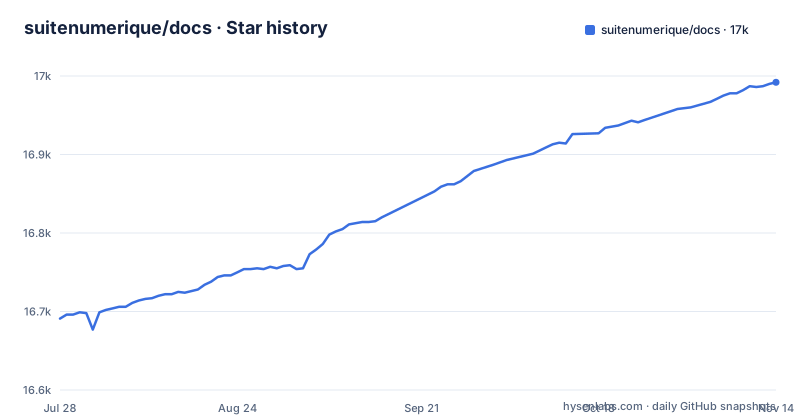
Star history
- suitenumerique/docs16,992 ★ · +301
| Repository | 2026-07-28 | 2026-11-14 |
|---|---|---|
| suitenumerique/docs | 16.7k | 17k |
301 Stars in the last 109 days, measured from the daily GitHub snapshot. Compare with other projects
Editorial analysis
The PDF export is GPL, and one build flag removes it
The licensing paragraph under self-hosting is the most consequential thing in this file, and it is a warning rather than a footnote. It says that some advanced features, giving PDF export as the example, rely on packages pulled in from the project's editor component, that those packages are licensed under the GPL, and that they are not compatible with the project's own MIT licence. The file then tells you what to do about it. You can run the project without those packages by building with a single environment variable set:
PUBLISH_AS_MIT=trueand that builds an image without the non-MIT features. So there are two distributions of the same application, one of which carries GPL-licensed dependencies, and the difference is a build flag rather than a fork. Pick the build, write the flag into your pipeline, and know that the features you drop are the ones listed.
The development stack is five containers and the credentials are printed
Local development is a first-class, well-trodden path, and it is worth reading as a description of what the application needs at runtime. The Compose file brings up a database, a cache, a mail catcher and an object store, plus a helper, and the readme gives you the loop: check the two Docker commands, bootstrap, run, open a local address. Bootstrap builds the backend and frontend development containers, installs dependencies, runs migrations and compiles translations, and the file recommends it again after every pull. Then there are the credentials, printed in the readme as a development-only username and password pair, and the admin interface on a port of its own. None of that is unusual for a documented development setup, and all of it is why the development stack should never be the thing you expose. Several ports in the Compose file are published on the host, including the database on a nonstandard port and the object store's console.
A compose file documents its own worst bug, in a comment, at length
One service in the Compose file carries a comment that is worth more than most documentation. It explains that the lines of the helper's entrypoint are joined with the shell's and operator rather than ending in a line continuation, because the YAML folds the block by joining its lines with spaces, so a trailing backslash arrives at the shell as an escaped space glued to the next word, which is not a command, and everything after the first and silently did nothing. Read that as engineering archaeology of the best kind. It records the failure mode, which was silence rather than an error, and it records that the fix was punctuation. It also tells you which parts of the deployment were quietly not happening while the bug was live. The comment continues into the reason the bucket is created in that helper at all, which is the next thing worth understanding.
Object versioning is created by a helper, because the app will not do it
The same comment block explains the rest. The bucket is created by the helper rather than left to the collaboration server, because the server creates a bucket it cannot find, and it creates it with no versioning on it. The file says versioning is what a deployment runs, and names the case that makes it matter: deleting an object then requires the version to be named, or nothing is deleted at all. So a single-purpose container is responsible for a property of your object storage that the application itself will not set, and the dependency is documented in a comment next to a shell snippet rather than in a deployment guide. If you are adapting the Compose file for your own storage, that is the line to read twice, because the failure it prevents is a silent difference in deletion semantics rather than a crash.
The Makefile disclaims itself, and it runs as root on Windows
The build file opens with a banner of repeated warning marks and a disclaimer, saying it is only meant for development because the user id that runs inside the container is changed, and asking in capitals that it not be used for continuous integration, production or anything else. Underneath is a set of conventions for editing it: variables in one section, rules in their own section sorted alphabetically, one dependency per line, and the phony declaration after the rule it belongs to. The interesting part is the platform handling. The container user is derived from the current user's numeric id and group, and on Windows the value is overridden so the containers run as root instead. That is a real limitation for anyone developing on a Windows host. The compose command itself is assembled from variables, with separate variants for the end-to-end and demo configurations.
Two AI designs, one of them a beta that writes like a collaborator
The AI section is short and careful, and it is worth reading as a data-protection decision rather than a feature list. The features are optional, they are described as model agnostic and gateway agnostic, you can run your own model or use your provider, and the configuration requires only an API key and a URL. That means nothing leaves your infrastructure unless you point it somewhere. There are two designs. The first is select and replace, where your selection is both the context and the instruction, and the model's output replaces the selection. The second is marked beta and uses the editor's own AI integration: a toolbar at the selection where you can prompt and then accept, reject and iterate, plus an AI cursor that interacts with the document as another collaborator would, using the document context on top of the selection. Replacing a selection is a bounded operation; a cursor that writes into the document is not, which is why the beta label is doing real work there.
Interoperability is two APIs and one worked example worth reading
The project ships a resource server API and a server-to-server API, and the file says they allow for integrations. The example it gives is a meeting application from the same suite. If you run an instance of it, then with a single token setting you can push a meeting transcript into a document and grant access to the user who requested it. That is a short, complete integration description, which makes it easy to copy, and it contains the two decisions that matter. A shared token between two services is a credential with the scope of both, and the access grant follows whoever asked for the meeting rather than a fixed list. Before you wire that up, decide whether a single shared token is acceptable and who is allowed to request a meeting, because both are policy questions that the integration example answers implicitly.
Editorial conclusion
Docs fits a public organisation or a team that wants collaborative editing on infrastructure it controls, with a Compose file, a Kubernetes path and an export story that covers the office formats people actually send each other. It does not fit anyone who needs one artefact to be unambiguously MIT, because the readme itself says some features rely on GPL-licensed packages and that the two builds differ. Before you adopt it, decide which build you ship and put the flag in your pipeline, so the licence position of your image is a decision rather than a default. Then treat the development stack for what it is, with printed credentials and several published ports, and keep it off anything reachable. And if you plan to wire in the server-to-server API, read the meeting transcript example first, because it hands access to the user who requested the meeting.
Frequently asked questions
Is there a self-hosted version of Google Docs?
The project describes itself as an open-source alternative to tools like Notion or Google Docs, and it is built to be self-hosted. The readme says the application supports Kubernetes, Docker Compose, and community-provided methods such as Nix and YunoHost, with an installation guide in its documentation directory.
How do I run Docs locally for development?
You need Docker, Docker Compose and GNU Make, and the readme suggests verifying the two Docker commands first. Then a single bootstrap target builds the backend and frontend development containers, installs dependencies, runs database migrations and compiles translations, and a run target starts the services, which you open on a local address. The readme prints a development-only username and password pair, and the admin interface is on its own port.
Does Docs send my documents to an AI provider?
Not unless you configure it. The AI features are described as optional, model agnostic and gateway agnostic, and the configuration requires only an API key and a URL, so you can run your own model or point it at your provider. There are two designs: one that replaces your selection, and a beta one that adds a toolbar and an AI cursor that interacts with the document as another collaborator.
What licence is Docs under, and is everything in it MIT?
The work is released under the MIT licence. It also carries a warning: some advanced features, PDF export among them, rely on packages from the editor component that are licensed under the GPL and are not MIT-compatible, and building with a single environment variable produces an image without those non-MIT features.
Official sources
Add this badge to your README
If you maintain this project, the badge below links readers to this analysis and shows its maintenance status from the daily GitHub snapshot. Paste the markdown into your README; add ?metric=license or ?metric=stars to the image URL for a different field.

[](https://hysenlabs.com/projects/suitenumerique-docs)Star history chart for your README
[](https://hysenlabs.com/projects/suitenumerique-docs)Was this useful?